Single-Cell Spatial Transcriptomics: Basic Data Analysis (Single-Sample Pipeline based on Seurat)
1. Module Introduction
This module is developed based on the Seurat V4 framework, specifically designed for processing and analyzing SeekSpace spatial transcriptomics single-sample sequencing data. Seurat is a powerful suite of R tools capable of systematic preprocessing, normalization, dimensionality reduction, and clustering analysis for spatial transcriptomics data. For SeekSpace spatial transcriptomics single-sample data, this pipeline primarily achieves the following core analysis objectives:
Data Construction: Reads the expression matrix output from the SeekSpace platform, seamlessly integrates it with physical spatial coordinates and background images, and constructs a complete spatial transcriptomics object.
Quality Control (QC): Performs QC filtering by calculating key metrics such as mitochondrial ratio and UMI counts to remove low-quality cells, ensuring the reliability of downstream analysis.
Feature Extraction and Dimensionality Reduction: Identifies highly variable genes (HVGs) and performs PCA and UMAP dimensionality reduction to reveal the internal structure of the data in low-dimensional space.
Cell Clustering and Spatial Mapping: Performs unsupervised clustering of cells based on gene expression profiles, and maps the clustering results and expression of feature genes back to the true physical space of the tissue slice, intuitively displaying spatial heterogeneity within a single sample.
2. Input File Preparation
The supporting basic data processing software for SeekSpace technology is SeekSpace™ Tool. This software can identify cell expression information from sequencing libraries and simultaneously identify the spatial location of each cell.
After processing with the SeekSpace™ Tool software, the resulting file formats and directory structure are as follows:
data/                                             # Main data directory
├── matrix/
│   └── WTHA5_filtered_feature_bc_matrix/         # Directory for filtered feature matrix and related images
│       ├── barcodes.tsv.gz                       # Cell barcodes
│       ├── features.tsv.gz                       # Gene features
│       ├── matrix.mtx.gz                         # Sparse matrix of expression levels
│       ├── cell_locations.tsv.gz                 # Cell spatial coordinates file
│       ├── WTHA5_aligned_DAPI.png                # DAPI stained image of the tissue slice
│       └── WTHA5_aligned_HE.png                  # H&E stained image of the tissue slice
└── rds/
    └── WTHA5.rds                                 # (Optional) Seurat object containing results such as cell clustering and annotations
Description of spatial coordinates file (cell_locations.tsv.gz):
- Column 1: barcode, the order is consistent with the cell order in
matrix.mtx.gz. - Columns 2 & 3: Represent the pixel coordinates of the cell represented by the barcode on the spatial chip.
- Physical Distance Conversion: In SeekSpace technology, the size of a pixel is approximately
0.2653micrometers. Multiplying the pixel coordinates by0.2653converts them to calculate the cell's distance in true physical space.
# --- Environment Preparation ---
library(Seurat)
library(tidyverse)
library(ggplot2)Warning message:
“package ‘tibble’ was built under R version 4.3.3”
Warning message:
“package ‘tidyr’ was built under R version 4.3.3”
Warning message:
“package ‘dplyr’ was built under R version 4.3.3”
Warning message:
“package ‘stringr’ was built under R version 4.3.3”
Warning message:
“package ‘lubridate’ was built under R version 4.3.3”
── Attaching core tidyverse packages ──────────────────────── tidyverse 2.0.0 ──
── Conflicts ────────────────────────────────────────── tidyverse_conflicts() ──
✗ dplyr::filter() masks stats::filter()
✗ dplyr::lag() masks stats::lag()
ℹ Use the conflicted package (
3. Create and Read Seurat Object
In this section, we provide two methods for loading SeekSpace data into the R environment and building it into a Seurat object. Users can choose based on their actual situation:
Method 1: Create from raw expression matrix Directly read the sparse matrix files (
matrix.mtx.gz,barcodes.tsv.gz,features.tsv.gz) in thefiltered_feature_bc_matrixdirectory output by SeekSpace tools. Here, building from scratch can be accomplished using Seurat's commonly usedRead10Xcombined with theCreateSeuratObjectfunction.Method 2: Directly read processed RDS object In addition to outputting the raw matrix, seekspacetools automatically generates a packaged Seurat object
.rdsfile (typically located in therds/directory). This object not only contains the complete gene expression matrix but also has built-in spatial coordinates. You can directly load it using thereadRDSfunction to quickly proceed to downstream cell clustering and spatial visualization analysis.
# --- Data Loading and Object Creation ---
mouse_ovary.data = Read10X('./matrix/WTHA5_filtered_feature_bc_matrix/')
mouse_ovary = CreateSeuratObject(counts=mouse_ovary.data,project='mouse_ovary')
mouse_ovary_rds = readRDS('./rds/WTHA5.rds')
4. Data Quality Control and Filtering
This section calculates and visualizes quality control (QC) metrics for the integrated data, and then filters low-quality cells based on QC standards.
4.1 QC Metrics Calculation
Key QC Metrics:
- nCount_RNA (Total UMI counts): Total number of UMIs detected per cell, reflecting sequencing depth.
- nFeature_RNA (Number of detected genes): Number of genes detected per cell, reflecting cell capture efficiency.
- percent.mt (Mitochondrial gene ratio): Proportion of mitochondrial gene expression, used to identify low-quality or dead cells.
QC Filtering Strategy (Result-oriented, no absolute standards):
- Mitochondrial gene ratio: Filter cells with
percent.mt > 20%. Cells with an excessively high proportion of mitochondrial genes may be dead or damaged. - Total UMI counts: Filter cells with
nCount_RNA < 200ornCount_RNA > 100000. Too few UMIs indicate insufficient sequencing depth, while too many could indicate doublets or technical anomalies. - Number of detected genes: Filter cells with
nFeature_RNA < 1ornFeature_RNA > 10000. Too few genes indicate low capture efficiency, while too many could indicate doublets.
Figure Legend: The figure below shows the distribution of various QC metrics before QC filtering, grouped by sample.
- X-axis: Different samples, facilitating the comparison of QC metric differences between samples.
- Y-axis: Values of each QC metric, including
nCount_RNA(Total UMI counts),nFeature_RNA(Number of detected genes), andpercent.mt(Mitochondrial gene ratio).- Violin plot: Each violin plot represents a sample. The width represents the cell density in that value range; a wider plot indicates more cells in that range.
- Purpose: Used to evaluate raw data quality, identify outliers, and determine QC filtering thresholds.
# --- Calculate Mitochondrial Gene Ratio ---
mouse_ovary[["percent.mito"]] = PercentageFeatureSet(mouse_ovary, pattern = "^mt-")
# --- QC Metrics Violin Plot Visualization ---
VlnPlot(mouse_ovary, features = c("nCount_RNA", "nFeature_RNA","percent.mito"),group.by = "orig.ident",
ncol = 3,pt.size = 0)“\`aes_string()\` was deprecated in ggplot2 3.0.0.
ℹ Please use tidy evaluation idioms with \`aes()\`.
ℹ See also \`vignette("ggplot2-in-packages")\` for more information.
ℹ The deprecated feature was likely used in the Seurat package.
Please report the issue at
4.2 QC Filtering
Filter low-quality cells based on QC standards.
# --- QC Filtering: Remove low-quality cells ---
mouse_ovary <- subset(mouse_ovary, subset = percent.mito < 20 &
                      nCount_RNA > 200 & nCount_RNA < 100000 &
                      nFeature_RNA > 1 & nFeature_RNA < 10000)

# Output filtered cell count
cat("Filtered cell count:", ncol(mouse_ovary), "\n")
# --- Post-QC Violin Plot Visualization ---
VlnPlot(mouse_ovary, features = c("nCount_RNA", "nFeature_RNA", "percent.mito"), group.by = "orig.ident",
ncol = 3, pt.size = 0)5. Data Preprocessing and Dimensionality Reduction
This section performs normalization, highly variable gene selection, data scaling, and Principal Component Analysis (PCA) on the post-QC data.
5.1 Data Normalization and Highly Variable Gene Selection
Data Normalization (NormalizeData):
- Function: Normalizes the raw UMI count data to eliminate sequencing depth differences between cells.
- Method: Employs the log-normalization method (
LogNormalize), with a scale factor of 10,000 transcripts. - Formula:
log(1 + UMI_count / 10000)
Highly Variable Gene Selection (FindVariableFeatures):
- Function: Identifies genes with the most significant expression variation across cells, focusing on biologically meaningful feature genes.
- Method: Uses the variance-stabilizing transformation method (
vst) to select the top 2,000 highly variable genes. - Significance: Highly variable genes typically correspond to cell type marker genes, excluding technical noise and preserving true biological variation.
Data Scaling (ScaleData):
- Function: Performs Z-score standardization on the expression matrix, preparing standardized data for dimensionality reduction analysis.
- Features: The mean of each gene is 0, and the standard deviation is 1, eliminating differences in expression magnitude between genes.
- Significance: Prevents highly expressed genes from dominating dimensionality reduction results, ensuring all genes contribute equally to PCA.
5.2 Principal Component Analysis (PCA)
Functional Overview:
- Performs principal component analysis on the normalized highly variable genes to extract the main directions of variation in the data.
- PCA reduces the dimensionality of high-dimensional gene expression data into a low-dimensional space, preserving primary biological signals.
- The first few principal components typically capture the differences between cell types.
# --- Data Normalization ---
mouse_ovary <- NormalizeData(mouse_ovary, normalization.method = "LogNormalize", scale.factor = 10000)

# --- Filter Highly Variable Genes ---
mouse_ovary <- FindVariableFeatures(mouse_ovary, selection.method = "vst", nfeatures = 2000)

# --- Data Scaling (Z-score Standardization) ---
# Note: The vars.to.regress parameter can be used to regress out specific variables (e.g., mitochondrial gene ratio, cell cycle, etc.)
mouse_ovary <- ScaleData(mouse_ovary, features = VariableFeatures(mouse_ovary))

# --- Principal Component Analysis (PCA) ---
mouse_ovary <- RunPCA(mouse_ovary, features = VariableFeatures(object = mouse_ovary), reduction.name = "pca")PC_ 1
Positive: Kcnma1, Mctp1, Dpf3, Tox2, Fshr, Fam13a, Prkar2b, Serpine2, Shisa6, Kcnq5
Inhbb, Prlr, Ano4, Ank3, Slc26a7, Jakmip3, Zfp385b, Inhba, Ltbp1, Stxbp6
Cables1, Chst8, Ephx2, Pgbd5, Ptprt, E330023G01Rik, Efna5, Cnmd, Lhcgr, Mro
Negative: Col4a1, Col4a2, Igfbp7, Nid1, St6galnac3, Col1a2, Col1a1, Ets1, Nhsl2, Rcsd1
Prkg1, Eng, Ltbp4, Ebf1, Shank3, Kdr, Cdh5, Col3a1, Pdgfrb, Flt1
Bicc1, Egfl7, Sparcl1, Lamb1, Rhoj, Fbn1, Mylk, Mrvi1, Frmd4b, Rbms3
PC_ 2
Positive: Cyp11a1, Runx2, Neat1, Sfrp4, Prlr, Plin4, Cemip, Ptgfr, Gm2a, Lhcgr
Fdx1, Sgk1, Mbp, Sorbs2, Idh1, Lipg, Sorbs1, Star, Scarb1, Acsl4
Tpst2, Tns3, Kcnd2, Rab27a, Myo7a, Fam129a, Abcb1b, Hsd17b7, Gsg1l, Ephb2
Negative: Csmd1, Cables1, Rad51b, Zfp385b, Kcnq5, Ank3, Mctp1, Ano4, Serpine2, Dock4
Pde7b, Kcnt2, Fam13a, Ptprd, Slc8a1, Thbs1, Fshr, Tox2, Rapgef4, Myo1e
Cfh, Prkar2b, Itih5, Slc18a2, Tmtc1, Chst8, Rbms3, Adamts19, Mki67, Slc26a7
PC_ 3
Positive: Muc16, Wnt2b, Upk3b, Plxna4, Myrf, Pkhd1l1, Upk1b, Nrg1, Ildr2, Sox6
Igfbp5, Lhx9, Pcnx2, Ppp2r2b, Hsd17b2, Cftr, Ly6e, Unc45b, Krt19, Lrrc7
Podxl, Anpep, Megf6, Grip1, Gpm6a, Stk26, Stum, Epcam, Lgr5, Krt7
Negative: Cped1, Cacna1c, Col1a2, Lama2, Ror2, Col1a1, Slit3, Cyp11a1, Frmd5, Gm17167
Egflam, Mrvi1, Pdzrn3, Dpp6, Col5a1, Dlc1, Pdgfrb, Pdgfra, Frem1, Arhgap24
Carmn, Lhfp, Prlr, 4930578G10Rik, Adcy5, Pcsk5, B130024G19Rik, Runx2, Cntfr, Col3a1
PC_ 4
Positive: Egfl7, Flt1, Shank3, Prkch, Fli1, Nos3, Pecam1, Cd93, Rapgef5, Tie1
Afap1l1, Mecom, Stab1, Cyyr1, Cdh5, Arap3, AC137513.1, Eng, Arhgef15, Pcdh17
Tek, Ptprb, Slco2a1, Plxnd1, Ushbp1, Notch4, Emcn, Nova2, Zfp366, Rasip1
Negative: Col6a2, Adgrl3, Bicc1, Muc16, Nrg1, Ildr2, Upk3b, Wnt2b, Lhx9, Myrf
Col6a1, Cacnb2, Upk1b, Pcnx2, Pkhd1l1, Sox6, Kcnab1, Cdh11, Lgr5, Ppp2r2b
Hsd17b2, Cald1, Palld, Col3a1, Krt19, Ltbp4, Cftr, Sorcs2, Ltbp2, Pdzrn3
PC_ 5
Positive: Ltbp1, Ephx2, Stxbp6, Sfrp4, Ptgfr, Shisa6, Plin4, Dpysl4, Cemip, Shroom3
Heg1, Jakmip3, Scarb1, Lipg, Lrp8, Dpf3, Sgk1, Rnf152, Hsd17b7, Gm2a
Sorbs1, Tns3, Ano4, Tubb5, Spns2, Runx2, Galnt18, Lrrn1, Vcan, Tox2
Negative: Dock2, Tbxas1, Myo1f, Ptprc, Fyb, Slc9a9, Cyth4, Cd84, Csf1r, Apobec1
Aoah, Arhgap25, Arhgap15, Dock10, Inpp5d, Wdfy4, Blnk, Lilrb4a, Ikzf1, Tmcc3
Hpgds, Ctss, Sirpa, Cd74, Pik3r5, Mrc1, Siglec1, Adap2, Prkcb, Ms4a7
6. Dimensionality Reduction and Cell Clustering
This section uses the PCA dimensionality reduction results to perform UMAP dimensionality reduction calculations, construct a neighborhood graph, and conduct cell clustering (unsupervised grouping). These calculation steps form the basis for all subsequent visualization displays.
6.1 UMAP Dimensionality Reduction Calculation
Functional Overview:
- Projects high-dimensional gene expression data into 2D space, preserving data topology, in preparation for intuitively displaying the relationships between cells.
Parameter Description:
dims = 1:30: Uses the first 30 principal components (PCA) as input features.reduction.name = "umap": Names the dimensionality reduction result "umap" and saves it in the Seurat object.
6.2 Construct Neighborhood Graph and Cell Clustering
Construct Neighborhood Graph:
- Function: Calculates the similarity between cells (e.g., Euclidean distance) based on the PCA dimensionality reduction space, and constructs a K-nearest neighbors (KNN) graph for subsequent graph clustering analysis.
- Parameter: Uses the first 30 principal components (
dims = 1:30) to define the distance between cells.
Cell Clustering:
- Function: Applies the Louvain or Leiden algorithm to perform community detection on the cell neighborhood graph, dividing cells into different clusters.
- Parameter:
resolution = 1, controls the granularity of clustering. The larger the resolution value, the more numerous and finer the divided clusters; conversely, fewer and broader clusters. It can be adjusted according to the actual complexity of cell types.
# --- UMAP Dimensionality Reduction Calculation ---
mouse_ovary <- RunUMAP(mouse_ovary, dims = 1:30, reduction.name = "umap")

# --- Construct Neighborhood Graph ---
mouse_ovary <- FindNeighbors(mouse_ovary, dims = 1:30)

# --- Cell Clustering ---
mouse_ovary <- FindClusters(mouse_ovary, resolution = 1)“The default method for RunUMAP has changed from calling Python UMAP via reticulate to the R-native UWOT using the cosine metric
To use Python UMAP via reticulate, set umap.method to 'umap-learn' and metric to 'correlation'
This message will be shown once per session”
10:45:57 UMAP embedding parameters a = 0.9922 b = 1.112
10:45:57 Read 67576 rows and found 30 numeric columns
10:45:57 Using Annoy for neighbor search, n_neighbors = 30
10:45:57 Building Annoy index with metric = cosine, n_trees = 50
0% 10 20 30 40 50 60 70 80 90 100%
[----|----|----|----|----|----|----|----|----|----|
*
*
*
*
*
*
*
*
*
*
*
*
*
*
*
*
*
*
*
*
*
*
*
*
*
*
*
*
*
*
*
*
*
*
*
*
*
*
*
*
*
*
*
*
*
*
*
*
*
*
|
10:46:03 Writing NN index file to temp file /tmp/RtmphxgDME/file36273fdc955
10:46:03 Searching Annoy index using 1 thread, search_k = 3000
10:46:25 Annoy recall = 100%
10:46:25 Commencing smooth kNN distance calibration using 1 thread
with target n_neighbors = 30
10:46:26 Initializing from normalized Laplacian + noise (using irlba)
10:46:32 Commencing optimization for 200 epochs, with 3081284 positive edges
10:47:02 Optimization finished
Computing nearest neighbor graph
Computing SNN
Modularity Optimizer version 1.3.0 by Ludo Waltman and Nees Jan van Eck
Number of nodes: 67576
Number of edges: 2338906
Running Louvain algorithm...n Maximum modularity in 10 random starts: 0.8918
Number of communities: 28
Elapsed time: 22 seconds
7. Results Visualization
After data integration analysis is complete, we need to display the analysis results using various visualization methods. This section introduces three primary visualization methods: 1. UMAP Dimensionality Reduction Visualization: Shows the distribution of cells in the reduced-dimensional space, facilitating observation of the relationships between different samples and cell populations. 2. Spatial Position Visualization: Shows the actual spatial location of cells within the tissue sample, used to analyze spatial distribution patterns. 3. Custom Spatial Plotting Functions: Provides a more flexible visualization approach that can be combined with tissue image backgrounds for display.
7.1 UMAP Dimensionality Reduction Visualization
Functional Overview: UMAP (Uniform Manifold Approximation and Projection) dimensionality reduction visualization is one of the most commonly used visualization methods in single-cell and spatial transcriptomics analysis. It can project high-dimensional gene expression data into two-dimensional space, preserving similarity relationships between cells.
Visualization Content:
- Grouped by cluster: Shows the distribution of different cell populations, used to identify cell types and subpopulations.
- Grouped by cell type: Differentiated using tissue-specific cell type markers.
Figure Legend (UMAP Dimensionality Reduction Visualization Plot): The figure below shows the distribution of cells in the reduced-dimensional space, displayed grouped by sample or cluster.
- Meaning of points: Each point represents a single cell.
- Distance relationship: Points close together indicate similar cell expression profiles.
- Color grouping: Points of the same color or marker belong to the same category.
# --- UMAP Dimensionality Reduction Calculation ---
# options(): Set the dimensions for graphical output (height and width, in inches)
# repr.plot.height and repr.plot.width: Control the display size of graphics in the Jupyter notebook
options(repr.plot.height=8, repr.plot.width=12)

MYCOLOR=c("#6394ce", "#2a4c87", "#eed500", "#ed5858",
          "#f6cbc2", "#f5a2a2", "#3ca676", "#6cc9d8",
          "#ef4db0", "#992269", "#bcb34a", "#74acf3",
          "#3e275b", "#fbec7e", "#ec4d3d", "#ee807e",
          "#f7bdb5", "#dbdde6", "#f591e1", "#51678c",
          "#2fbcd3", "#80cfc3", "#fbefd1", "#edb8b5",
          "#5678a8", "#2fb290", "#a6b5cd", "#90d1c1",
          "#a4e0ea", "#837fd3", "#5dce8b", "#c5cdd9",
          "#f9e2d6", "#c64ea4", "#b2dfd6", "#dbdfe7",
          "#dff2ec", "#cce8f3", "#e74d51", "#f7c9c4",
          "#f29c81", "#c9e6e0", "#c1c5de", "#750000"
          )

DimPlot(mouse_ovary, pt.size = 1,cols = MYCOLOR,group.by=c("seurat_clusters"))+
labs(x = "UMAP1", y = "UMAP2",title = "Cluster") +
  theme(panel.border = element_rect(fill=NA,color="black", size=1, linetype="solid"),
        axis.text.y = element_blank(),
        axis.ticks.y = element_blank(),
        axis.text.x = element_blank(),
        axis.ticks.x = element_blank())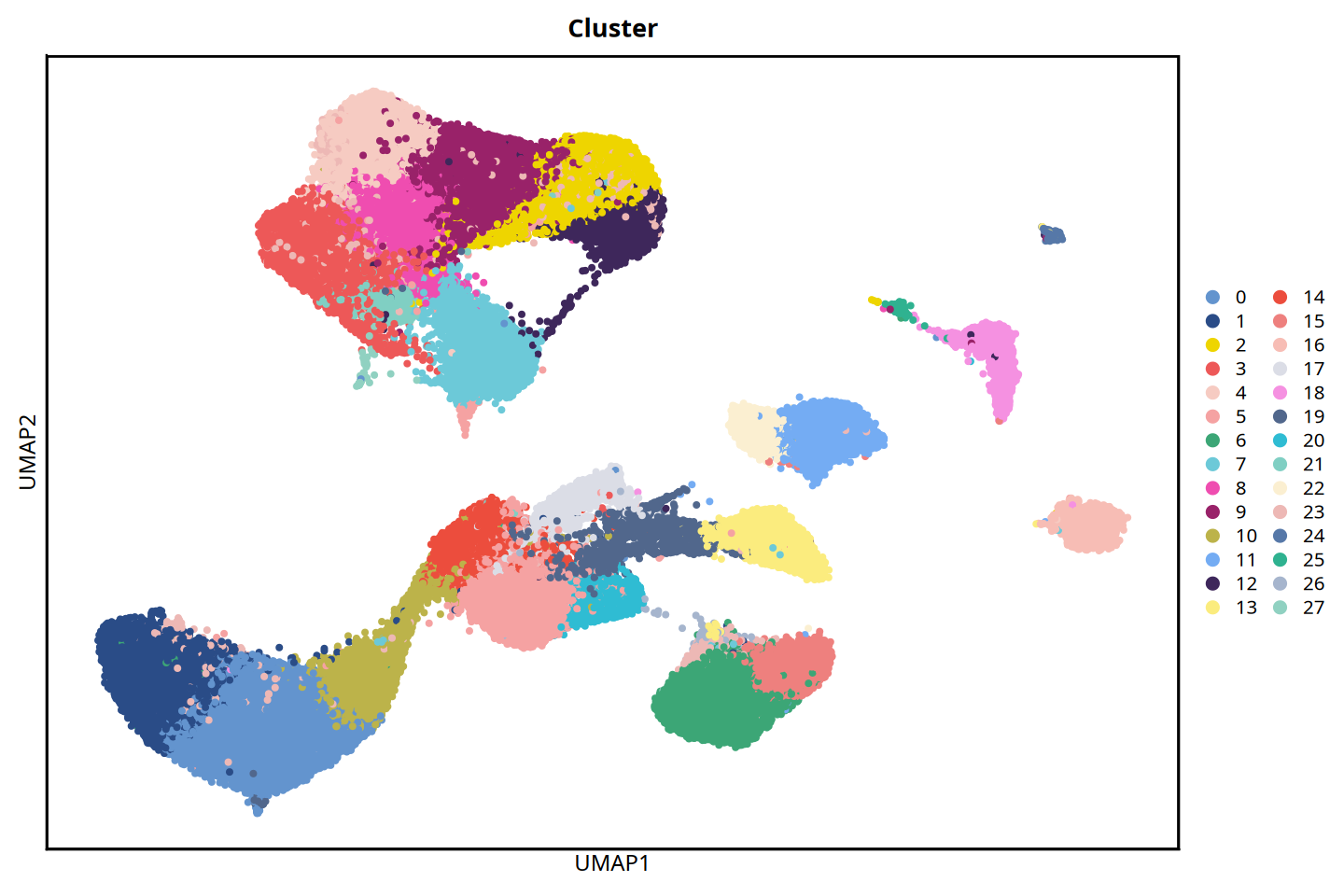
7.2 Cell Type Annotation
Unsupervised clustering can only divide cells into different clusters (e.g., 0, 1, 2, etc.). To endow these clusters with true biological meaning, we need to integrate prior biological knowledge (such as the expression profile of feature marker genes for specific cell types) to name each cluster, which is cell type annotation.
# --- Cell Type Annotation (Cluster Mapping) ---
cluster2celltype <- c("0"="theca cells",
                      "1"="theca cells",
                      "2"="Granulosa cells",
                      "3"="Proliferating cells",
                      "4"="Granulosa cells",
                      "5"="Stromal cells",
                      "6"="luteal cells",
                      "7"="Granulosa cells",
                      "8"="Granulosa cells",
                      "9"="Granulosa cells",
                      "10"="theca cells",
                      "11"="luteal cells",
                      "12"="Granulosa cells",
                      "13"="Endothelial cells",
                      "14"="Stromal cells",
                      "15"="luteal cells",
                      "16"="Epithelial cells",
                      "17"="Stromal cells",
                      "18"="Immune cells",
                      "19"="Endothelial cells",
                      "20"="Stromal cells",
                      "21"="Proliferating cells",
                      "22"="luteal cells",
                      "23"="Granulosa cells",
                      "24"="Epithelial cells",
                      "25"="Immune cells",
                      "26"="luteal cells",
                      "27"="Oocytes")
mouse_ovary[['cell_type']] = unname(cluster2celltype[mouse_ovary@meta.data$seurat_clusters])options(repr.plot.height=8, repr.plot.width=12)
MYCOLOR=c("#6394ce", "#2a4c87", "#eed500", "#ed5858",
"#f6cbc2", "#f5a2a2", "#3ca676", "#6cc9d8",
"#ef4db0", "#992269", "#bcb34a", "#74acf3",
"#3e275b", "#fbec7e", "#ec4d3d", "#ee807e",
"#f7bdb5", "#dbdde6", "#f591e1", "#51678c",
"#2fbcd3", "#80cfc3", "#fbefd1", "#edb8b5",
"#5678a8", "#2fb290", "#a6b5cd", "#90d1c1",
"#a4e0ea", "#837fd3", "#5dce8b", "#c5cdd9",
"#f9e2d6", "#c64ea4", "#b2dfd6", "#dbdfe7",
"#dff2ec", "#cce8f3", "#e74d51", "#f7c9c4",
"#f29c81", "#c9e6e0", "#c1c5de", "#750000"
)
DimPlot(mouse_ovary, pt.size = 1,cols = MYCOLOR,group.by=c("cell_type"))+
#NoLegend()+
labs(x = "UMAP1", y = "UMAP2",title = "Celltype") +
theme(panel.border = element_rect(fill=NA,color="black", size=1, linetype="solid"),
axis.text.y = element_blank(),
axis.ticks.y = element_blank(),
axis.text.x = element_blank(),
axis.ticks.x = element_blank())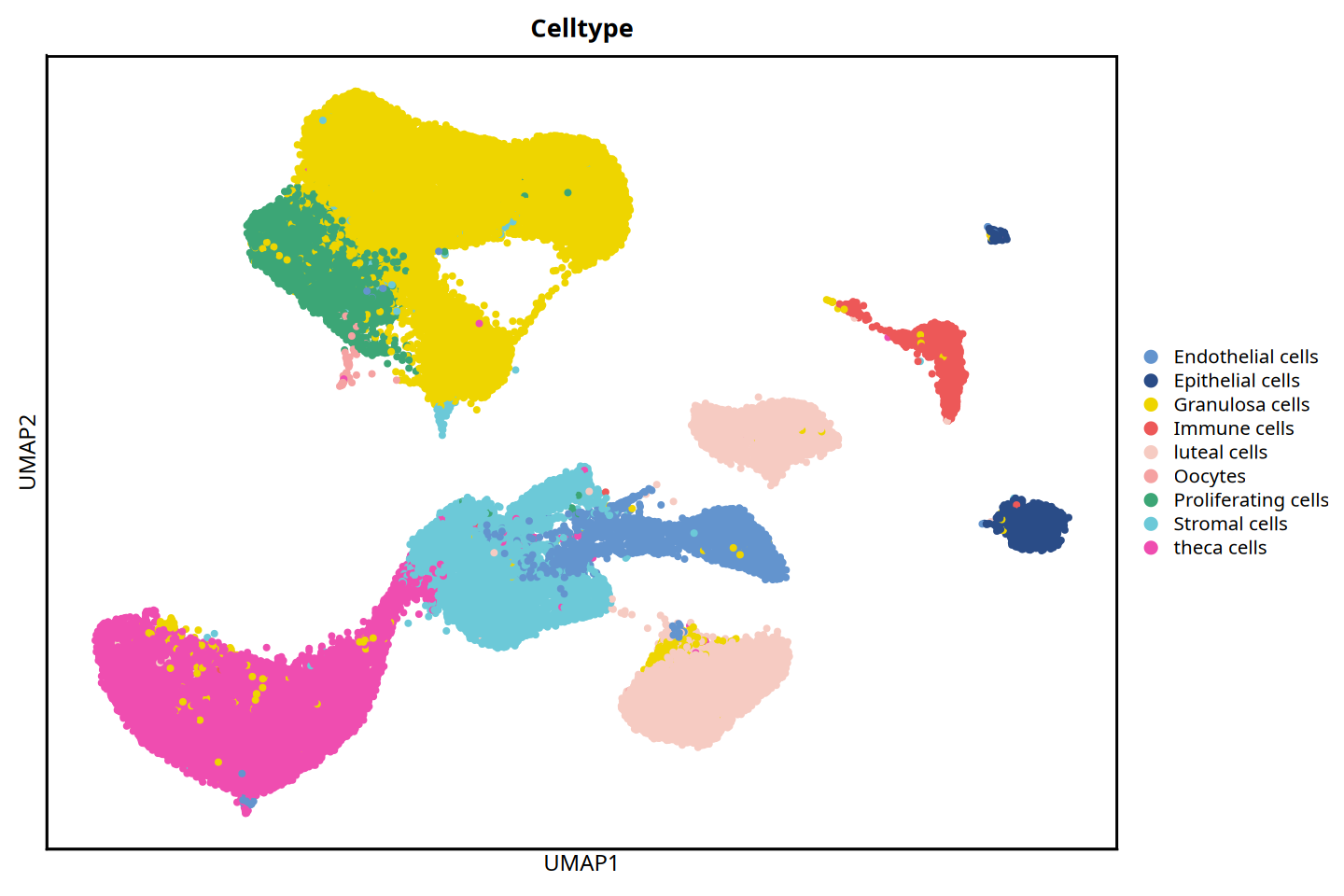
8. Add Spatial Coordinates
To display the distribution characteristics of cells in true physical space, we need to integrate the cell spatial coordinates output by seekspacetools (cell_locations.tsv.gz) into the Seurat object.
Technical Implementation and Considerations:
- Coordinate Storage Method: In this pipeline, we treat two-dimensional spatial coordinates (X, Y) as a special "dimensionality reduction result", utilizing the
CreateDimReducObjectfunction to store them in the@reductions$spatialslot of the Seurat object. This way, in subsequent visualization steps, built-in functions likeDimPlotcan be used directly to plot the spatial distribution of cells. - Cell Order Alignment (Crucial): When constructing a spatial coordinate object, the order of cell barcodes in the loaded spatial coordinate matrix must be strictly consistent with the cell order in the current Seurat object metadata (
@meta.data). If the order is disrupted, it will result in incorrect mapping between gene expression profiles and physical locations.
# --- Add Spatial Coordinate Information ---
spatial_df <- read.table('../SGS25030607_mouse_ovary_demo/data/matrix/WTHA5_filtered_feature_bc_matrix/cell_locations.tsv.gz', row.names = 1, sep = '\t',header = T)
colnames(spatial_df) <- c("spatial_1","spatial_2")
spatial_matrix <- as.matrix(spatial_df)
spatial_matrix_sorted <- spatial_matrix[match(row.names(mouse_ovary@meta.data),row.names(spatial_matrix)), ]
mouse_ovary@reductions$spatial <- CreateDimReducObject(embeddings = spatial_matrix_sorted, key='spatial_', assay='RNA')
9. Add Tissue Image Information
To more intuitively combine cell clustering results and gene expression features with true histological morphology, we also need to integrate the pathological staining image of the slice (such as H&E or DAPI fluorescence images) into the current Seurat object.
We uniformly store the image itself and its physical dimension parameters (maximum pixel values of the X and Y axes) in the @misc$info slot of the Seurat object. Thus, in subsequent spatial plotting, the system can directly call this information, ensuring that cell coordinate points land precisely on the corresponding anatomical structures of the background image.
# --- Image Parameter Configuration ---
samplename = 'A5'
size_x = 55050
size_y = 19906
mouse_ovary@misc$info[[`samplename`]]$size_x = as.integer(size_x)
mouse_ovary@misc$info[[`samplename`]]$size_y = as.integer(size_y)

# --- Load and Attach DAPI/HE Image ---
img = './matrix/WTHA5_aligned_DAPI.png'

# base64 format
img_64 = base64enc::dataURI(file = img)
mouse_ovary@misc$info[[`samplename`]]$img = img_64
# png format
img_gg <- png::readPNG(img)
img_grob <- grid::rasterGrob(img_gg, interpolate = FALSE, width = grid::unit(1,"npc"), height = grid::unit(1, "npc"))
mouse_ovary@misc$info[[`samplename`]]$img_gg = img_grob
10. Spatial Plot Display
At this point, the Seurat object has integrated gene expression profiles, cell clustering results (Clusters), two-dimensional dimensionality reduction coordinates (UMAP), and true physical spatial coordinates (Spatial).
Next, we can directly utilize Seurat's rich built-in plotting functions (such as DimPlot, FeaturePlot, etc.) to restore heterogeneity features at the molecular level to the true anatomical space of the tissue slice, thereby intuitively exploring the spatial distribution of cell types and spatial expression patterns of genes.
10.1 Spatial Coordinate Plotting
In addition to building the object from the raw expression matrix (Matrix) and conducting a full-pipeline analysis, if a processed Seurat .rds file with saved spatial coordinates already exists in your data/rds/ directory (e.g., an object containing cell clustering and annotation information), you can also directly read this RDS file to perform spatial distribution visualization analysis, thereby skipping the previous preprocessing and dimensionality reduction clustering steps.
# --- Clustering Plot at the Spatial Coordinate Level ---
options(repr.plot.height=7, repr.plot.width=15)
DimPlot(mouse_ovary, reduction = 'spatial',pt.size = 1)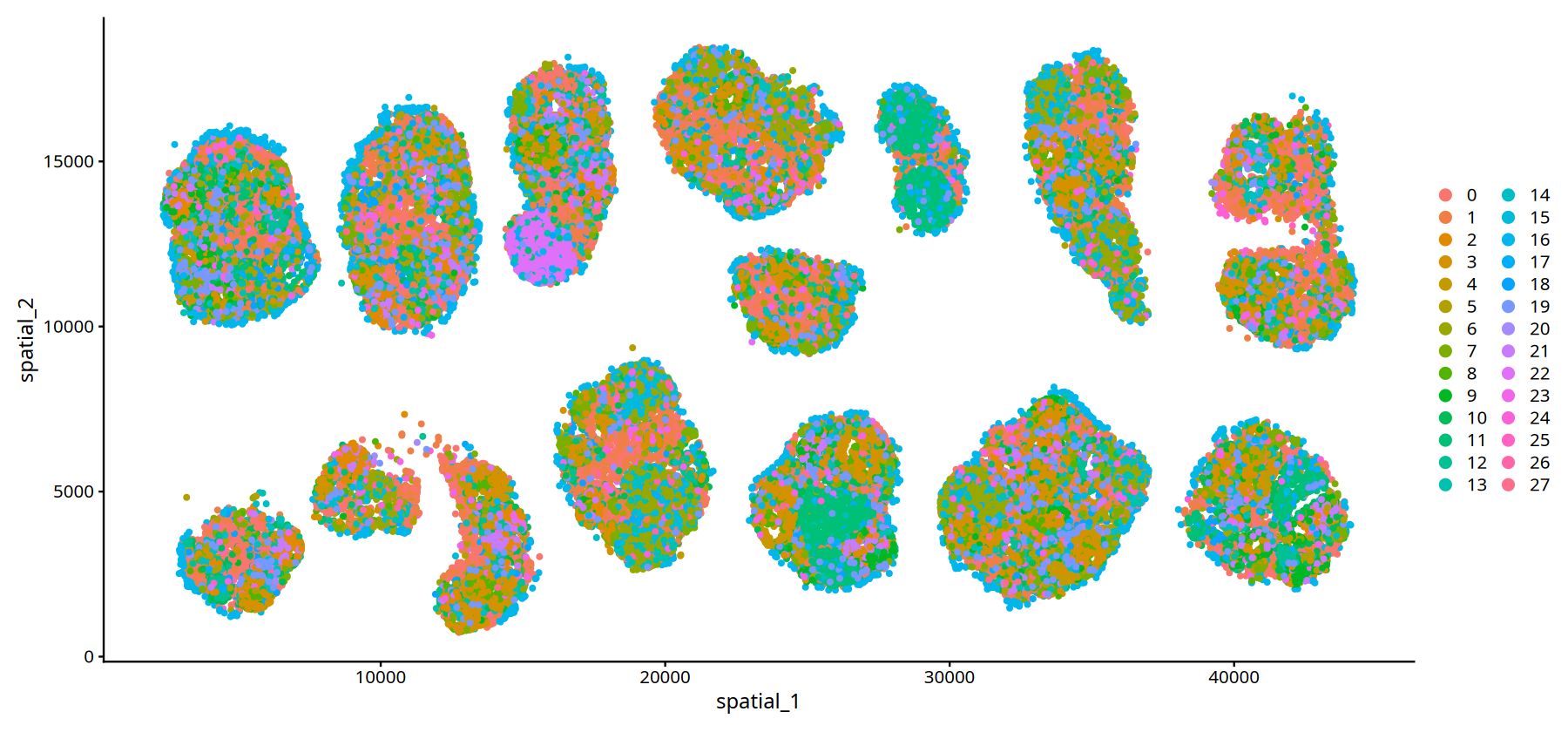
# --- Feature Expression Plot at the Spatial Coordinate Level ---
options(repr.plot.height=5, repr.plot.width=20)
FeaturePlot(mouse_ovary, reduction = 'spatial', features = c('Cdh5','Nckap5'),pt.size = 0.7)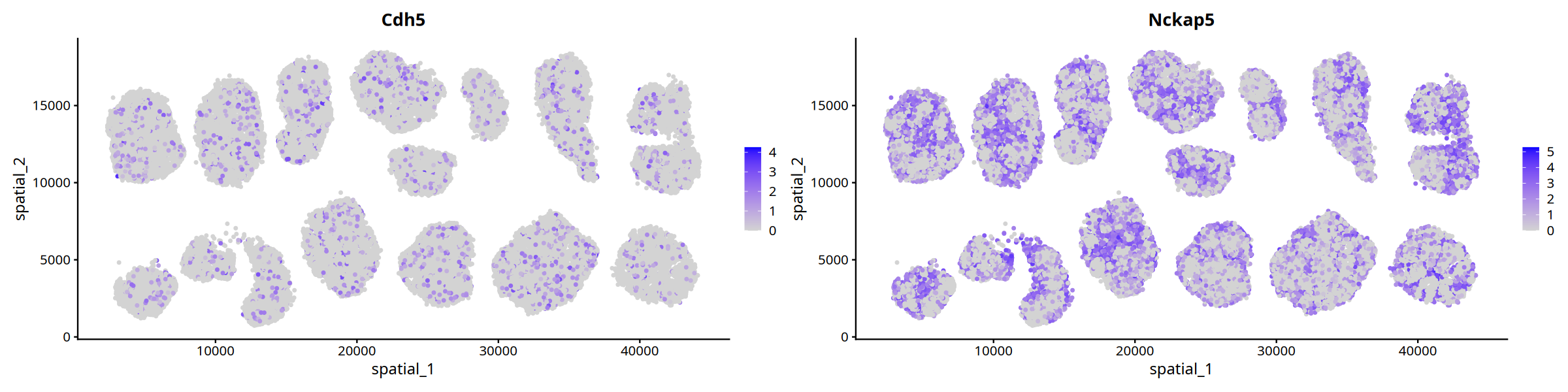
The code example below will demonstrate how to read an existing RDS object (using WTHA5.rds as an example) and directly display spatial plots:
# --- Clustering Plot at Spatial Coordinate Level (Based on Read RDS Object) ---
options(repr.plot.height=7, repr.plot.width=15)
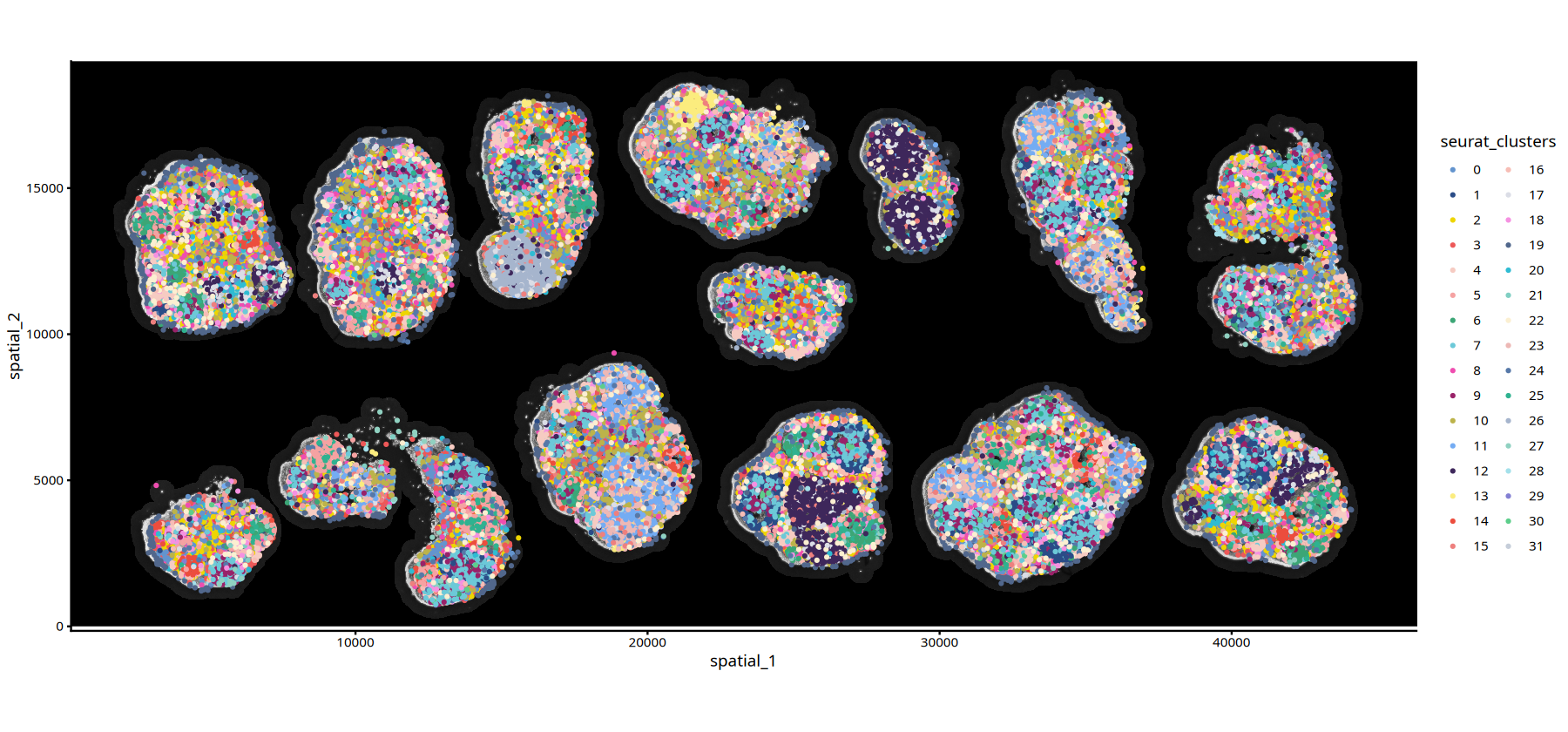
DimPlot(mouse_ovary_rds, reduction = 'spatial',pt.size = 1,group.by = "seurat_clusters")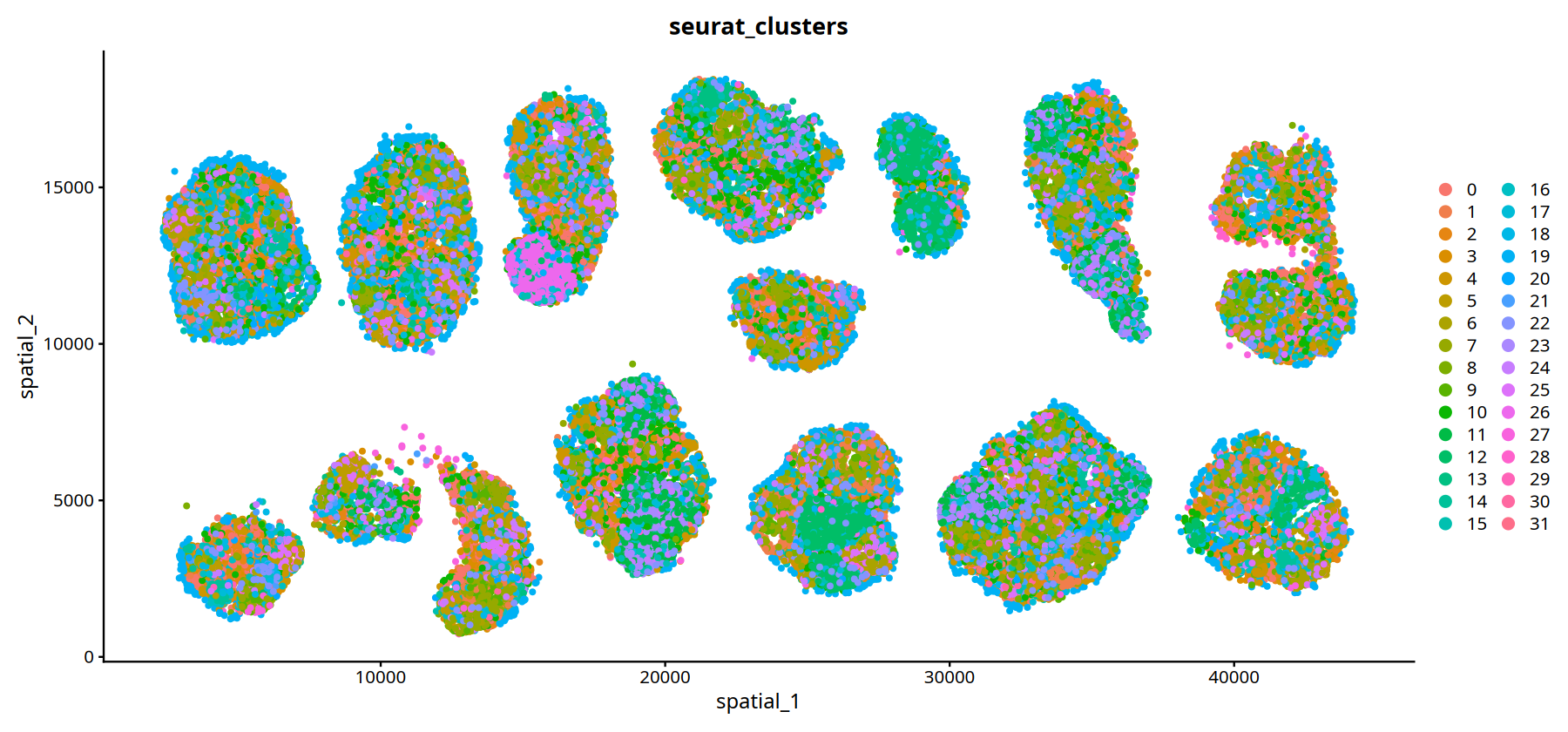
# --- Feature Expression Plot at Spatial Coordinate Level (Based on Read RDS Object) ---
options(repr.plot.height=5, repr.plot.width=20)
FeaturePlot(mouse_ovary_rds, reduction = 'spatial', features = c('Cdh5','Nckap5'),pt.size = 0.7)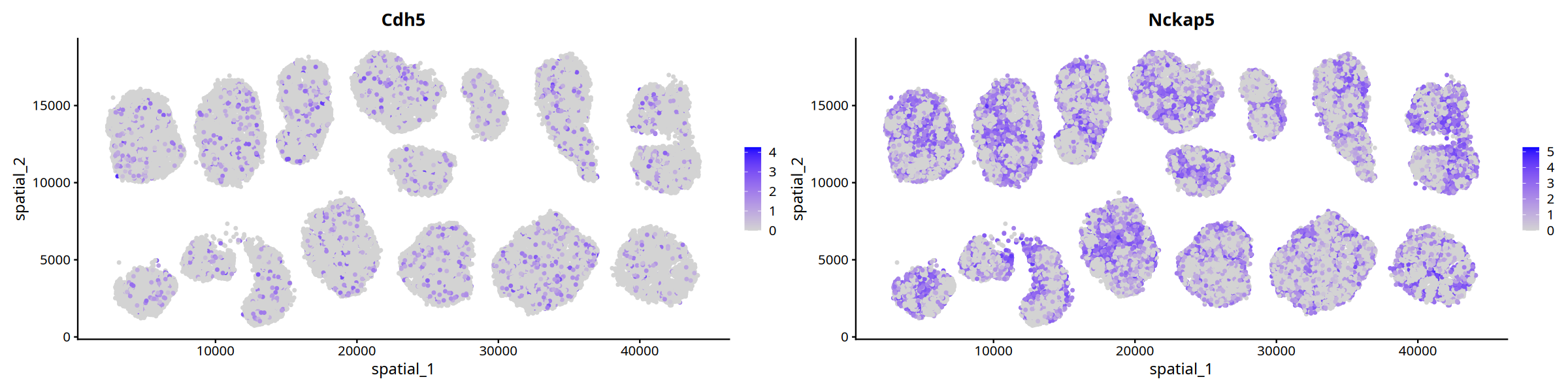
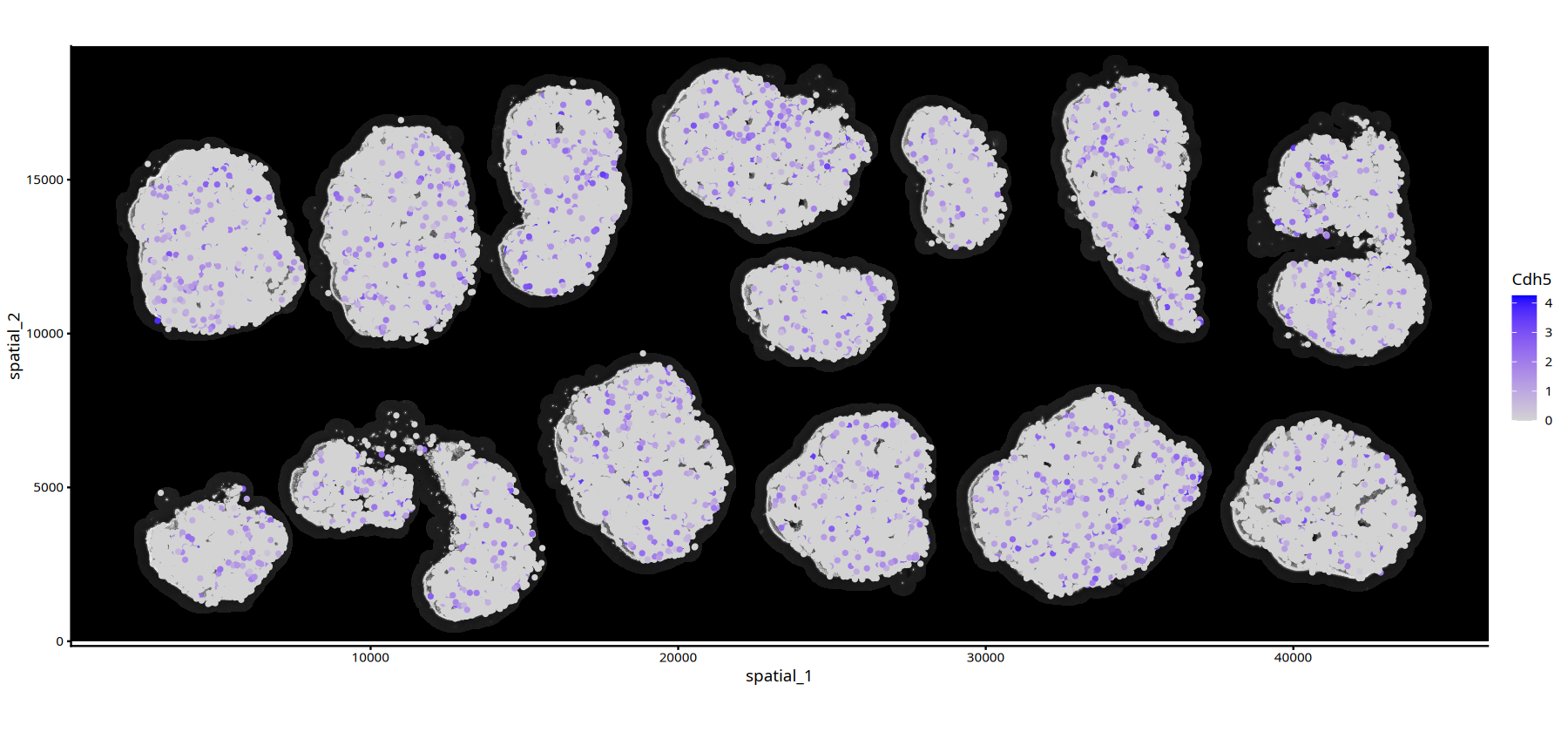
10.2 Spatial Feature Plots with Background Images
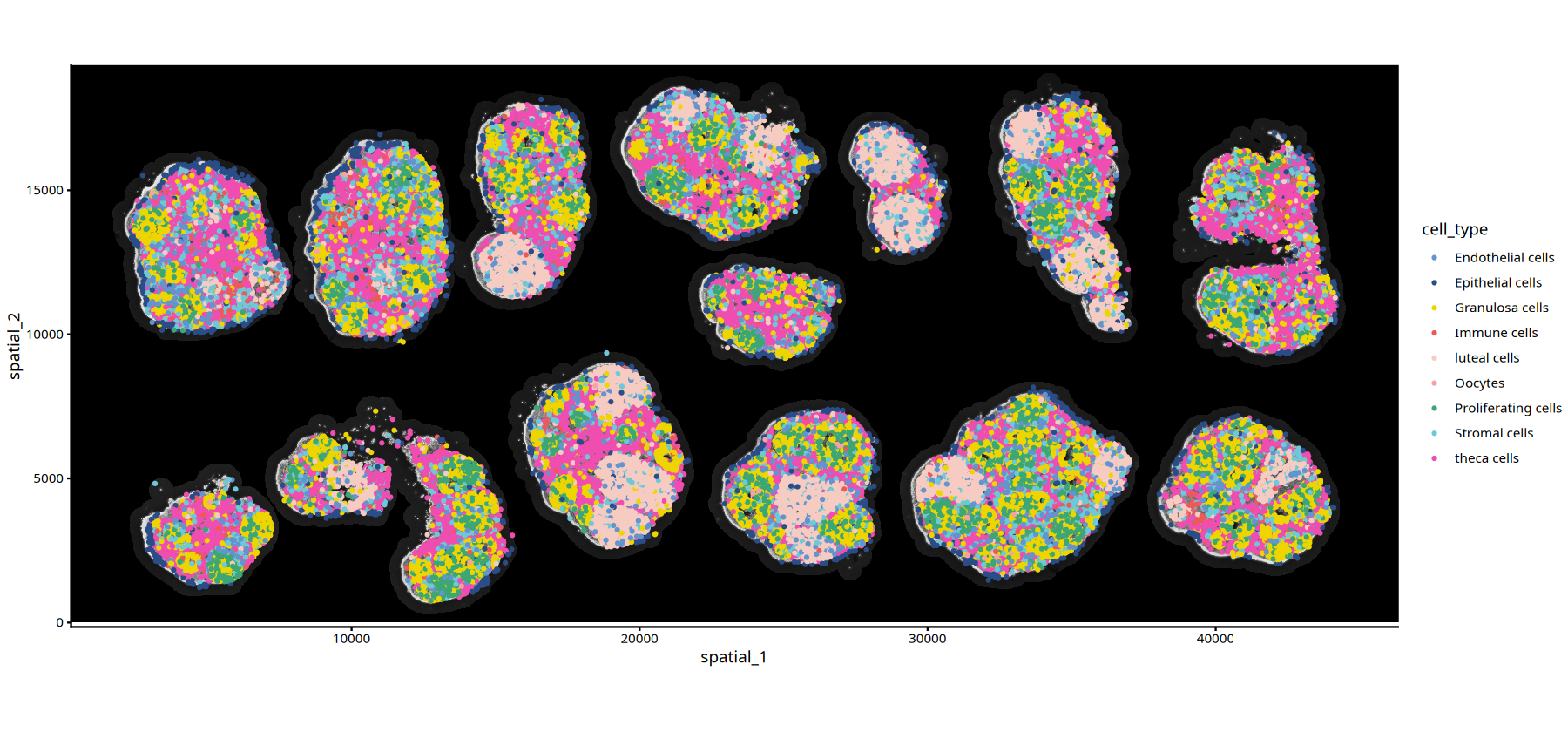
Customized two functions, ImageSpacePlot and FeatureSpacePlot, to plot cell clustering information in space and indicators of cell continuous variables.
###################### Plot Cell Clustering Function
ImageSpacePlot = function(obj, group_by, type="DAPI", sample=names(obj@misc$info)[1], size=1, alpha=1,color=MYCOLOR){
    MYCOLOR=c("#6394ce", "#2a4c87", "#eed500", "#ed5858",
              "#f6cbc2", "#f5a2a2", "#3ca676", "#6cc9d8",
              "#ef4db0", "#992269", "#bcb34a", "#74acf3",
              "#3e275b", "#fbec7e", "#ec4d3d", "#ee807e",
              "#f7bdb5", "#dbdde6", "#f591e1", "#51678c",
              "#2fbcd3", "#80cfc3", "#fbefd1", "#edb8b5",
              "#5678a8", "#2fb290", "#a6b5cd", "#90d1c1",
              "#a4e0ea", "#837fd3", "#5dce8b", "#c5cdd9",
              "#f9e2d6", "#c64ea4", "#b2dfd6", "#dbdfe7",
              "#dff2ec", "#cce8f3", "#e74d51", "#f7c9c4",
              "#f29c81", "#c9e6e0", "#c1c5de", "#750000")

        raster_type <- switch(type,
                          HE = "img_he_gg",
                          DAPI = "img_gg",
                          stop("Invalid type. Must be 'HE' or 'DAPI'.")
                             )

        spatial_coord1 <- as.data.frame(obj[[group_by]])
        colnames(spatial_coord1) <- group_by
        spatial_coord2 <- as.data.frame(obj@reductions$spatial@cell.embeddings)
        spatial_coord <-cbind(spatial_coord2,spatial_coord1)


        ImageSpacePlot <- ggplot2::ggplot() + ggplot2::annotation_custom(grob = obj@misc$info[[sample]][[raster_type]],
        xmin = 0, xmax = obj@misc$info[[sample]]$size_x,
        ymin = 0, ymax = obj@misc$info[[sample]]$size_y) +
        ggplot2::geom_point(data = spatial_coord, ggplot2::aes(x = spatial_1,y = spatial_2, color = !!sym(group_by),
                            fill = !!sym(group_by)), size=size, alpha=alpha)+
        labs(size = group_by) + guides(alpha = "none")+
        ggplot2::theme_classic()+
        scale_color_manual(values = color)+ coord_fixed()
    return(ImageSpacePlot)
}

################### Plot Gene Expression Function
FeatureSpacePlot = function(obj, feature, type="DAPI", sample=names(obj@misc$info)[1], size=1, alpha=c(1,1),color=c("lightgrey","blue")){
    raster_type <- switch(type,
                          HE = "img_he_gg",
                          DAPI = "img_gg",
                          stop("Invalid type. Must be 'HE' or 'DAPI'.")
                             )

    spatial_coord1 <- as.data.frame(obj@reductions$spatial@cell.embeddings)
    spatial_coord2 <- FetchData(obj,feature)
    colnames(spatial_coord2) <- feature
    spatial_coord <-cbind(spatial_coord1,spatial_coord2)

    FeatureSpacePlot <-ggplot2::ggplot() + ggplot2::annotation_custom(grob = obj@misc$info[[sample]][[raster_type]],
        xmin = 0, xmax = obj@misc$info[[sample]]$size_x, ymin = 0, ymax = obj@misc$info[[sample]]$size_y) +
        ggplot2::geom_point(data = spatial_coord, ggplot2::aes(x = spatial_1, y = spatial_2,color = !!sym(feature),alpha = !!sym(feature)), size=size)+
        labs(color = feature)+
        guides(alpha = "none")+
        ggplot2::theme_classic()+
        ggplot2::scale_alpha_continuous(range=alpha)+
        scale_color_gradient(low=color[1],high = color[2])+ coord_fixed()
    return(FeatureSpacePlot)
}# --- Cell Clustering Plot with DAPI/HE Background ---
# Cell Clustering Plot with DAPI/HE Background
options(repr.plot.height=7, repr.plot.width=15)
ImageSpacePlot(obj=mouse_ovary, group_by = "cell_type",type="DAPI",size=0.7)• size : "cell_type"
# --- Gene Expression Plot with DAPI/HE Background ---
# Gene Expression Plot with DAPI/HE Background
options(repr.plot.height=7, repr.plot.width=15)
FeatureSpacePlot(obj=mouse_ovary, feature="Cdh5",type="DAPI")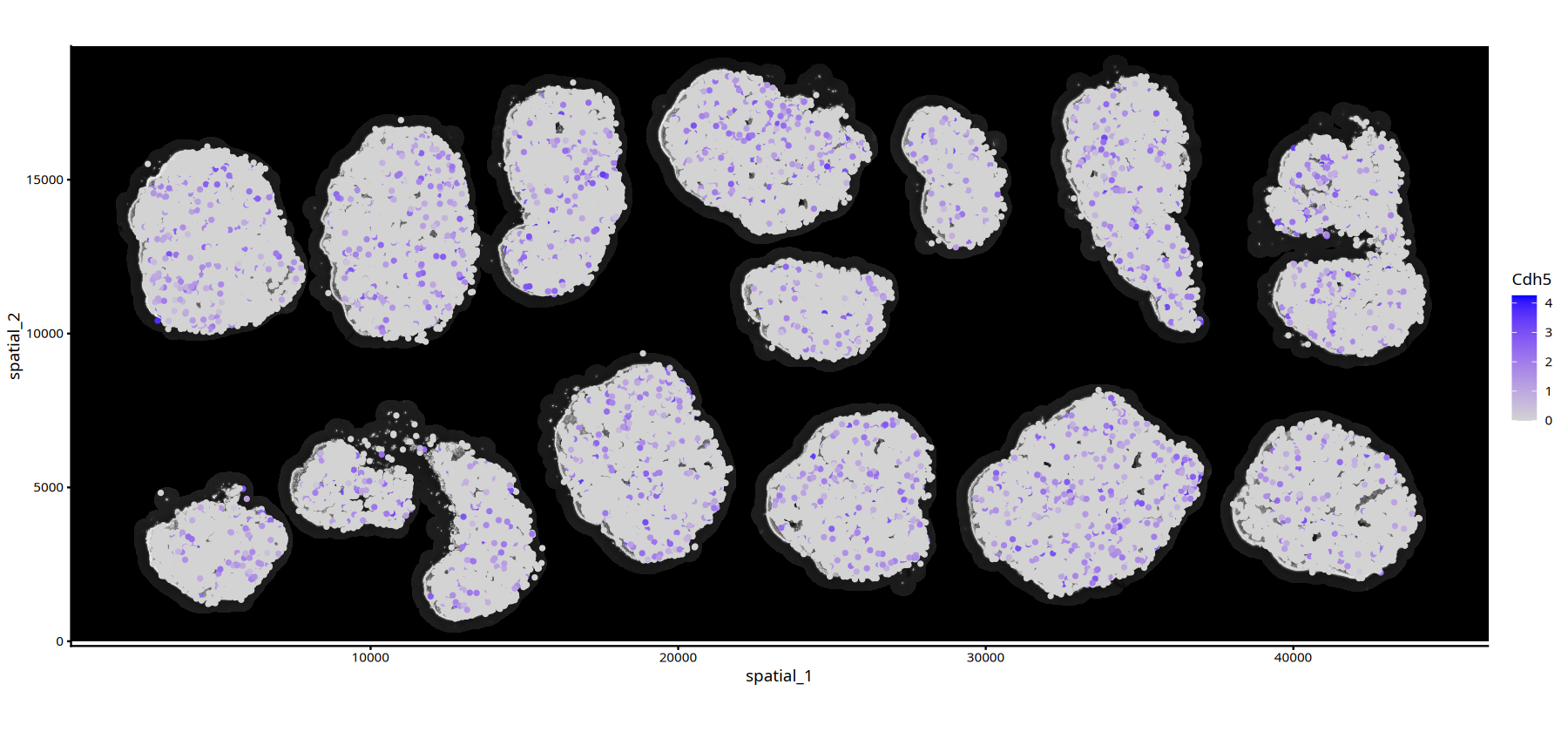
The code example below will demonstrate how to read an existing RDS object (using WTHA5.rds as an example) and directly display spatial plots:
# --- Cell Clustering Plot with DAPI Background (Based on Read RDS Object) ---
# Cell Clustering Plot with DAPI Background
options(repr.plot.height=7, repr.plot.width=15)
ImageSpacePlot(obj=mouse_ovary_rds, group_by = "seurat_clusters",type="DAPI",size=0.7)• size : "seurat_clusters"
# --- Gene Expression Plot with DAPI/HE Background (Based on Read RDS Object) ---
# Gene Expression Plot with DAPI/HE Background
options(repr.plot.height=7, repr.plot.width=15)
FeatureSpacePlot(obj=mouse_ovary_rds, feature="Cdh5",type="DAPI")