Single-Cell Spatial Transcriptomics: Cell Communication Analysis (based on stLearn)
1. Module Introduction
This module is based on the stLearn algorithm and is used for cell communication analysis of spatial transcriptomics data.
stLearn is a computational tool developed specifically for spatial transcriptomics data. It utilizes co-expression information of ligands and receptors between adjacent spots, combined with spatial distance and cell type diversity, to calculate ligand-receptor (L-R) scores, thereby identifying active cell communication within the tissue. It achieves the following core analytical objectives:
- Infer spatial cell communication networks: Evaluate interactions between all potential cell type pairs in the dataset, revealing the complex communication network topology in the cellular microenvironment.
- Identify spatial communication hotspot regions: Find communication hotspot regions within a given tissue, where cell type interactions are more likely to occur based on the spatial distribution of ligand-receptors compared to random non-interacting gene pairs.
💡 Note The input for this pipeline is Scanpy-compatible format data and spatial coordinate files, and the analysis results will generate network plots, heatmaps, chord diagrams, and related diagnostic charts showing cell-cell interaction relationships.
Brief Algorithm Principle: By integrating gene expression data with spatial location information, stLearn first calculates the co-expression of ligand-receptor pairs, and then performs a permutation test based on spatial neighborhoods (considering physical distance) to evaluate whether the observed ligand-receptor interactions are statistically significant in space, thereby accurately inferring cell communication in the spatial microenvironment.
2. Input File Preparation
This module requires files containing the expression matrix and spatial coordinates, along with corresponding Metadata.
File Structure Example:
filtered_feature_bc_matrix/          # rds converted matrix output directory
├── matrix.mtx.gz                    # Expression matrix
├── barcodes.tsv.gz                  # Cell barcodes
├── features.tsv.gz                  # Gene features
└── cell_locations.tsv               # Spatial coordinate file
How to export required files for stLearn from a Seurat object:
If you already have a Seurat object (.rds), you can use the following R code snippet to export the expression matrix and spatial coordinates into the folder structure shown above:
library(Seurat)
library(dplyr)
library(tibble)
library(readr)
library(Matrix)

# 1. Set input path
rds_path <- "your_input.rds"
meta_path <- "your_meta.txt"

# 2. Read data and integrate metadata
obj <- readRDS(rds_path)
meta <- read.delim(meta_path)
rownames(meta) <- meta$barcode
obj@meta.data <- meta

# 3. Create output directory
dir.create('filtered_feature_bc_matrix', showWarnings = FALSE)

# 4. Extract spatial coordinates and save
spatial_data <- Embeddings(obj, reduction = 'spatial')
spatial_data <- as.data.frame(spatial_data)
colnames(spatial_data) <- c('x', 'y')
spatial_data <- rownames_to_column(spatial_data, "Barcode")
write_delim(spatial_data, 'filtered_feature_bc_matrix/cell_locations.tsv', delim = '\t')

# 5. Extract expression matrix and save (MTX format)
writeMM(GetAssayData(obj, slot="counts"), file = 'filtered_feature_bc_matrix/matrix.mtx')

# 6. Save gene and barcode features
Gene <- data.frame(GeneID = rownames(obj), Gene = rownames(obj))
write.table(Gene, 'filtered_feature_bc_matrix/genes.tsv', row.names = FALSE, col.names = FALSE, sep = '\t', quote = FALSE)

barcode <- data.frame(Barcode = colnames(obj))
write.table(barcode, 'filtered_feature_bc_matrix/barcodes.tsv', row.names = FALSE, col.names = FALSE, sep = '\t', quote = FALSE)

# Get the complete Base64 string, where info[["25020230_nao_CS_expression"]] can be viewed via names(obj@misc$info)
b64_string <- obj@misc$info[["25020230_nao_CS_expression"]]$img

# Remove the "data:;base64," prefix from the string
b64_clean <- sub("^data:.*base64,", "", b64_string)

# Decode it into binary data and save as a PNG file
bin_data <- jsonlite::base64_dec(b64_clean)

# Save the file to the current working directory
writeBin(bin_data, paste0("filtered_feature_bc_matrix/expression.png"))
3. Data Loading and Preprocessing
import stlearn as st
import numpy as np
import pandas as pd
# matplotlib version 3.5.3, higher versions conflict with stlearn
import matplotlib.pyplot as plt
import matplotlib.image as mpimg
import scanpy as sc
import re
import warnings
from PIL import Image
import os@jit(parallel=True, nopython=False)
## sample_name: Sample name
sample_name = "25020230_nao_CS_expression"
## image_path: Path to spatial H&E staining photo
image_path = ""
## meta_path: Path to annotated cell type file
meta_path = "/PROJ2/FLOAT/jinwen/project/other_ans_project/25020230_nao_CS_demo/temp-20250814092026/data/rds/meta.tsv"
## spot_diameter_fullres: Spot diameter at full resolution
spot_diameter_fullres = 50
## species: Species selection, either "human" or "mouse"
species = "mouse"
## grid_step: Whether to grid the spatial slice
grid_step = False
n_ = 125
meta_celltype_colums_name = "RNA_snn_res.0.2"# Read SeekSpace data and perform normalization, dimensionality reduction, and clustering
warnings.filterwarnings('ignore')
warnings.simplefilter('ignore')
adata = sc.read_10x_mtx("./filtered_feature_bc_matrix/")
spatial = pd.read_csv('./filtered_feature_bc_matrix/cell_locations.tsv',sep="\t",index_col=0)
spatial = spatial.loc[:,("x","y")]
selected_rows = spatial.loc[spatial.index.isin(adata.obs_names)]
selected_rows.columns = ["imagecol","imagerow"]
selected_rows = selected_rows.reindex(adata.obs_names)
selected_rows = selected_rows*0.265385
a = st.create_stlearn(count=adata.to_df(),spatial=selected_rows,library_id=sample_name, scale=1,spot_diameter_fullres=spot_diameter_fullres)
a.layers["raw_count"] = a.X
# Preprocessing
st.pp.normalize_total(a)
st.pp.log1p(a)
# Keep raw data
a.raw = a
st.pp.scale(a)
st.em.run_pca(a,n_comps=50,random_state=0)
st.pp.neighbors(a,n_neighbors=25,use_rep='X_pca',random_state=0)
st.tl.clustering.louvain(a,random_state=0)
sc.tl.umap(a)Log transformation step is finished in adata.X
Scale step is finished in adata.X
PCA is done! Generated in adata.obsm['X_pca'], adata.uns['pca'] and adata.varm['PCs']
2026-05-28 16:37:31.067583: I tensorflow/core/platform/cpu_feature_guard.cc:193] This TensorFlow binary is optimized with oneAPI Deep Neural Network Library (oneDNN) to use the following CPU instructions in performance-critical operations: AVX2 FMA
To enable them in other operations, rebuild TensorFlow with the appropriate compiler flags.
2026-05-28 16:37:31.175224: W tensorflow/compiler/xla/stream_executor/platform/default/dso_loader.cc:64] Could not load dynamic library 'libcudart.so.11.0'; dlerror: libcudart.so.11.0: cannot open shared object file: No such file or directory
2026-05-28 16:37:31.175245: I tensorflow/compiler/xla/stream_executor/cuda/cudart_stub.cc:29] Ignore above cudart dlerror if you do not have a GPU set up on your machine.
2026-05-28 16:37:38.340693: W tensorflow/compiler/xla/stream_executor/platform/default/dso_loader.cc:64] Could not load dynamic library 'libnvinfer.so.7'; dlerror: libnvinfer.so.7: cannot open shared object file: No such file or directory
2026-05-28 16:37:38.340786: W tensorflow/compiler/xla/stream_executor/platform/default/dso_loader.cc:64] Could not load dynamic library 'libnvinfer_plugin.so.7'; dlerror: libnvinfer_plugin.so.7: cannot open shared object file: No such file or directory
2026-05-28 16:37:38.340792: W tensorflow/compiler/tf2tensorrt/utils/py_utils.cc:38] TF-TRT Warning: Cannot dlopen some TensorRT libraries. If you would like to use Nvidia GPU with TensorRT, please make sure the missing libraries mentioned above are installed properly.
Created k-Nearest-Neighbor graph in adata.uns['neighbors']
Applying Louvain cluster ...n Louvain cluster is done! The labels are stored in adata.obs['louvain']
# Add the annotated cell types to the adata object
cluster_name = "celltype"
celltype = pd.read_csv(meta_path,index_col=0,sep = "\t")
celltype = celltype.loc[a.obs.index]
a.obs[cluster_name] = celltype[meta_celltype_colums_name]
a.obs[cluster_name] = a.obs[cluster_name].astype('category')# Divide the spatial slice into n_ length and n_ width
if grid_step:
# n_ = 125
print(f'{n_} by {n_} has this many spots:\n', n_*n_)
a = st.tl.cci.grid(a,n_row=n_, n_col=n_, use_label = cluster_name)
print(a.shape)# Load the ligand-receptor database, calculate the significance of ligand-receptor expression
lrs = st.tl.cci.load_lrs(['connectomeDB2020_lit'], species=species)
st.tl.cci.run(a, lrs,
min_spots = 20, #Filter out any LR pairs with no scores for less than min_spots
distance=None, # None defaults to spot+immediate neighbours; distance=0 for within-spot mode
n_pairs=100, # Number of random pairs to generate; low as example, recommend ~10,000
n_cpus=16, # Number of CPUs for parallel. If None, detects & use all available.
)Spot neighbour indices stored in adata.obsm['spot_neighbours'] & adata.obsm['spot_neigh_bcs'].
Altogether 1460 valid L-R pairs
enerating backgrounds & testing each LR pair...: 100%|██████████ [ time left: 00:00 ]
Storing results:
lr_scores stored in adata.obsm['lr_scores'].
p_vals stored in adata.obsm['p_vals'].
p_adjs stored in adata.obsm['p_adjs'].
-log10(p_adjs) stored in adata.obsm['-log10(p_adjs)'].
lr_sig_scores stored in adata.obsm['lr_sig_scores'].
Per-spot results in adata.obsm have columns in same order as rows in adata.uns['lr_summary'].
Summary of LR results in adata.uns['lr_summary'].
4. Cell Communication Calculation Results
4.1 Ligand-Receptor Expression Significance Results
lr_info = a.uns['lr_summary']Figure Legend: The summary table displays the statistical results of ligand-receptor interactions:
- Rows: Represent different ligand-receptor interaction pairs (Ligand-Receptor pairs).
- n_spot (First column): The total number of cells/Spots with interactions in space (without P-value significance filtering).
- n_spots_sig (Second column): The number of interacting cells/Spots with statistical significance after multiple hypothesis testing correction.
- n_spots_sig_pval (Third column): The number of significant interacting cells/Spots filtered according to the user-set P-value threshold.
lr_info| n_spots | n_spots_sig | n_spots_sig_pval | |
|---|---|---|---|
| Agrn_Atp1a3 | 13164 | 2856 | 4935 |
| Robo1_Robo1 | 6762 | 2742 | 4992 |
| Cadm1_Cadm1 | 10046 | 2669 | 4703 |
| Serpine2_Lrp1 | 8611 | 2412 | 3242 |
| Ptprm_Ptprm | 6452 | 2399 | 3745 |
| ... | ... | ... | ... |
| Prok2_Prokr2 | 23 | 7 | 23 |
| Tnfsf13b_Tnfrsf13c | 24 | 7 | 24 |
| Spx_Galr3 | 25 | 7 | 25 |
| Ccl5_Ackr1 | 21 | 6 | 21 |
| Prl_Prlr | 21 | 3 | 21 |
1460 rows × 3 columns
st.tl.cci.adj_pvals(a, correct_axis='spot',
                   pval_adj_cutoff=0.05, adj_method='fdr_bh')
4.2 Ligand-Receptor Diagnostics Plot
A key aspect of ligand-receptor analysis is controlling for the expression level and frequency of ligands and receptors when determining significant hotspots. Therefore, the diagnostic plot should show little to no correlation between the hotspots of ligand-receptor pairs and their expression levels and frequencies. The following diagnostic methods can help check and confirm this; if this is not the case, it indicates that a larger number of Permutations may be needed.
Figure Legend: The ligand-receptor diagnostics plot is used to confirm whether there is no strong correlation (unbiasedness) between significant interaction hotspots and expression abundance or expression frequency.
- Left Plot (Expression Level): The horizontal axis represents ligand-receptor pairs sorted by the number of significantly interacting cells/Spots; the vertical axis represents the median expression value of the ligand-receptor pair in non-zero expressing cells.
- Right Plot (Expression Frequency): The horizontal axis is the same as the left plot; the vertical axis represents the proportion of cells with a ligand-receptor expression value of 0 among all cells (i.e., Dropout rate).
st.pl.lr_diagnostics(a, show=False,figsize=(15,5))
plt.tight_layout()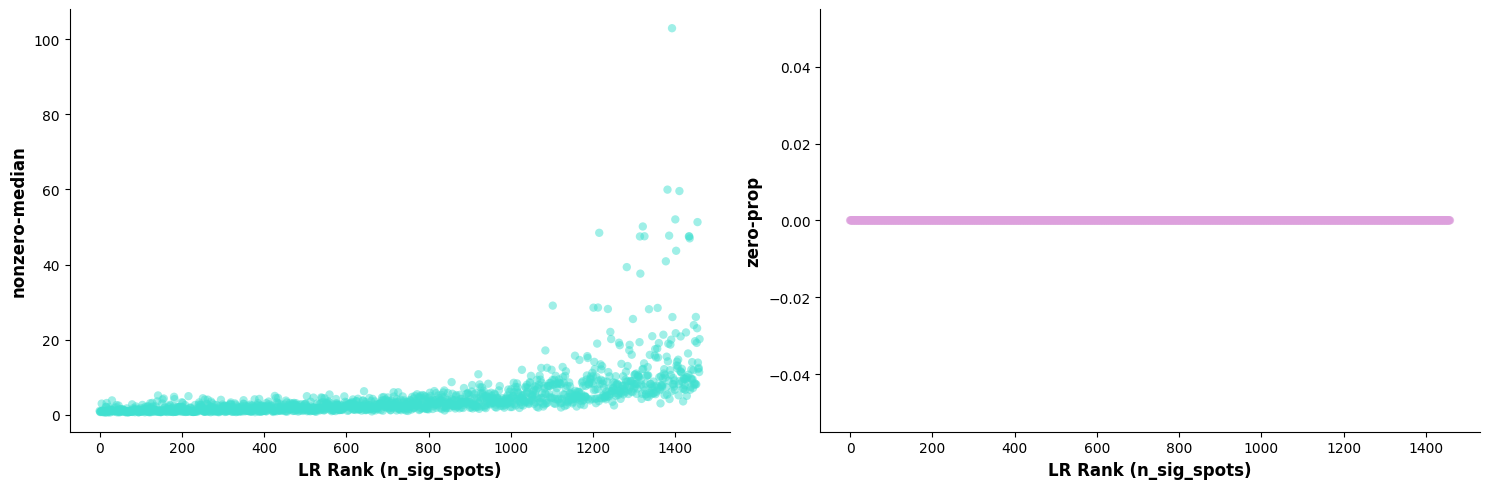
4.3 Significant Ligand-Receptor Interaction Scatter Plot
Figure Legend: Scatter plot of significant ligand-receptor interactions.
- Horizontal Axis (X-axis): Represents the Top 50 ligand-receptor pairs sorted by significance.
- Vertical Axis (Y-axis): Represents the number of cells/Spots with significant interactions for the ligand-receptor pair after P-value filtering and correction (
n_spots_sig).
# st.pl.lr_summary(a, n_top=500,show=False)
st.pl.lr_summary(a, n_top=50, show=False,figsize=(10,5))
plt.tight_layout()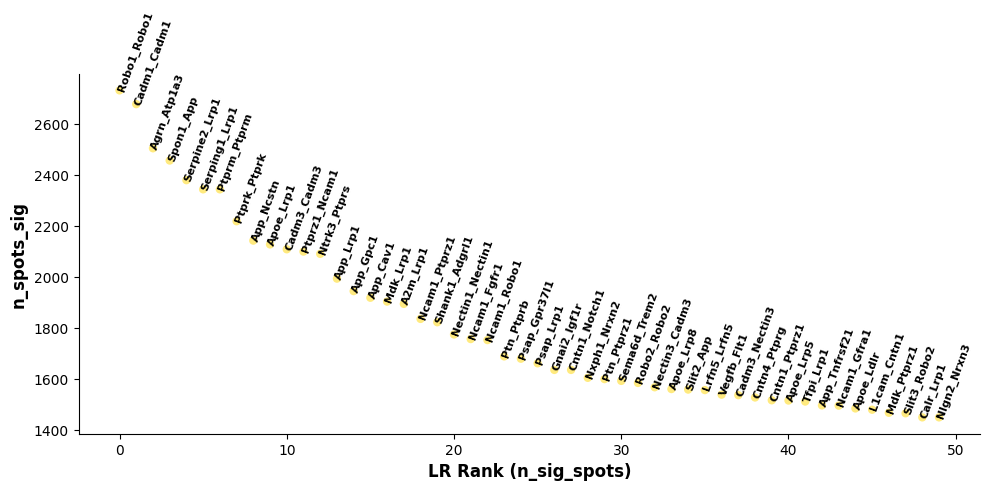
4.4 Significant Ligand-Receptor Interaction Bar Chart
Figure Legend: Bar chart of ligand-receptor interaction frequencies.
- Horizontal Axis (X-axis): Represents the Top ligand-receptor pairs sorted by significance.
- Vertical Axis (Y-axis): Represents the total number of cells/Spots with interactions (including both significant and non-significant).
- Bar Color: Green represents the proportion of significant interactions, Blue represents the proportion of non-significant interactions.
st.pl.lr_n_spots(a, n_top=50,max_text=100,show=False,figsize=(11, 5))
plt.tight_layout()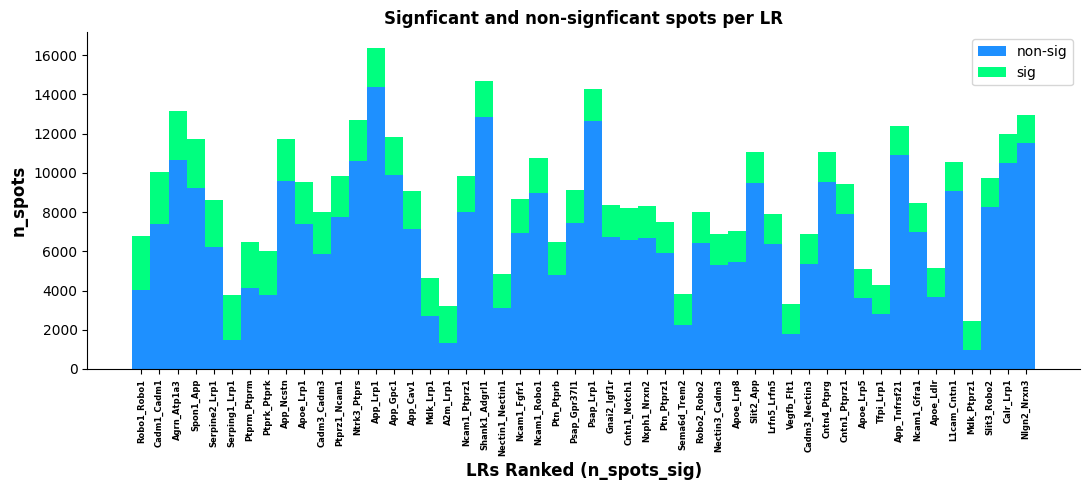
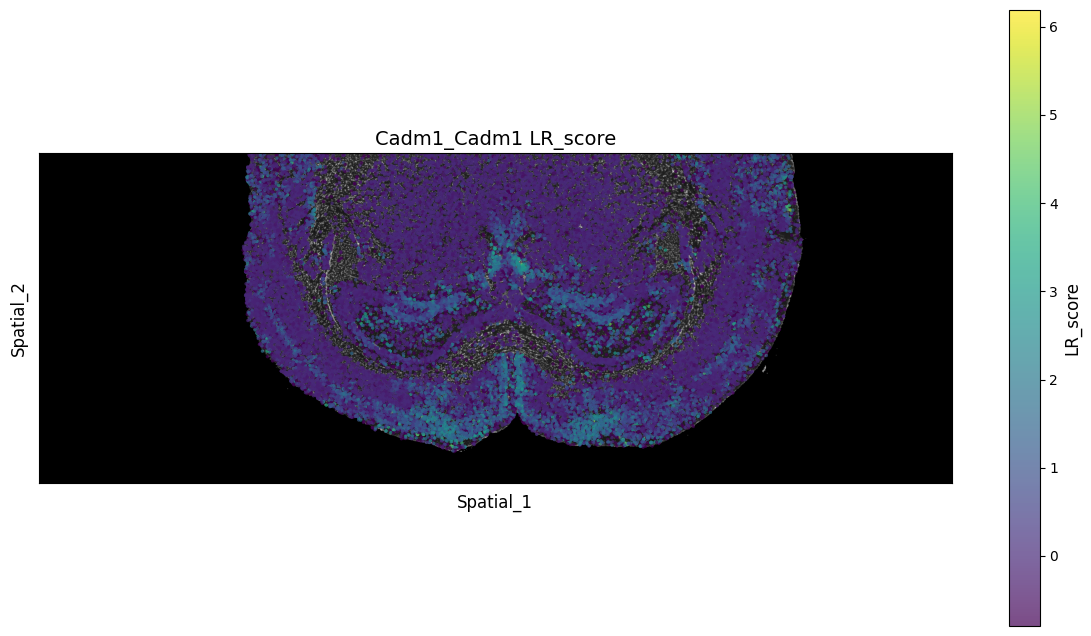
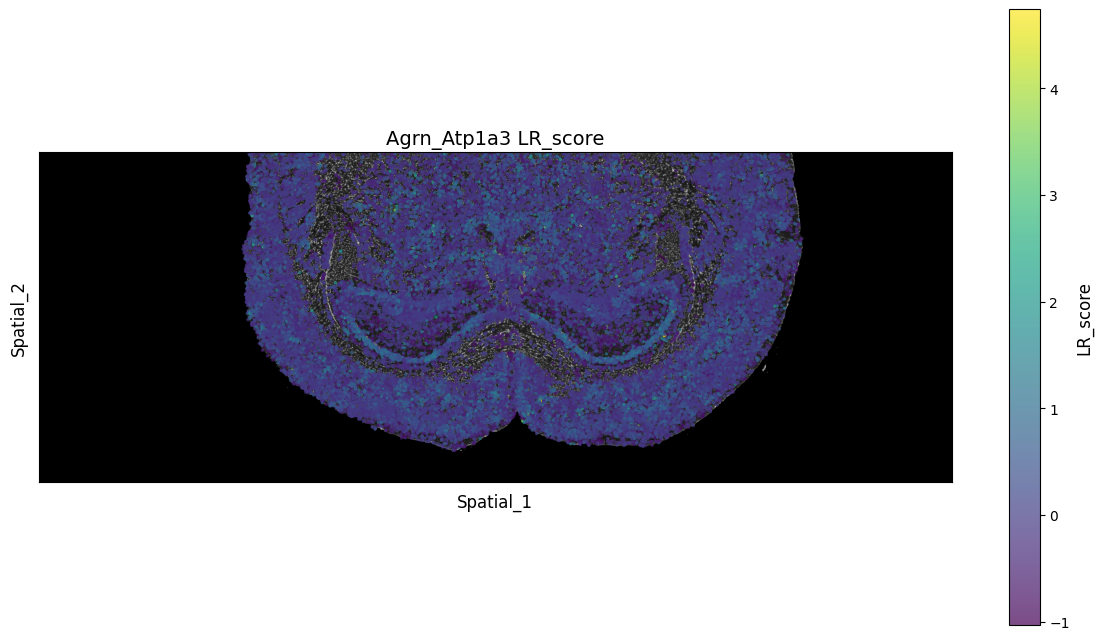
4.5 Spatial Distribution Plot of Ligand-Receptor Interaction Score (LR Score)
This section intuitively displays the raw interaction scores of specific ligand-receptor pairs on tissue slices using a spatial scatter plot. The interaction score (LR Score) is a continuous value calculated based on the co-expression abundance of ligands and receptors in spatially adjacent cells.
Figure Legend: Spatial scatter plot of ligand-receptor interaction score (LR Score).
- Basemap: Grayscale tissue slice background (e.g., H&E or DAPI staining image), providing a reference for tissue morphology.
- Dots: Each dot in the plot represents a specific cell or Spot on the spatial transcriptomics slice.
- Dot Color (LR_score): The color of the dot maps the ligand-receptor interaction score at that spatial location. Brighter colors (usually leaning towards yellow/green, depending on the color bar) indicate higher co-expression levels of receptors and ligands in that local area, suggesting stronger potential cell-cell communication; darker colors (leaning towards dark blue/purple) indicate lower interaction scores.
lr_scores = pd.DataFrame(a.obsm["lr_scores"])
lr_scores.columns = lr_info.index
lr_scores.index = a.obs.index

p_vals = pd.DataFrame(a.obsm["p_vals"])
p_vals.columns = lr_info.index
p_vals.index = a.obs.index

p_adjs = pd.DataFrame(a.obsm["p_adjs"])
p_adjs.columns = lr_info.index
p_adjs.index = a.obs.index

log10_p_adjs = pd.DataFrame(a.obsm["-log10(p_adjs)"])
log10_p_adjs.columns = lr_info.index
log10_p_adjs.index = a.obs.index# Read spatial H&E or DAPI
background_image = mpimg.imread('filtered_feature_bc_matrix/expression.png')
lrs = a.uns['lr_summary'].index.values[0:3]
for best_lr in lrs[0:3]:
if grid_step:
tmp = pd.DataFrame(a.obsm["spatial"])
tmp.columns = ["x","y"]
tmp.index = a.obs.index
tmp = tmp / 0.265385
spatial_tmp = tmp.copy()
else:
spatial_tmp = spatial.copy()
spatial_tmp["LR_score"] = lr_scores[best_lr]
spatial_tmp["p_vals"] = p_vals[best_lr]
spatial_tmp["p_adjs"] = p_adjs[best_lr]
spatial_tmp["-log10(p_adjs)"] = log10_p_adjs[best_lr]
# Create a new figure
fig, ax = plt.subplots(figsize=(12, 8))
# Display the background image
# ax.imshow(background_image, extent=[0, 55050, 0, 19906], aspect='auto',)
ax.imshow(background_image, extent=[0, 55050, 0, 19906], aspect='auto', zorder=0, cmap='gray')
# Select the numeric column for color gradient (please modify the column name according to your data)
# E.g.: 'expression_level', 'score', 'intensity', etc.
value_column = 'LR_score' # Please replace with the actual numeric column name
# Create color mapping
# Different colormaps can be chosen: 'viridis', 'plasma', 'inferno', 'magma', 'coolwarm', 'RdBu_r', etc.
cmap = plt.cm.viridis
norm = plt.Normalize(vmin=spatial_tmp[value_column].min(),
vmax=spatial_tmp[value_column].max())
# Create a scatter plot, set color according to the numeric column
scatter = ax.scatter(spatial_tmp['x'], spatial_tmp['y'],
c=spatial_tmp[value_column],
cmap=cmap, norm=norm,
alpha=0.7, s=6, edgecolors='none')
# Add a color bar
cbar = plt.colorbar(scatter, ax=ax, shrink=0.8)
cbar.set_label(value_column, fontsize=12)
# Add labels and titles
ax.set_xlabel('Spatial_1', fontsize=12)
ax.set_ylabel('Spatial_2', fontsize=12)
ax.set_title(f'{best_lr} {value_column}', fontsize=14)
# Remove axis ticks (optional, to make the image more aesthetically pleasing)
ax.set_xticks([])
ax.set_yticks([])
ax.set_aspect("equal")
# Display the figure
plt.tight_layout()
# Still display (optional)
plt.show()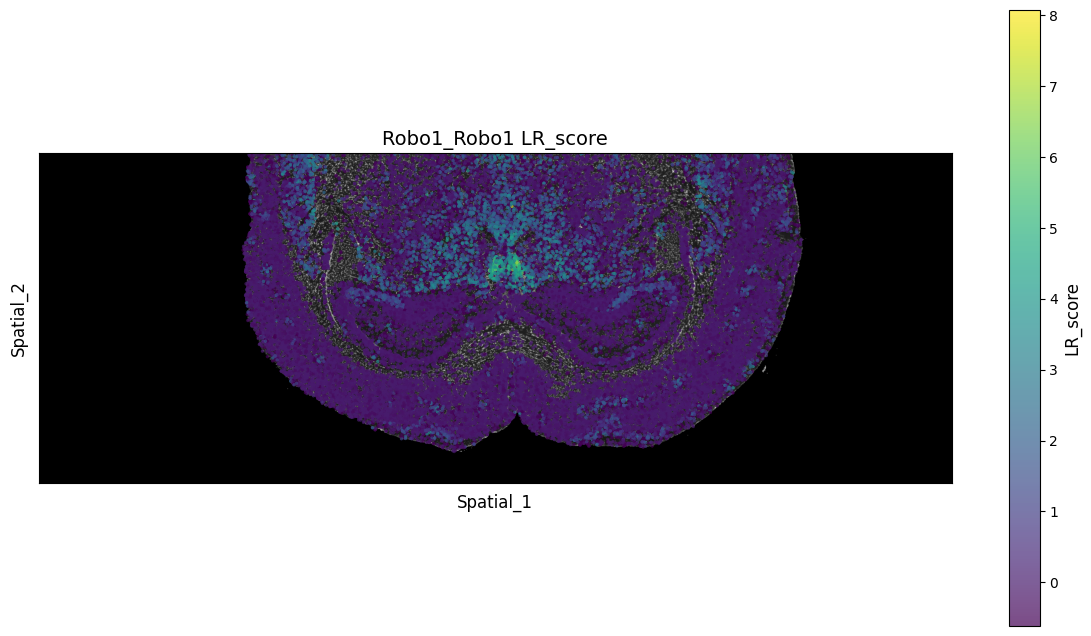
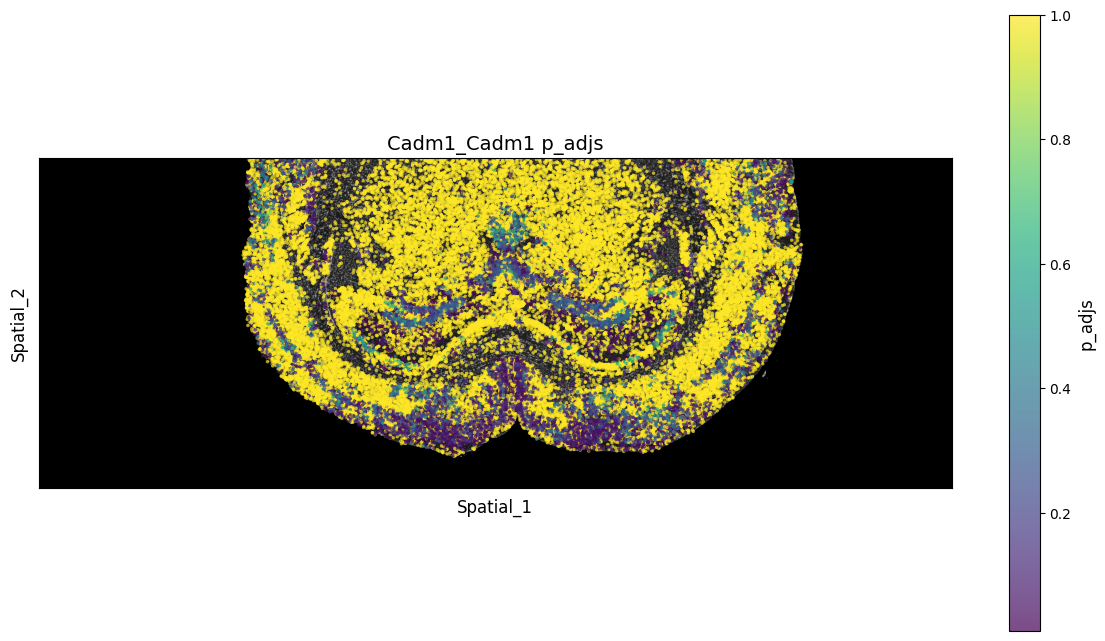
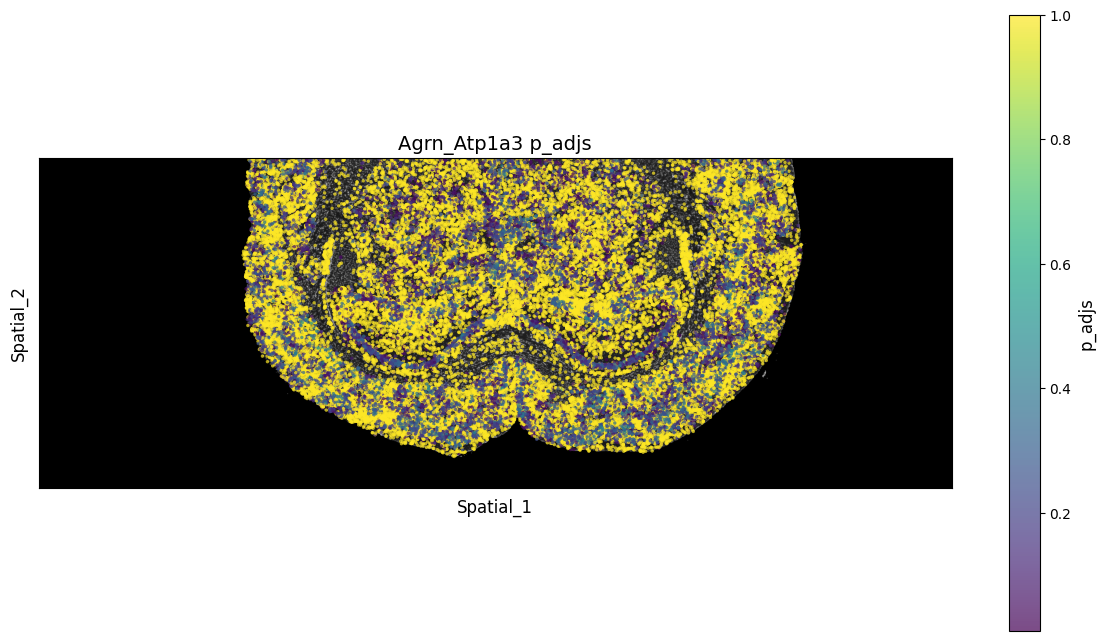
4.6 Spatial Distribution Plot of Ligand-Receptor Interaction Significance (p_adjs)
This section displays the statistical significance (adjusted P-value) of interactions for specific ligand-receptor pairs at various spatial locations. This helps filter out background noise caused solely by random co-expression, precisely locating communication hotspots with true biological significance.
Figure Legend: Spatial distribution scatter plot of the P-value (p_adjs) for specific ligand-receptor pairs.
- Basemap: Grayscale tissue slice background (e.g., H&E or DAPI staining image), providing a reference for tissue morphology.
- Dots: Each dot in the plot represents a specific cell or Spot on the spatial transcriptomics slice.
- Color Mapping (Colorbar): Represents the adjusted P-value (p_adjs) of ligand-receptor interactions at that location. Typically, deeper colors (smaller values closer to 0) indicate that cell communication in that region is more statistically significant.
# Read spatial H&E or DAPI
background_image = mpimg.imread('filtered_feature_bc_matrix/expression.png')

for best_lr in lrs[0:3]:
    if grid_step:
        tmp = pd.DataFrame(a.obsm["spatial"])
        tmp.columns = ["x","y"]
        tmp.index = a.obs.index
        tmp = tmp / 0.265385
        spatial_tmp = tmp.copy()
    else:
        spatial_tmp = spatial.copy()


    spatial_tmp["LR_score"] = lr_scores[best_lr]
    spatial_tmp["p_vals"] = p_vals[best_lr]
    spatial_tmp["p_adjs"] = p_adjs[best_lr]
    spatial_tmp["-log10(p_adjs)"] = log10_p_adjs[best_lr]

    # Create a new figure
    fig, ax = plt.subplots(figsize=(12, 8))

    # Display the background image
    ax.imshow(background_image, extent=[0, 55050, 0, 19906], aspect='auto', zorder=0, cmap='gray')

    # Select the numeric column for color gradient (please modify the column name according to your data)
    # E.g.: 'expression_level', 'score', 'intensity', etc.
    value_column = 'p_adjs'  # Please replace with the actual numeric column name

    # Create color mapping
    # Different colormaps can be chosen: 'viridis', 'plasma', 'inferno', 'magma', 'coolwarm', 'RdBu_r', etc.
    cmap = plt.cm.viridis
    norm = plt.Normalize(vmin=spatial_tmp[value_column].min(),
                        vmax=spatial_tmp[value_column].max())

    # Create a scatter plot, set color according to the numeric column
    scatter = ax.scatter(spatial_tmp['x'], spatial_tmp['y'],
                        c=spatial_tmp[value_column],
                        cmap=cmap, norm=norm,
                        alpha=0.7, s=6, edgecolors='none')

    # Add a color bar
    cbar = plt.colorbar(scatter, ax=ax, shrink=0.8)
    cbar.set_label(value_column, fontsize=12)

    # Add labels and titles
    ax.set_xlabel('Spatial_1', fontsize=12)
    ax.set_ylabel('Spatial_2', fontsize=12)
    ax.set_title(f'{best_lr} {value_column}', fontsize=14)

    # Remove axis ticks (optional, to make the image more aesthetically pleasing)
    ax.set_xticks([])
    ax.set_yticks([])
    ax.set_aspect("equal")
    # Display the figure
    plt.tight_layout()


    # Still display (optional)
    plt.show()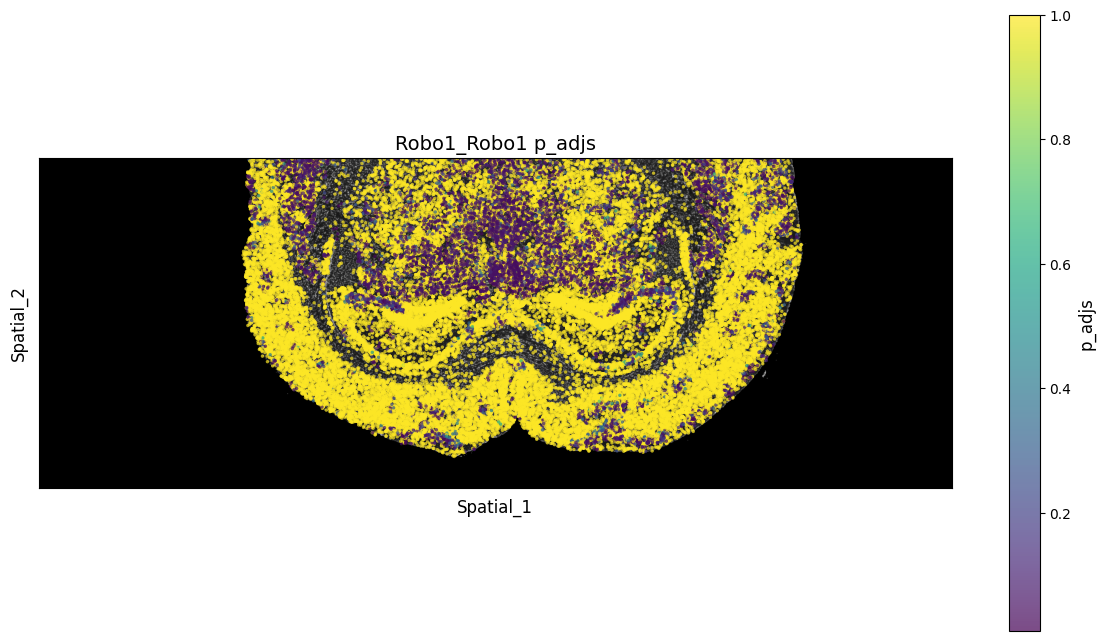
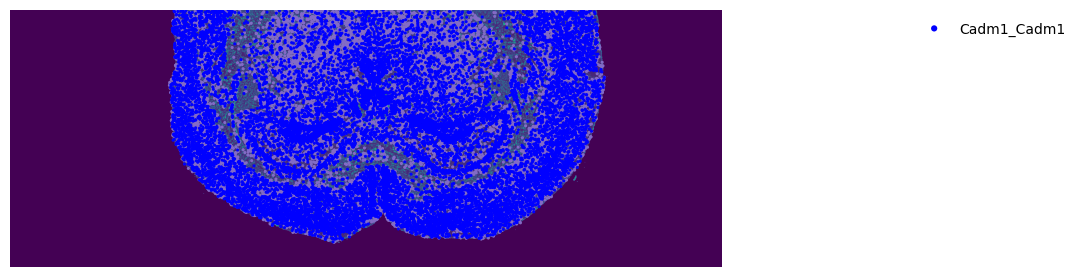
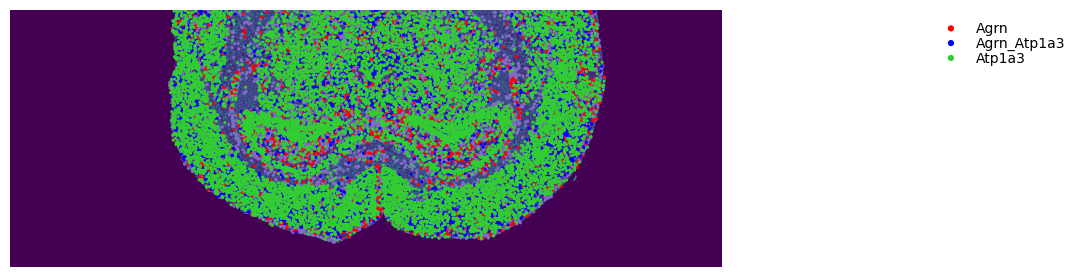
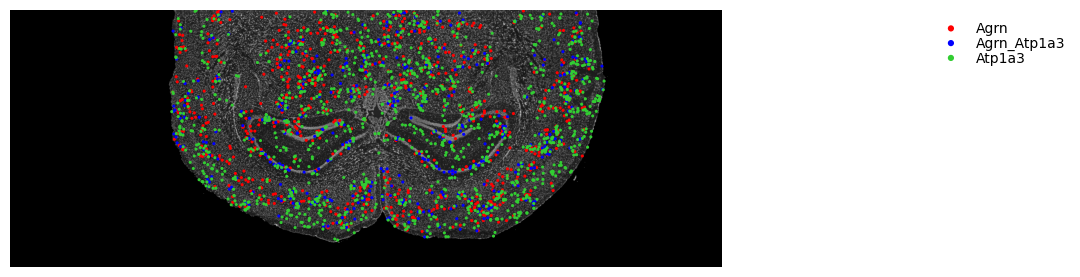
4.7 Ligand-Receptor Spatial Co-expression Plot
Figure Legend: Spatial co-expression plot of specific ligand-receptor pairs (showing panorama).
- Dot Structure: Each cell/Spot is rendered as a double-layer structure, representing the expression status of the ligand and receptor, respectively.
- Color Interpretation:
- If the dot is blue, it indicates that the cell/Spot highly expresses both the ligand and receptor simultaneously (potential autocrine or tight paracrine interaction exists).
- If the dot is only red or green, it indicates unilateral expression of either the ligand or receptor.
- Display Range: Displays the ligand-receptor expression status of all cells/Spots on the tissue slice, not limited by P-value significance filtering.
# 1. Read large-size background image
img_path = 'filtered_feature_bc_matrix/expression.png'
background_image = mpimg.imread(img_path)

for best_lr in lrs[0:3]:
    # 2. Backup the current spatial coordinates
    # Note: The object in the previous code environment is named a; if you prefer block1, replace all a below with block1
    original_spatial = a.obsm['spatial'].copy()

    # 3. Scale the cell coordinates back to the unscaled size to perfectly match the background image [0, 55050, 0, 19906] range
    a.obsm['spatial'] = original_spatial / 0.265385

    # 4. Create a unique drawing board
    fig, ax = plt.subplots(figsize=(12, 8))

    # 5. Draw the background image at the original stretched size as requested, and place it at the bottom layer (zorder=0)
    ax.imshow(background_image, extent=[0, 55050, 0, 19906], aspect='auto', zorder=0, cmap='gray')

    st.pl.lr_plot(a, best_lr, inner_size_prop=0.1, outer_mode='binary', pt_scale=5,
                  use_label=None, show_image=False,
                  sig_spots=False, bbox_to_anchor=(1.5, 1),
                  fig=fig, ax=ax)  # <- Must pass both fig and ax simultaneously to resolve the split-plot bug

    # 6. Restore the original scaled coordinates to avoid affecting subsequent analysis modules
    a.obsm['spatial'] = original_spatial

    # 7. Axis beautification and display
    ax.set_xticks([])
    ax.set_yticks([])
    ax.set_aspect("equal")
    plt.tight_layout()

    # Still display (optional)
    plt.show()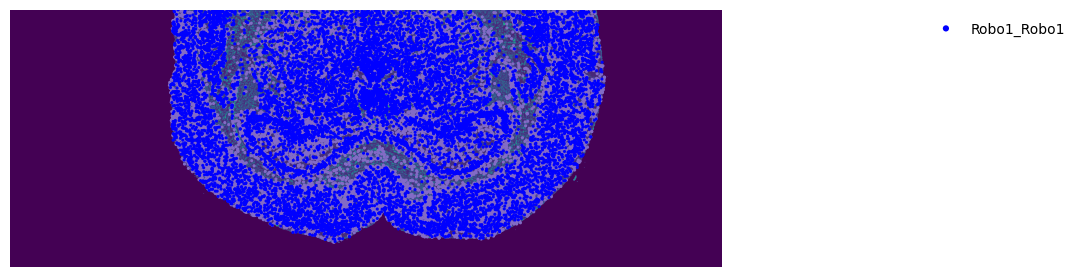
4.8 Significant Interaction Ligand-Receptor Spatial Co-expression Plot
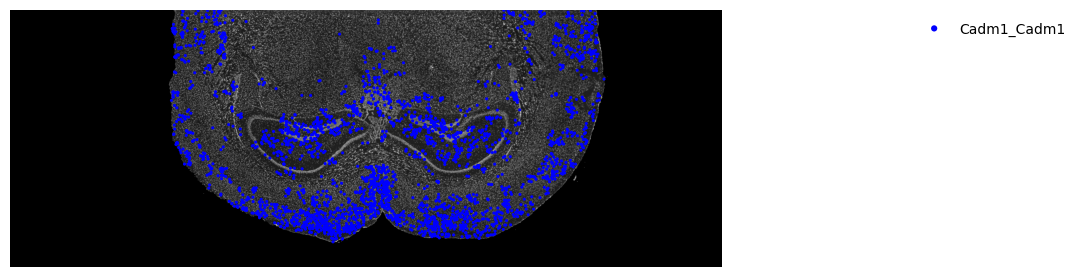
Building upon the panoramic display in the previous section, this part further applies statistical significance filtering, retaining only regions where strong and non-random interactions truly occur.
Figure Legend: Spatial co-expression plot of specific ligand-receptor pairs.
- Dot Structure: Spatial co-expression plot of specific ligand-receptor pairs (showing panorama).
- Significance Filtering: The plot only highlights and retains those interaction hotspot regions whose P-values reach statistical significance; dots in the remaining non-significant background regions will be hidden or weakened.
- Biological Significance: Color-displayed regions indicate that the ligand-receptor communication is abnormally active in the local microenvironment, serving as core hubs for tissue-specific communication.
# 1. Read large-size background image
img_path = 'filtered_feature_bc_matrix/expression.png'
background_image = mpimg.imread(img_path)

for best_lr in lrs[0:3]:
    # 2. Backup the current spatial coordinates
    # Note: The object in the previous code environment is named a; if you prefer block1, replace all a below with block1
    original_spatial = a.obsm['spatial'].copy()

    # 3. Scale the cell coordinates back to the unscaled size to perfectly match the background image [0, 55050, 0, 19906] range
    a.obsm['spatial'] = original_spatial / 0.265385

    # 4. Create a unique drawing board
    fig, ax = plt.subplots(figsize=(12, 8))

    # 5. Draw the background image at the original stretched size as requested, and place it at the bottom layer (zorder=0)
    ax.imshow(background_image, extent=[0, 55050, 0, 19906], aspect='auto', zorder=0, cmap='gray')

    st.pl.lr_plot(a, best_lr, outer_size_prop=1, outer_mode='binary', pt_scale=5,
                  use_label=None, show_image=False,
                  sig_spots=True, bbox_to_anchor=(1.5, 1),
                  fig=fig, ax=ax)

    # 6. Restore the original scaled coordinates to avoid affecting subsequent analysis modules
    a.obsm['spatial'] = original_spatial

    # 7. Axis beautification and display
    ax.set_xticks([])
    ax.set_yticks([])
    ax.set_aspect("equal")
    plt.tight_layout()

    # Still display (optional)
    plt.show()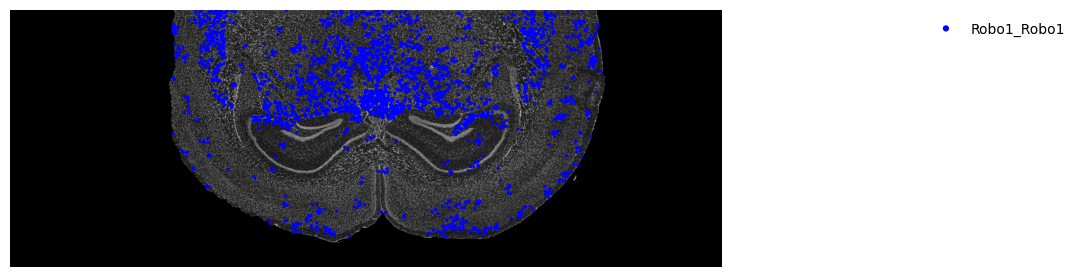
# If downsample is used, run the following code (assuming the barcode file after downsampling is generated)
barcode = pd.read_csv("downsample_filtered_feature_bc_matrix/barcodes.tsv",index_col=None,header=None,names=['barcode'])
a = a[a.obs.index.isin(barcode["barcode"])]# Predict significantly interacting cell types (the runtime of this step increases with the number of cells), the tutorial uses a downsample strategy
st.tl.cci.run_cci(a, cluster_name, # Spot cell information either in data.obs or data.uns
min_spots=3, # Minimum number of spots for LR to be tested.
sig_spots=True, # Only consider neighbourhoods of spots which had significant LR scores.
n_perms=1000, # Permutations of cell information to get background, recommend ~1000
n_cpus=16
)ounting celltype-celltype interactions per LR and permutating 1000 times.: 100%|██████████ [ time left: 00:00 ]
Significant counts of cci_rank interactions for all LR pairs in data.uns[lr_cci_celltype]
Significant counts of cci_rank interactions for each LR pair stored in dictionary data.uns[per_lr_cci_celltype]
4.9 Cell Type Diagnostics Plot
Check the correlation between ligand-receptor interactions and the number of cells of different cell types. If the number of permutations is sufficient, the following chart should show little or no correlation; otherwise, it is recommended to increase the value of n_perms (number of permutations).
Figure Legend: Cell type diagnostics plot, used to check whether ligand-receptor interactions are biased by the size of cell populations.
- Horizontal Axis (X-axis): Represents different cell types.
- Bar Chart (Left vertical axis): Represents the total number of cells for each cell type.
- Line Chart (Right vertical axis): Represents the number of significant ligand-receptors involved in interactions for that cell type.
st.pl.cci_check(a, cluster_name,show=False,figsize=(10,4),cell_label_size=10,axis_text_size=12)
plt.tight_layout()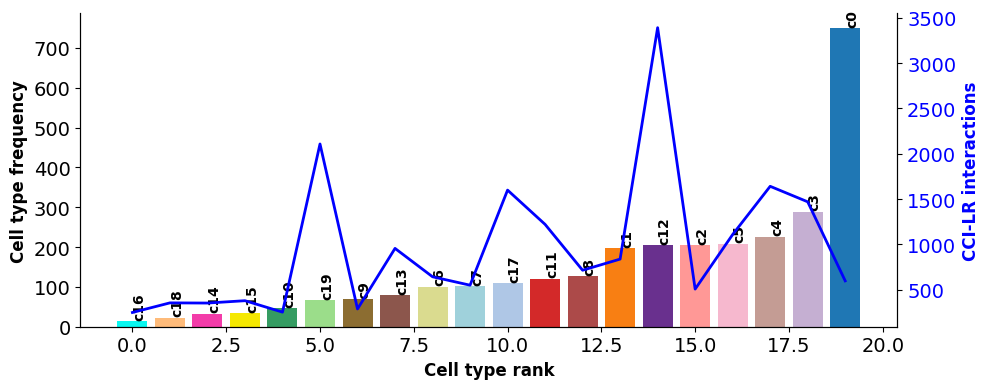
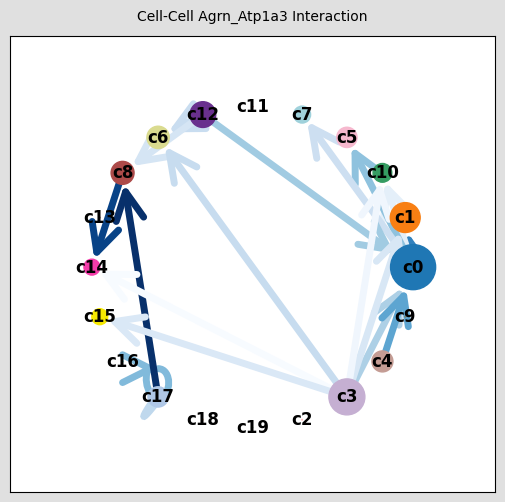
4.10 Cell Type Interaction Network Plot
Figure Legend: Spatial interaction network plot of cell types.
- Nodes (Solid circles): Each color represents a specific cell type.
- Edges (Lines): Lines connect the signal sender and receiver. Arrows pointing to themselves represent autocrine communication, while those pointing to other cells represent paracrine communication.
- Line Color Depth: The depth of the color represents the communication interaction number between these two cell types.
st.pl.ccinet_plot(a, cluster_name, return_pos=True,pad=0.3,node_size_exp=0.8)
fig = plt.gcf()
fig.suptitle("Cell-Cell LR Interaction", fontsize=10)
fig.set_size_inches(5, 5)

lr_pair = a.uns['lr_summary'].index.values[0:3]
st.pl.ccinet_plot(a, cluster_name, lr_pair[0], min_counts=2,pad=0.3,node_size_exp=0.8)
fig = plt.gcf()
fig.suptitle("Cell-Cell "+lr_pair[0]+" Interaction", fontsize=10)
fig.set_size_inches(5, 5)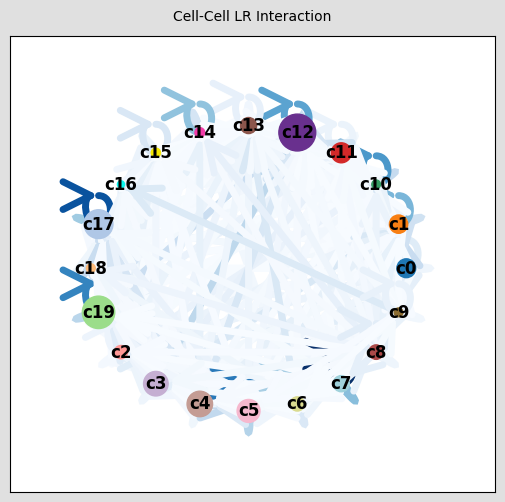
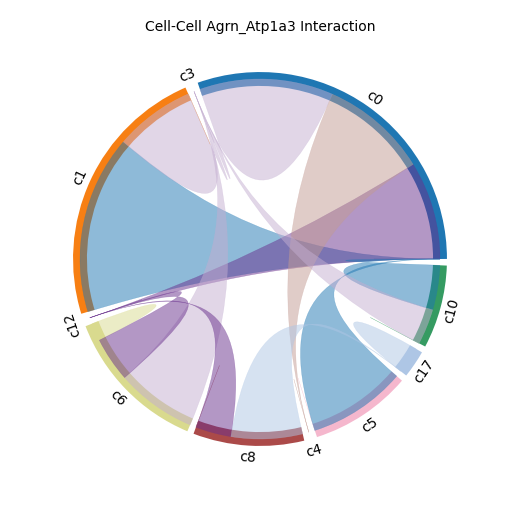
4.11 Cell Type Interaction Chord Diagram
Figure Legend: Chord diagram of cell type interactions.
- Outer ring segments: Different color blocks on the ring represent different cell types.
- Inner chords: Connect two cell types with communication interactions.
- Chord Width: The width of the chord intuitively reflects the interaction number between cells; wider chords indicate more interactions.
st.pl.lr_chord_plot(a, cluster_name,show=False)
fig = plt.gcf()
fig.suptitle("Cell-Cell LR Interaction", fontsize=10)
fig.set_size_inches(5, 5)


st.pl.lr_chord_plot(a, cluster_name,show=False,lr=lr_pair[0])
fig = plt.gcf()
fig.suptitle("Cell-Cell "+lr_pair[0]+" Interaction", fontsize=10)
fig.set_size_inches(5, 5)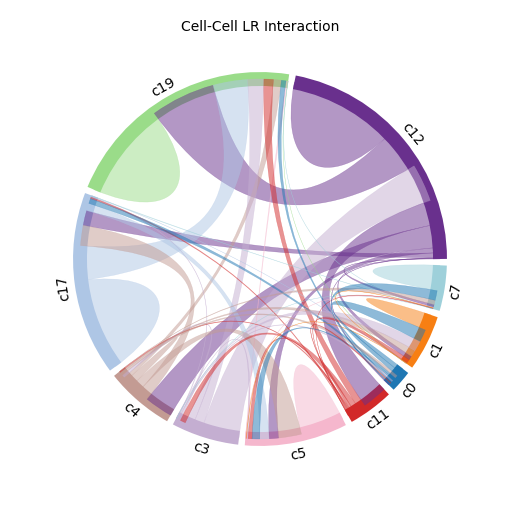
4.12 Cell Type Interaction Heatmap
Figure Legend: Heatmap of interaction number of ligand-receptor pairs between cells.
- Horizontal Axis (X-axis): Represents interacting cell type pairs (Sender -> Receiver).
- Vertical Axis (Y-axis): Represents specific ligand-receptor pairs.
- Color Depth: Redder/deeper colors indicate high interaction number, bluer/lighter colors indicate low interaction number.
st.pl.lr_cci_map(a, cluster_name, lrs=None, min_total=100, figsize=(20,4),show=False)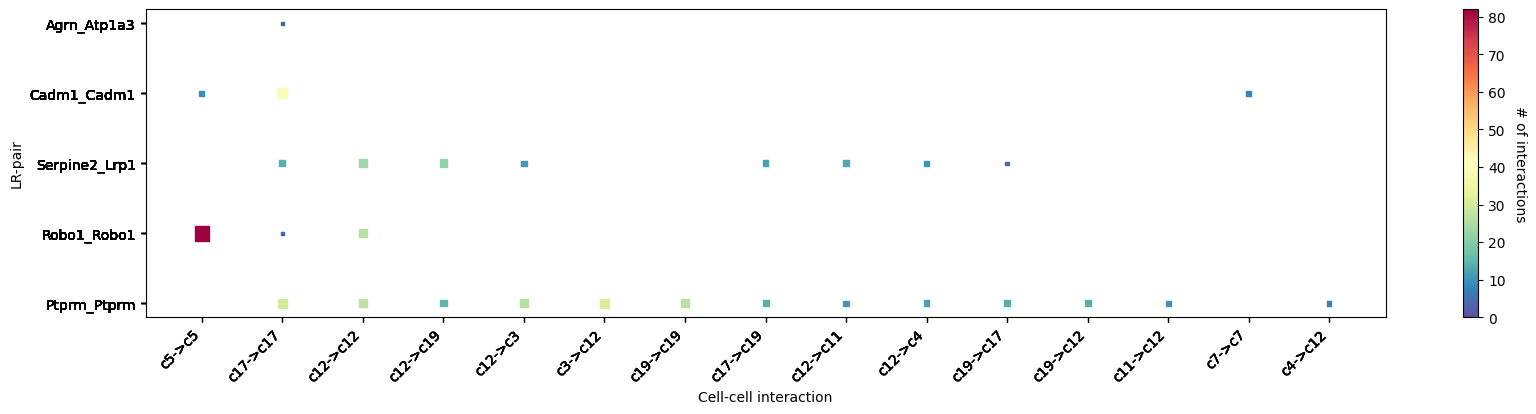
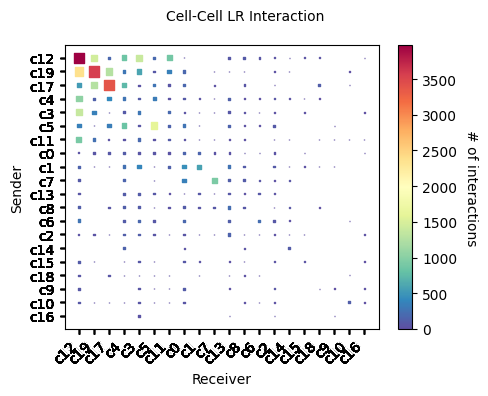
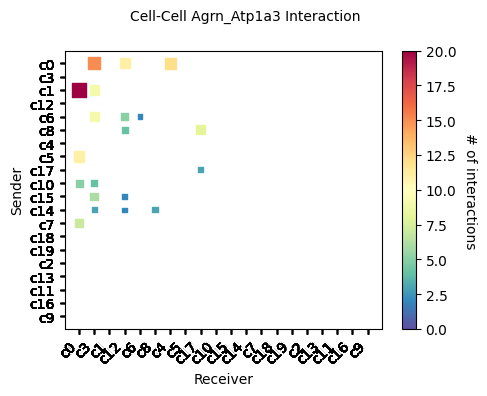
Figure Legend: Heatmap of overall interaction number among cell populations.
- Horizontal and Vertical Axes: Both represent different cell types.
- Heatmap Squares: The depth of the square's color reflects the overall communication interaction number between any two cell types.
st.pl.cci_map(a, cluster_name,show=False,figsize=(5,4))
fig = plt.gcf()
fig.suptitle("Cell-Cell LR Interaction", fontsize=10)
# fig.set_size_inches(5, 5)
plt.tight_layout()

st.pl.cci_map(a, cluster_name, lr=lr_pair[0],show=False,figsize=(5,4))
fig = plt.gcf()
fig.suptitle("Cell-Cell "+lr_pair[0]+" Interaction", fontsize=10)
# fig.set_size_inches(5, 5)
plt.tight_layout()