Single-Cell Spatial Transcriptomics: Neighborhood Enrichment Analysis (based on CellCharter)
1. Module Introduction
This module is based on the CellCharter algorithm and is designed for Neighborhood Enrichment Analysis of spatial transcriptomics data.
By constructing a spatial proximity network between cells/spots, CellCharter evaluates spatial colocalization patterns among different cell populations. It achieves the following core analysis objectives:
- Single-Sample Cell Type Colocalization: Evaluates whether the spatial proximity between two cell populations (or states) within a tissue is significantly higher than random expectation, thereby revealing mutual attraction or repulsion between cells.
- Multi-Sample Differential Neighborhood Enrichment Analysis: Compares significant changes in spatial cellular interactions across different biological conditions (e.g., healthy vs. disease, different groups).
💡 Note
The input for this pipeline is Seurat/Scanpy compatible format data. The analysis results will generate heatmaps and related tables displaying spatial cellular interactions.
Brief Algorithm Principles:
- Network Construction: Constructs a node connection network based on spatial coordinates (e.g., via Delaunay Triangulation).
- Calculate Enrichment Score (NE): Calculates the ratio of the observed number of connections (Observed) to the expected number of connections based on node degree (Expected).
- Differential Analysis: Compares the significance of NE score differences between two groups using permutation testing.
2. Input File Preparation
This module requires files containing the expression matrix, spatial coordinates, and corresponding Metadata.
File Structure Example:
filtered_feature_bc_matrix/          # Output directory for rds to matrix conversion
├── matrix.mtx.gz                    # Expression matrix
├── barcodes.tsv.gz                  # Cell barcodes
├── features.tsv.gz                  # Gene features
└── cell_locations.tsv               # Spatial coordinates file
How to export required files for CellCharter from a Seurat object:
If you already have a Seurat object (.rds), you can use the following R code snippet to export the expression matrix and spatial coordinates into the folder structure shown above:
library(Seurat)
library(dplyr)
library(tibble)
library(readr)
library(Matrix)

# 1. Set input paths
rds_path <- "your_input.rds"
meta_path <- "your_meta.txt"

# 2. Read data and integrate metadata
obj <- readRDS(rds_path)
meta <- read.delim(meta_path)
rownames(meta) <- meta$barcode
obj@meta.data <- meta

# 3. Create output directory
dir.create('filtered_feature_bc_matrix', showWarnings = FALSE)

# 4. Extract and save spatial coordinates
spatial_data <- Embeddings(obj, reduction = 'spatial')
spatial_data <- as.data.frame(spatial_data)
colnames(spatial_data) <- c('x', 'y')
spatial_data <- rownames_to_column(spatial_data, "Barcode")
write_delim(spatial_data, 'filtered_feature_bc_matrix/cell_locations.tsv', delim = '\t')

# 5. Extract and save expression matrix (MTX format)
writeMM(GetAssayData(obj, slot="counts"), file = 'filtered_feature_bc_matrix/matrix.mtx')

# 6. Save gene and barcode features
Gene <- data.frame(GeneID = rownames(obj), Gene = rownames(obj))
write.table(Gene, 'filtered_feature_bc_matrix/genes.tsv', row.names = FALSE, col.names = FALSE, sep = '\t', quote = FALSE)

barcode <- data.frame(Barcode = colnames(obj))
write.table(barcode, 'filtered_feature_bc_matrix/barcodes.tsv', row.names = FALSE, col.names = FALSE, sep = '\t', quote = FALSE)
3. Data Loading and Preprocessing
# --- Environment Preparation ---
import squidpy as sq
import cellcharter as cc
import scanpy as sc
import pandas as pd
import numpy as np
import seaborn as sns
import matplotlib.pyplot as plt
from itertools import combinations
import matplotlib.image as mpimg
import os
import mathwarnings.warn('nopython is set for njit and is ignored', RuntimeWarning)
/PROJ2/FLOAT/jinwen/apps/miniconda3/envs/cellcharter-env/lib/python3.9/site-packages/tqdm/auto.py:21: TqdmWarning: IProgress not found. Please update jupyter and ipywidgets. See https://ipywidgets.readthedocs.io/en/stable/user_install.html
from .autonotebook import tqdm as notebook_tqdm
# --- Input Parameter Configuration ---

## meta_path: Path to external metadata file
meta_path = "./rds/meta.tsv"

## col_sam: Column name representing the sample name in Metadata
col_sam = "Sample"

## sample_name: Sample names to analyze, separated by commas
sample_name = "25020230_nao_CS_expression"

## col_celltype: Column name representing cell types in Metadata
col_celltype = "RNA_snn_res.0.2"

## celltypes: List of cell types to focus on, separated by commas
celltypes = "0,1,2,3,4,5,6,7,8,9,10,11,12,13,14,15,16,17,18,19"

## col_group: Column name representing experimental groups in Metadata (for multi-sample differential analysis)
col_group = ""# --- Parameter Parsing ---
sample_name=sample_name.strip().split(",")
celltypes=celltypes.strip().split(",")# --- Data Loading and Coordinates Merging ---
adata = sc.read_10x_mtx("filtered_feature_bc_matrix/",cache=False)
## Add coordinates information
spatial_df = pd.read_csv("filtered_feature_bc_matrix/cell_locations.tsv",index_col=0,sep='\t')
spatial_df1 = spatial_df[spatial_df.index.isin(adata.obs_names)]
adata.obsm["spatial"] = spatial_df1.values
meta_df = pd.read_csv(meta_path,index_col=0,sep='\t')
meta_df = meta_df.reindex(adata.obs_names)
adata.obs = pd.concat([adata.obs, meta_df], axis=1)# --- Data Format Conversion ---
adata.obs[col_sam] = adata.obs[col_sam].astype('category')
adata.obs[col_celltype] = adata.obs[col_celltype].astype('category')3.1 Construct Spatial Neighborhood Network
Before performing neighborhood enrichment analysis, cells must be connected into a "spatial neighborhood network graph" based on physical spatial coordinates.
Three common spatial network construction strategies: This tool provides three methods to construct the cell neighborhood network. Users can choose flexibly based on data characteristics (e.g., uniform cell density):
- Delaunay Triangulation:
- Parameter setting:
delaunay=True - Principle: Connects spatial points to form a continuous triangular mesh; cells sharing a triangle edge are considered direct neighbors.
- Advantage: Highly robust to variations in cell density within the tissue, without needing to pre-guess the number of neighbors or distance thresholds.
- Parameter setting:
- k-Nearest Neighbors (k-NN):
- Parameter setting:
n_neighs=K(e.g.,n_neighs=6) - Principle: Forces each cell to find the K nearest cells in spatial distance as neighbors.
- Advantage: Regular network structure with a fixed degree for each node.
- Disadvantage: If there are sparse cell regions in the tissue, it may force connections across large empty physical spaces between unrelated cells.
- Parameter setting:
- Radius-based:
- Parameter setting:
radius=R(e.g.,radius=50) - Principle: Treats every cell within a radius R from each cell center as a neighbor.
- Advantage: Strictly based on physical distance thresholds.
- Disadvantage: If tissue cell density is highly uneven, cells in dense areas will have too many neighbors, while cells in sparse areas may have none (becoming isolated points).
- Parameter setting:
Other Key Parameters Description:
coord_type='generic': Indicates the use of generic 2D continuous coordinates (suitable for SeekSpace, Xenium, etc.), rather than fixed hexagonal/square grids like Visium.library_key=col_sam: This is a crucial parameter for multi-sample analysis. It instructs the algorithm to build networks independently within each sample (slice), strictly preventing cells from different slices from being erroneously connected as neighbors.
# --- Construct Spatial Neighborhood Network ---
# Build spatial neighbor graph based on spatial coordinates (default uses Delaunay Triangulation)
sq.gr.spatial_neighbors(adata, library_key=col_sam, coord_type='generic', delaunay=True)
4. Single-Sample Cell Type Colocalization
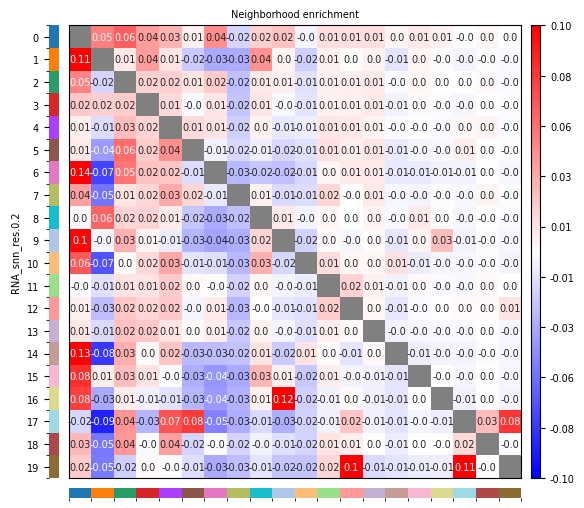
This section evaluates whether the spatial proximity between two cell populations (or states) within a single tissue slice is significantly higher or lower than expected from a random distribution.
By calculating the "Neighborhood Enrichment Score", we can quantitatively describe the spatial interaction patterns between different cell types:
- Enrichment (Attraction): Certain cell types tend to cluster spatially, suggesting active cellular communication or synergistic execution of specific microenvironmental functions.
- Depletion (Repulsion): Certain cell types deliberately maintain distance spatially, reflecting niche exclusivity or different developmental origins.
Figure Legend: The figure below displays the single-sample cell type colocalization neighborhood enrichment heatmap.
- Rows: Source cell type
; Columns: Target cell type . - Color (Positive values): Indicates that cell populations
and tend to be enriched spatially, i.e., more likely to be adjacent. - Color (Negative values): Indicates that cell populations
and tend to be depleted (repelled) spatially, i.e., more likely to be separated. - Color (Zero): Indicates that the number of connections matches random expectation.
- Interpretation: Redder/darker colors represent a stronger tendency for two cell types to colocalize/cluster spatially; bluer/cooler colors represent spatial repulsion.
# --- Data Format Conversion ---

for i in range(len(sample_name)):
    adata1 = adata[adata.obs[col_sam] == sample_name[i]]
    cc.gr.nhood_enrichment(
        adata1,
        cluster_key=col_celltype,
    )
    adata1 = adata1[adata1.obs[col_celltype].isin(celltypes)]
    adata1.obs[col_celltype] = adata1.obs[col_celltype].astype('category')
    #adata1.uns["FCN1_LGR5_2_nhood_enrichment"]["enrichment"] = adata1.uns["FCN1_LGR5_2_nhood_enrichment"]["enrichment"].drop(index="Others", columns="Others")

    adata1.uns[col_celltype+"_nhood_enrichment"]["enrichment"].columns = adata1.uns[col_celltype+"_nhood_enrichment"]["enrichment"].columns.astype(str)
    adata1.uns[col_celltype+"_nhood_enrichment"]["enrichment"].index = adata1.uns[col_celltype+"_nhood_enrichment"]["enrichment"].index.astype(str)
    adata1.uns[col_celltype+"_nhood_enrichment"]["enrichment"] = adata1.uns[col_celltype+"_nhood_enrichment"]["enrichment"].loc[celltypes,celltypes]
    cc.pl.nhood_enrichment(
        adata1,
        cluster_key=col_celltype,
        annotate=True,
        vmin=-0.1,
        vmax=0.1,
        figsize=(5,5),
        fontsize=7,
        save=sample_name[i]+"_"+col_celltype+"_enrichment_heatmap.png"
)adata.uns[f"{cluster_key}_nhood_enrichment"] = result
/tmp/ipykernel_1483/3764853794.py:10: ImplicitModificationWarning: Trying to modify attribute \`.obs\` of view, initializing view as actual.
adata1.obs[col_celltype] = adata1.obs[col_celltype].astype('category')
5. Multi-Sample Differential Neighborhood Enrichment Analysis
When the study design includes multiple biological replicates or different treatment conditions (e.g., healthy vs. disease, pre-treatment vs. post-treatment), we need to evaluate whether these specific conditions lead to significant changes in spatial cellular interaction patterns.
This section compares the neighborhood enrichment score differences between two groups of samples using a statistical Permutation Test:
- Identify Interaction Changes: Find which spatial contacts between cell populations are specifically enhanced or weakened under specific disease states or therapeutic interventions.
- Reveal Microenvironment Remodeling: The dynamic changes in these spatial interactions are often direct evidence of tissue microenvironment remodeling, providing key clues for disease mechanisms or drug response mechanisms.
Figure Legend: The figure below displays the multi-sample differential neighborhood enrichment analysis heatmap.
- Rows: Source cell type
; Columns: Target cell type . - Color (Positive values): Indicates that in the Experimental group (vs. baseline), cell populations
and tend to be enriched (closer to each other). - Color (Negative values): Indicates that in the Experimental group (vs. baseline), cell populations
and tend to be depleted (further from each other). - Color (Zero): No significant difference.
- Interpretation: Used to discover cell spatial interaction patterns that are specifically enhanced or weakened under particular disease or treatment conditions.
# --- Calculate Multi-Sample Differential Neighborhood Enrichment ---
if len(sample_name) > 1:
    cc.gr.diff_nhood_enrichment(
        adata,
        cluster_key=col_celltype,
        condition_key=col_sam,
        library_key=col_group,
        pvalues=True,
        n_jobs=15,
        n_perms=100
)# --- Plot Differential Neighborhood Enrichment Heatmap ---
if len(sample_name) > 1:
combinations_list = list(combinations(sample_name, 2))
for i in range(len(combinations_list)):
cc.pl.diff_nhood_enrichment(
adata,
cluster_key=col_celltype,
condition_key=col_group,
condition_groups=list(combinations_list[i]),
annotate=True,
figsize=(5,5),
#significance=0.05,
fontsize=5,
save=list(combinations_list[i])[0]+"vs"+list(combinations_list[i])[1]+"_"+col_celltype+"_enrichment_heatmap.png"
)6. Cell Spatial Distribution Density Analysis
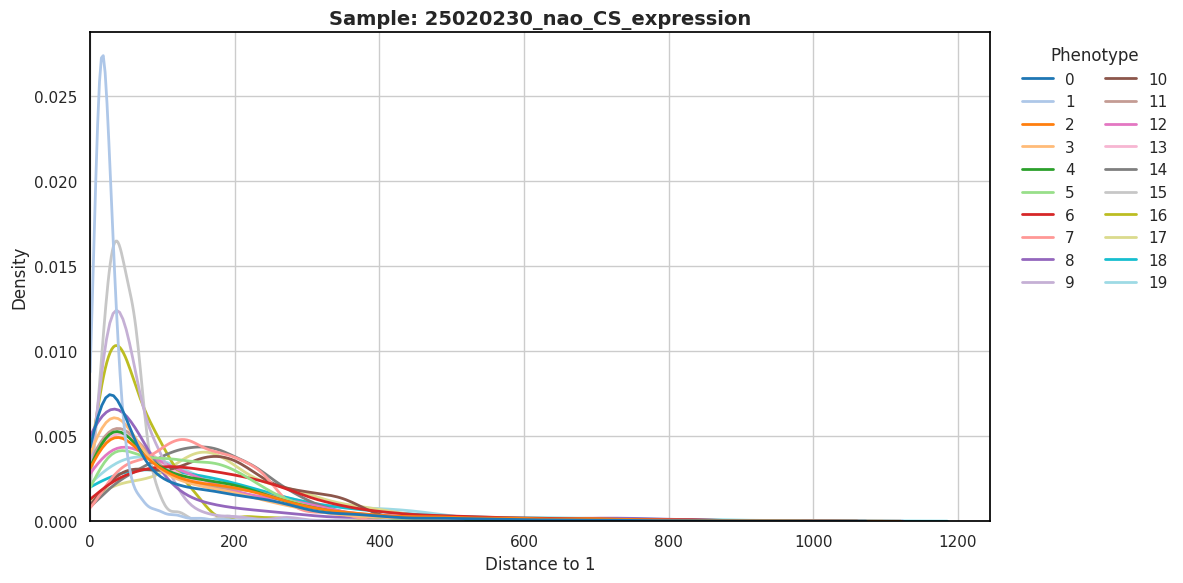
Quantify the spatial distribution density of different cell types relative to target cells based on physical distances.
Figure Legend: The figure below displays the cell type colocalization density plot.
- X-axis (Distance to Target): Represents the spatial physical distance from a certain class of cells to the Target Cell.
- Y-axis (Density): Represents the distribution density of cells across different distance intervals.
- Color Grouping (Phenotype): Different color curves represent different cell types (Phenotype).
- Interpretation: A peak further to the left (closer distance) indicates a stronger tendency for that cell type to colocalize (cluster) spatially with the target cell; a flatter curve or a peak further to the right indicates that the cell type is spatially distant from the target cell or randomly distributed.
import pandas as pd
import numpy as np
from scipy.spatial import cKDTree

def find_nearest_distance(df,
                          id_col='Cell ID',
                          pheno_col='Phenotype',
                          x_col='Cell X Position',
                          y_col='Cell Y Position'):

    results = {}
    # Get all unique phenotypes in the data
    phenotypes = df[pheno_col].dropna().unique()

    # Extract coordinates and IDs of all cells
    coords_all = df[[x_col, y_col]].values
    cell_ids_all = df[id_col].values

    for pheno in phenotypes:
        # Filter cells for specific phenotypes
        mask_p = (df[pheno_col] == pheno)
        df_p = df[mask_p].reset_index(drop=True)

        dist_col_name = f'Distance to {pheno}'
        id_col_name = f'Cell ID {pheno}'

        n_p = len(df_p)

        # Return NaN if there are no cells for this phenotype
        if n_p == 0:
            results[dist_col_name] = np.nan
            results[id_col_name] = np.nan
            continue

        coords_p = df_p[[x_col, y_col]].values
        ids_p = df_p[id_col].values

        # Build KDTree for fast spatial nearest neighbor search
        tree = cKDTree(coords_p)

        # If there is only 1 cell for this phenotype, query the closest 1; otherwise query the closest 2 (to exclude itself)
        k_query = 2 if n_p > 1 else 1
        distances, indices = tree.query(coords_all, k=k_query)

        final_dists = np.zeros(len(df))
        final_ids = np.empty(len(df), dtype=object)

        if k_query == 1:
            for i in range(len(df)):
                # If the closest cell found is itself (same ID), it means there are no "other" cells for this phenotype
                if cell_ids_all[i] == ids_p[indices[i]]:
                    final_dists[i] = np.nan
                    final_ids[i] = pd.NA
                else:
                    final_dists[i] = distances[i]
                    final_ids[i] = ids_p[indices[i]]
        else:
            for i in range(len(df)):
                # indices[i, 0] is the closest, indices[i, 1] is the second closest
                # If the closest cell is itself, take the second closest cell
                if cell_ids_all[i] == ids_p[indices[i, 0]]:
                    final_dists[i] = distances[i, 1]
                    final_ids[i] = ids_p[indices[i, 1]]
                else:
                    final_dists[i] = distances[i, 0]
                    final_ids[i] = ids_p[indices[i, 0]]

        results[dist_col_name] = final_dists
        results[id_col_name] = final_ids

    # Return as DataFrame format, aligned with original data index
return pd.DataFrame(results, index=df.index)adata.obs[["Cell X Position", "Cell Y Position"]] = adata.obsm["spatial"]
position = adata.obs[["Cell X Position","Cell Y Position",col_celltype,col_sam]]
position = position.reset_index(names='Cell ID')
position.rename(columns={col_celltype: 'Phenotype'}, inplace=True)
position[["Cell X Position","Cell Y Position"]] = position[["Cell X Position","Cell Y Position"]]*0.2653custom_40_colors = [
'#1f77b4', '#aec7e8', '#ff7f0e', '#ffbb78', '#2ca02c', '#98df8a', '#d62728', '#ff9896',
'#9467bd', '#c5b0d5', '#8c564b', '#c49c94', '#e377c2', '#f7b6d2', '#7f7f7f', '#c7c7c7',
'#bcbd22', '#dbdb8d', '#17becf', '#9edae5', '#393b79', '#5254a3', '#6b6ecf', '#9c9ede',
'#637939', '#8ca252', '#b5cf6b', '#cedb9c', '#8c6d31', '#bd9e39', '#e7ba52', '#e7cb94',
'#843c39', '#ad494a', '#d6616b', '#e7969c', '#7b4173', '#a55194', '#ce6dbd', '#de9ed6'
]
# === Layout Design: Arrange up to 3 sample density plots per row ===
max_cols = 3
num_samples = len(sample_name)
# Automatically calculate required columns and rows
ncols = max_cols if num_samples >= max_cols else num_samples
nrows = math.ceil(num_samples / ncols) if num_samples > 0 else 1
# Set overall theme
sns.set_theme(style="whitegrid", rc={"axes.edgecolor": "black"})
# Dynamically generate canvas size: width 12 per subplot (allowing ample legend space), height 6 per subplot
fig, axes = plt.subplots(nrows=nrows, ncols=ncols, figsize=(12 * ncols, 6 * nrows))
# Uniformly convert to a 1D list for convenient ax access by index in loops
if isinstance(axes, np.ndarray):
axes_list = axes.flatten()
else:
axes_list = [axes]
for i in range(num_samples):
ax = axes_list[i]
# Extract current sample data
sub_position = position.loc[position[col_sam] == sample_name[i]]
distances = find_nearest_distance(sub_position)
csd_with_distance = pd.concat([sub_position, distances], axis=1)
# Plot density map, specifying the current ax
sns.kdeplot(
data=csd_with_distance,
x='Distance to 1',
hue='Phenotype',
linewidth=2,
common_norm=False,
clip=(0, None),
palette=custom_40_colors,
ax=ax
)
ax.set_xlim(left=0)
ax.set_ylabel('Density', fontsize=12)
ax.set_title(f'Sample: {sample_name[i]}', fontsize=14, fontweight='bold')
# Use seaborn's move_legend to move the legend of each subplot to the right
if ax.get_legend() is not None:
sns.move_legend(
ax, "upper left",
bbox_to_anchor=(1.02, 1),
ncol=2,
title="Phenotype",
frameon=False
)
# If the number of subplot grids is greater than the number of samples, delete excess blank subplots
for j in range(num_samples, len(axes_list)):
fig.delaxes(axes_list[j])
# Automatically adjust subplot spacing to prevent legend overlap with adjacent plots
plt.tight_layout()
plt.show()sns.kdeplot(