
Single-Cell Spatial Transcriptomics: Cell Communication Analysis (based on COMMOT)
1. Module Introduction
This module is based on the COMMOT algorithm and is used for cell communication analysis of single-cell spatial transcriptomics data.
COMMOT (COMmunication analysis by optimal transpOrt) is a computational tool that uses optimal transport theory to infer cell-cell communication (CCC) in spatial transcriptomics data. It integrates gene expression with spatial location information to not only infer which cells are communicating but also determine the specific direction and signal flow of communication. It achieves the following core analytical objectives:
- Infer cell-cell communication networks and directions: Evaluates the interaction strength between sending and receiving cells in space through optimal transport algorithms to construct directional spatial signal flows.
- Identify local patterns of spatial signal flow: Visualizes the activity of specific ligand-receptor pairs in tissue space, including local communication strength and signal transmission paths.
💡 Note
The input for this pipeline is Scanpy-compatible format data and spatial coordinate files. The analysis will generate visualizations showing cell-cell interaction signal flow, spatial network plots, chord diagrams, and related communication strengths.
Brief Algorithm Principle: COMMOT utilizes collective optimal transport theory to infer spatial cell communication by minimizing the spatial distance between signal sending and receiving while maximizing signal capacity (based on the co-expression levels of ligands and receptors). It applies non-probability mass distribution control and strict spatial distance constraints to the transport plan, thereby preserving the biological authenticity of communication between spatially adjacent cells while avoiding crossing excessively large physical distances.
2. Input File Preparation
This module requires files containing the expression matrix and spatial coordinates, as well as the corresponding Metadata.
Example File Structure:
filtered_feature_bc_matrix/          # rds converted matrix output directory
├── matrix.mtx.gz                    # expression matrix
├── barcodes.tsv.gz                  # cell barcodes
├── features.tsv.gz                  # gene features
└── cell_locations.tsv               # spatial coordinate file
How to export required COMMOT files from a Seurat object:
If you already have a Seurat object (.rds), you can use the following R code snippet to export the expression matrix and spatial coordinates into the folder structure shown above:
library(Seurat)
library(dplyr)
library(tibble)
library(readr)
library(Matrix)

# 1. Set input path
rds_path <- "your_input.rds"
meta_path <- "your_meta.txt"

# 2. Read data and integrate metadata
obj <- readRDS(rds_path)
meta <- read.delim(meta_path)
rownames(meta) <- meta$barcode
obj@meta.data <- meta

# 3. Create output directory
dir.create('filtered_feature_bc_matrix', showWarnings = FALSE)

# 4. Extract spatial coordinates and save
spatial_data <- Embeddings(obj, reduction = 'spatial')
spatial_data <- as.data.frame(spatial_data)
colnames(spatial_data) <- c('x', 'y')
spatial_data <- rownames_to_column(spatial_data, "Barcode")
write_delim(spatial_data, 'filtered_feature_bc_matrix/cell_locations.tsv', delim = '\t')

# 5. Extract expression matrix and save (MTX format)
writeMM(GetAssayData(obj, slot="counts"), file = 'filtered_feature_bc_matrix/matrix.mtx')

# 6. Save gene and barcode features
Gene <- data.frame(GeneID = rownames(obj), Gene = rownames(obj))
write.table(Gene, 'filtered_feature_bc_matrix/genes.tsv', row.names = FALSE, col.names = FALSE, sep = '\t', quote = FALSE)

barcode <- data.frame(Barcode = colnames(obj))
write.table(barcode, 'filtered_feature_bc_matrix/barcodes.tsv', row.names = FALSE, col.names = FALSE, sep = '\t', quote = FALSE)

# Get the complete Base64 string, where info[["25020230_nao_CS_expression"]] can be viewed via names(obj@misc$info)
b64_string <- obj@misc$info[["25020230_nao_CS_expression"]]$img

# Remove the "data:;base64," prefix from the string
b64_clean <- sub("^data:.*base64,", "", b64_string)

# Decode it to binary data and save as a PNG file
bin_data <- jsonlite::base64_dec(b64_clean)

# Save the file to the current working directory
writeBin(bin_data, paste0("filtered_feature_bc_matrix/expression.png"))
3. Data Loading and Preprocessing
%%capture
import os
import gc
import ot
import pickle
import anndata
import scanpy as sc
import pandas as pd
import numpy as np
from scipy import sparse
from scipy.stats import spearmanr, pearsonr
from scipy.spatial import distance_matrix
import matplotlib.pyplot as plt
from matplotlib import cm
from matplotlib.colors import Normalize
import matplotlib.image as mpimg
from pycirclize import Circos

import commot as ct
import stlearn as st
from PIL import Image
import plotly
import sys
import logging
import re
import warnings
import matplotlib as mpl
from matplotlib.lines import Line2D
import networkx as nx
from networkx.drawing.nx_agraph import to_agraphTo enable them in other operations, rebuild TensorFlow with the appropriate compiler flags.
2026-05-27 16:50:38.912575: W tensorflow/compiler/xla/stream_executor/platform/default/dso_loader.cc:64] Could not load dynamic library 'libcudart.so.11.0'; dlerror: libcudart.so.11.0: cannot open shared object file: No such file or directory
2026-05-27 16:50:38.912597: I tensorflow/compiler/xla/stream_executor/cuda/cudart_stub.cc:29] Ignore above cudart dlerror if you do not have a GPU set up on your machine.
2026-05-27 16:50:44.974897: W tensorflow/compiler/xla/stream_executor/platform/default/dso_loader.cc:64] Could not load dynamic library 'libnvinfer.so.7'; dlerror: libnvinfer.so.7: cannot open shared object file: No such file or directory
2026-05-27 16:50:44.974968: W tensorflow/compiler/xla/stream_executor/platform/default/dso_loader.cc:64] Could not load dynamic library 'libnvinfer_plugin.so.7'; dlerror: libnvinfer_plugin.so.7: cannot open shared object file: No such file or directory
2026-05-27 16:50:44.974974: W tensorflow/compiler/tf2tensorrt/utils/py_utils.cc:38] TF-TRT Warning: Cannot dlopen some TensorRT libraries. If you would like to use Nvidia GPU with TensorRT, please make sure the missing libraries mentioned above are installed properly.
# --- Input parameter configuration ---
## sample_name: Specify the sample name or output prefix
sample_name = "25020230_nao_CS_expression"
## meta_path: Annotated cell type file path (must have barcode as row names)
meta_path = "./rds/meta.tsv"
## species: Species selection, either "human" or "mouse"
species = "mouse"
# lr_database: Built-in ligand-receptor database name to use (e.g., "CellChat" or "CellPhoneDB_v4.0")
## lr_database: Selected ligand-receptor database for filtering analysis (e.g., 'CellChat')
lr_database = "CellChat"
# signaling_type: Analyzed signaling type (e.g., "Secreted Signaling")
## signaling_type: Specify signaling type, such as 'Secreted Signaling', 'ECM-Receptor', 'Cell-Cell Contact'
signaling_type = "Secreted Signaling"
# celltypes: Specify specific cell type clusters to analyze
celltypes = "0,1,2,3,4,5,6,7,8,9,10,11,12,13,14,15,16,17,18,19"
# col_sam: Specify the sample column name in metadata
col_sam = "Sample"
# col_celltype: Specify the cell type column name in metadata
col_celltype = "RNA_snn_res.0.2"%%capture
def get_cmap_qualitative(cmap_name):
if cmap_name == "Plotly":
cmap = plotly.colors.qualitative.Plotly
elif cmap_name == "Alphabet":
cmap = plotly.colors.qualitative.Alphabet
elif cmap_name == "Light24":
cmap = plotly.colors.qualitative.Light24
elif cmap_name == "Dark24":
cmap = plotly.colors.qualitative.Dark24
# Safe and Vivid are strings of form "rbg(...)"
# Handle this later.
elif cmap_name == "Safe":
cmap = plotly.colors.qualitative.Safe
elif cmap_name == "Vivid":
cmap = plotly.colors.qualitative.Vivid
return cmap
def plot_cluster_signaling_chord(S, p_values, filename=None, label_name=None, colormap='Plotly', quantile_cutoff=None, p_value_cutoff=None, cutoff=0, separate=False, diagonal_off=False, figsize=(5, 5)):
    # 1. Get COMMOT color list
    try:
        cmap_list = ct.pl.get_cmap_qualitative(colormap)
    except AttributeError:
        if hasattr(ct.pl, '_plotting'):
            cmap_list = ct.pl._plotting.get_cmap_qualitative(colormap)
        else:
            cmap_list = ct._utils.get_cmap_qualitative(colormap)

    if label_name is None:
        label_name = [str(i) for i in range(S.shape[0])]

    # 2. Filter the connection matrix
    filtered_S = S.copy()
    if quantile_cutoff is not None:
        cutoff = np.quantile(S.values.reshape(-1), quantile_cutoff)

    for i in range(S.shape[0]):
        for j in range(S.shape[1]):
            if diagonal_off and i == j:
                filtered_S.iloc[i, j] = 0
                continue
            if not (S.iloc[i, j] >= cutoff or p_values.iloc[i, j] <= p_value_cutoff):
                filtered_S.iloc[i, j] = 0

    # 3. Prepare the names of sender and receiver
    if separate:
        row_names = ['S_' + str(lbl) for lbl in label_name]
        col_names = ['T_' + str(lbl) for lbl in label_name]
    else:
        row_names = [str(lbl) for lbl in label_name]
        col_names = [str(lbl) for lbl in label_name]

    filtered_S.index = row_names
    filtered_S.columns = col_names

    # 4. Generate matching node color dictionary
    color_dict = {}
    for i, lbl in enumerate(label_name):
        color = cmap_list[i % len(cmap_list)]
        if separate:
            color_dict['S_' + str(lbl)] = color
            color_dict['T_' + str(lbl)] = color
        else:
            color_dict[str(lbl)] = color

    # 5. Draw chord diagram using pycirclize
    circos = Circos.initialize_from_matrix(
        filtered_S,
        space=2,
        cmap=color_dict,
        # Slightly reduce label font size to prevent text overlapping
        label_kws=dict(size=8, orientation="horizontal"),
        link_kws=dict(direction=1, ec="black", lw=0.5, alpha=0.6)
    )

    # 6. Render the plot directly in Jupyter
    # Modification: Pass figsize parameter here to control overall image size (width, height)
    fig = circos.plotfig(figsize=figsize)

    # 7. If filename is provided, also save locally
    if filename:
        fig.savefig(filename, dpi=300, bbox_inches='tight')
        if filename.endswith(".pdf"):
            filename_png = filename[:-4] + ".png"
            fig.savefig(filename_png, dpi=300, bbox_inches='tight')

    # Remove return fig, only explicitly display once using plt.show()
plt.show()def plot_cluster_communication_network_native(
adata,
uns_names: list = None,
clustering: str = None,
quantile_cutoff: float = 0.99,
p_value_cutoff: float = 0.05,
self_communication_off: bool = False,
filename: str = "total-total_cluster.png",
nx_node_size: float = 0.2,
nx_node_cmap: str = "Light24",
nx_node_cluster_cmap: dict = None,
nx_pos_idx: np.ndarray = np.array([0,1],int),
nx_node_pos: str = "cluster",
nx_edge_width_lb_quantile: float = 0.05,
nx_edge_width_ub_quantile: float = 0.95,
nx_edge_width_min: float = 1,
nx_edge_width_max: float = 4,
nx_edge_color = "node",
nx_edge_colormap = plt.cm.Greys,
nx_bg_pos: bool = True,
nx_bg_color: str = "lavender",
nx_bg_ndsize: float = 0.05,
figsize=(20, 10)
):
"""
Plotting function reconstructed based on native network plot generation logic:
It no longer calls native plotting functions, but directly builds a Graphviz AGraph from data, generating a high-definition large image with a Legend directly attached.
"""
# --- 1. Extract communication matrix ---
X_tmp = adata.uns[uns_names[0]]['communication_matrix'].copy()
labels = list( X_tmp.columns.values )
X = np.zeros_like(X_tmp.values, float)
for i in range(len(uns_names)):
X_tmp = adata.uns[uns_names[i]]['communication_matrix'].values.copy()
p_values_tmp = adata.uns[uns_names[i]]['communication_pvalue'].values.copy()
if not quantile_cutoff is None:
cutoff = np.quantile(X_tmp.reshape(-1), quantile_cutoff)
else:
cutoff = np.inf
tmp_mask = ( X_tmp < cutoff ) * ( p_values_tmp > p_value_cutoff )
X_tmp[tmp_mask] = 0
X = X + X_tmp
X = X / len(uns_names)
if self_communication_off:
for i in range(X.shape[0]):
X[i,i] = 0
# --- 2. Calculate node positions ---
if nx_node_pos == "cluster":
node_pos = [adata.uns["cluster_pos-"+clustering][labels[i]] for i in range(len(labels)) ]
node_pos = np.array(node_pos)
node_pos = node_pos[:, nx_pos_idx]
lx = np.max(node_pos[:,0])-np.min(node_pos[:,0])
ly = np.max(node_pos[:,1])-np.min(node_pos[:,1])
pos_scale = max(lx, ly)
node_pos = node_pos / pos_scale * 8.0
else:
node_pos = None
if nx_bg_pos:
background_pos = adata.obsm["spatial"][:,nx_pos_idx]
background_pos = background_pos / pos_scale * 8.0
else:
background_pos = None
# --- 3. Construct NetworkX graph ---
try:
node_cmap = ct.pl.get_cmap_qualitative(nx_node_cmap)
except:
node_cmap = ct._utils.get_cmap_qualitative(nx_node_cmap)
G = nx.MultiDiGraph()
edge_width_lb = np.quantile(X.reshape(-1), nx_edge_width_lb_quantile)
edge_width_ub = np.quantile(X.reshape(-1), nx_edge_width_ub_quantile)
if not background_pos is None:
for i in range(background_pos.shape[0]):
G.add_node("cell_"+str(i), shape='point', color=nx_bg_color, fillcolor=nx_bg_color, width=nx_bg_ndsize)
G.nodes["cell_"+str(i)]["pos"] = "%f,%f!" %(background_pos[i,0],background_pos[i,1])
for i in range(len(labels)):
if nx_node_cluster_cmap is None:
G.add_node(labels[i], shape="point", fillcolor=node_cmap[i], color=node_cmap[i])
else:
G.add_node(labels[i], shape="point", fillcolor=nx_node_cluster_cmap[labels[i]], color=node_cmap[i])
if not node_pos is None:
G.nodes[labels[i]]["pos"] = "%f,%f!" % (node_pos[i,0],node_pos[i,1])
G.nodes[labels[i]]["width"] = str(nx_node_size)
def linear_clamp_value(x, lower_bound, upper_bound, out_min, out_max):
if x <= lower_bound:
y = out_min
elif x >= upper_bound:
y = out_max
else:
y = out_min + (x - lower_bound)/(upper_bound-lower_bound) * (out_max-out_min)
return y
for i in range(X.shape[0]):
for j in range(X.shape[1]):
if X[i,j] > 0:
G.add_edge(labels[i], labels[j], splines="curved")
G[labels[i]][labels[j]][0]["penwidth"] = str(linear_clamp_value(X[i,j],edge_width_lb,edge_width_ub,nx_edge_width_min,nx_edge_width_max))
if nx_edge_color == "node":
G[labels[i]][labels[j]][0]['color'] = node_cmap[i]
elif isinstance(nx_edge_color, np.ndarray):
G[labels[i]][labels[j]][0]['color'] = mpl.colors.to_hex( nx_edge_colormap(nx_edge_color[i,j]) )
else:
G[labels[i]][labels[j]][0]['color'] = nx_edge_color
# --- 4. Generate temporary network plot image ---
A = to_agraph(G)
if node_pos is None:
A.layout("dot")
else:
A.layout()
tmp_network_file = "_tmp_network.png"
A.draw(tmp_network_file, format="png")
# --- 5. Assemble native Matplotlib drawing board ---
img_network = mpimg.imread(tmp_network_file)
# Auto crop white margins
if img_network.shape[-1] == 4:
mask = img_network[:, :, 3] > 0
else:
mask = img_network.min(axis=2) < 1.0
if mask.any():
rows = mask.any(axis=1)
cols = mask.any(axis=0)
rmin, rmax = np.where(rows)[0][[0, -1]]
cmin, cmax = np.where(cols)[0][[0, -1]]
pad = 10
img_network = img_network[max(0, rmin-pad):min(img_network.shape[0], rmax+pad),
max(0, cmin-pad):min(img_network.shape[1], cmax+pad)]
fig, axes = plt.subplots(1, 2, figsize=figsize, gridspec_kw={'width_ratios': [3, 1]})
axes[0].imshow(img_network, aspect='equal')
axes[0].axis('off')
axes[0].set_title('Cluster Communication Network', fontsize=24, pad=10)
# --- 6. Draw native Legend ---
legend_elements = []
for i in range(len(labels)):
color = nx_node_cluster_cmap[labels[i]] if nx_node_cluster_cmap else node_cmap[i]
legend_elements.append(Line2D([0], [0], marker='o', color='w', markerfacecolor=color, label=labels[i], markersize=15))
axes[1].axis('off')
# Removed dynamic ncol=... judgment, forced to 1
axes[1].legend(handles=legend_elements, loc='center left', ncol=1, title='Cell Types', title_fontsize=20, fontsize=14, frameon=False)
plt.tight_layout()
plt.savefig(filename, dpi=300, bbox_inches='tight', facecolor='white')
plt.show()
os.remove(tmp_network_file)# Read SeekSpace data and perform normalization, dimensionality reduction, and clustering
warnings.filterwarnings('ignore')
warnings.simplefilter('ignore')
adata = sc.read_10x_mtx("../filtered_feature_bc_matrix/")
spatial = pd.read_csv('../filtered_feature_bc_matrix/cell_locations.tsv',sep="\t",index_col=0)
spatial = spatial.loc[:,("x","y")]
selected_rows = spatial.loc[spatial.index.isin(adata.obs_names)]
selected_rows.columns = ["imagecol","imagerow"]
selected_rows = selected_rows.reindex(adata.obs_names)
selected_rows = selected_rows*0.265385
a = st.create_stlearn(count=adata.to_df(),spatial=selected_rows,library_id=sample_name, scale=1)
a.raw = a
#a.layers["raw_count"] = a.X
# Preprocessing
#st.pp.filter_genes(a,min_cells=3)
st.pp.normalize_total(a)
st.pp.log1p(a)
a_dis500 = a.copy()
# Keep raw data
#a.raw = a
st.pp.scale(a)
st.em.run_pca(a,n_comps=50,random_state=0)
st.pp.neighbors(a,n_neighbors=25,use_rep='X_pca',random_state=0)
st.tl.clustering.louvain(a,random_state=0)
sc.tl.umap(a)Log transformation step is finished in adata.X
Scale step is finished in adata.X
PCA is done! Generated in adata.obsm['X_pca'], adata.uns['pca'] and adata.varm['PCs']
Created k-Nearest-Neighbor graph in adata.uns['neighbors']
Applying Louvain cluster ...n Louvain cluster is done! The labels are stored in adata.obs['louvain']
# Add the annotated cell types to the adata object.
cluster_name = "celltype"
celltypes=celltypes.strip().split(",")
celltype = pd.read_csv(meta_path,index_col=0,sep = "\t")
celltype.index = [re.sub(r'_9$', '', s) for s in celltype.index]
celltype=celltype[celltype[col_sam]==sample_name]
celltype = celltype.loc[a.obs.index]
a.obs[cluster_name] = celltype[col_celltype]
a.obs[cluster_name] = a.obs[cluster_name].astype(str)
a = a[a.obs[cluster_name].isin(celltypes),:]
a.obs[cluster_name] = a.obs[cluster_name].astype('category')
a_dis500 = a_dis500[a.obs.index,:]# Select the required ligand-receptor database and filter based on ligand-receptor expression
df_ligrec = ct.pp.ligand_receptor_database(species=species, signaling_type=signaling_type, database=lr_database)
df_ligrec_filtered = ct.pp.filter_lr_database(df_ligrec, a_dis500, min_cell_pct=0.05)df_ligrec_filtered = df_ligrec_filtered[:5]# Perform cell communication inference on filtered ligand-receptors, distance range 500um. (This step takes longer)
ct.tl.spatial_communication(a_dis500,
database_name=lr_database, df_ligrec=df_ligrec_filtered, dis_thr=500, heteromeric=True, pathway_sum=True)4. Cell Communication Calculation Results
4.1 Spatial Distribution of Sent and Received Signals for Ligand-Receptor Pairs
Figure Legend: Spatial distribution plot of ligand-receptor signal sending and receiving.
- Dots in the plot (cell): Represent specific locations on the spatial transcriptomics slice.
- Left/Right plot: Represent the signal strength of cells as senders (Sender) or receivers (Receiver), respectively; deeper colors (warmer colors) indicate stronger signal sending or receiving at that local position.
pts = a_dis500.obsm['spatial']
sender = a_dis500.obsm['commot-' + lr_database + '-sum-sender'][a_dis500.obsm['commot-' + lr_database + '-sum-sender'].columns[1]]
receiver = a_dis500.obsm['commot-' + lr_database + '-sum-receiver'][a_dis500.obsm['commot-' + lr_database + '-sum-receiver'].columns[1]]
fig, ax = plt.subplots(1,2, figsize=(20,8))
ax[0].scatter(pts[:,0], pts[:,1], c=sender, s=5, cmap='Blues')
ax[0].set_title(a_dis500.obsm['commot-' + lr_database + '-sum-sender'].columns[1]+'_Sender')
norm_sender = Normalize(vmin=min(sender), vmax=max(sender))
plt.colorbar(cm.ScalarMappable(norm=norm_sender, cmap='Blues'), ax=ax[0])
ax[0].set_aspect("equal")

ax[1].scatter(pts[:,0], pts[:,1], c=receiver, s=5, cmap='Reds')
ax[1].set_title(a_dis500.obsm['commot-' + lr_database + '-sum-receiver'].columns[1]+'_Receiver')
norm_receiver = Normalize(vmin=min(receiver), vmax=max(receiver))
plt.colorbar(cm.ScalarMappable(norm=norm_receiver, cmap='Reds'), ax=ax[1])
ax[1].set_aspect("equal")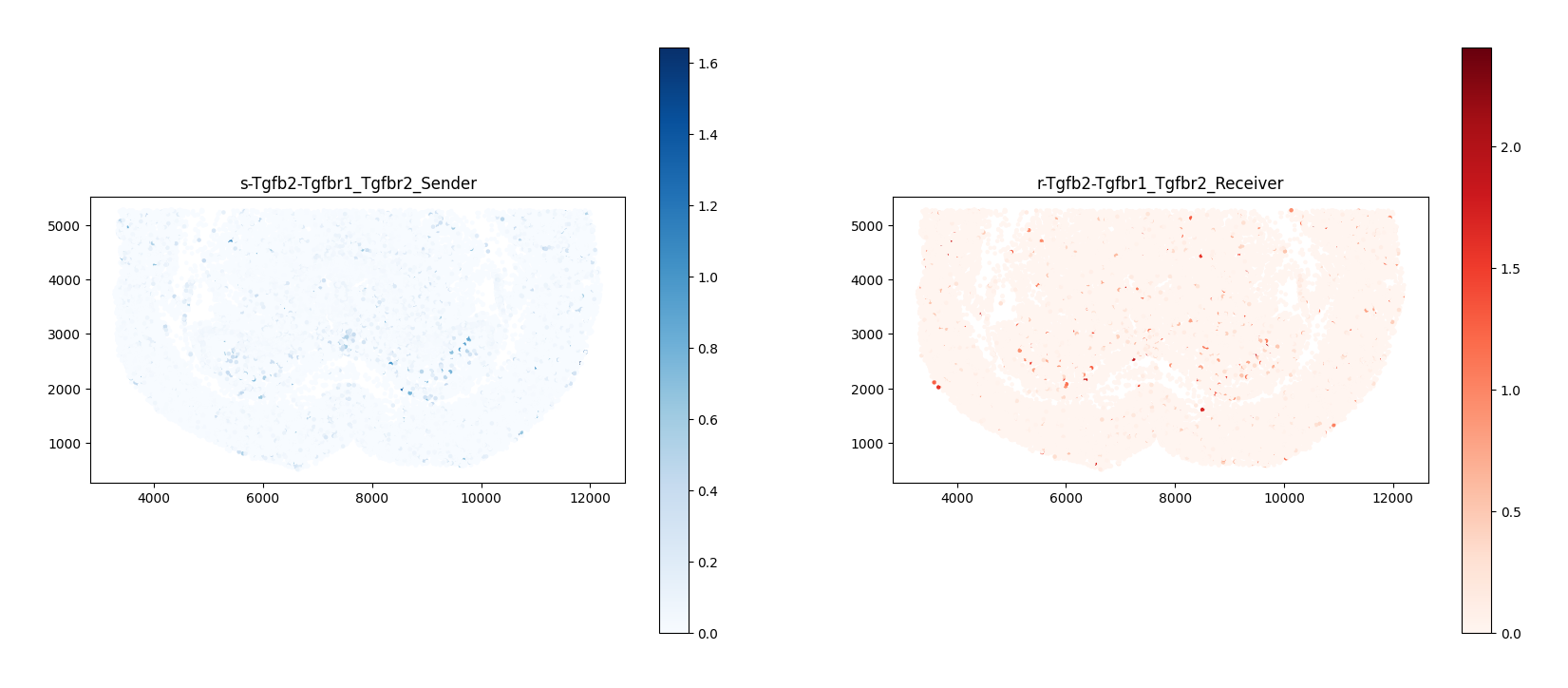
4.2 Visualization of Cell Communication Signal Flow
COMMOT considers cell communication to be locally transitive: a cell interacts with a neighboring cell, which in turn interacts with the next neighboring cell, and so on, forming a "Signal Flow". The following figure uses a vector field to show the local signal transmission direction of the pathway.
ct.tl.communication_direction(a_dis500, database_name=lr_database, k=5)Figure Legend: Vector field of cell communication signal flow.
- Basemap/Background color: Usually represents the tissue spatial background, cell density, or the heatmap distribution of local communication scores for that specific ligand-receptor pair.
- Arrows (Quiver/Streamlines): Represent the local directionality and strength of communication between cells.
- Flow direction: The direction of the arrows indicates the spatial diffusion and transmission path of the signaling factor (ligand) from a high-expression signal source to the target receiving area.
- Size/Thickness: The length of the arrows represents the relative strength of the signal flow in that direction.
import matplotlib.pyplot as plt
import matplotlib.image as mpimg

# 1. Read DAPI background image
background_image = mpimg.imread('../filtered_feature_bc_matrix/expression.png')

# 2. Temporarily divide cell coordinates by 0.265385 to match background image size
# a_dis500.obsm["spatial"] stores the spot coordinates
a_dis500.obsm["spatial"] = a_dis500.obsm["spatial"] / 0.265385

# 3. Let COMMOT generate canvas with signal flow (using scaled coordinates)
ax = ct.pl.plot_cell_communication(
    a_dis500,
    database_name=lr_database,
    lr_pair=('total','total'),
    plot_method='stream',
    background_legend=True,
    scale=0.00003,
    ndsize=4,
    grid_density=0.4,
    summary='sender',
    background='summary',
    clustering=cluster_name,
    cmap='Reds',
    normalize_v=True,
    normalize_v_quantile=0.995
)

# 4. "Stuff" DAPI background to the bottom (zorder=0 ensures it's at the very bottom)
ax.imshow(background_image, extent=[0, 55050, 0, 19906], aspect='auto', zorder=0, cmap='gray')
ax.grid(False)

# 5. Adjust canvas size and display
fig = ax.get_figure()
fig.set_size_inches(15, 7)
ax.set_aspect('equal', adjustable='box')

plt.show()

# 6. (Optional) If subsequent code needs the previously scaled coordinates, multiply back here to restore
# a_dis500.obsm["spatial"] = a_dis500.obsm["spatial"] * 0.265385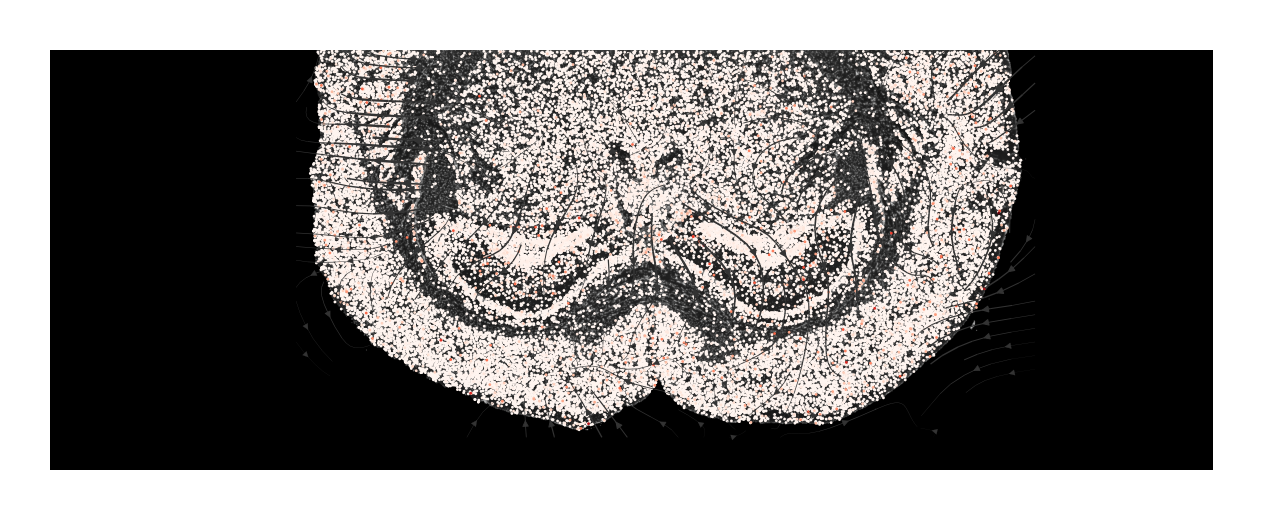
# Calculate communication interaction strength between different cell types
a_dis500.obs[cluster_name] = a.obs[cluster_name]
#pathway = df_ligrec_filtered.loc[df_ligrec_filtered.iloc[:, 2].isin(["PSAP"])]
for i,j in enumerate(df_ligrec_filtered.values):
    ct.tl.cluster_communication(a_dis500, database_name=lr_database, clustering=cluster_name,n_permutations=100,lr_pair=(j[0],j[1]))

ct.tl.cluster_communication(a_dis500, database_name=lr_database, clustering=cluster_name,n_permutations=100)
4.3 Cell Type Interaction Network Plot
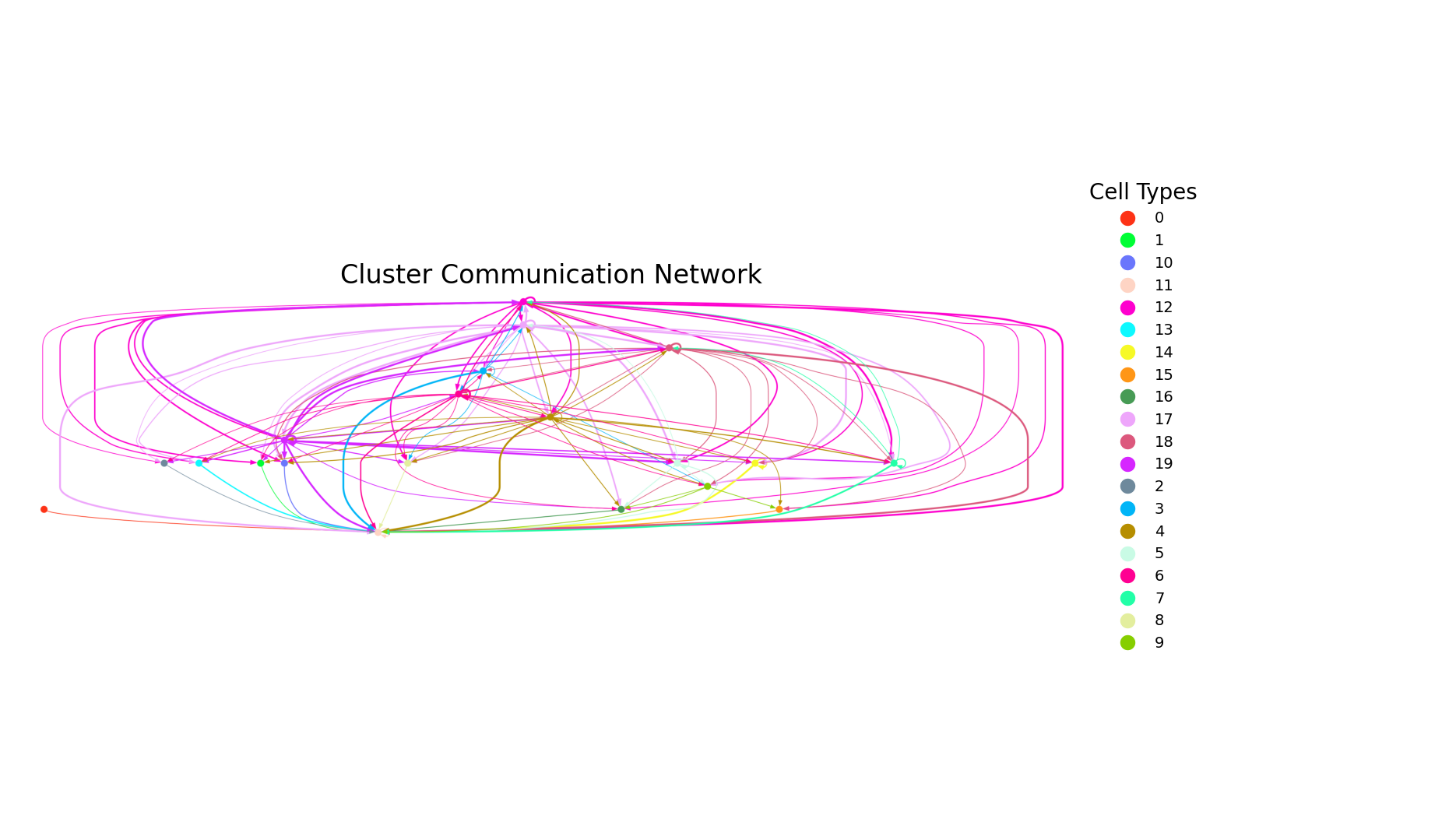
Figure Legend: Spatial communication network plot between cell types.
- Nodes (Solid circles): Circles of each color represent a specific cell type.
- Edges (Lines): Lines connect the signal sender and receiver. Arrows pointing to other cells represent paracrine communication, while those pointing back to themselves represent autocrine communication.
# --- 7. Call the new function directly ---
uns_names = ['commot_cluster'+'-'+cluster_name+'-'+lr_database+'-total-total']
plot_cluster_communication_network_native(
    adata=a_dis500,
    uns_names=uns_names,
    clustering='cell_type',
    nx_node_pos=None,
    nx_bg_pos=False,
    p_value_cutoff=5e-2,
    filename='total-total_cluster.png',
    nx_node_cmap='Light24',
    figsize=(18, 10)
)
4.4 Cell Type Interaction Chord Diagram
Figure Legend: Chord diagram of cell type communication interactions.
- Outer ring segments: Different color blocks on the ring represent different cell type groups.
- Inner chords: Connect signal senders and receivers with significant communication interactions. The wider end near the color block is usually the signal receiver.
- Chord width: The width of the chord intuitively reflects the interaction strength between cell groups; wider chords indicate stronger interactions.
# Call function to draw plot
plot_cluster_signaling_chord(S = a_dis500.uns["commot_cluster-"+cluster_name+"-"+lr_database+"-total-total"]['communication_matrix'],
                             p_values = a_dis500.uns["commot_cluster-"+cluster_name+"-"+lr_database+"-total-total"]['communication_matrix'],
                             p_value_cutoff=0.05,
                             #filename="./total_chord_plot.pdf",
                             label_name=a_dis500.uns["commot_cluster-"+cluster_name+"-"+lr_database+"-total-total"]['communication_matrix'].index)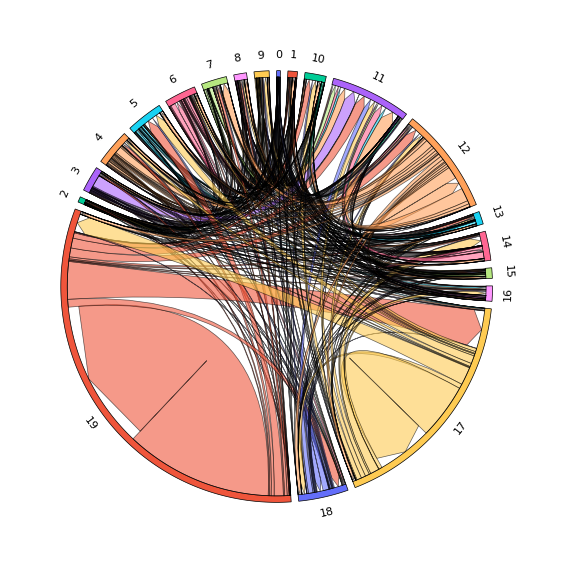
a.write("adata.h5ad")
a_dis500.write("adata_dis500.h5ad")