
单细胞空间转录组: 细胞通讯分析(基于 COMMOT)
时长: 21 分钟
字数: 4.7k 字
更新: 2026-06-05
阅读: 0 次
1. 模块简介
本模块基于 COMMOT 算法,用于对单细胞空间转录组数据进行细胞通讯分析。
COMMOT (COMmunication analysis by optimal transpOrt) 是一种利用最优传输理论推断空间转录组数据中细胞间通讯(CCC)的计算工具。它能够整合基因表达与空间位置信息,不仅推断哪些细胞之间存在通讯,还能确定通讯的特定方向和信号流。实现以下核心分析目标:
- 推断细胞间通讯网络与方向:通过最优传输算法,评估空间中发送细胞和接收细胞之间的互作强度,构建具有方向性的空间信号流。
- 识别空间信号流的局部模式:可视化特定配体-受体对在组织空间上的活动,包括局部的通讯强度及信号传递路径。
💡 Note
本流程输入为 Scanpy 兼容格式数据及空间坐标文件。分析结果将生成展示细胞间互作信号流、空间网络图、和弦图及相关通讯强度的可视化结果。
算法原理简述: COMMOT 利用集体最优传输理论,通过最小化信号发送和接收之间的空间距离,同时最大化信号容量(基于配体和受体的共表达水平),来推断空间细胞通讯。它对运输计划应用了非概率质量分布控制和严格的空间距离约束,从而在避免跨越过大物理距离的同时,保留了空间相邻细胞间通讯的生物学真实性。
2. 输入文件准备
本模块需要提供包含表达矩阵和空间坐标的文件以及对应的 Metadata。
文件结构示例:
text
filtered_feature_bc_matrix/          # rds 转化矩阵 输出目录
├── matrix.mtx.gz                    # 表达矩阵
├── barcodes.tsv.gz                  # 细胞条码
├── features.tsv.gz                  # 基因特征
└── cell_locations.tsv               # 空间坐标文件
如何从 Seurat 对象导出 COMMOT 所需文件:
如果您已有 Seurat 对象(.rds),可以使用以下 R 代码片段将表达矩阵和空间坐标导出为上方所示的文件夹结构:
R
library(Seurat)
library(dplyr)
library(tibble)
library(readr)
library(Matrix)

# 1. 设定输入路径
rds_path <- "your_input.rds"
meta_path <- "your_meta.txt"

# 2. 读取数据并整合 metadata
obj <- readRDS(rds_path)
meta <- read.delim(meta_path)
rownames(meta) <- meta$barcode
obj@meta.data <- meta

# 3. 创建输出目录
dir.create('filtered_feature_bc_matrix', showWarnings = FALSE)

# 4. 提取空间坐标并保存
spatial_data <- Embeddings(obj, reduction = 'spatial')
spatial_data <- as.data.frame(spatial_data)
colnames(spatial_data) <- c('x', 'y')
spatial_data <- rownames_to_column(spatial_data, "Barcode")
write_delim(spatial_data, 'filtered_feature_bc_matrix/cell_locations.tsv', delim = '\t')

# 5. 提取表达矩阵并保存 (MTX 格式)
writeMM(GetAssayData(obj, slot="counts"), file = 'filtered_feature_bc_matrix/matrix.mtx')

# 6. 保存基因和条码特征
Gene <- data.frame(GeneID = rownames(obj), Gene = rownames(obj))
write.table(Gene, 'filtered_feature_bc_matrix/genes.tsv', row.names = FALSE, col.names = FALSE, sep = '\t', quote = FALSE)

barcode <- data.frame(Barcode = colnames(obj))
write.table(barcode, 'filtered_feature_bc_matrix/barcodes.tsv', row.names = FALSE, col.names = FALSE, sep = '\t', quote = FALSE)

# 获取完整的 Base64 字符串,其中 info[["25020230_nao_CS_expression"]],可通过 names(obj@misc$info)进行查看
b64_string <- obj@misc$info[["25020230_nao_CS_expression"]]$img

# 去除字符串前面的 "data:;base64," 前缀
b64_clean <- sub("^data:.*base64,", "", b64_string)

# 将其解码为二进制数据并保存为 PNG 文件
bin_data <- jsonlite::base64_dec(b64_clean)

# 保存文件到当前工作目录
writeBin(bin_data, paste0("filtered_feature_bc_matrix/expression.png"))
3. 数据加载与预处理
python
%%capture
import os
import gc
import ot
import pickle
import anndata
import scanpy as sc
import pandas as pd
import numpy as np
from scipy import sparse
from scipy.stats import spearmanr, pearsonr
from scipy.spatial import distance_matrix
import matplotlib.pyplot as plt
from matplotlib import cm
from matplotlib.colors import Normalize
import matplotlib.image as mpimg
from pycirclize import Circos

import commot as ct
import stlearn as st
from PIL import Image
import plotly
import sys
import logging
import re
import warnings
import matplotlib as mpl
from matplotlib.lines import Line2D
import networkx as nx
from networkx.drawing.nx_agraph import to_agraph
output
2026-05-27 16:37:50.492339: I tensorflow/core/platform/cpu_feature_guard.cc:193] This TensorFlow binary is optimized with oneAPI Deep Neural Network Library (oneDNN) to use the following CPU instructions in performance-critical operations: AVX2 FMA
To enable them in other operations, rebuild TensorFlow with the appropriate compiler flags.
2026-05-27 16:37:50.596572: W tensorflow/compiler/xla/stream_executor/platform/default/dso_loader.cc:64] Could not load dynamic library 'libcudart.so.11.0'; dlerror: libcudart.so.11.0: cannot open shared object file: No such file or directory
2026-05-27 16:37:50.596590: I tensorflow/compiler/xla/stream_executor/cuda/cudart_stub.cc:29] Ignore above cudart dlerror if you do not have a GPU set up on your machine.
2026-05-27 16:37:57.455849: W tensorflow/compiler/xla/stream_executor/platform/default/dso_loader.cc:64] Could not load dynamic library 'libnvinfer.so.7'; dlerror: libnvinfer.so.7: cannot open shared object file: No such file or directory
2026-05-27 16:37:57.455918: W tensorflow/compiler/xla/stream_executor/platform/default/dso_loader.cc:64] Could not load dynamic library 'libnvinfer_plugin.so.7'; dlerror: libnvinfer_plugin.so.7: cannot open shared object file: No such file or directory
2026-05-27 16:37:57.455923: W tensorflow/compiler/tf2tensorrt/utils/py_utils.cc:38] TF-TRT Warning: Cannot dlopen some TensorRT libraries. If you would like to use Nvidia GPU with TensorRT, please make sure the missing libraries mentioned above are installed properly.
To enable them in other operations, rebuild TensorFlow with the appropriate compiler flags.
2026-05-27 16:37:50.596572: W tensorflow/compiler/xla/stream_executor/platform/default/dso_loader.cc:64] Could not load dynamic library 'libcudart.so.11.0'; dlerror: libcudart.so.11.0: cannot open shared object file: No such file or directory
2026-05-27 16:37:50.596590: I tensorflow/compiler/xla/stream_executor/cuda/cudart_stub.cc:29] Ignore above cudart dlerror if you do not have a GPU set up on your machine.
2026-05-27 16:37:57.455849: W tensorflow/compiler/xla/stream_executor/platform/default/dso_loader.cc:64] Could not load dynamic library 'libnvinfer.so.7'; dlerror: libnvinfer.so.7: cannot open shared object file: No such file or directory
2026-05-27 16:37:57.455918: W tensorflow/compiler/xla/stream_executor/platform/default/dso_loader.cc:64] Could not load dynamic library 'libnvinfer_plugin.so.7'; dlerror: libnvinfer_plugin.so.7: cannot open shared object file: No such file or directory
2026-05-27 16:37:57.455923: W tensorflow/compiler/tf2tensorrt/utils/py_utils.cc:38] TF-TRT Warning: Cannot dlopen some TensorRT libraries. If you would like to use Nvidia GPU with TensorRT, please make sure the missing libraries mentioned above are installed properly.
python
# --- 输入参数配置 ---
## sample_name:指定样本名或输出前缀
sample_name = "25020230_nao_CS_expression"
## meta_path:注释的细胞类型文件路径 (需以 barcode 为行名)
meta_path = "./rds/meta.tsv"
## species:物种选择,可选 "human" 或 "mouse"
species = "mouse"
# lr_database:使用的自带受配体数据库名称 (如 "CellChat" 或 "CellPhoneDB_v4.0")
## lr_database:选定用于过滤分析的受配体数据库(如 'CellChat')
lr_database = "CellChat"
# signaling_type:分析的信号类型 (如 "Secreted Signaling")
## signaling_type:指定信号类型,如 'Secreted Signaling', 'ECM-Receptor', 'Cell-Cell Contact'
signaling_type = "Secreted Signaling"
# celltypes:指定需要分析的具体细胞类型簇
celltypes = "0,1,2,3,4,5,6,7,8,9,10,11,12,13,14,15,16,17,18,19"
# col_sam:指定 metadata 中的样本列名
col_sam = "Sample"
# col_celltype:指定 metadata 中的细胞类型列名
col_celltype = "RNA_snn_res.0.2"
python
%%capture
def get_cmap_qualitative(cmap_name):
    if cmap_name == "Plotly":
        cmap = plotly.colors.qualitative.Plotly
    elif cmap_name == "Alphabet":
        cmap = plotly.colors.qualitative.Alphabet
    elif cmap_name == "Light24":
        cmap = plotly.colors.qualitative.Light24
    elif cmap_name == "Dark24":
        cmap = plotly.colors.qualitative.Dark24
    # Safe and Vivid are strings of form "rbg(...)"
    # Handle this later.
    elif cmap_name == "Safe":
        cmap = plotly.colors.qualitative.Safe
    elif cmap_name == "Vivid":
        cmap = plotly.colors.qualitative.Vivid
    return cmap
python
def plot_cluster_signaling_chord(S, p_values, filename=None, label_name=None, colormap='Plotly', quantile_cutoff=None, p_value_cutoff=None, cutoff=0, separate=False, diagonal_off=False, figsize=(5, 5)):
    # 1. 获取 commot 的颜色列表
    try:
        cmap_list = ct.pl.get_cmap_qualitative(colormap)
    except AttributeError:
        if hasattr(ct.pl, '_plotting'):
            cmap_list = ct.pl._plotting.get_cmap_qualitative(colormap)
        else:
            cmap_list = ct._utils.get_cmap_qualitative(colormap)

    if label_name is None:
        label_name = [str(i) for i in range(S.shape[0])]

    # 2. 过滤连线矩阵
    filtered_S = S.copy()
    if quantile_cutoff is not None:
        cutoff = np.quantile(S.values.reshape(-1), quantile_cutoff)

    for i in range(S.shape[0]):
        for j in range(S.shape[1]):
            if diagonal_off and i == j:
                filtered_S.iloc[i, j] = 0
                continue
            if not (S.iloc[i, j] >= cutoff or p_values.iloc[i, j] <= p_value_cutoff):
                filtered_S.iloc[i, j] = 0

    # 3. 准备收发双方的名字
    if separate:
        row_names = ['S_' + str(lbl) for lbl in label_name]
        col_names = ['T_' + str(lbl) for lbl in label_name]
    else:
        row_names = [str(lbl) for lbl in label_name]
        col_names = [str(lbl) for lbl in label_name]

    filtered_S.index = row_names
    filtered_S.columns = col_names

    # 4. 生成匹配的节点颜色字典
    color_dict = {}
    for i, lbl in enumerate(label_name):
        color = cmap_list[i % len(cmap_list)]
        if separate:
            color_dict['S_' + str(lbl)] = color
            color_dict['T_' + str(lbl)] = color
        else:
            color_dict[str(lbl)] = color

    # 5. 使用 pycirclize 画和弦图
    circos = Circos.initialize_from_matrix(
        filtered_S,
        space=2,
        cmap=color_dict,
        # 把标签字体稍微调小一点,防止图变小后字挤在一起
        label_kws=dict(size=8, orientation="horizontal"),
        link_kws=dict(direction=1, ec="black", lw=0.5, alpha=0.6)
    )

    # 6. 在 Jupyter 中直接渲染出图
    # 修改点:在这里传入 figsize 参数控制整体图片大小(宽度, 高度)
    fig = circos.plotfig(figsize=figsize)

    # 7. 如果提供了 filename,也一并保存到本地
    if filename:
        fig.savefig(filename, dpi=300, bbox_inches='tight')
        if filename.endswith(".pdf"):
            filename_png = filename[:-4] + ".png"
            fig.savefig(filename_png, dpi=300, bbox_inches='tight')

    # 去掉 return fig,只用 plt.show() 显式展示一次
    plt.show()
python
def plot_cluster_communication_network_native(
    adata,
    uns_names: list = None,
    clustering: str = None,
    quantile_cutoff: float = 0.99,
    p_value_cutoff: float = 0.05,
    self_communication_off: bool = False,
    filename: str = "total-total_cluster.png",
    nx_node_size: float = 0.2,
    nx_node_cmap: str = "Light24",
    nx_node_cluster_cmap: dict = None,
    nx_pos_idx: np.ndarray = np.array([0,1],int),
    nx_node_pos: str = "cluster",
    nx_edge_width_lb_quantile: float = 0.05,
    nx_edge_width_ub_quantile: float = 0.95,
    nx_edge_width_min: float = 1,
    nx_edge_width_max: float = 4,
    nx_edge_color = "node",
    nx_edge_colormap = plt.cm.Greys,
    nx_bg_pos: bool = True,
    nx_bg_color: str = "lavender",
    nx_bg_ndsize: float = 0.05,
    figsize=(20, 10)
):
    """
    基于原生网络图生成逻辑重构的画图函数:
    它不再调用原生画图函数,而是直接从数据中构建 Graphviz AGraph,生成高清大图并直接带上 Legend。
    """
    # --- 1. 提取通讯矩阵 ---
    X_tmp = adata.uns[uns_names[0]]['communication_matrix'].copy()
    labels = list( X_tmp.columns.values )
    X = np.zeros_like(X_tmp.values, float)
    for i in range(len(uns_names)):
        X_tmp = adata.uns[uns_names[i]]['communication_matrix'].values.copy()
        p_values_tmp = adata.uns[uns_names[i]]['communication_pvalue'].values.copy()
        if not quantile_cutoff is None:
            cutoff = np.quantile(X_tmp.reshape(-1), quantile_cutoff)
        else:
            cutoff = np.inf
        tmp_mask = ( X_tmp < cutoff ) * ( p_values_tmp > p_value_cutoff )
        X_tmp[tmp_mask] = 0
        X = X + X_tmp
    X = X / len(uns_names)
    if self_communication_off:
        for i in range(X.shape[0]):
            X[i,i] = 0

    # --- 2. 计算节点位置 ---
    if nx_node_pos == "cluster":
        node_pos = [adata.uns["cluster_pos-"+clustering][labels[i]] for i in range(len(labels)) ]
        node_pos = np.array(node_pos)
        node_pos = node_pos[:, nx_pos_idx]
        lx = np.max(node_pos[:,0])-np.min(node_pos[:,0])
        ly = np.max(node_pos[:,1])-np.min(node_pos[:,1])
        pos_scale = max(lx, ly)
        node_pos = node_pos / pos_scale * 8.0
    else:
        node_pos = None

    if nx_bg_pos:
        background_pos = adata.obsm["spatial"][:,nx_pos_idx]
        background_pos = background_pos / pos_scale * 8.0
    else:
        background_pos = None

    # --- 3. 构建 NetworkX 图 ---
    try:
        node_cmap = ct.pl.get_cmap_qualitative(nx_node_cmap)
    except:
        node_cmap = ct._utils.get_cmap_qualitative(nx_node_cmap)

    G = nx.MultiDiGraph()
    edge_width_lb = np.quantile(X.reshape(-1), nx_edge_width_lb_quantile)
    edge_width_ub = np.quantile(X.reshape(-1), nx_edge_width_ub_quantile)

    if not background_pos is None:
        for i in range(background_pos.shape[0]):
            G.add_node("cell_"+str(i), shape='point', color=nx_bg_color, fillcolor=nx_bg_color, width=nx_bg_ndsize)
            G.nodes["cell_"+str(i)]["pos"] = "%f,%f!" %(background_pos[i,0],background_pos[i,1])

    for i in range(len(labels)):
        if nx_node_cluster_cmap is None:
            G.add_node(labels[i], shape="point", fillcolor=node_cmap[i], color=node_cmap[i])
        else:
            G.add_node(labels[i], shape="point", fillcolor=nx_node_cluster_cmap[labels[i]], color=node_cmap[i])
        if not node_pos is None:
            G.nodes[labels[i]]["pos"] = "%f,%f!" % (node_pos[i,0],node_pos[i,1])
        G.nodes[labels[i]]["width"] = str(nx_node_size)

    def linear_clamp_value(x, lower_bound, upper_bound, out_min, out_max):
        if x <= lower_bound:
            y = out_min
        elif x >= upper_bound:
            y = out_max
        else:
            y = out_min + (x - lower_bound)/(upper_bound-lower_bound) * (out_max-out_min)
        return y

    for i in range(X.shape[0]):
        for j in range(X.shape[1]):
            if X[i,j] > 0:
                G.add_edge(labels[i], labels[j], splines="curved")
                G[labels[i]][labels[j]][0]["penwidth"] = str(linear_clamp_value(X[i,j],edge_width_lb,edge_width_ub,nx_edge_width_min,nx_edge_width_max))
                if nx_edge_color == "node":
                    G[labels[i]][labels[j]][0]['color'] = node_cmap[i]
                elif isinstance(nx_edge_color, np.ndarray):
                    G[labels[i]][labels[j]][0]['color'] = mpl.colors.to_hex( nx_edge_colormap(nx_edge_color[i,j]) )
                else:
                    G[labels[i]][labels[j]][0]['color'] = nx_edge_color

    # --- 4. 生成临时网络图图片 ---
    A = to_agraph(G)
    if node_pos is None:
        A.layout("dot")
    else:
        A.layout()
    tmp_network_file = "_tmp_network.png"
    A.draw(tmp_network_file, format="png")

    # --- 5. 组装原生 Matplotlib 图板 ---
    img_network = mpimg.imread(tmp_network_file)
    # 自动裁剪白边
    if img_network.shape[-1] == 4:
        mask = img_network[:, :, 3] > 0
    else:
        mask = img_network.min(axis=2) < 1.0
    if mask.any():
        rows = mask.any(axis=1)
        cols = mask.any(axis=0)
        rmin, rmax = np.where(rows)[0][[0, -1]]
        cmin, cmax = np.where(cols)[0][[0, -1]]
        pad = 10
        img_network = img_network[max(0, rmin-pad):min(img_network.shape[0], rmax+pad),
                                  max(0, cmin-pad):min(img_network.shape[1], cmax+pad)]

    fig, axes = plt.subplots(1, 2, figsize=figsize, gridspec_kw={'width_ratios': [3, 1]})

    axes[0].imshow(img_network, aspect='equal')
    axes[0].axis('off')
    axes[0].set_title('Cluster Communication Network', fontsize=24, pad=10)

    # --- 6. 绘制原生 Legend ---
    legend_elements = []
    for i in range(len(labels)):
        color = nx_node_cluster_cmap[labels[i]] if nx_node_cluster_cmap else node_cmap[i]
        legend_elements.append(Line2D([0], [0], marker='o', color='w', markerfacecolor=color, label=labels[i], markersize=15))

    axes[1].axis('off')
    # 这里将原来的 ncol=... 动态判断去掉了,强制设为 1
    axes[1].legend(handles=legend_elements, loc='center left', ncol=1, title='Cell Types', title_fontsize=20, fontsize=14, frameon=False)

    plt.tight_layout()
    plt.savefig(filename, dpi=300, bbox_inches='tight', facecolor='white')
    plt.show()

    os.remove(tmp_network_file)
python
# 读取SeekSpace数据并进行标准化、降维、聚类
warnings.filterwarnings('ignore')
warnings.simplefilter('ignore')
adata = sc.read_10x_mtx("./filtered_feature_bc_matrix/")
spatial = pd.read_csv('./filtered_feature_bc_matrix/cell_locations.tsv',sep="\t",index_col=0)
spatial = spatial.loc[:,("x","y")]
selected_rows = spatial.loc[spatial.index.isin(adata.obs_names)]
selected_rows.columns = ["imagecol","imagerow"]
selected_rows = selected_rows.reindex(adata.obs_names)
selected_rows = selected_rows*0.265385
a = st.create_stlearn(count=adata.to_df(),spatial=selected_rows,library_id=sample_name, scale=1)
a.raw = a
st.pp.normalize_total(a)
st.pp.log1p(a)
a_dis500 = a.copy()
st.pp.scale(a)
st.em.run_pca(a,n_comps=50,random_state=0)
st.pp.neighbors(a,n_neighbors=25,use_rep='X_pca',random_state=0)
st.tl.clustering.louvain(a,random_state=0)
sc.tl.umap(a)
output
Normalization step is finished in adata.X
Log transformation step is finished in adata.X
Scale step is finished in adata.X
PCA is done! Generated in adata.obsm['X_pca'], adata.uns['pca'] and adata.varm['PCs']
Created k-Nearest-Neighbor graph in adata.uns['neighbors']
Applying Louvain cluster ...n Louvain cluster is done! The labels are stored in adata.obs['louvain']
Log transformation step is finished in adata.X
Scale step is finished in adata.X
PCA is done! Generated in adata.obsm['X_pca'], adata.uns['pca'] and adata.varm['PCs']
Created k-Nearest-Neighbor graph in adata.uns['neighbors']
Applying Louvain cluster ...n Louvain cluster is done! The labels are stored in adata.obs['louvain']
python
# 将注释好的细胞类型添加到adata对象中。
cluster_name = "celltype"
celltypes=celltypes.strip().split(",")
celltype = pd.read_csv(meta_path,index_col=0,sep = "\t")
celltype=celltype[celltype[col_sam]==sample_name]
celltype = celltype.loc[a.obs.index]
a.obs[cluster_name] = celltype[col_celltype]
a.obs[cluster_name] = a.obs[cluster_name].astype(str)
a = a[a.obs[cluster_name].isin(celltypes),:]
a.obs[cluster_name] = a.obs[cluster_name].astype('category')
a_dis500 = a_dis500[a.obs.index,:]
python
# 选择需要的受配体库,根据受配体的表达进行过滤
df_ligrec = ct.pp.ligand_receptor_database(species=species, signaling_type=signaling_type, database=lr_database)
df_ligrec_filtered = ct.pp.filter_lr_database(df_ligrec, a_dis500, min_cell_pct=0.05)
python
df_ligrec_filtered = df_ligrec_filtered[:5]python
# 针对过滤后的受配体进行细胞通讯推断,距离范围在500um。(该步骤用时较长)
ct.tl.spatial_communication(a_dis500,
    database_name=lr_database, df_ligrec=df_ligrec_filtered, dis_thr=500, heteromeric=True, pathway_sum=True)
4. 细胞通讯计算结果
4.1 受配体对发送和接收信号的空间分布
图注说明:受配体信号发送与接收的空间分布图。
- 图中的点(cell):代表空间转录组切片上的具体位置。
- 左图/右图:分别代表细胞作为发送者(Sender)或接收者(Receiver)的信号强度;颜色越深(偏暖色)表示在该局部位置的信号发送或接收越强烈。
python
pts = a_dis500.obsm['spatial']
sender = a_dis500.obsm['commot-' + lr_database + '-sum-sender'][a_dis500.obsm['commot-' + lr_database + '-sum-sender'].columns[1]]
receiver = a_dis500.obsm['commot-' + lr_database + '-sum-receiver'][a_dis500.obsm['commot-' + lr_database + '-sum-receiver'].columns[1]]
fig, ax = plt.subplots(1,2, figsize=(20,8))
ax[0].scatter(pts[:,0], pts[:,1], c=sender, s=5, cmap='Blues')
ax[0].set_title(a_dis500.obsm['commot-' + lr_database + '-sum-sender'].columns[1]+'_Sender')
norm_sender = Normalize(vmin=min(sender), vmax=max(sender))
plt.colorbar(cm.ScalarMappable(norm=norm_sender, cmap='Blues'), ax=ax[0])
ax[0].set_aspect("equal")

ax[1].scatter(pts[:,0], pts[:,1], c=receiver, s=5, cmap='Reds')
ax[1].set_title(a_dis500.obsm['commot-' + lr_database + '-sum-receiver'].columns[1]+'_Receiver')
norm_receiver = Normalize(vmin=min(receiver), vmax=max(receiver))
plt.colorbar(cm.ScalarMappable(norm=norm_receiver, cmap='Reds'), ax=ax[1])
ax[1].set_aspect("equal")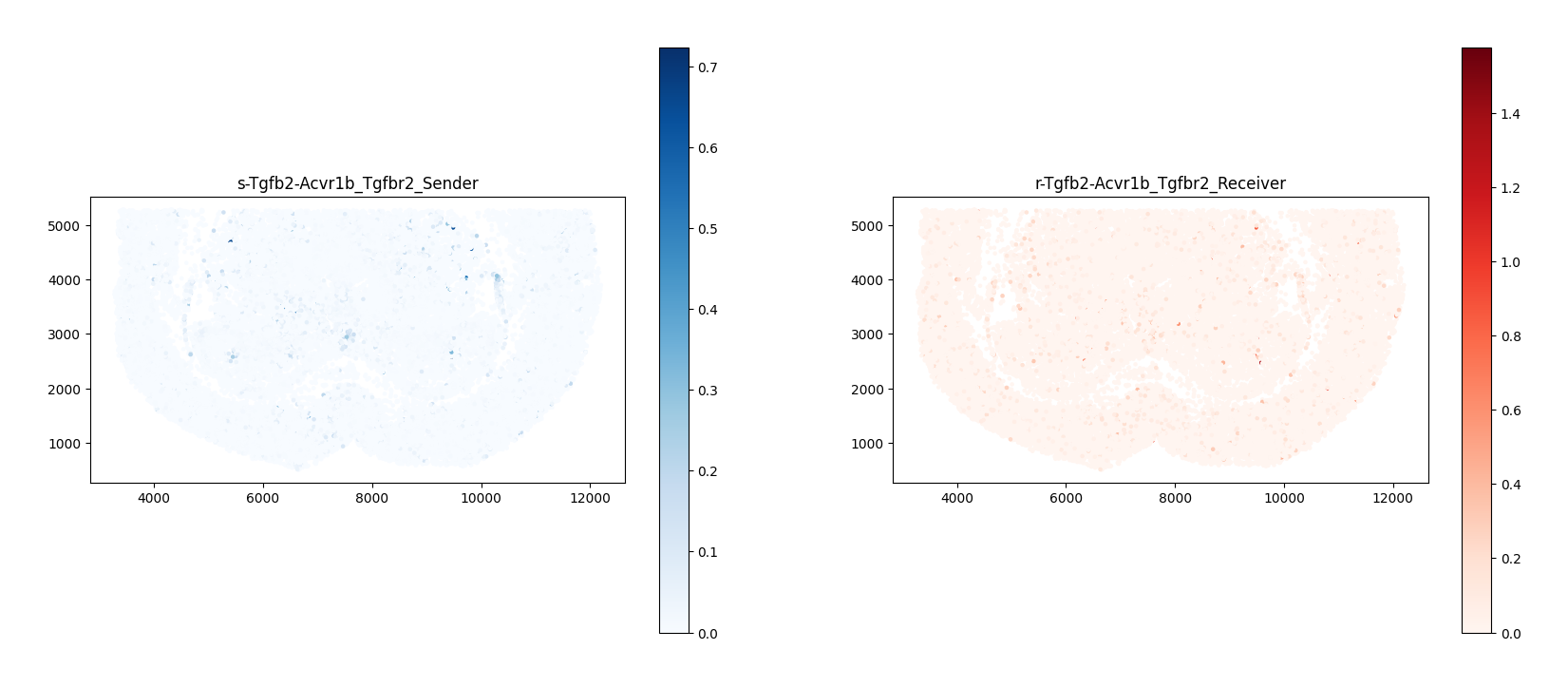
4.2 细胞通讯信号流可视化
COMMOT 认为细胞通讯具有局部传递性:某个细胞会与邻近细胞互作,该邻近细胞又与下一个邻近细胞互作,依次进行就会形成“信号流(Signal Flow)”。下图通过向量场展示了该通路的局部信号传递方向。
python
ct.tl.communication_direction(a_dis500, database_name=lr_database, k=5)图注说明: 细胞通讯信号流向量场。
- 底图/背景色:通常代表组织空间背景、细胞密度或该特定受配体对局部通讯得分(Communication Score)的热图分布。
- 箭头(Quiver/Streamlines):代表细胞之间通讯的局部方向性与强度。
- 流向:箭头的方向指示了信号因子(配体)从高表达信号源向目标接收区域的空间扩散和传递路径。
- 大小/粗细:箭头的长短代表该方向上信号流的相对强度。
python
import matplotlib.pyplot as plt
import matplotlib.image as mpimg

# 1. 读取 DAPI 底片
background_image = mpimg.imread('./filtered_feature_bc_matrix/expression.png')

# 2. 临时将细胞坐标除以 0.265385 以匹配底片大小
# a_dis500.obsm["spatial"] 存储的是点坐标
a_dis500.obsm["spatial"] = a_dis500.obsm["spatial"] / 0.265385

# 3. 让 COMMOT 生成带信号流的画布 (利用已放大的坐标)
ax = ct.pl.plot_cell_communication(
    a_dis500,
    database_name=lr_database,
    lr_pair=('total','total'),
    plot_method='stream',
    background_legend=True,
    scale=0.00003,
    ndsize=4,
    grid_density=0.4,
    summary='sender',
    background='summary',
    clustering=cluster_name,
    cmap='Reds',
    normalize_v=True,
    normalize_v_quantile=0.995
)

# 4. 把 DAPI 底片 "塞" 到底层去 (zorder=0 保证在最底下)
ax.imshow(background_image, extent=[0, 55050, 0, 19906], aspect='auto', zorder=0, cmap='gray')
ax.grid(False)

# 5. 调整画板大小并展示
fig = ax.get_figure()
fig.set_size_inches(15, 7)
ax.set_aspect('equal', adjustable='box')

plt.show()

# 6. (可选) 如果你后面的代码还需要用到之前缩放后的坐标,这里再乘回来恢复原样
# a_dis500.obsm["spatial"] = a_dis500.obsm["spatial"] * 0.265385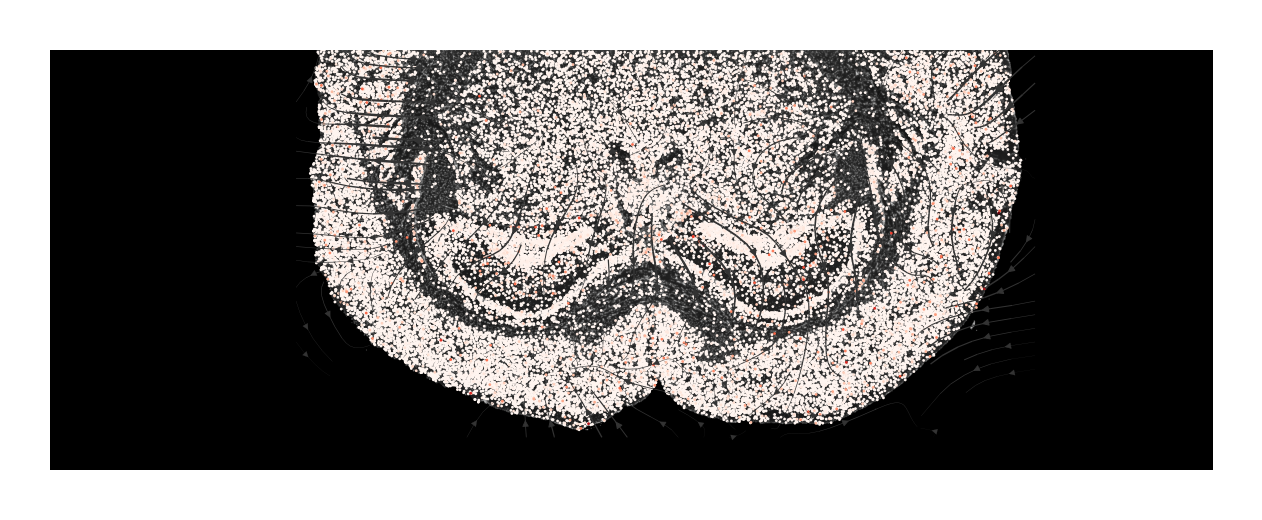
python
# 计算不同细胞类型之间通讯交流强度
a_dis500.obs[cluster_name] = a.obs[cluster_name]
#pathway = df_ligrec_filtered.loc[df_ligrec_filtered.iloc[:, 2].isin(["PSAP"])]
for i,j in enumerate(df_ligrec_filtered.values):
    ct.tl.cluster_communication(a_dis500, database_name=lr_database, clustering=cluster_name,n_permutations=100,lr_pair=(j[0],j[1]))

ct.tl.cluster_communication(a_dis500, database_name=lr_database, clustering=cluster_name,n_permutations=100)
4.3 细胞类型互作网络图
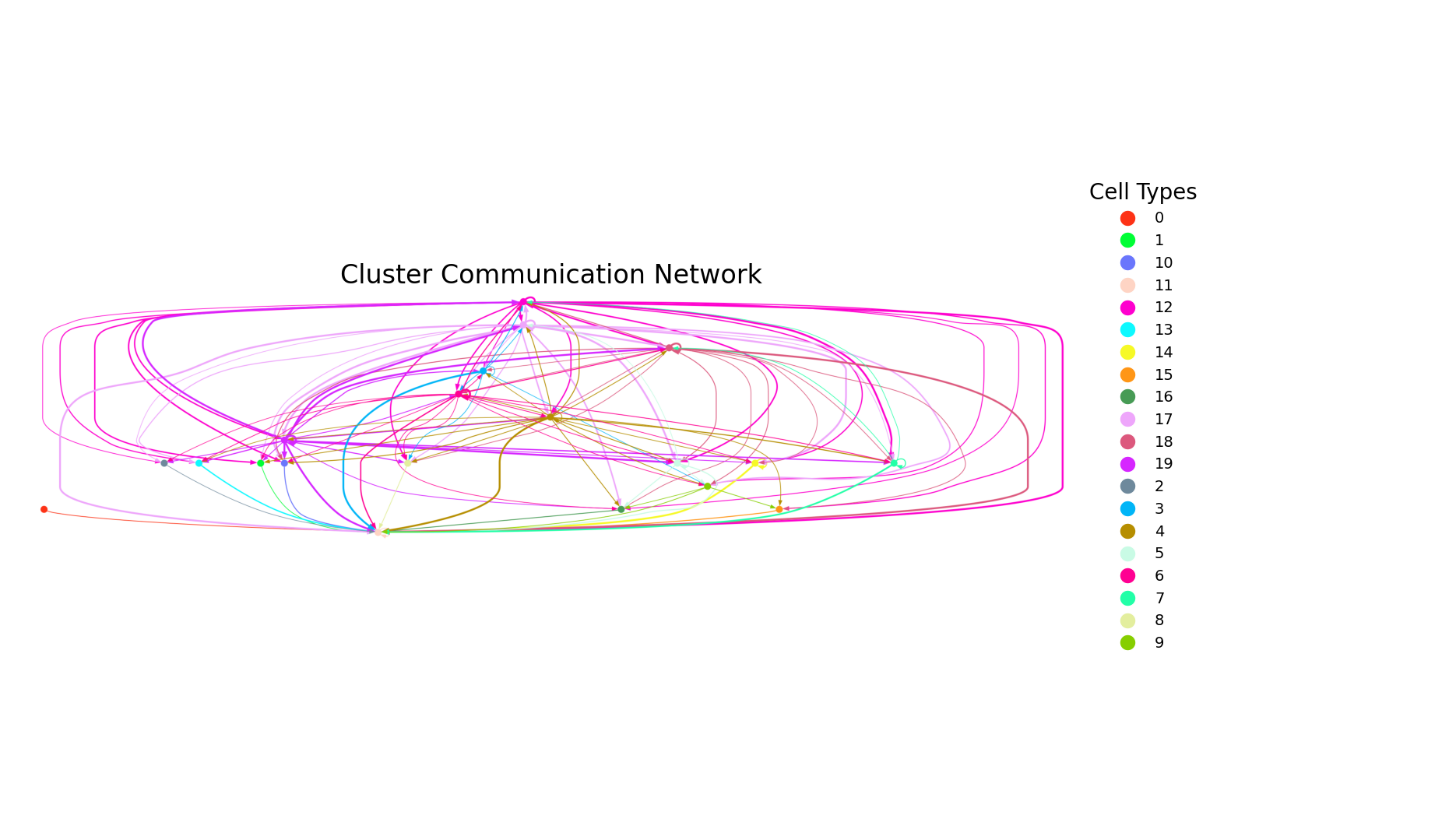
图注说明: 细胞类型间空间通讯网络图。
- 节点(实心圆):每种颜色的圆圈代表一种特定的细胞类型。
- 边(连线):线条连接信号的发送方与接收方。箭头指向其他细胞代表旁分泌通讯,指回自身代表自分泌。
python
# --- 7. 直接调用新函数 ---
uns_names = ['commot_cluster'+'-'+cluster_name+'-'+lr_database+'-total-total']
plot_cluster_communication_network_native(
    adata=a_dis500,
    uns_names=uns_names,
    clustering='cell_type',
    nx_node_pos=None,
    nx_bg_pos=False,
    p_value_cutoff=5e-2,
    filename='total-total_cluster.png',
    nx_node_cmap='Light24',
    figsize=(18, 10)
)
4.4 细胞类型互作和弦图
图注说明: 细胞类型通讯互作和弦图。
- 外环分段:圆环上的不同颜色块代表着不同的细胞类型群。
- 内侧弦线:连接存在显著通讯互作的信号发送方与接收方。靠近颜色块的较宽一端通常为信号接收方。
- 弦线宽度:弦的宽度直观反映了细胞群之间相互作用的强度,弦越宽代表相互作用越强烈。
python
# 调用函数画图
plot_cluster_signaling_chord(S = a_dis500.uns["commot_cluster-"+cluster_name+"-"+lr_database+"-total-total"]['communication_matrix'],
                             p_values = a_dis500.uns["commot_cluster-"+cluster_name+"-"+lr_database+"-total-total"]['communication_matrix'],
                             p_value_cutoff=0.05,
                             #filename="./total_chord_plot.pdf",
                             label_name=a_dis500.uns["commot_cluster-"+cluster_name+"-"+lr_database+"-total-total"]['communication_matrix'].index)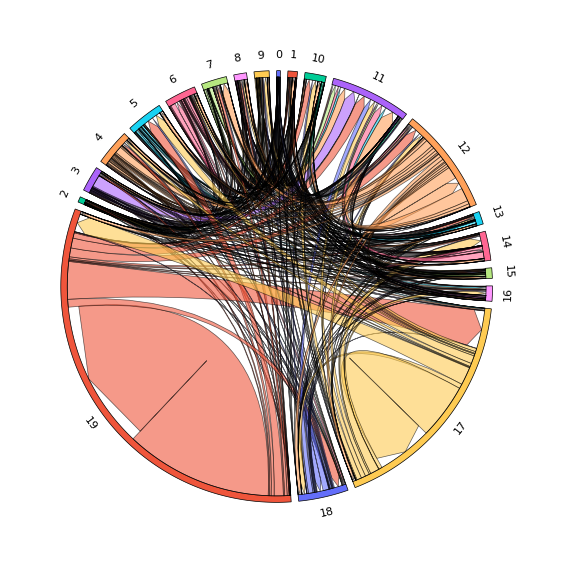
python
a.write("adata.h5ad")
a_dis500.write("adata_dis500.h5ad")
python