
Single-Cell Spatial Transcriptomics: Cell Communication Analysis (based on CellChat)
1. Module Introduction
This module is based on the CellChat V2 algorithm, which is used to infer, visualize, and systematically analyze cell-cell communication networks from single-cell spatial transcriptomics data.
1.1 Background and Significance: Why Analyze Cell Communication?
Single-cell spatial transcriptomics sequencing enables us to identify various cell types in tissues, but this is merely understanding the "parts list". Cells do not exist in isolation; they secrete ligands to bind with receptors, forming complex communication networks that coordinate tissue development, homeostasis maintenance, and disease progression. CellChat helps us reconstruct these "wiring diagrams" from data, answering the following key biological questions:
- Which cells are talking? (Who are the primary signal senders and receivers?)
- What are they saying? (Which signaling pathways are mainly used for communication?)
- How does the environment affect communication? (How does spatial location restrict or promote cell interactions?)
1.2 Core Principles: Law of Mass Action and Spatial Constraints
The core assumption of CellChat is based on the Law of Mass Action in biochemistry: the binding strength of a ligand and a receptor depends on their expression abundance in the corresponding cells.
- Expression Inference: First, extract the expression levels of ligands (L) and receptors (R) from the gene expression matrix.
- Probability Calculation: Calculate the interaction probability of ligand-receptor pairs. The simplified formula is:
. - Spatial Constraints: This is the soul of spatial transcriptomics analysis. Unlike conventional single-cell analysis, this module incorporates the physical coordinates of cells. The model considers paracrine communication possible only when two cells are physically close enough (e.g., < 250 micrometers). This significantly reduces the false positive rate and restores the real tissue microenvironment.
2. Input File Preparation
Data quality is the cornerstone of a successful analysis. This module has explicit format requirements for input data, please check carefully before running.
2.1 Core Input: Seurat Object (.rds)
You need to provide a standard .rds file that stores the Seurat object. The object must contain the following three elements:
| Element | Description | Check Method (R Language) |
|---|---|---|
| 1. Gene Expression Matrix | Must contain normalized data (data slot). Data processed by LogNormalize or SCTransform is recommended. | GetAssayData(obj, slot='data') |
| 2. Cell Type Annotation | The metadata must have a column clearly labeling the cell types (e.g., T_cell, B_cell). CellChat analyzes based on cell populations rather than individual cells. | table(obj$CellAnnotation) |
| 3. Spatial Location Information | Crucial. The object must store the physical coordinates (x, y) of each cell/Spot. Usually located in the images list or reductions$spatial. | Embeddings(obj, 'spatial') |
3. Data Loading and Preprocessing
This step reads the user's input data and converts it into the object format required by CellChat. Main steps include:
- Load Data and Create CellChat Object: Read the expression matrix and metadata.
- Set Receptor-Ligand Database: Select the corresponding species database (human, mouse, or zebrafish).
- Data Preprocessing: Identify overexpressed genes and interactions, and calculate cell-cell communication probabilities.
library(Seurat)
library(CellChat)
library(patchwork)
library(gridExtra)
library(figpatch)
library(cowplot)
library(ComplexHeatmap)Loading required package: dplyr
Warning message:
“package ‘dplyr’ was built under R version 4.3.3”
Attaching package: ‘dplyr’
The following objects are masked from ‘package:stats’:
filter, lag
The following objects are masked from ‘package:base’:
intersect, setdiff, setequal, union
Loading required package: igraph
Attaching package: ‘igraph’
The following objects are masked from ‘package:dplyr’:
as_data_frame, groups, union
The following objects are masked from ‘package:stats’:
decompose, spectrum
The following object is masked from ‘package:base’:
union
Loading required package: ggplot2
Warning message:
“package ‘gridExtra’ was built under R version 4.3.3”
Attaching package: ‘gridExtra’
The following object is masked from ‘package:Biobase’:
combine
The following object is masked from ‘package:BiocGenerics’:
combine
The following object is masked from ‘package:dplyr’:
combine
Warning message:
“package ‘cowplot’ was built under R version 4.3.3”
Attaching package: ‘cowplot’
The following object is masked from ‘package:patchwork’:
align_plots
Attaching package: ‘DT’
The following object is masked from ‘package:SeuratObject’:
JS
The following object is masked from ‘package:Seurat’:
JS
Warning message:
“package ‘ComplexHeatmap’ was built under R version 4.3.2”
Loading required package: grid
========================================
ComplexHeatmap version 2.18.0
Bioconductor page: http://bioconductor.org/packages/ComplexHeatmap/
Github page: https://github.com/jokergoo/ComplexHeatmap
Documentation: http://jokergoo.github.io/ComplexHeatmap-reference
If you use it in published research, please cite either one:
- Gu, Z. Complex Heatmap Visualization. iMeta 2022.
- Gu, Z. Complex heatmaps reveal patterns and correlations in multidimensional
genomic data. Bioinformatics 2016.
The new InteractiveComplexHeatmap package can directly export static
complex heatmaps into an interactive Shiny app with zero effort. Have a try!
This message can be suppressed by:
suppressPackageStartupMessages(library(ComplexHeatmap))
========================================
## rds_path: The rds file path of the Seurat object, must include cell/spatial spot expression matrix and metadata
rds_path="./rds/25020230_nao_CS_banksy.rds"
## species: Species selection, "human" or "mouse"
species="mouse"
## meta_path: Parameter description not available
meta_path = "./rds/meta.tsv"
## method: Calculation method selection. Options include 'triMean' (recommended for single-cell), 'truncatedMean', 'median', etc.
method="truncatedMean"
## mincell: The minimum threshold for the number of cells in each cell group. Cell groups with fewer cells will be filtered out and not participate in communication analysis
mincell="10"
## Samples: Specific sample names to analyze (must match the names in the col_sam column)
Samples="25020230_nao_CS_expression"
## col_sam: The column name in the Seurat object metadata used to distinguish samples
col_sam="Sample"
## col_celltype: The column name in the Seurat object metadata storing cell type information
col_celltype="RNA_snn_res.0.2"
## trim: The truncation ratio used for truncated mean calculation (method='truncatedMean') (e.g., 0.25 means removing the top and bottom 25%)
trim=0.25
## celltypes: Cell type names or cluster numbers to include in the analysis (separated by commas)
celltypes="0,1,2,3,4,5,6,7,8,9,10,11,12,13,14,15,16,17,18,19"if (species == "human"){
CellChatDB = CellChatDB.human
}else if (species == "mouse"){
CellChatDB = CellChatDB.mouse
}else if (species == "zebrafish"){
CellChatDB = CellChatDB.zebrafish
}data = readRDS(rds_path)
Samples=strsplit(Samples,",")[[1]]
celltypes=strsplit(celltypes,",")[[1]]if (meta_path != ""){
meta = read.table(meta_path,header=T,sep='\t',check.names=F)
if(colnames(meta)[1]=="barcode"){
rownames(meta) <- meta$barcode
} else if(colnames(meta)[1]=="barcodes"){
rownames(meta) <- meta$barcodes
}
data@meta.data = meta
}
data = subset(data,cells=rownames(data@meta.data[data@meta.data[[col_celltype]] %in% celltypes,]))if ("0" %in% celltypes) {
celltypes = paste0("c", celltypes)
data@meta.data$new_celltype_col = paste0("c", data@meta.data[[col_celltype]])
col_celltype = "new_celltype_col"
}3.1 Create CellChat Object and Run Core Analysis
This is the most critical step in the entire analysis pipeline. We will iterate through each sample and construct cell communication networks based on its gene expression profile and spatial location information. Below is a detailed breakdown of the steps:
Step 1: Data Extraction and Preparation
Before creating the object, we need to extract three core components from the Seurat object:
- Gene Expression Matrix (
data.input): Use normalized data (dataslot). - Metadata (
meta): Contains cell type annotations (CellAnnotation). - Spatial Coordinates (
spatial.locs): Extracted from the reduction of Seurat. Note: CellChat requires column names to be"imagerow"and"imagecol", so manual renaming is needed. - Spatial Conversion Factors (
spatial.factors): Defines the conversion ratio between pixels and physical distance (e.g., micrometers) (ratio), and the tolerance between slices (tol). This is particularly important for multi-slice analysis.
Step 2: Create CellChat Object (createCellChat)
Initialize the object using the createCellChat function.
- Key Parameter
datatype="spatial": Explicitly tells CellChat that we are processing spatial transcriptomics data. This activates subsequent spatial distance constraint algorithms.
Step 3: Preprocessing - Finding Active "Talkers"
Before inferring communication, we need to determine which genes are active in which cell types.
identifyOverExpressedGenes: Finds highly expressed genes in specific cell populations.identifyOverExpressedInteractions: Identifies potential interaction pairs based on the ligand-receptor database. If both ligand and receptor are highly expressed in certain cell populations, the interaction is retained.
Step 4: Core Inference - Calculating Communication Probability (computeCommunProb)
This is where the "magic" happens. The algorithm calculates the communication probability
💡 Key Parameters Detailed (Specific to Spatial Analysis):
type: Method for calculating the mean of gene expression. Options include"triMean"(recommended, robust to noise, weighted average of quartiles) or"truncatedMean"(truncated mean).trim: Used whentype="truncatedMean", specifies the proportion to truncate (e.g., 0.1 means removing the top and bottom 10% extreme values to avoid outlier impact).distance.use = TRUE: Key parameter, enables spatial distance restriction. Only allows cells within a spatial distance to communicate, which is the core of spatial transcriptomics analysis.interaction.range: Interaction distance threshold (e.g., 250). Defines the maximum physical distance for cell communication to occur (unit consistent with spatial coordinates).scale.distance: Distance scaling factor (e.g., 0.1). Used to adjust the scale of input spatial coordinates to fit model parameters.contact.dependent = TRUE: Enables contact-dependent restriction. Applies stricter distance constraints for contact-dependent ligand-receptors (like the Notch pathway).contact.range: Distance threshold for contact-dependent interactions (e.g., 10). Usually much smaller thaninteraction.range, used to simulate direct cell contact.
Step 5: Result Aggregation and Filtering
filterCommunication: Filters out communications involving cell populations with very few cells to reduce noise.computeCommunProbPathway: Summarizes hundreds of ligand-receptor pairs (like Wnt3a-Fzd5, Wnt5a-Fzd2) into biological pathways (like WNT signaling pathway) for easier macroscopic interpretation.aggregateNet: Calculates the total communication strength between all cell pairs, generating a summary network graph.
subset_obj = subset(data, cells=rownames(data@meta.data[data@meta.data[[col_sam]] %in% Samples,]))

print(dim(subset_obj@meta.data))
print(table(subset_obj[[col_celltype]]))
data.input = Seurat::GetAssayData(subset_obj,slot="data",assay="RNA")
meta = subset_obj@meta.data
spatial.locs = Embeddings(subset_obj,reduction = 'spatial')
colnames(spatial.locs) = c("imagerow","imagecol")
spatial.factors = data.frame(ratio = 0.265, tol = 5)
meta$slices="slice1"
meta$slices = factor(meta$slices)
spatial.locs = as.data.frame(spatial.locs)
spatial.locs = spatial.locs[!is.na(spatial.locs$imagerow),]
data.input = data.input[,rownames(spatial.locs)]
meta = meta[rownames(meta),]
cellchat = createCellChat(object=data.input,meta=droplevels(meta),group.by=col_celltype,datatype="spatial",
                          coordinates=spatial.locs,spatial.factors=spatial.factors)

cellchat@DB = CellChatDB

cellchat = subsetData(cellchat)
cellchat = identifyOverExpressedGenes(cellchat)
cellchat = identifyOverExpressedInteractions(cellchat)

if (method == "triMean") {
    cellchat = computeCommunProb(cellchat, type = "triMean", trim = trim,
                                  distance.use = TRUE, interaction.range = 250, scale.distance = 0.1,
                                  contact.dependent = TRUE, contact.range = 10)
} else {
    cellchat = computeCommunProb(cellchat, type = "truncatedMean", trim = trim,
                                  distance.use = TRUE, interaction.range = 250, scale.distance = 0.1,
                                  contact.dependent = TRUE, contact.range = 10)
}
cellchat = filterCommunication(cellchat, min.cells = mincell)
cellchat = computeCommunProbPathway(cellchat)
cellchat = aggregateNet(cellchat)

cellchat = netAnalysis_computeCentrality(cellchat, slot.name = "netP")
cellchat = computeNetSimilarity(cellchat, type = "functional")

df.netp <- subsetCommunication(cellchat,slot.name = "netP")
df.net <- subsetCommunication(cellchat,slot.name = "net")new_celltype_col
c0 c1 c10 c11 c12 c13 c14 c15 c16 c17 c18 c19 c2
13144 4454 1036 970 948 882 584 439 291 232 218 185 4195
c3 c4 c5 c6 c7 c8 c9
2747 2380 2306 2194 1784 1601 1494
[1] "Create a CellChat object from a data matrix"
Create a CellChat object from spatial transcriptomics data...
Warning message in createCellChat(object = data.input, meta = droplevels(meta), :
“The 'meta' data does not have a column named \`samples\`. We now add this column and all cells are assumed to belong to \`sample1\`!
”
Set cell identities for the new CellChat object
The cell groups used for CellChat analysis are c0, c1, c10, c11, c12, c13, c14, c15, c16, c17, c18, c19, c2, c3, c4, c5, c6, c7, c8, c9
The number of highly variable ligand-receptor pairs used for signaling inference is 3116
truncatedMean is used for calculating the average gene expression per cell group.
[1] ">>> Run CellChat on spatial transcriptomics data using distances as constraints of the computed communication probability <<< [2026-05-11 16:06:08.813226]"
The input L-R pairs have both secreted signaling and contact-dependent signaling. Run CellChat in a contact-dependent manner for \`Cell-Cell Contact\` signaling, and in a diffusion manner based on the \`interaction.range\` for other L-R pairs.
[1] ">>> CellChat inference is done. Parameter values are stored in \`object@options$parameter\` <<< [2026-05-11 16:18:38.874591]"
4. Cell Communication Calculation Results
4.1 Number and Strength of Cell-Cell Interactions
This section aims to display the overall communication status among different cell subpopulations at a macroscopic network level. The CellChat algorithm infers statistically significant intercellular communication among various cell groups and summarizes them into two key metrics:
- Number of Interactions: The sum of significantly existing ligand-receptor pairs (L-R pairs) between two cell populations.
- Interaction Strength (Communication Probability): The sum of communication probabilities of these interacting pairs calculated based on the Law of Mass Action.
Figure Legend: Statistics of the number of L-R pairs (interactions) and communication strength between different cell groups.
- Solid Circles (Nodes): Solid circles of different colors represent different cell subpopulations. The size of the solid circle is proportional to the number of cells corresponding to that cell group.
- Edges (Lines): The color of each edge matches the signal sender. The thickness of the edge is proportional to the number of ligand-receptor pairs/communication strength.
options(repr.plot.height=8, repr.plot.width=16)
par(mfrow = c(1,2), xpd=TRUE)
p1=netVisual_circle(cellchat@net$count, weight.scale = T, label.edge= F, title.name = "Number of interactions")
p2=netVisual_circle(cellchat@net$weight, weight.scale = T, label.edge= F, title.name = "Interaction weights/strength")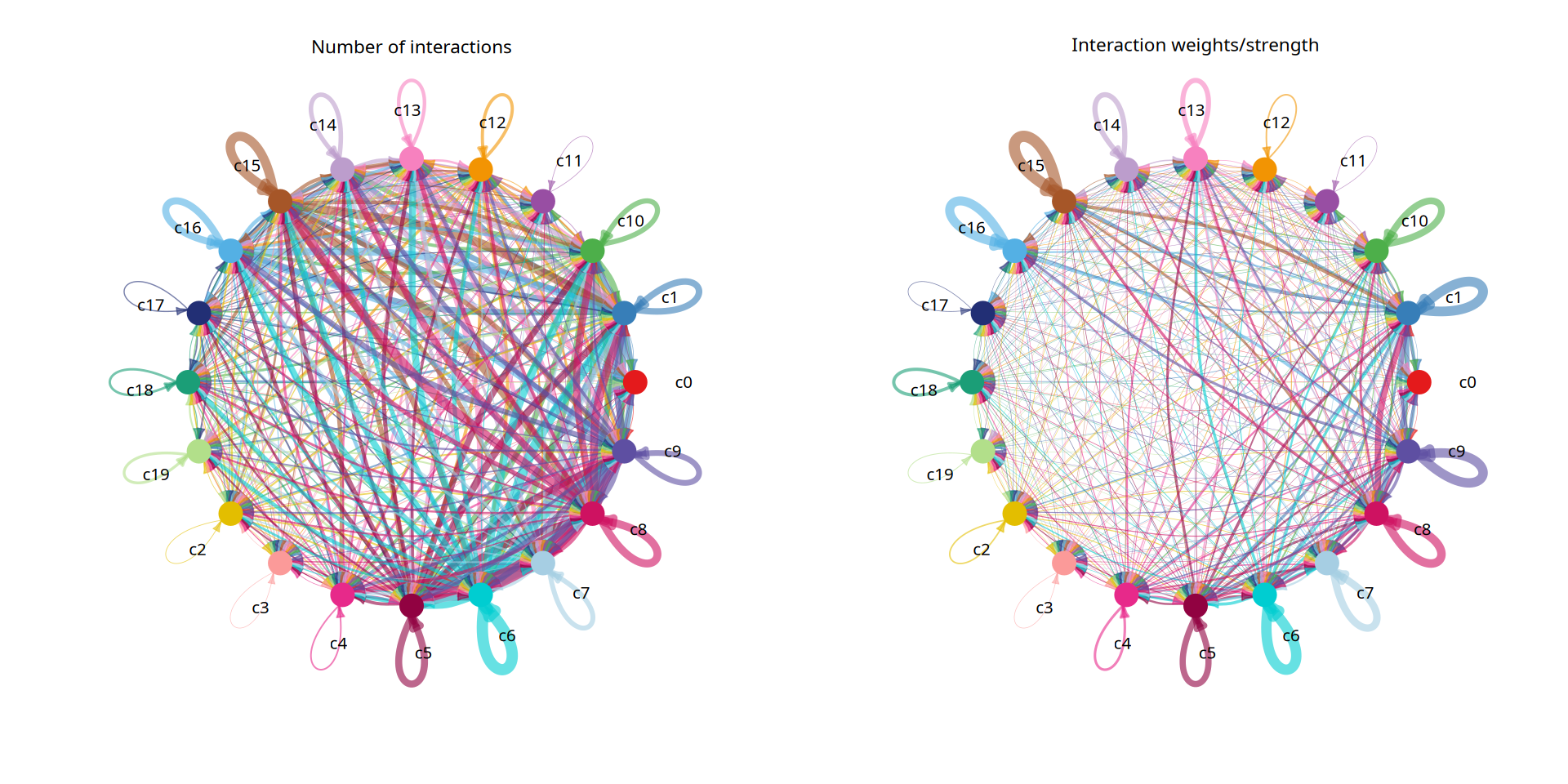
Figure Legend: Heatmap display of the cell-cell communication network.
- Rows (Target) and Columns (Source): Represent the signal-receiving and signal-sending cell groups, respectively.
- Color Depth: The depth of the color represents the number (count) or strength (weight) of interactions between cell groups. Deeper colors indicate more active communication.
- Top Bar Chart: Displays the overall communication strength output by each cell group as a signal sender (Source).
- Right Bar Chart: Displays the overall communication strength received by each cell group as a signal receiver (Target).
netVisual_heatmap(cellchat, measure = "count", color.heatmap = "Blues")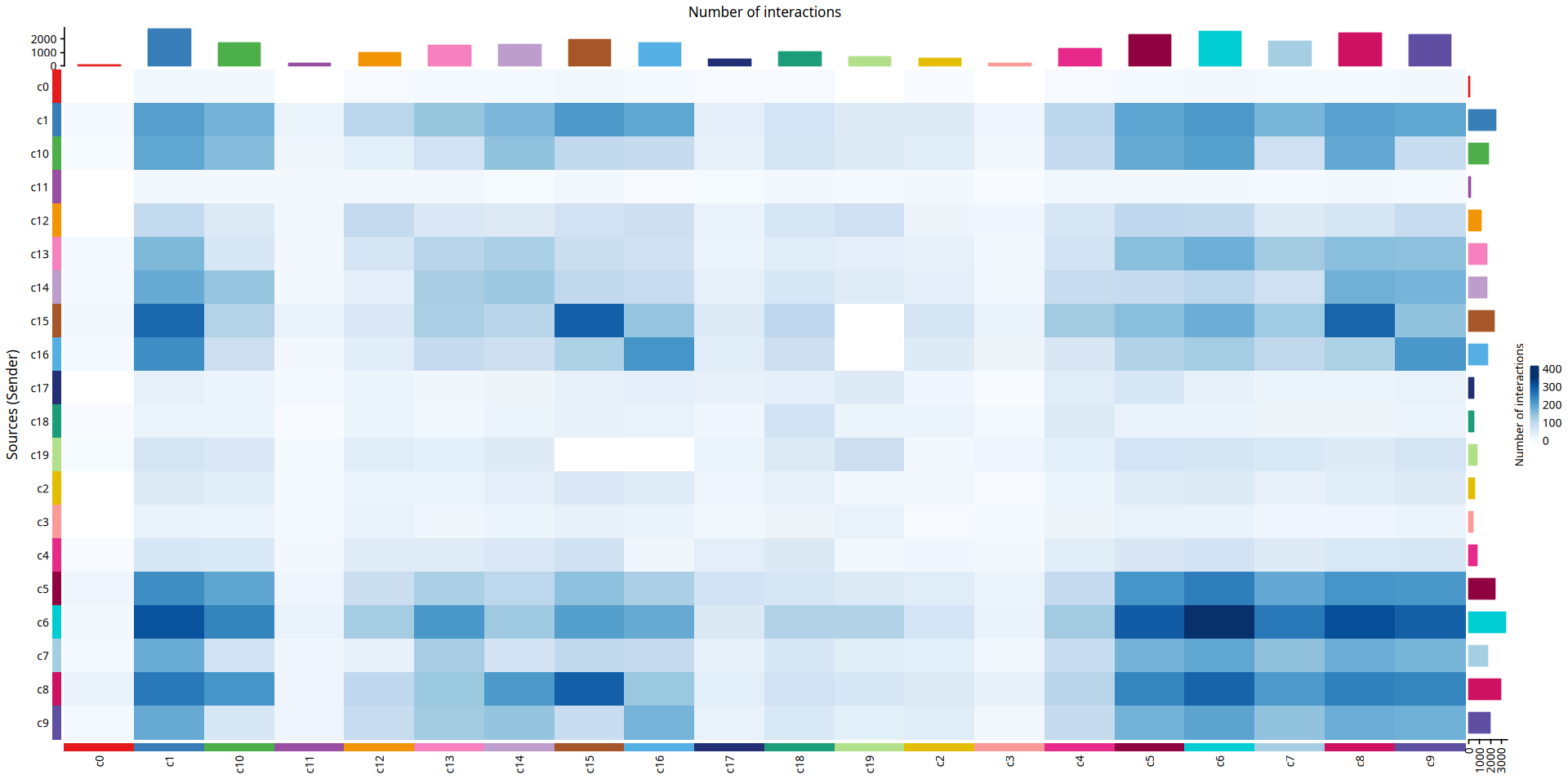
netVisual_heatmap(cellchat, measure = "weight", color.heatmap = "Blues")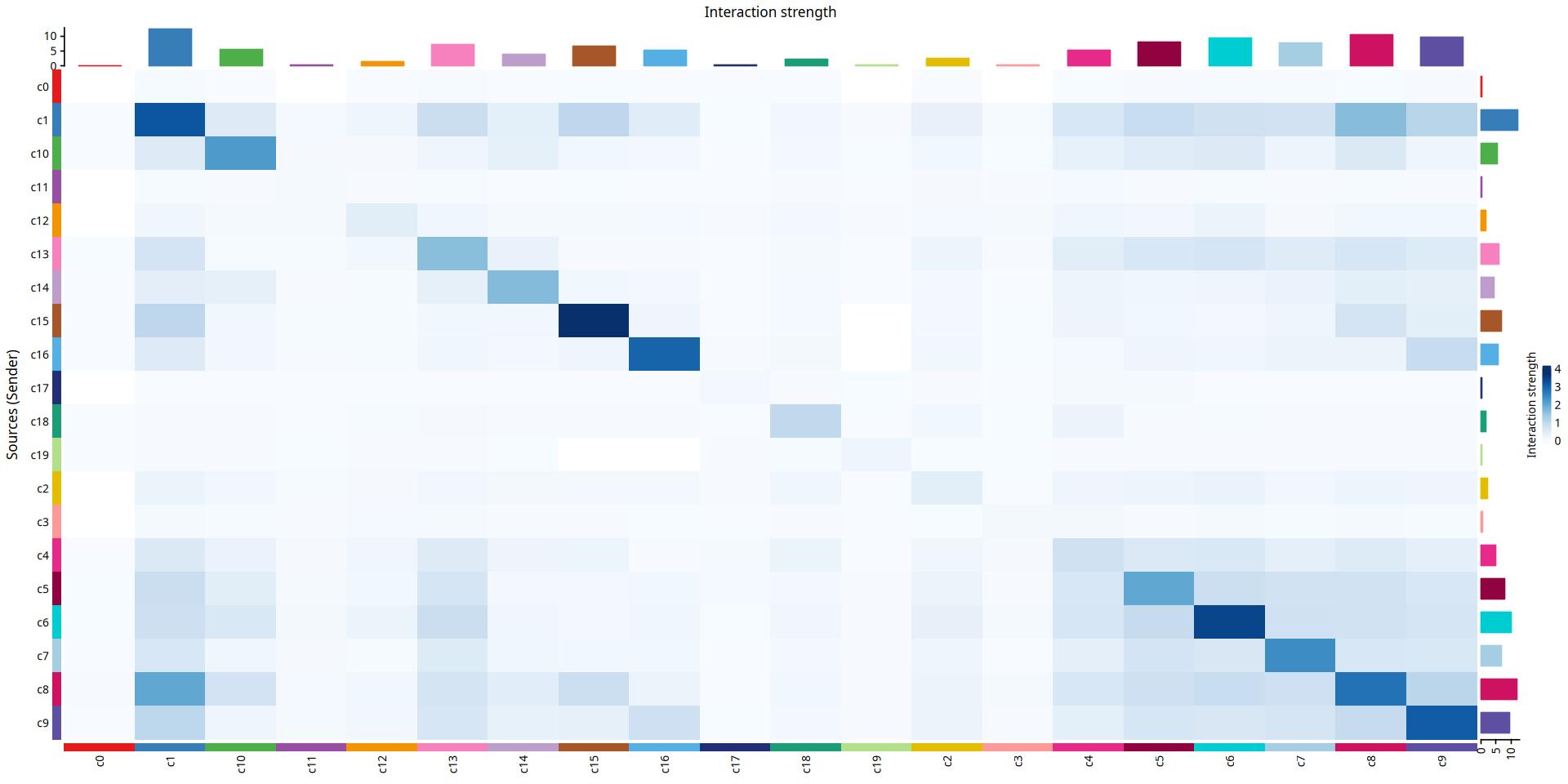
Figure Legend: Split display of the communication strength of each cell group acting as a signal sender.
- Solid Circles (Nodes): Solid circles of different colors represent different cell subpopulations. The size of the solid circle is proportional to the number of cells corresponding to that cell group.
- Edges (Lines): The color of each edge matches the current signal sender. The thickness of the edge is proportional to the communication strength.
mat = cellchat@net$weight

mat2 = matrix(0, nrow = nrow(mat), ncol = ncol(mat), dimnames = dimnames(mat))
mat2[1, ] = mat[1, ]
groupSize = as.numeric(table(cellchat@idents))
p = netVisual_circle(mat2, vertex.weight = groupSize, weight.scale = T, edge.weight.max = max(mat), title.name = rownames(mat)[1])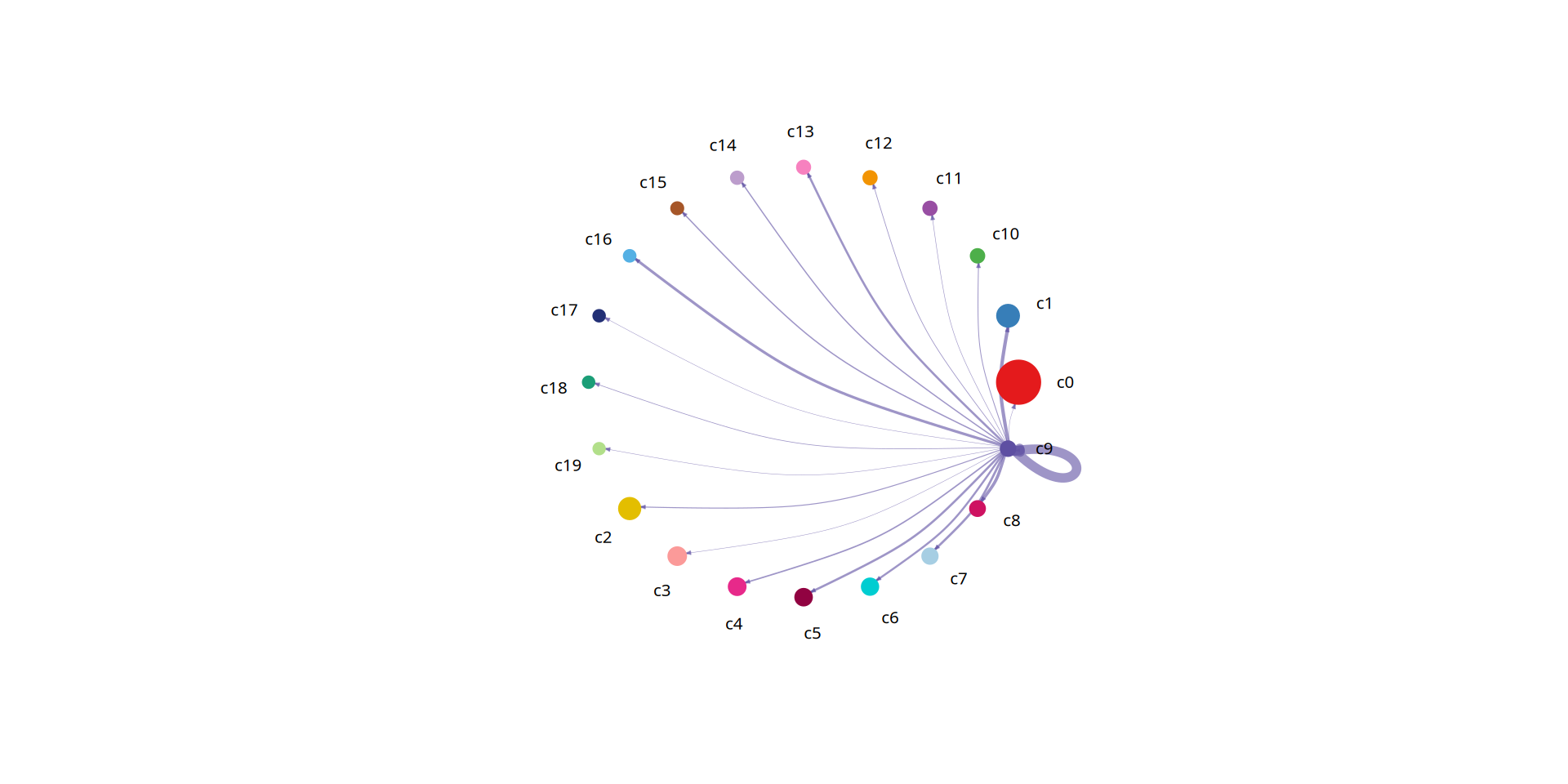
Figure Legend: Split display of the number of L-R pairs (interactions) for each cell group acting as a signal sender.
- Solid Circles (Nodes): Solid circles of different colors represent different cell subpopulations. The size of the solid circle is proportional to the number of cells corresponding to that cell group.
- Edges (Lines): The color of each edge matches the current signal sender. The thickness of the edge is proportional to the number of ligand-receptor pairs.
mat <- cellchat@net$count

mat2 = matrix(0, nrow = nrow(mat), ncol = ncol(mat), dimnames = dimnames(mat))
mat2[1, ] = mat[1, ]
p = netVisual_circle(mat2, vertex.weight = groupSize, weight.scale = T, edge.weight.max = max(mat), title.name = rownames(mat)[1])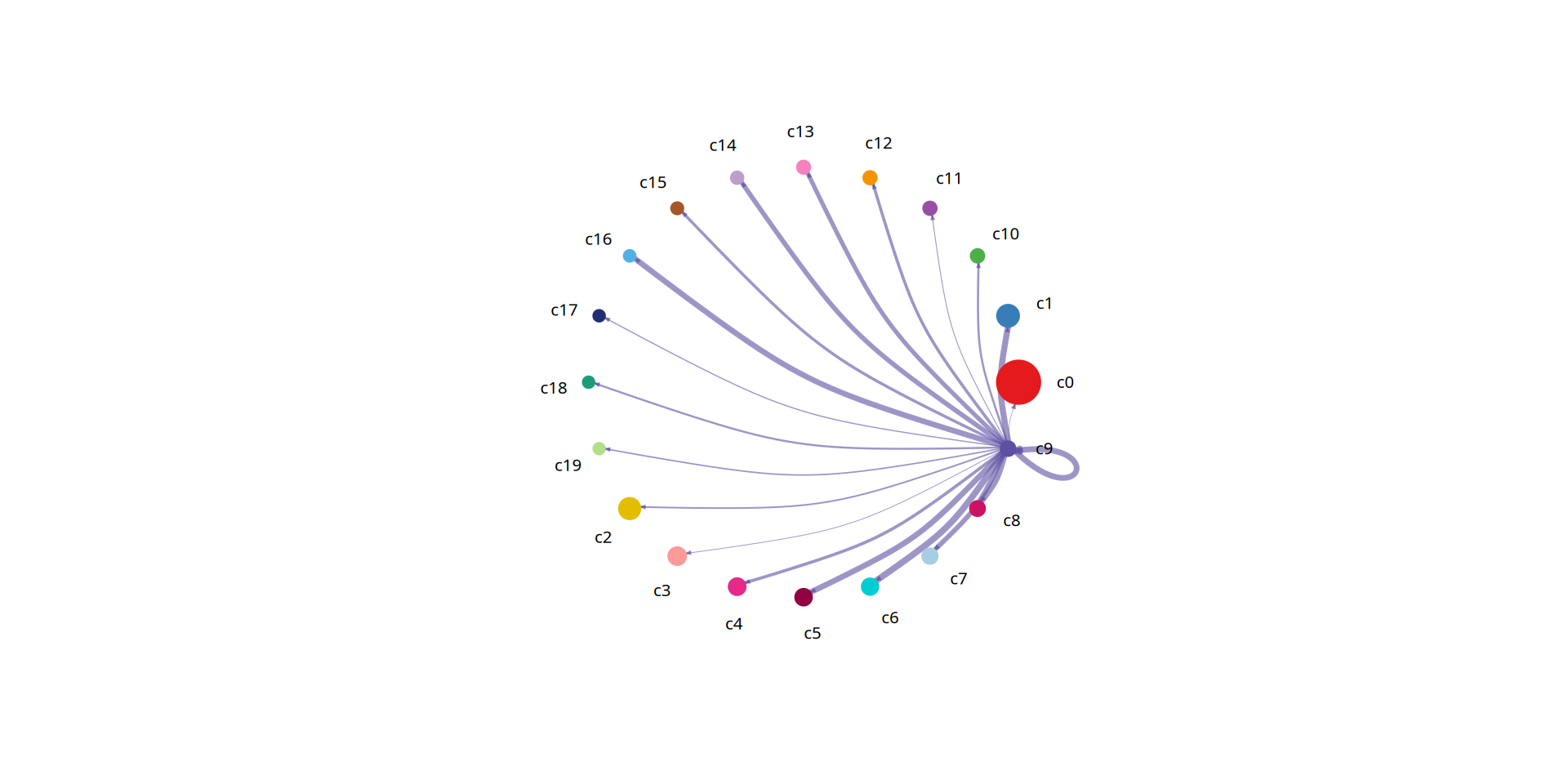
4.2 Cell Communication Ligand-Receptor Bubble Plot
After understanding the overall communication network topology, we often need to dig deeper into the specific molecular mechanisms that cause these communications. This section shifts the analytical perspective from the "cellular level" to the "molecular level".
By extracting significant ligand-receptor (L-R) pair interactions between specific cell groups (e.g., selecting one cell type as the sender and another as the receiver), we can precisely identify which ligand-receptor bindings mediate their crosstalk.
Figure Legend: Cell communication ligand-receptor Bubble Plot display.
- Horizontal Axis (X-axis): Represents the interacting cell pairs (Sender -> Receiver).
- Vertical Axis (Y-axis): Represents specific ligand-receptor pairs.
- Bubble Size: Represents the communication probability (negative logarithm of the P-value, i.e., significance). Larger bubbles indicate more significant interactions.
- Bubble Color: Represents the relative strength of communication (Communication Probability). Deeper colors (redder/warmer colors) indicate higher interaction probability/strength.
# Cell interaction bubble plot
options(repr.plot.height=12, repr.plot.width=12)
netVisual_bubble(cellchat,remove.isolate = FALSE, angle.x = 90,sources.use = c(1:9),targets.use = c(13,14))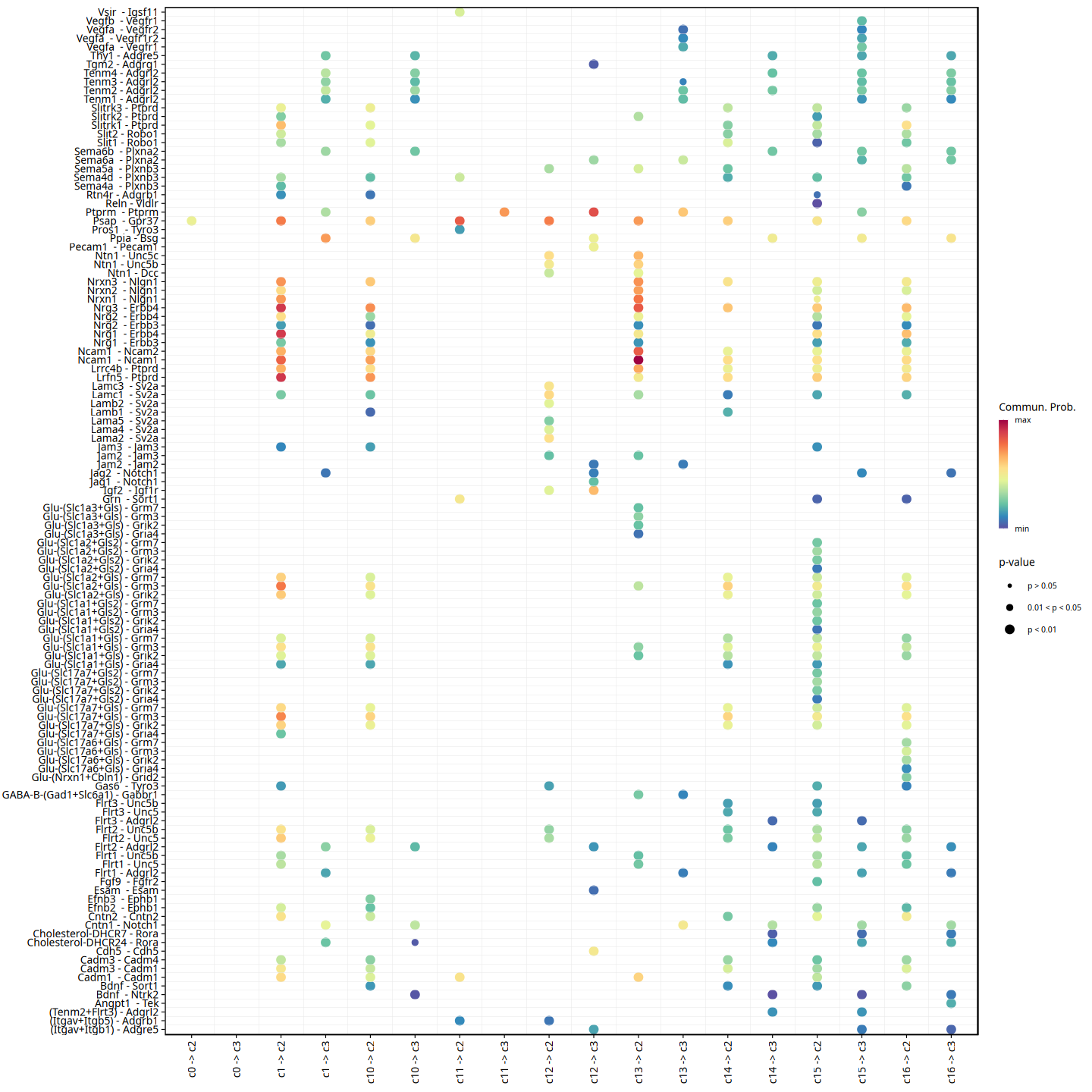
4.3 Cell Communication Ligand-Receptor Chord Diagram
In addition to bubble plots, we can also use chord diagrams to display significant ligand-receptor pairs among specific cell groups. Chord diagrams intuitively show the complex signal sending and receiving network topology across multiple cell populations.
Figure Legend: Chord diagram displaying receptor-ligand pairs (L-R pairs) with significant communication probabilities among specific cell groups (p < 0.05).
- Outermost Ring: Each segment in the ring represents a different cell group or receptor/ligand. Different colors represent different cell groups.
- Inner Arcs: Arcs connect the signal sender and receiver. The arrow points from the signal emitter to the receiver.
- Arc Width: Wider arcs indicate higher communication probability (interaction strength) for the ligand-receptor pair.
p=netVisual_chord_gene(cellchat, slot.name = "net", lab.cex = 1,legend.pos.y = 30,reduce=0.005,legend.pos.x=1)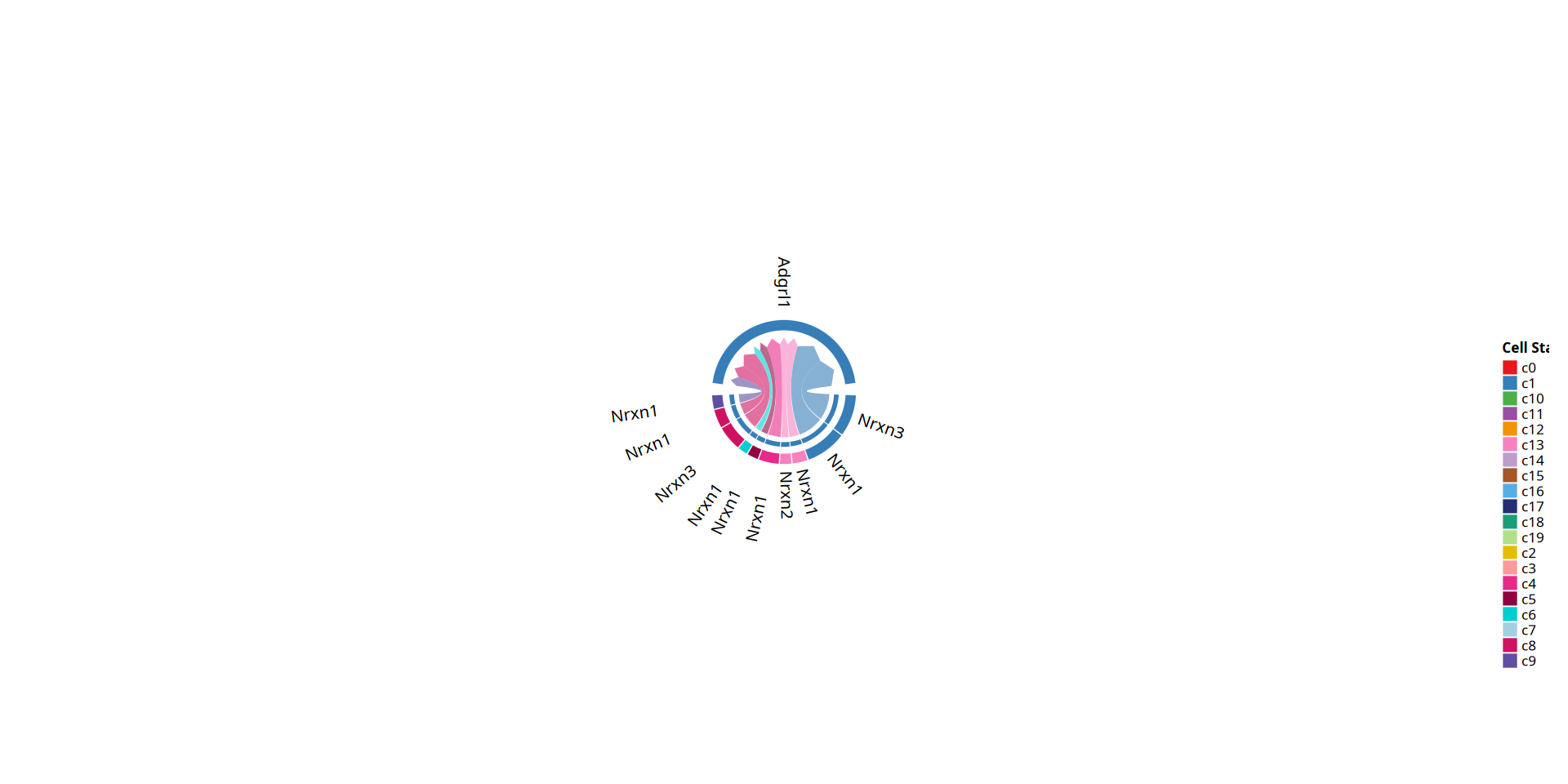
4.4 Signaling Pathway Hierarchical Analysis
Unlike the previous section focusing on interactions of single ligand-receptor (L-R) pairs, this section elevates the perspective to the signaling pathway level.
Because a biological signaling pathway is often co-mediated by multiple ligands, receptors, and their cofactors, CellChat can evaluate the communication strength of an entire signaling pathway by summing the communication probabilities of all relevant ligand-receptor pairs within the pathway. This helps us understand at a higher functional dimension which key signaling pathways (like TGFb, WNT, NOTCH, etc.) the cell groups primarily rely on for crosstalk.
Figure Legend: Chord diagram displaying signaling pathways with significant communication probabilities among specific cell groups (p < 0.05).
- Outermost Ring: Each segment in the ring represents a different signaling pathway or cell group. Different colors represent different cell groups.
- Inner Arcs (Lines): Arcs connect the signal sender and receiver. The arrow points from the signal emitter to the receiver.
- Arc Width: Wider arcs indicate higher communication probability (interaction strength) of the signaling pathway.
p=netVisual_chord_gene(cellchat, slot.name = "netP", lab.cex = 0.8,legend.pos.y = 80,reduce=0.005,legend.pos.x=10)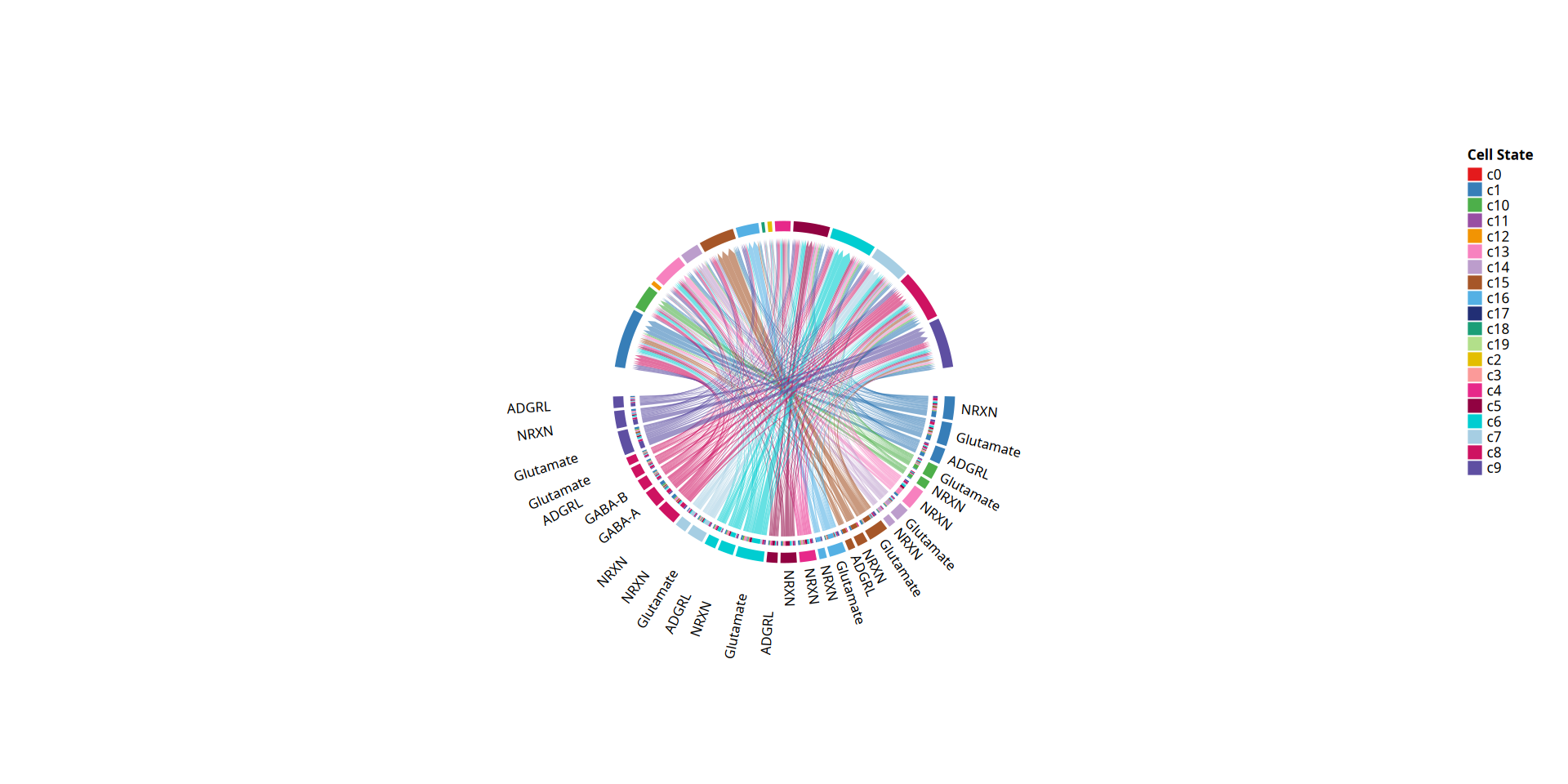
4.5 Cell Communication Role Identification
In a complex cellular microenvironment, different cell populations often play different "communication roles". This section aims to quantitatively evaluate the importance of each cell type in the overall communication network by calculating network centrality metrics.
By calculating the total outgoing probability and total incoming probability of each cell, we can intuitively identify which cell groups are the main signal "Senders", which are the main "Receivers", and which cell groups serve both roles, acting as "Hubs" in the network within the tissue microenvironment.
Figure Legend: 2D scatter plot displaying cell communication role identification.
- Horizontal Axis (X-axis): Represents the total outgoing communication probability associated with the cell group. Larger values indicate a stronger role for the cell as a signal sender.
- Vertical Axis (Y-axis): Represents the total incoming communication probability associated with the cell group. Larger values indicate a stronger role for the cell as a signal receiver.
- Dot Size: Represents the total number of relationships associated with the cell group (including all significant outgoing and incoming interactions).
- Dot Color: Represents different cell groups.
options(repr.plot.height=8, repr.plot.width=12)
netAnalysis_signalingRole_scatter(cellchat)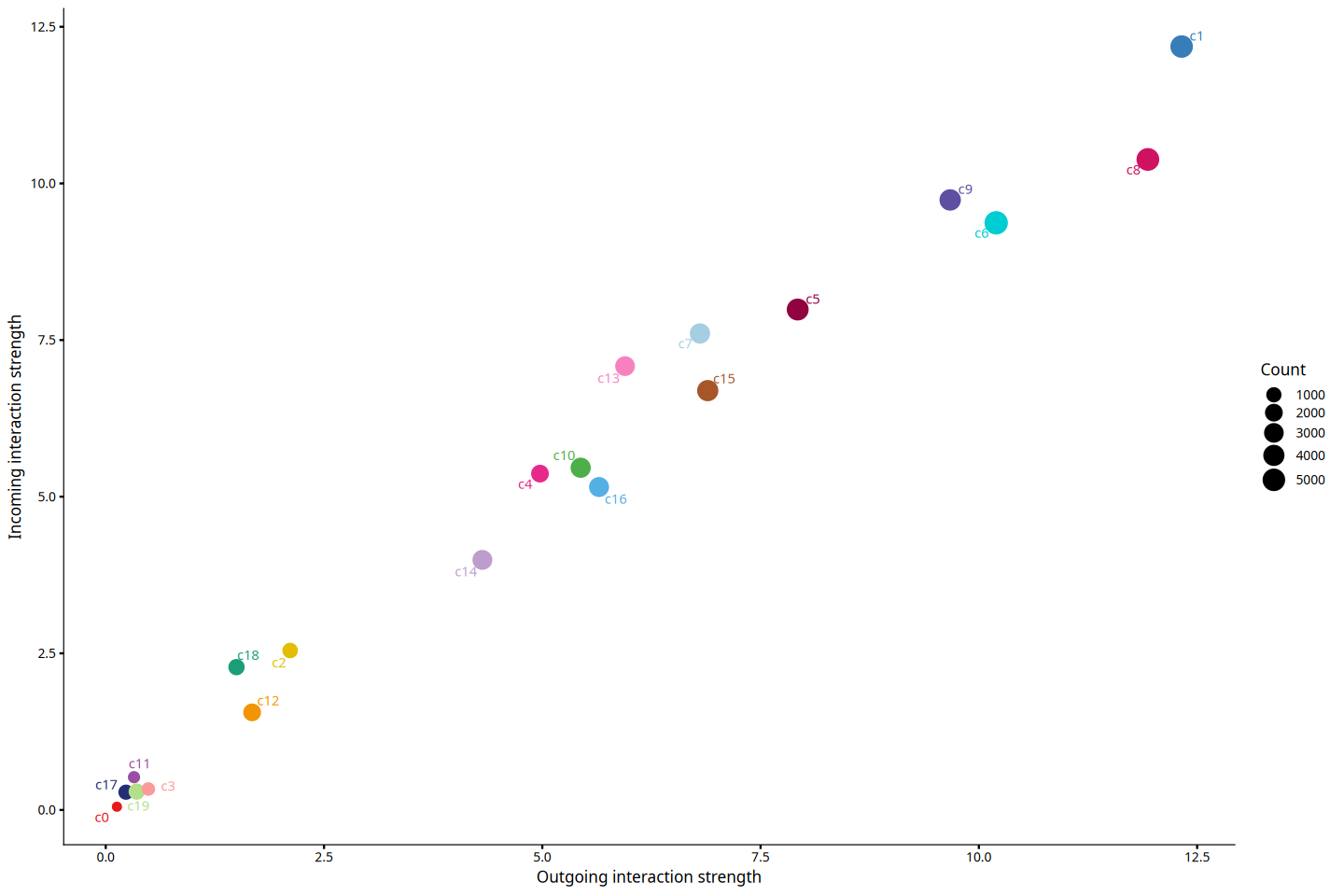
4.6 Identify Signals with Maximum Contribution to Incoming and Outgoing Signals
After clarifying the overall roles of cell groups as senders or receivers, this section further uses heatmaps to deeply analyze how specific signaling pathways are distributed and contribute among different cell groups.
This analysis helps us answer: Which pathways dominate the primary outgoing signals of a specific cell group? Or, through which pathways does a cell group mainly receive stimuli from the external environment? This has important guiding significance for uncovering core communication drivers.
# Data preprocessing into a plotting matrix before drawing the heatmap
signalingRole_heatmap_data_process = function(object,pattern,signaling=NULL,slot.name = "netP"){
    centr <- slot(object, slot.name)$centr
    outgoing <- matrix(0, nrow = nlevels(object@idents), ncol = length(centr))
    incoming <- matrix(0, nrow = nlevels(object@idents), ncol = length(centr))
    dimnames(outgoing) <- list(levels(object@idents), names(centr))
    dimnames(incoming) <- dimnames(outgoing)
    for (i in 1:length(centr)) {
        outgoing[,i] <- centr[[i]]$outdeg
        incoming[,i] <- centr[[i]]$indeg
    }
    if (pattern == "outgoing") {
        mat <- t(outgoing)
        legend.name <- "Outgoing"
    } else if (pattern == "incoming") {
        mat <- t(incoming)
        legend.name <- "Incoming"
    } else if (pattern == "all") {
        mat <- t(outgoing+ incoming)
        legend.name <- "Overall"
    }

    if (!is.null(signaling)) {
        mat1 <- mat[rownames(mat) %in% signaling, , drop = FALSE]
        mat <- matrix(0, nrow = length(signaling), ncol = ncol(mat))
        idx <- match(rownames(mat1), signaling)
        mat[idx[!is.na(idx)], ] <- mat1
        dimnames(mat) <- list(signaling, colnames(mat1))
    }
    return(mat)
}netAnalysis_signalingRole_heatmap = function(mat,mat.ori,legend.name,color.use = NULL, color.heatmap = "BuGn",title = NULL, width = 10, height = 8, font.size = 8, font.size.title = 10, cluster.rows = FALSE, cluster.cols = FALSE){
if (is.null(title)) {
title <- paste0(legend.name, " signaling patterns")
} else {
title <- paste0(paste0(legend.name, " signaling patterns"), " - ",title)
}
if (is.null(color.use)) {
color.use <- scPalette(length(colnames(mat)))
}
color.heatmap.use = grDevices::colorRampPalette((RColorBrewer::brewer.pal(n = 9, name = color.heatmap)))(100)
df<- data.frame(group = colnames(mat)); rownames(df) <- colnames(mat)
names(color.use) <- colnames(mat)
col_annotation <- HeatmapAnnotation(df = df, col = list(group = color.use),which = "column",
show_legend = FALSE, show_annotation_name = FALSE,
simple_anno_size = grid::unit(0.2, "cm"))
ha2 = HeatmapAnnotation(Strength = anno_barplot(colSums(mat.ori), border = FALSE,gp = gpar(fill = color.use, col=color.use)), show_annotation_name = FALSE)
pSum <- rowSums(mat.ori)
pSum.original <- pSum
pSum <- -1/log(pSum)
pSum[is.na(pSum)] <- 0
idx1 <- which(is.infinite(pSum) | pSum < 0)
if (length(idx1) > 0) {
values.assign <- seq(max(pSum)*1.1, max(pSum)*1.5, length.out = length(idx1))
position <- sort(pSum.original[idx1], index.return = TRUE)$ix
pSum[idx1] <- values.assign[match(1:length(idx1), position)]
}
ha1 = rowAnnotation(Strength = anno_barplot(pSum, border = FALSE), show_annotation_name = FALSE)
if (min(mat, na.rm = T) == max(mat, na.rm = T)) {
legend.break <- max(mat, na.rm = T)
} else {
legend.break <- c(round(min(mat, na.rm = T), digits = 1), round(max(mat, na.rm = T), digits = 1))
}
ht1 = Heatmap(mat, col = color.heatmap.use, na_col = "white", name = "Relative strength",
bottom_annotation = col_annotation, top_annotation = ha2, right_annotation = ha1,
cluster_rows = cluster.rows,cluster_columns = cluster.rows,
row_names_side = "left",row_names_rot = 0,row_names_gp = gpar(fontsize = font.size),column_names_gp = gpar(fontsize = font.size),
width = unit(width, "cm"), height = unit(height, "cm"),
column_title = title,column_title_gp = gpar(fontsize = font.size.title),column_names_rot = 90,
heatmap_legend_param = list(title_gp = gpar(fontsize = 8, fontface = "plain"),title_position = "leftcenter-rot",
border = NA, at = legend.break,
legend_height = unit(20, "mm"),labels_gp = gpar(fontsize = 8),grid_width = unit(2, "mm"))
)
return(ht1)
}Figure Legend: Heatmap displaying the contribution of cell groups and signaling pathways.
- Horizontal Axis (X-axis): Represents different cell types.
- Vertical Axis (Y-axis): Represents different signaling pathways.
- Color Depth: Each square in the heatmap represents the signal strength of a specific cell type in a specific signaling pathway; deeper colors indicate greater signal strength.
- Top Colored Bar Chart: Summarizes the total signal strength of the cell type across all signaling pathways. Higher bars indicate stronger overall incoming/outgoing signals for the cell type.
- Right Gray Bar Chart: Summarizes the total signal strength of the signaling pathway across all cell groups. Higher bars indicate a greater contribution of the pathway to the overall incoming/outgoing signals.
x=length(celltypes)
y=length(cellchat@netP$pathways)

mat = signalingRole_heatmap_data_process(cellchat,pattern = "outgoing")
mat.ori <- mat
mat <- sweep(mat, 1L, apply(mat, 1, max), '/', check.margin = FALSE)
mat[mat == 0] <- NA

if(min(mat,na.rm = TRUE)==max(mat,na.rm=TRUE)){
    mat[is.na(mat)] = 0
}

netAnalysis_signalingRole_heatmap(mat=mat,mat.ori=mat.ori, legend.name = "Outgoing", width = 10, height = 15)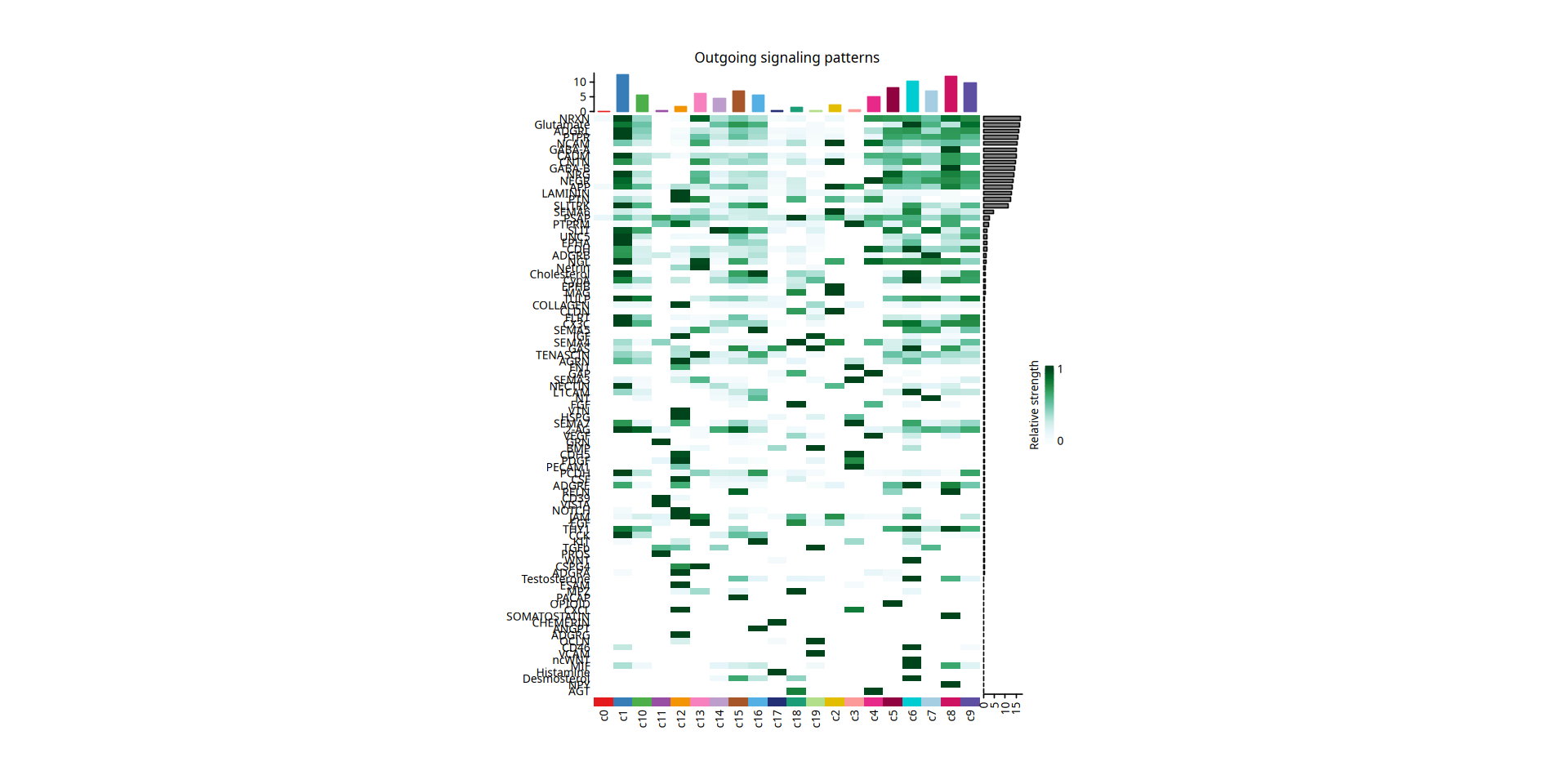
mat = signalingRole_heatmap_data_process(cellchat,pattern = "incoming")
mat.ori <- mat
mat <- sweep(mat, 1L, apply(mat, 1, max), '/', check.margin = FALSE)
mat[mat == 0] <- NA

if(min(mat,na.rm = TRUE)==max(mat,na.rm=TRUE)){
    mat[is.na(mat)] = 0
}
ht2 = netAnalysis_signalingRole_heatmap(mat=mat,mat.ori=mat.ori, legend.name = "Incoming", width = 10, height = 15)

print(ht2)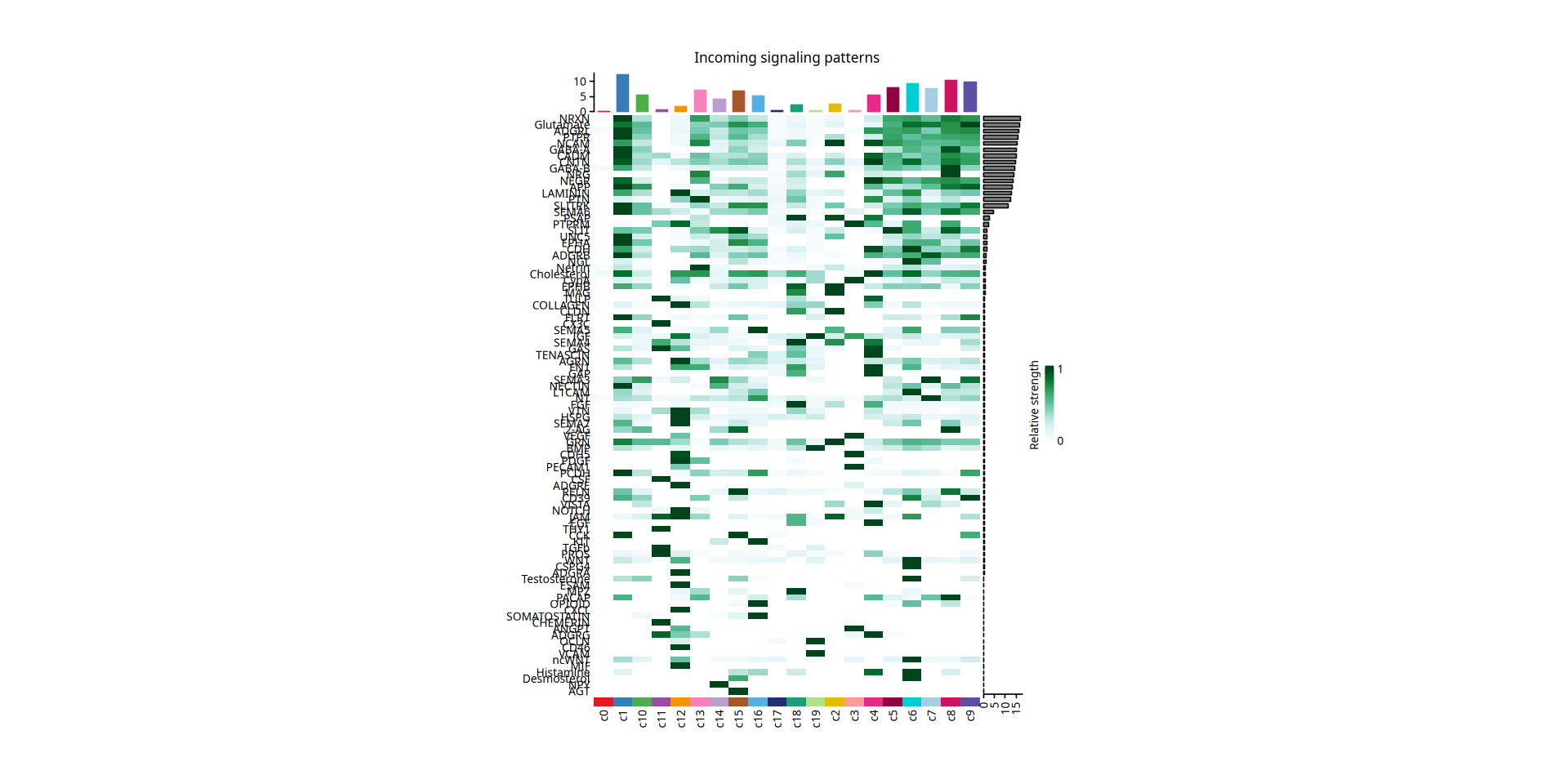
4.7 Functional Similarity Clustering of Signaling Pathways
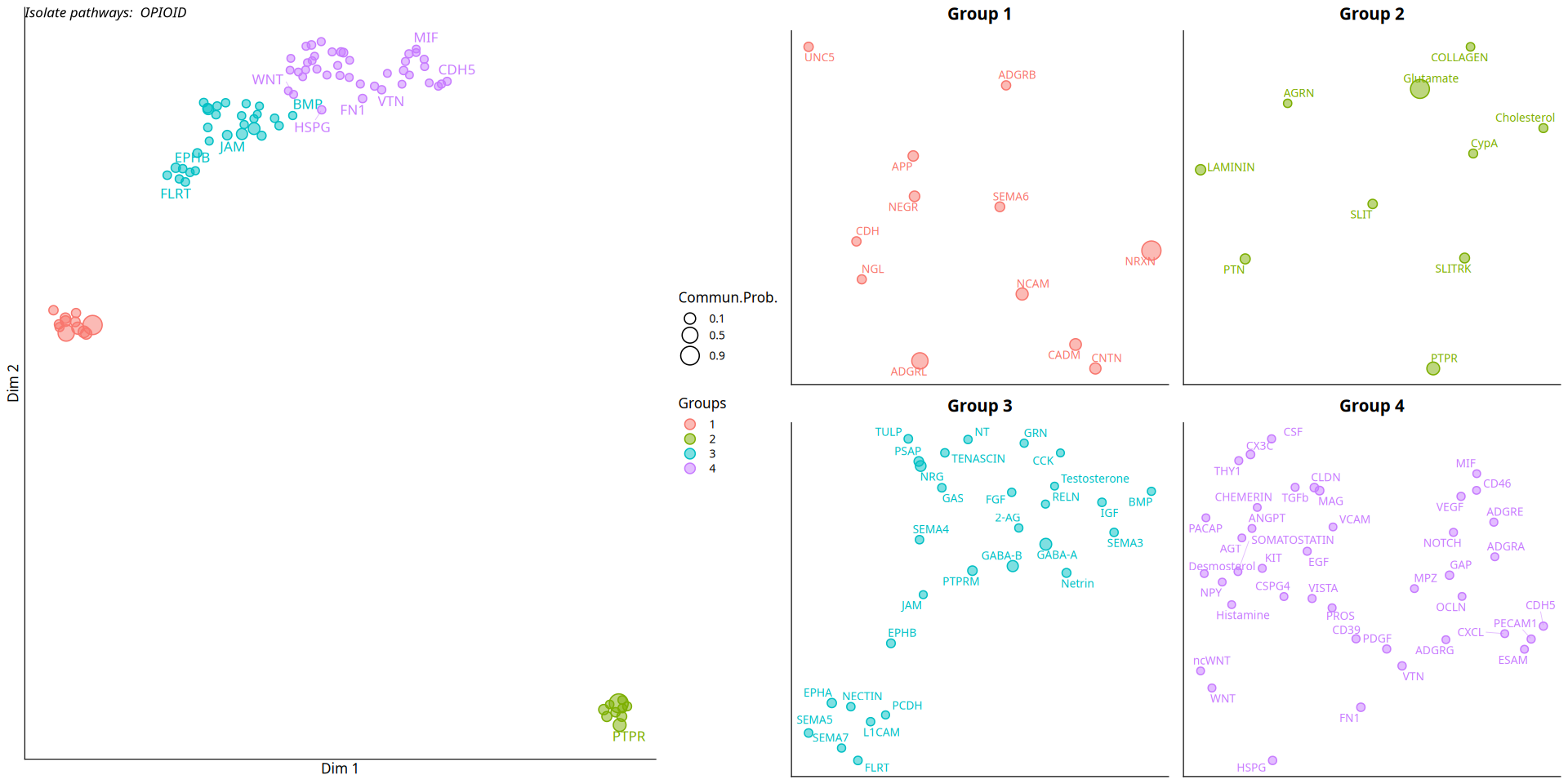
This section aims to explore the functional similarities of signaling pathways by comparing their communication network structures. The CellChat algorithm constructs a Shared Nearest Neighbor (SNN) graph based on the pathway communication probability matrix and performs dimensionality reduction clustering analysis.
Through this clustering, we can group signaling pathways with highly similar transmission patterns across different cell populations (e.g., some pathways might co-mediate communication between specific immune cells and tumor cells). The 2D scatter plot below shows the classification and dimensionality reduction results of all significant signaling pathways based on functional similarity.
Figure Legend: 2D dimensionality reduction plot of functional similarity clustering of signaling pathways.
- Dots: Each dot in the plot represents a specific signaling pathway.
- Shape/Color: Different colors or shapes of dots represent different clusters or groups; pathways belonging to the same cluster are considered to have similar communication functions.
- Spatial Distance: The distance between dots reflects their functional similarity in the communication network. Closer distances indicate that the two signaling pathways play more similar functions or patterns in the cell communication network.
ll = list()
cellchat = computeNetSimilarity(cellchat, type = "functional")
cellchat = netEmbedding(cellchat, type = "functional", umap.method = 'uwot')
cellchat = netClustering(cellchat, type = "functional", do.parallel=FALSE)

ll[[1]] = netVisual_embedding(cellchat, type = "functional", label.size = 3.5)

ll[[2]] = netVisual_embeddingZoomIn(cellchat, type = "functional", nCol = 2)

options(repr.plot.height=8, repr.plot.width=16)
plot_grid(plotlist = ll, ncol = 2)Classification learning of the signaling networks for a single dataset
saveRDS(cellchat,"cellchat.rds")
write.table(df.netp,"cellchat_netp_lr.xls",quote=F,sep='\t',row.names=F)
write.table(df.net,"cellchat_net_lr.xls",quote=F,sep='\t',row.names=F)