
单细胞空间转录组: 细胞通讯分析(基于 CellChat)
1. 模块简介
本模块基于 CellChat V2 算法,用于从单细胞空间转录组数据中推断、可视化和系统分析细胞间的通讯网络。
1.1 背景与意义:为什么要分析细胞通讯?
单细胞空间转录组测序使我们能够识别组织中的各种细胞类型,但这仅仅是了解了“零件清单”。细胞不是孤立存在的,它们通过分泌配体(Ligand)与受体(Receptor)结合,形成复杂的通讯网络,协调组织发育、稳态维持及疾病进展。CellChat 能够帮助我们从数据中重构这些“线路图”,回答以下关键生物学问题:
- 哪些细胞在对话?(主要的信号发送者和接收者是谁?)
- 它们在说什么?(主要通过哪些信号通路进行交流?)
- 环境如何影响通讯?(空间位置如何限制或促进细胞间的互作?)
1.2 核心原理:质量作用定律与空间约束
CellChat 的核心假设基于生物化学中的质量作用定律:配体与受体的结合强度取决于它们在对应细胞中的表达丰度。
- 表达推断:首先从基因表达矩阵中提取配体(Ligand, L)和受体(Receptor, R)的表达量。
- 概率计算:计算配体-受体对的互作概率(Communication Probability)。公式简略为:
。 - 空间约束:这是空间转录组分析的灵魂。与普通单细胞分析不同,本模块引入了细胞的物理坐标。只有当两个细胞在物理距离上足够接近(例如 < 250 微米)时,模型才认为它们可能发生旁分泌(Paracrine)通讯。这极大地降低了假阳性率,还原了真实的组织微环境。
2. 输入文件准备
数据质量是分析成功的基石。本模块对输入数据有明确的格式要求,请在运行前仔细检查。
2.1 核心输入:Seurat 对象 (.rds)
你需要提供一个标准的 .rds 文件,其中存储了 Seurat 对象。该对象必须包含以下三要素:
| 要素 | 说明 | 检查方法 (R 语言) |
|---|---|---|
| 1. 基因表达矩阵 | 需包含归一化后的数据 (data slot)。推荐使用 LogNormalize 或 SCTransform 后的数据。 | GetAssayData(obj, slot='data') |
| 2. 细胞类型注释 | Metadata 中必须有一列明确标注了细胞类型(如 T_cell, B_cell)。CellChat 是基于细胞群而非单个细胞进行分析的。 | table(obj$CellAnnotation) |
| 3. 空间位置信息 | 至关重要。对象中需存储每个细胞/Spot 的物理坐标 (x, y)。通常位于 images 列表或 reductions$spatial 中。 | Embeddings(obj, 'spatial') |
3. 数据加载与预处理
本步骤将读取用户的输入数据,并将其转化为 CellChat 所需的对象格式。主要步骤包括:
- 加载数据并创建 CellChat 对象:读取表达矩阵和 metadata。
- 设置受体-配体数据库:选择对应的物种数据库(人,小鼠或斑马鱼)。
- 数据预处理:识别过表达的基因和相互作用,计算细胞间通信概率。
library(Seurat)
library(CellChat)
library(patchwork)
library(gridExtra)
library(figpatch)
library(cowplot)
library(ComplexHeatmap)Loading required package: dplyr
Warning message:
“package ‘dplyr’ was built under R version 4.3.3”
Attaching package: ‘dplyr’
The following objects are masked from ‘package:stats’:
filter, lag
The following objects are masked from ‘package:base’:
intersect, setdiff, setequal, union
Loading required package: igraph
Attaching package: ‘igraph’
The following objects are masked from ‘package:dplyr’:
as_data_frame, groups, union
The following objects are masked from ‘package:stats’:
decompose, spectrum
The following object is masked from ‘package:base’:
union
Loading required package: ggplot2
Warning message:
“package ‘gridExtra’ was built under R version 4.3.3”
Attaching package: ‘gridExtra’
The following object is masked from ‘package:Biobase’:
combine
The following object is masked from ‘package:BiocGenerics’:
combine
The following object is masked from ‘package:dplyr’:
combine
Warning message:
“package ‘cowplot’ was built under R version 4.3.3”
Attaching package: ‘cowplot’
The following object is masked from ‘package:patchwork’:
align_plots
Attaching package: ‘DT’
The following object is masked from ‘package:SeuratObject’:
JS
The following object is masked from ‘package:Seurat’:
JS
Warning message:
“package ‘ComplexHeatmap’ was built under R version 4.3.2”
Loading required package: grid
========================================
ComplexHeatmap version 2.18.0
Bioconductor page: http://bioconductor.org/packages/ComplexHeatmap/
Github page: https://github.com/jokergoo/ComplexHeatmap
Documentation: http://jokergoo.github.io/ComplexHeatmap-reference
If you use it in published research, please cite either one:
- Gu, Z. Complex Heatmap Visualization. iMeta 2022.
- Gu, Z. Complex heatmaps reveal patterns and correlations in multidimensional
genomic data. Bioinformatics 2016.
The new InteractiveComplexHeatmap package can directly export static
complex heatmaps into an interactive Shiny app with zero effort. Have a try!
This message can be suppressed by:
suppressPackageStartupMessages(library(ComplexHeatmap))
========================================
## rds_path:Seurat 对象的 rds 文件路径,需包含细胞/空间点表达矩阵及元数据
rds_path="./rds/25020230_nao_CS_banksy.rds"
## species:物种选择,可选 "human" 或者 "mouse"
species="mouse"
## meta_path:参数说明暂无
meta_path = "./rds/meta.tsv"
## method:计算方法选择。可选 'triMean'(推荐用于单细胞)、'truncatedMean'、'median' 等
method="truncatedMean"
## mincell:每个细胞群中细胞数量的最小阈值。少于该值的细胞群将被过滤掉,不参与通讯分析
mincell="10"
## Samples:需要分析的具体样本名称(需与 col_sam 列中的名称一致)
Samples="25020230_nao_CS_expression"
## col_sam:Seurat 对象 metadata 中用于区分样本的列名
col_sam="Sample"
## col_celltype:Seurat 对象 metadata 中存储细胞类型信息的列名
col_celltype="RNA_snn_res.0.2"
## trim:用于截断均值计算(method='truncatedMean')的截断比例(例如 0.25 表示去除最高和最低的 25%)
trim=0.25
## celltypes:需要包含在分析中的细胞类型名称或簇编号(用逗号分隔)
celltypes="0,1,2,3,4,5,6,7,8,9,10,11,12,13,14,15,16,17,18,19"if (species == "human"){
CellChatDB = CellChatDB.human
}else if (species == "mouse"){
CellChatDB = CellChatDB.mouse
}else if (species == "zebrafish"){
CellChatDB = CellChatDB.zebrafish
}data = readRDS(rds_path)
Samples=strsplit(Samples,",")[[1]]
celltypes=strsplit(celltypes,",")[[1]]if (meta_path != ""){
meta = read.table(meta_path,header=T,sep='\t',check.names=F)
if(colnames(meta)[1]=="barcode"){
rownames(meta) <- meta$barcode
} else if(colnames(meta)[1]=="barcodes"){
rownames(meta) <- meta$barcodes
}
data@meta.data = meta
}
data = subset(data,cells=rownames(data@meta.data[data@meta.data[[col_celltype]] %in% celltypes,]))if ("0" %in% celltypes) {
celltypes = paste0("c", celltypes)
data@meta.data$new_celltype_col = paste0("c", data@meta.data[[col_celltype]])
col_celltype = "new_celltype_col"
}3.1 创建 CellChat 对象并运行核心分析
这是整个分析流程中最关键的步骤。我们将遍历每个样本,基于其基因表达谱和空间位置信息,构建细胞通讯网络。以下是详细的步骤解析:
步骤一:数据提取与整理
在创建对象前,我们需要从 Seurat 对象中提取三个核心组件:
- 基因表达矩阵 (
data.input):使用归一化后的数据 (dataslot)。 - 元数据 (
meta):包含细胞类型注释 (CellAnnotation)。 - 空间坐标 (
spatial.locs):从 Seurat 的 reduction 中提取。注意:CellChat 要求列名必须为"imagerow"和"imagecol",因此我们需要手动重命名。 - 空间转换因子 (
spatial.factors):定义像素与物理距离(如微米)的换算关系 (ratio),以及切片之间的容差 (tol)。这对于多切片分析尤为重要。
步骤二:创建 CellChat 对象 (createCellChat)
使用 createCellChat 函数初始化对象。
- 关键参数
datatype="spatial":明确告知 CellChat 我们正在处理空间转录组数据。这会激活后续的空间距离约束算法。
步骤三:预处理——寻找活跃的“对话者”
在推断通讯前,我们需要确定哪些基因在哪些细胞类型中是活跃的。
identifyOverExpressedGenes:寻找在特定细胞群中高表达的基因。identifyOverExpressedInteractions:基于配体-受体数据库,识别潜在的互作对。如果配体和受体都在某些细胞群中高表达,则保留该互作。
步骤四:核心推断——计算通讯概率 (computeCommunProb)
这是“魔法”发生的步骤。算法结合表达量和空间距离计算通讯概率
💡 关键参数详解(空间分析特有):
type: 计算基因表达均值的方法。可选"triMean"(推荐,抗噪性强,取四分位数的加权平均) 或"truncatedMean"(截断均值)。trim: 当type="truncatedMean"时使用,指定截断的比例(如 0.1 表示去除首尾 10% 的极值,避免离群点影响)。distance.use = TRUE: 关键参数,开启空间距离限制。仅允许空间距离内的细胞进行通讯,这是空间转录组分析的核心。interaction.range: 互作距离阈值(如 250)。定义了细胞间通讯发生的最大物理距离(单位与空间坐标一致)。scale.distance: 距离缩放因子(如 0.1)。用于调整输入空间坐标的尺度,使其适配模型参数。contact.dependent = TRUE: 开启接触依赖性限制。针对接触依赖型配受体(如 Notch 通路),施加更严格的距离约束。contact.range: 接触依赖性互作的距离阈值(如 10)。通常远小于interaction.range,用于模拟细胞直接接触的情况。
步骤五:结果聚合与过滤
filterCommunication:过滤掉细胞数量极少的细胞群参与的通讯,减少噪音。computeCommunProbPathway:将成百上千个配体-受体对(如 Wnt3a-Fzd5, Wnt5a-Fzd2)归纳为生物学通路(如 WNT 信号通路),便于宏观解释。aggregateNet:计算所有细胞对之间的总通讯强度,生成综述性的网络图。
subset_obj = subset(data, cells=rownames(data@meta.data[data@meta.data[[col_sam]] %in% Samples,]))

print(dim(subset_obj@meta.data))
print(table(subset_obj[[col_celltype]]))
data.input = Seurat::GetAssayData(subset_obj,slot="data",assay="RNA")
meta = subset_obj@meta.data
spatial.locs = Embeddings(subset_obj,reduction = 'spatial')
colnames(spatial.locs) = c("imagerow","imagecol")
spatial.factors = data.frame(ratio = 0.265, tol = 5)
meta$slices="slice1"
meta$slices = factor(meta$slices)
spatial.locs = as.data.frame(spatial.locs)
spatial.locs = spatial.locs[!is.na(spatial.locs$imagerow),]
data.input = data.input[,rownames(spatial.locs)]
meta = meta[rownames(meta),]
cellchat = createCellChat(object=data.input,meta=droplevels(meta),group.by=col_celltype,datatype="spatial",
                          coordinates=spatial.locs,spatial.factors=spatial.factors)

cellchat@DB = CellChatDB

cellchat = subsetData(cellchat)
cellchat = identifyOverExpressedGenes(cellchat)
cellchat = identifyOverExpressedInteractions(cellchat)

if (method == "triMean") {
    cellchat = computeCommunProb(cellchat, type = "triMean", trim = trim,
                                  distance.use = TRUE, interaction.range = 250, scale.distance = 0.1,
                                  contact.dependent = TRUE, contact.range = 10)
} else {
    cellchat = computeCommunProb(cellchat, type = "truncatedMean", trim = trim,
                                  distance.use = TRUE, interaction.range = 250, scale.distance = 0.1,
                                  contact.dependent = TRUE, contact.range = 10)
}
cellchat = filterCommunication(cellchat, min.cells = mincell)
cellchat = computeCommunProbPathway(cellchat)
cellchat = aggregateNet(cellchat)

cellchat = netAnalysis_computeCentrality(cellchat, slot.name = "netP")
cellchat = computeNetSimilarity(cellchat, type = "functional")

df.netp <- subsetCommunication(cellchat,slot.name = "netP")
df.net <- subsetCommunication(cellchat,slot.name = "net")new_celltype_col
c0 c1 c10 c11 c12 c13 c14 c15 c16 c17 c18 c19 c2
13144 4454 1036 970 948 882 584 439 291 232 218 185 4195
c3 c4 c5 c6 c7 c8 c9
2747 2380 2306 2194 1784 1601 1494
[1] "Create a CellChat object from a data matrix"
Create a CellChat object from spatial transcriptomics data...
Warning message in createCellChat(object = data.input, meta = droplevels(meta), :
“The 'meta' data does not have a column named \`samples\`. We now add this column and all cells are assumed to belong to \`sample1\`!
”
Set cell identities for the new CellChat object
The cell groups used for CellChat analysis are c0, c1, c10, c11, c12, c13, c14, c15, c16, c17, c18, c19, c2, c3, c4, c5, c6, c7, c8, c9
The number of highly variable ligand-receptor pairs used for signaling inference is 3116
truncatedMean is used for calculating the average gene expression per cell group.
[1] ">>> Run CellChat on spatial transcriptomics data using distances as constraints of the computed communication probability <<< [2026-05-11 16:06:08.813226]"
The input L-R pairs have both secreted signaling and contact-dependent signaling. Run CellChat in a contact-dependent manner for \`Cell-Cell Contact\` signaling, and in a diffusion manner based on the \`interaction.range\` for other L-R pairs.
[1] ">>> CellChat inference is done. Parameter values are stored in \`object@options$parameter\` <<< [2026-05-11 16:18:38.874591]"
4. 细胞通讯计算结果
4.1 细胞间互作数目与互作强度
本部分旨在从宏观网络层面展示不同细胞亚群之间的整体通讯状态。CellChat 算法会推断各细胞群之间具有统计学意义的细胞间通信,并汇总为两个关键指标:
- 互作数目(Interactions):即两群细胞之间显著存在的受配体对(L-R pairs)的数量总和。
- 互作强度(Strength / Communication Probability):即基于质量作用定律计算得出的这些互作对的通讯概率总和。
图注说明:统计不同细胞类群之间的 L-R pairs 数量(interactions)和通讯强度(strength)。
- 实心圆(节点):不同颜色的实心圆表示不同的细胞亚群,实心圆的大小与该细胞组对应的细胞个数成正比。
- 边(连线):每条边的颜色与信号发送者保持一致,边的粗细与受配体对数量/通讯强度成比例。
options(repr.plot.height=8, repr.plot.width=16)
par(mfrow = c(1,2), xpd=TRUE)
p1=netVisual_circle(cellchat@net$count, weight.scale = T, label.edge= F, title.name = "Number of interactions")
p2=netVisual_circle(cellchat@net$weight, weight.scale = T, label.edge= F, title.name = "Interaction weights/strength")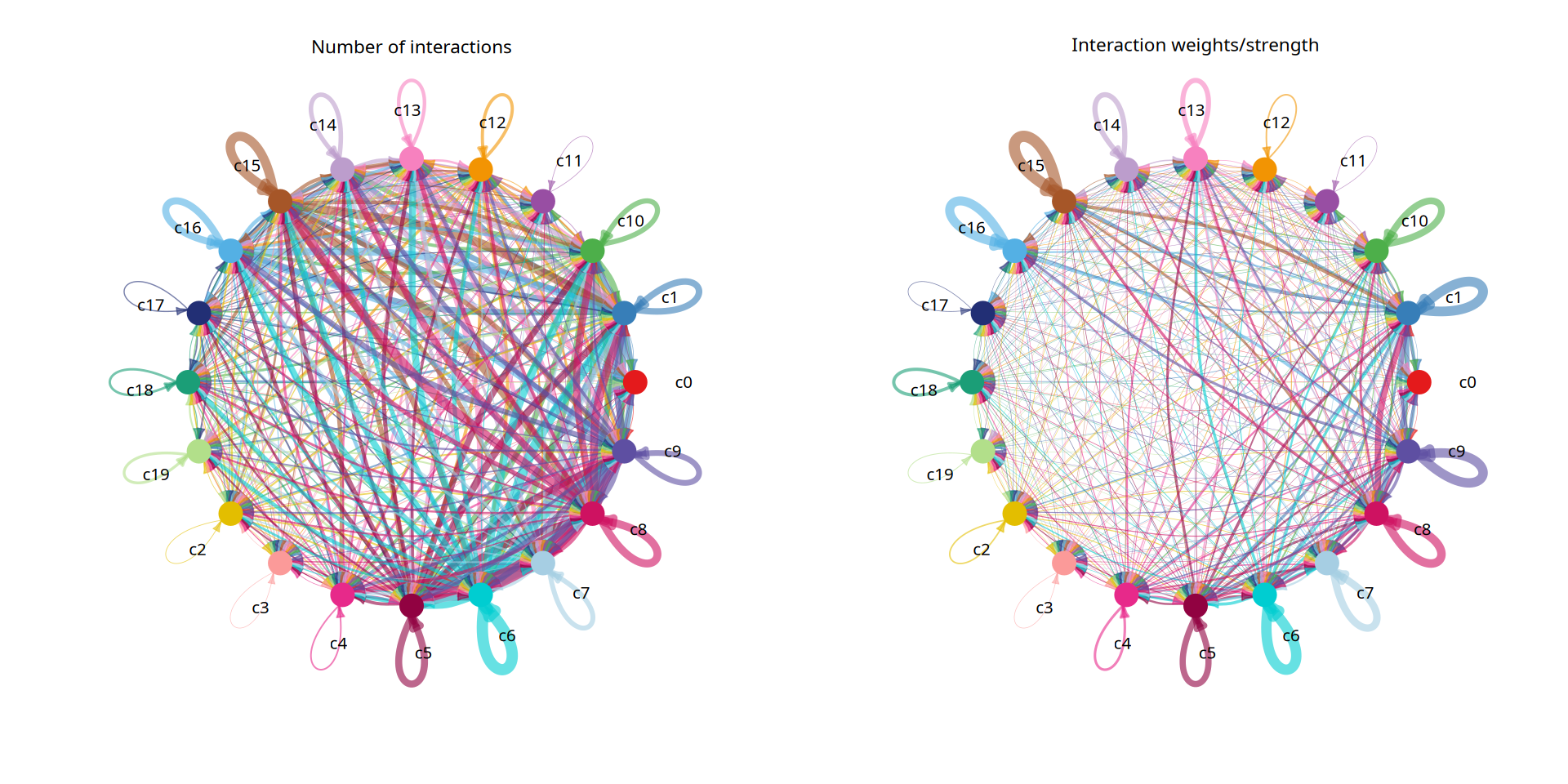
图注说明:细胞间通讯网络的热图(Heatmap)展示。
- 行(Target)与列(Source):分别代表接收信号和发送信号的细胞群。
- 颜色深浅:颜色的深浅代表细胞群之间相互作用的数量(count)或强度(weight)。颜色越深,表示通讯越活跃。
- 顶部条形图:显示每种细胞群作为信号发送者(Source)向外输出的总体通讯强度。
- 右侧条形图:显示每种细胞群作为信号接收者(Target)接收的总体通讯强度。
netVisual_heatmap(cellchat, measure = "count", color.heatmap = "Blues")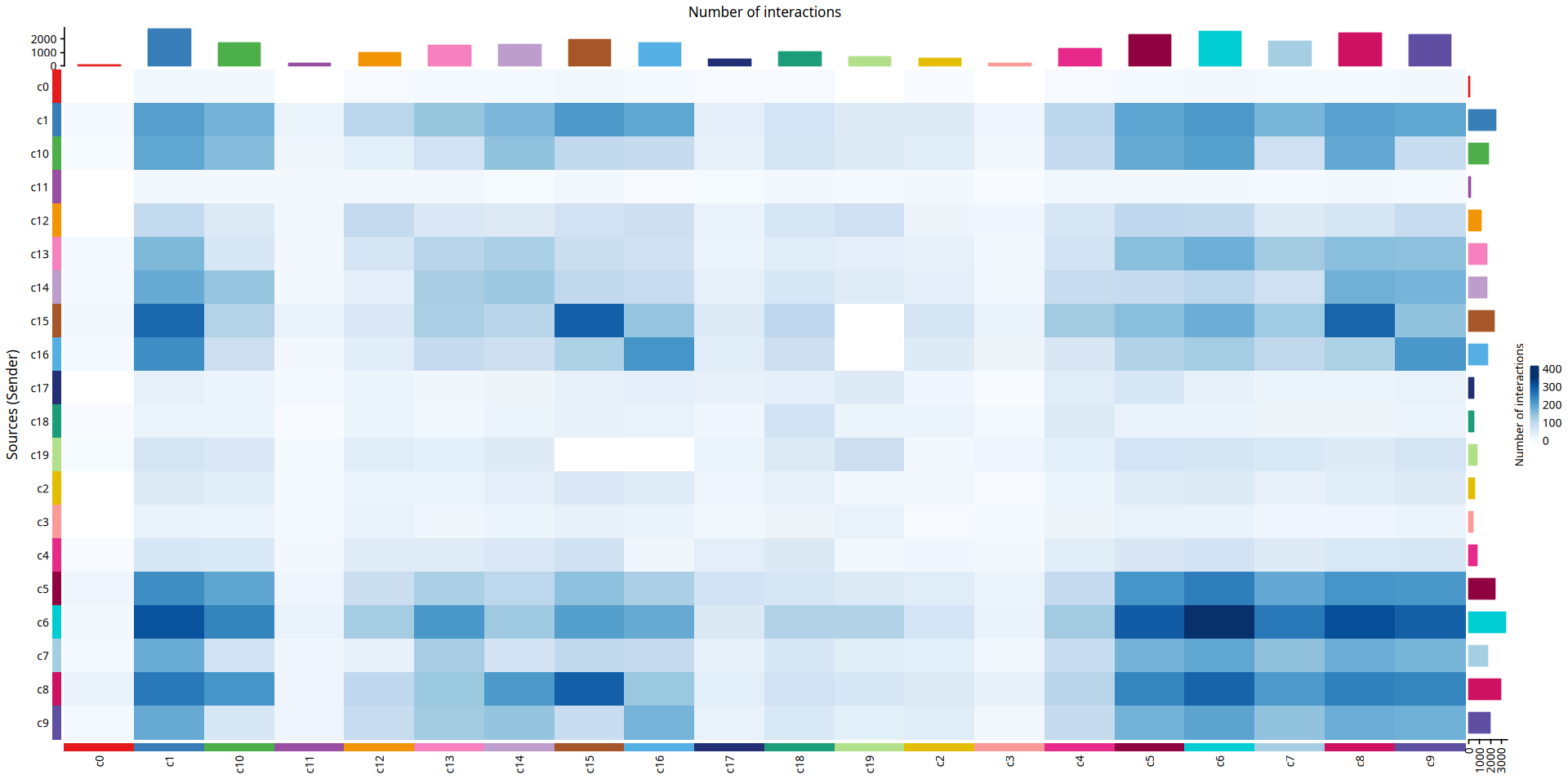
netVisual_heatmap(cellchat, measure = "weight", color.heatmap = "Blues")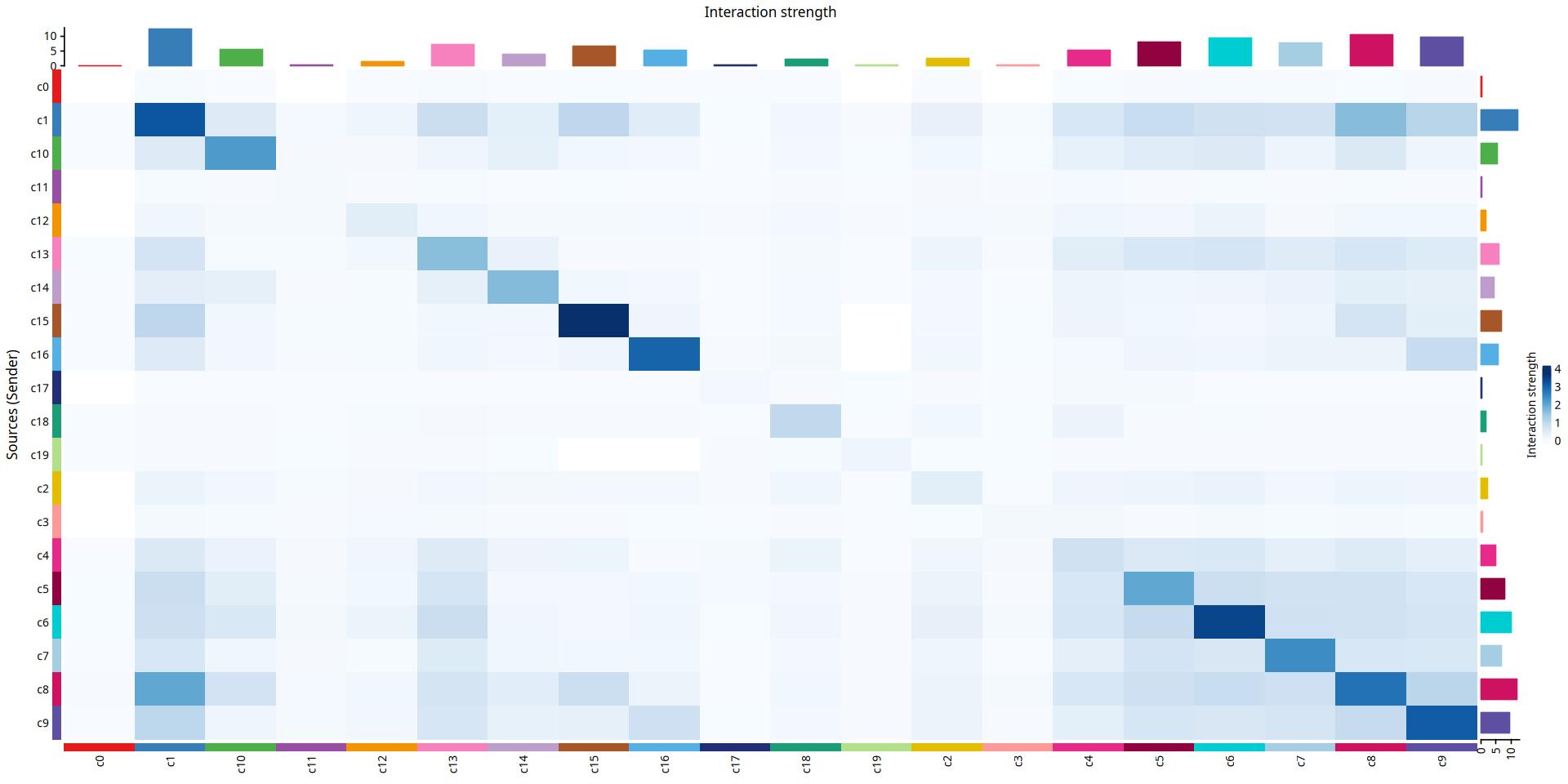
图注说明:拆分展示各细胞群作为信号发送者时的通讯强度(strength)。
- 实心圆(节点):不同颜色的实心圆表示不同的细胞亚群,实心圆的大小与该细胞组对应的细胞个数成正比。
- 边(连线):每条边的颜色与当前的信号发送者保持一致,边的粗细与通讯强度成比例。
mat = cellchat@net$weight

mat2 = matrix(0, nrow = nrow(mat), ncol = ncol(mat), dimnames = dimnames(mat))
mat2[1, ] = mat[1, ]
groupSize = as.numeric(table(cellchat@idents))
p = netVisual_circle(mat2, vertex.weight = groupSize, weight.scale = T, edge.weight.max = max(mat), title.name = rownames(mat)[1])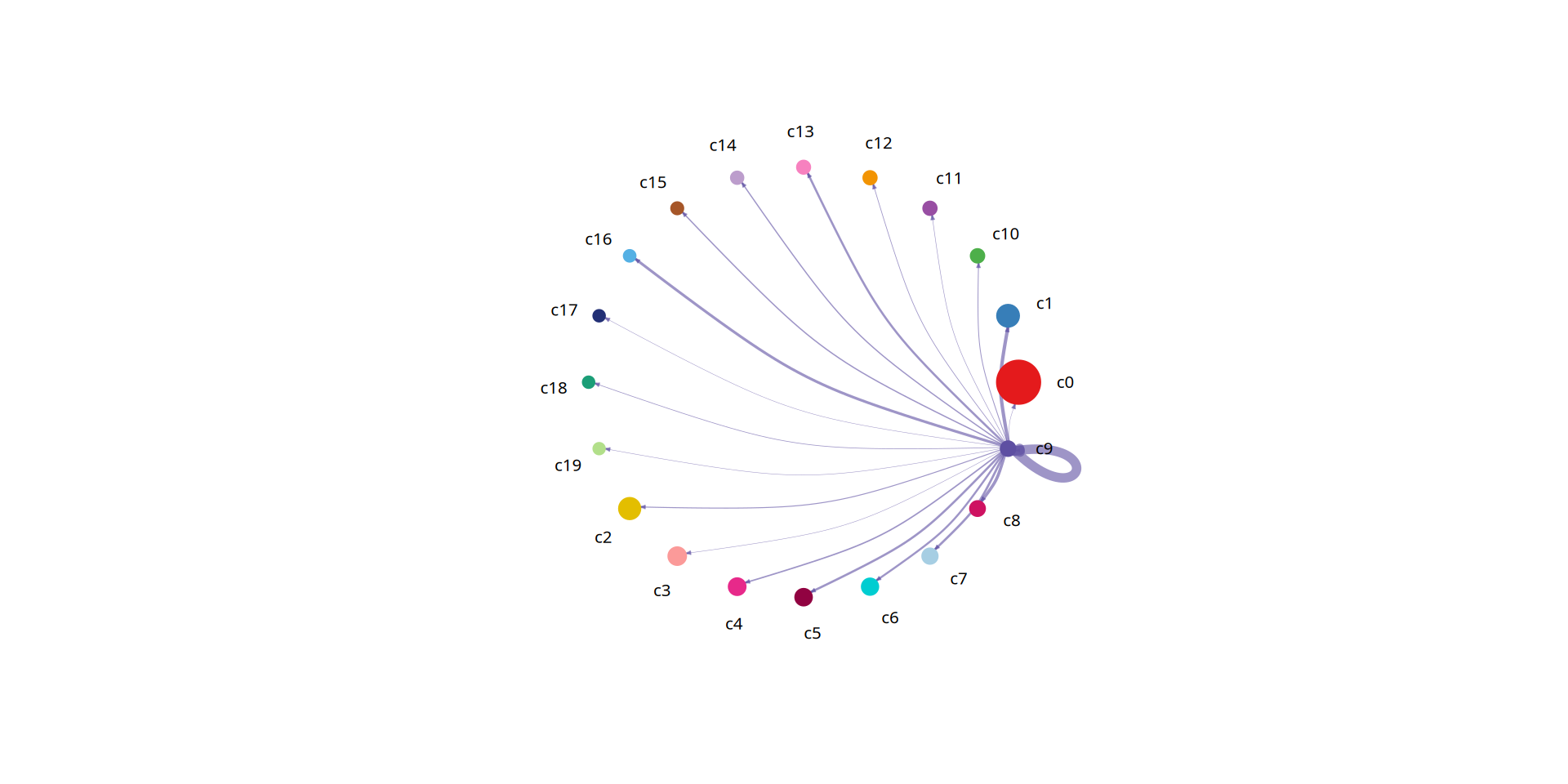
图注说明:拆分展示各细胞群作为信号发送者时的 L-R pairs 数量(interactions)。
- 实心圆(节点):不同颜色的实心圆表示不同的细胞亚群,实心圆的大小与该细胞组对应的细胞个数成正比。
- 边(连线):每条边的颜色与当前的信号发送者保持一致,边的粗细与受配体对数量成比例。
mat <- cellchat@net$count

mat2 = matrix(0, nrow = nrow(mat), ncol = ncol(mat), dimnames = dimnames(mat))
mat2[1, ] = mat[1, ]
p = netVisual_circle(mat2, vertex.weight = groupSize, weight.scale = T, edge.weight.max = max(mat), title.name = rownames(mat)[1])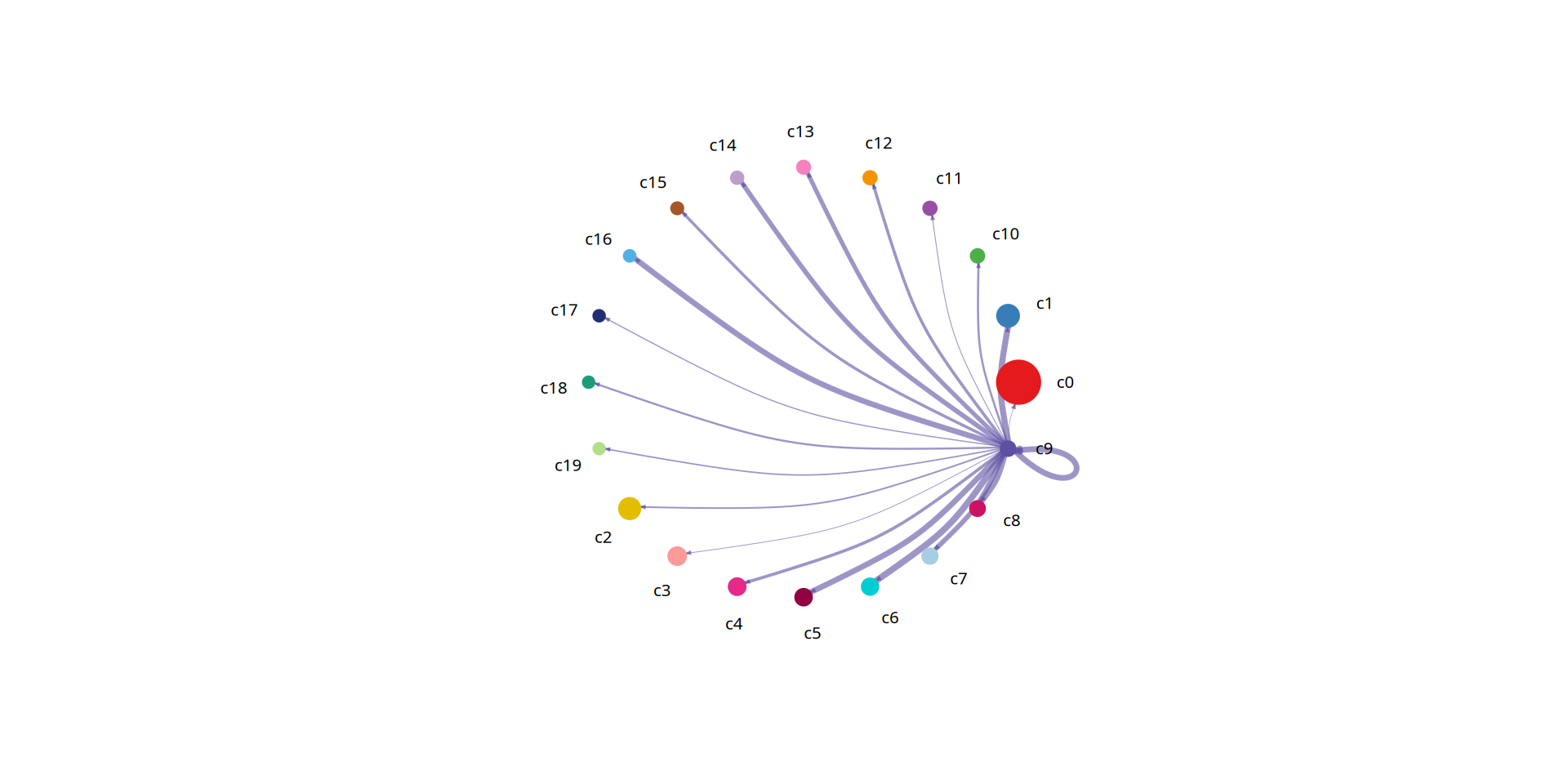
4.2 细胞通讯配体-受体气泡图
在了解了整体通讯网络拓扑后,我们往往需要深入挖掘导致这些通讯发生的具体分子机制。本部分将分析视角从“细胞水平”下沉到“分子水平”。
通过提取特定细胞群(如选定某一类细胞作为发送者,另一类细胞作为接收者)之间显著的配体-受体(L-R)对相互作用,我们可以精确地识别出是哪些配体与受体的结合介导了它们之间的串扰。
图注说明:细胞通讯配体-受体气泡图(Bubble Plot)展示。
- 横坐标(X 轴):代表参与相互作用的细胞对(Sender -> Receiver)。
- 纵坐标(Y 轴):代表具体的配体-受体对(Ligand-Receptor pairs)。
- 气泡大小:表示通讯概率(P-value 的负对数,即显著性),气泡越大代表该互作越显著。
- 气泡颜色:代表通讯的相对强度(Communication Probability),颜色越深(偏红/偏暖色)表示互作概率/强度越高。
#细胞互作气泡图
options(repr.plot.height=12, repr.plot.width=12)
netVisual_bubble(cellchat,remove.isolate = FALSE, angle.x = 90,sources.use = c(1:9),targets.use = c(13,14))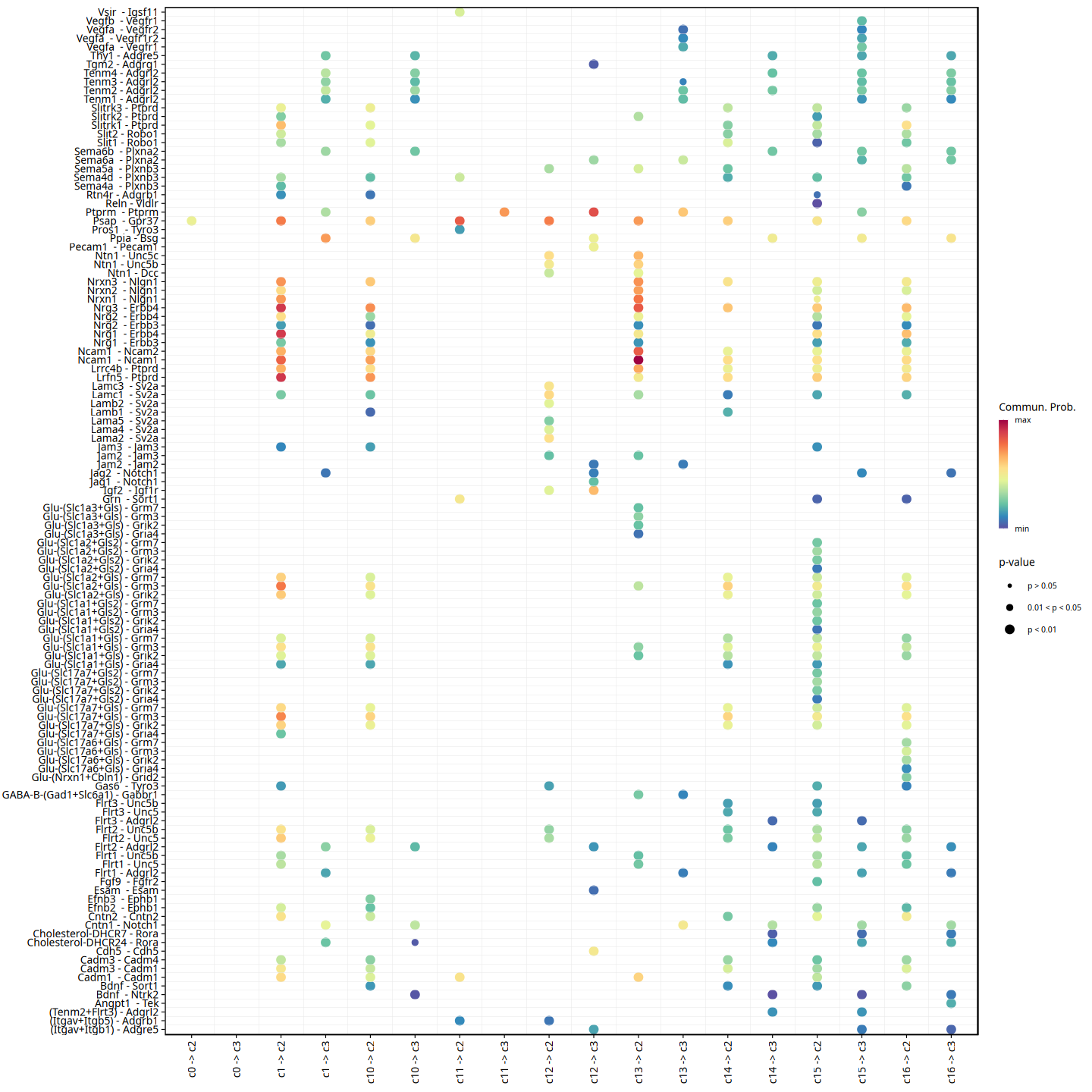
4.3 细胞通讯配体-受体和弦图
除了气泡图,我们还可以使用和弦图来展示特定细胞群之间显著的配体-受体对。和弦图能够非常直观地展示多个细胞群之间复杂的信号发送与接收网络拓扑结构。
图注说明:和弦图展示在特定细胞群之间通讯概率显著的受体-配体对(L-R pairs,p < 0.05)。
- 最外层圆环:圆环中的每一段代表不同的细胞类群或受体/配体,不同颜色代表不同的细胞类群。
- 内部弧线:弧线连接信号的发送方与接收方。箭头从信号发出者指向接收者。
- 弧线宽度:弧线越宽代表该配体-受体对的通讯概率(互作强度)越大。
p=netVisual_chord_gene(cellchat, slot.name = "net", lab.cex = 1,legend.pos.y = 30,reduce=0.005,legend.pos.x=1)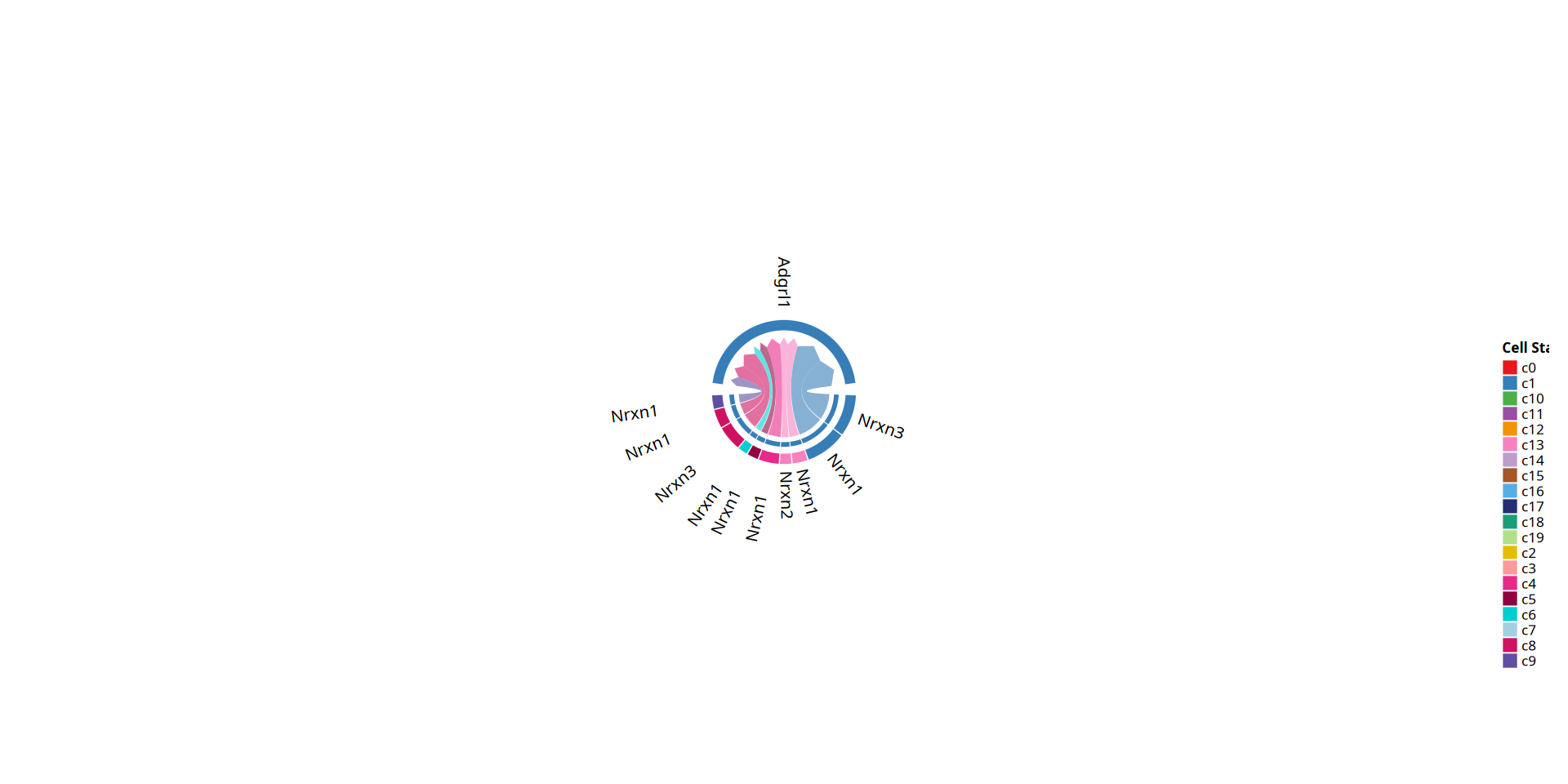
4.4 信号通路层次分析
不同于前一部分聚焦在单个配体-受体(L-R)对的互作,本部分将视角提升到了信号通路层面。
由于一个生物学信号通路往往由多个配体、受体及其辅因子共同介导,CellChat 能够通过计算通路内所有相关配受体对通讯概率的总和,来评估整个信号通路的通讯强度。这有助于我们在更高的功能维度上,理解细胞群之间主要依赖哪些关键信号通路(如 TGFb、WNT、NOTCH 等)进行串扰。
图注说明:和弦图展示在特定细胞群之间通讯概率显著的信号通路(p < 0.05)。
- 最外层圆环:圆环中的每一段代表不同的信号通路或细胞类群,不同颜色代表不同的细胞类群。
- 内部弧线(连线):弧线连接信号的发送方与接收方。箭头从信号发出者指向接收者。
- 弧线宽度:弧线越宽代表该信号通路的通讯概率(互作强度)越大。
p=netVisual_chord_gene(cellchat, slot.name = "netP", lab.cex = 0.8,legend.pos.y = 80,reduce=0.005,legend.pos.x=10)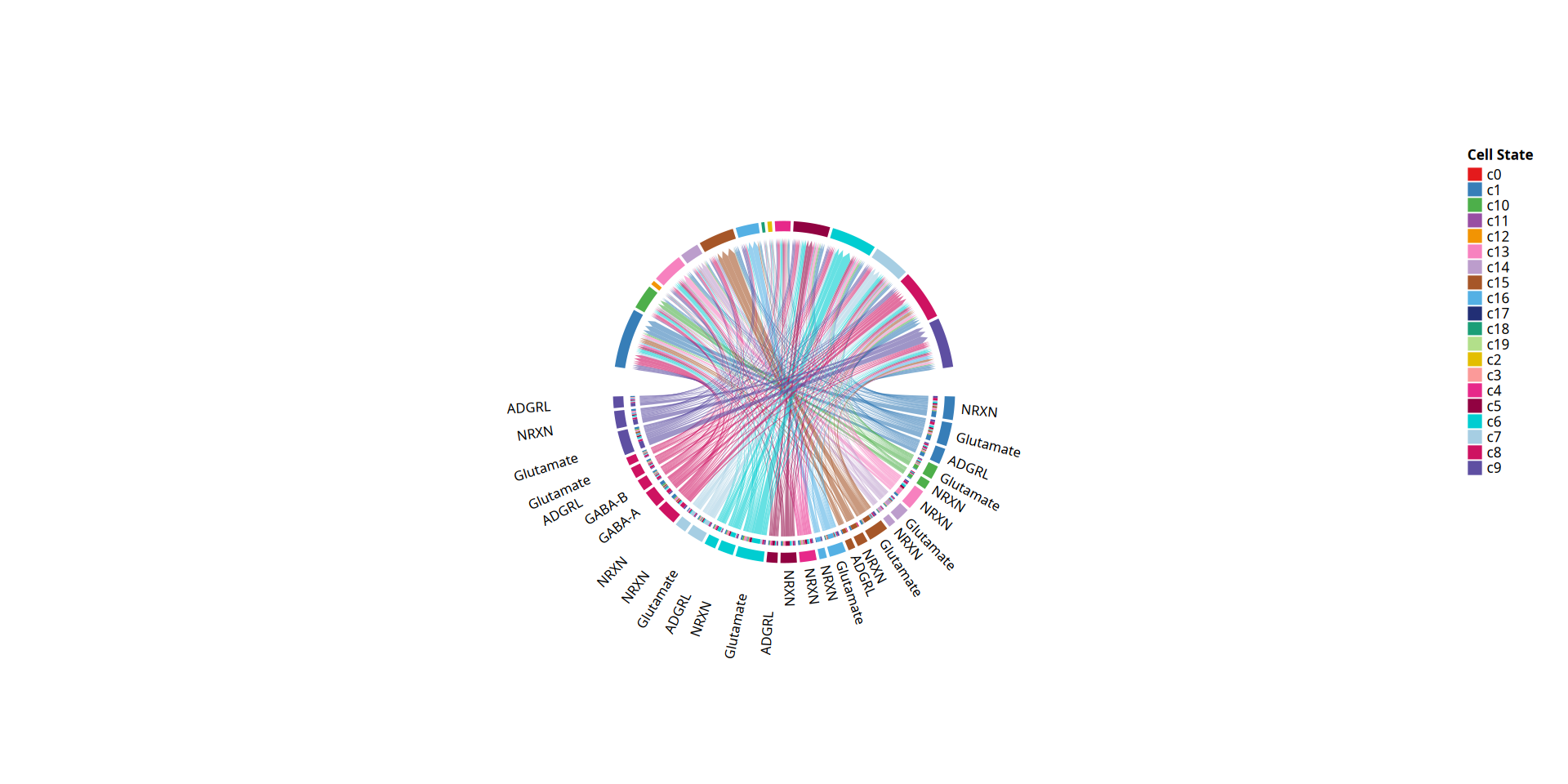
4.5 细胞通讯角色识别
在一个复杂的细胞微环境中,不同的细胞群体通常扮演着不同的“通讯角色”。本部分旨在通过计算网络中心性指标(Network Centrality),来量化评估每种细胞类型在整体通讯网络中的重要性。
通过计算每种细胞的总传出概率(Outgoing)和总传入概率(Incoming),我们可以直观地识别出哪些细胞群是组织微环境中的主要信号“发送者(Sender)”,哪些是主要的“接收者(Receiver)”,以及哪些细胞群同时兼具这两种身份,成为网络中的“核心枢纽(Hub)”。
图注说明:细胞通讯角色识别的 2D 散点图展示。
- 横坐标(X 轴):代表与该细胞群相关的总传出通信概率(Outgoing interaction strength)。值越大,表示该细胞作为信号发送方的作用越强。
- 纵坐标(Y 轴):代表与该细胞群相关的总传入通信概率(Incoming interaction strength)。值越大,表示该细胞作为信号接收方的作用越强。
- 点的大小:代表与该细胞群相关的总关系数量(包括传出和传入的所有显著互作数)。
- 点的颜色:表示不同的细胞群。
options(repr.plot.height=8, repr.plot.width=12)
netAnalysis_signalingRole_scatter(cellchat)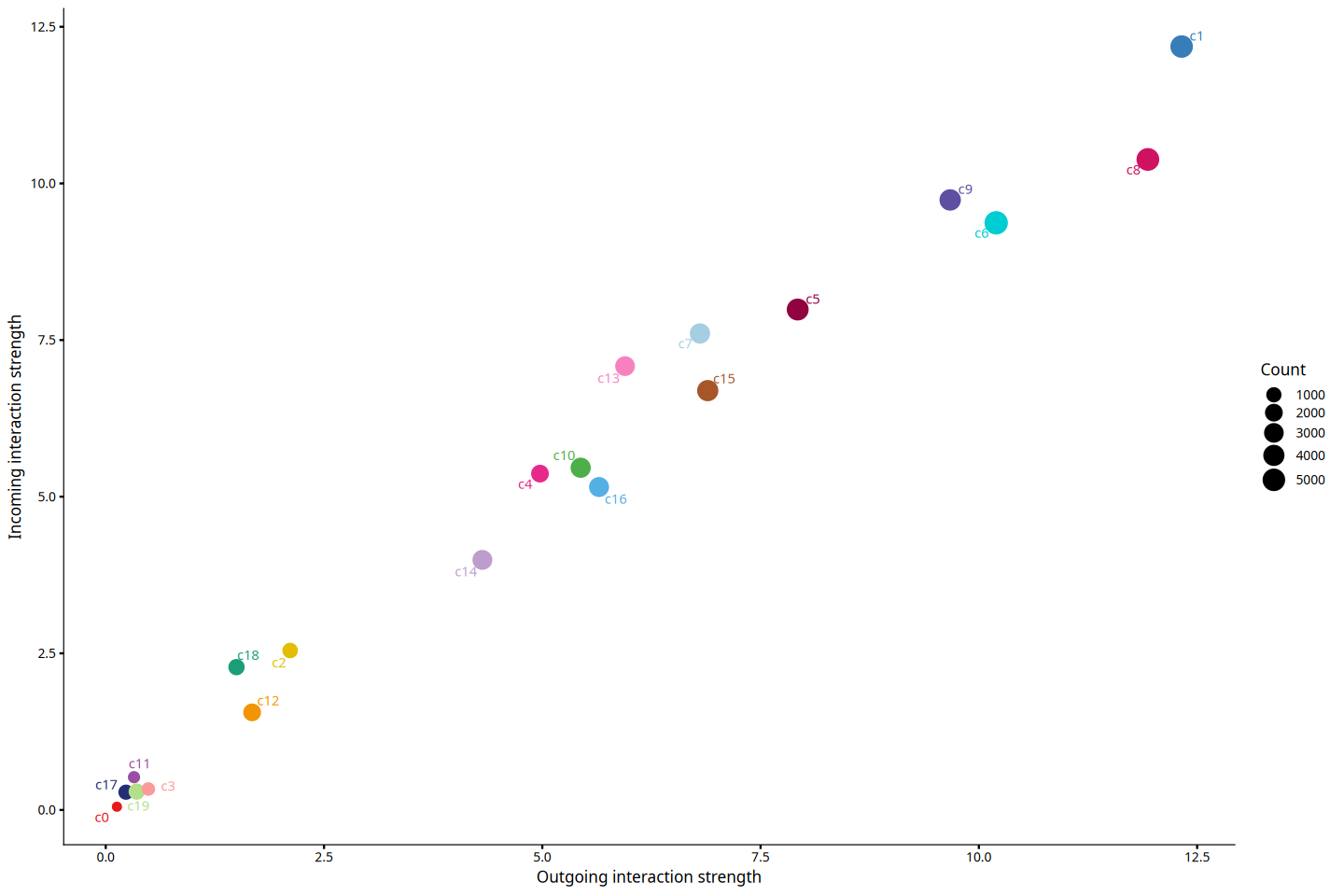
4.6 识别对传入和传出信号贡献最大信号
在明确了各细胞群作为发送者或接收者的整体角色后,本部分进一步通过热图深入剖析具体的信号通路是如何在不同细胞群之间分布和贡献的。
该分析能够帮助我们回答:某个特定的细胞群其主要的传出信号是由哪些通路主导的?或者,某个细胞群主要通过哪些通路来接收外部环境的刺激?这对于挖掘核心的通讯驱动因子具有重要指导意义。
#画热图前数据预处理成画图矩阵
signalingRole_heatmap_data_process = function(object,pattern,signaling=NULL,slot.name = "netP"){
    centr <- slot(object, slot.name)$centr
    outgoing <- matrix(0, nrow = nlevels(object@idents), ncol = length(centr))
    incoming <- matrix(0, nrow = nlevels(object@idents), ncol = length(centr))
    dimnames(outgoing) <- list(levels(object@idents), names(centr))
    dimnames(incoming) <- dimnames(outgoing)
    for (i in 1:length(centr)) {
        outgoing[,i] <- centr[[i]]$outdeg
        incoming[,i] <- centr[[i]]$indeg
    }
    if (pattern == "outgoing") {
        mat <- t(outgoing)
        legend.name <- "Outgoing"
    } else if (pattern == "incoming") {
        mat <- t(incoming)
        legend.name <- "Incoming"
    } else if (pattern == "all") {
        mat <- t(outgoing+ incoming)
        legend.name <- "Overall"
    }

    if (!is.null(signaling)) {
        mat1 <- mat[rownames(mat) %in% signaling, , drop = FALSE]
        mat <- matrix(0, nrow = length(signaling), ncol = ncol(mat))
        idx <- match(rownames(mat1), signaling)
        mat[idx[!is.na(idx)], ] <- mat1
        dimnames(mat) <- list(signaling, colnames(mat1))
    }
    return(mat)
}netAnalysis_signalingRole_heatmap = function(mat,mat.ori,legend.name,color.use = NULL, color.heatmap = "BuGn",title = NULL, width = 10, height = 8, font.size = 8, font.size.title = 10, cluster.rows = FALSE, cluster.cols = FALSE){
if (is.null(title)) {
title <- paste0(legend.name, " signaling patterns")
} else {
title <- paste0(paste0(legend.name, " signaling patterns"), " - ",title)
}
if (is.null(color.use)) {
color.use <- scPalette(length(colnames(mat)))
}
color.heatmap.use = grDevices::colorRampPalette((RColorBrewer::brewer.pal(n = 9, name = color.heatmap)))(100)
df<- data.frame(group = colnames(mat)); rownames(df) <- colnames(mat)
names(color.use) <- colnames(mat)
col_annotation <- HeatmapAnnotation(df = df, col = list(group = color.use),which = "column",
show_legend = FALSE, show_annotation_name = FALSE,
simple_anno_size = grid::unit(0.2, "cm"))
ha2 = HeatmapAnnotation(Strength = anno_barplot(colSums(mat.ori), border = FALSE,gp = gpar(fill = color.use, col=color.use)), show_annotation_name = FALSE)
pSum <- rowSums(mat.ori)
pSum.original <- pSum
pSum <- -1/log(pSum)
pSum[is.na(pSum)] <- 0
idx1 <- which(is.infinite(pSum) | pSum < 0)
if (length(idx1) > 0) {
values.assign <- seq(max(pSum)*1.1, max(pSum)*1.5, length.out = length(idx1))
position <- sort(pSum.original[idx1], index.return = TRUE)$ix
pSum[idx1] <- values.assign[match(1:length(idx1), position)]
}
ha1 = rowAnnotation(Strength = anno_barplot(pSum, border = FALSE), show_annotation_name = FALSE)
if (min(mat, na.rm = T) == max(mat, na.rm = T)) {
legend.break <- max(mat, na.rm = T)
} else {
legend.break <- c(round(min(mat, na.rm = T), digits = 1), round(max(mat, na.rm = T), digits = 1))
}
ht1 = Heatmap(mat, col = color.heatmap.use, na_col = "white", name = "Relative strength",
bottom_annotation = col_annotation, top_annotation = ha2, right_annotation = ha1,
cluster_rows = cluster.rows,cluster_columns = cluster.rows,
row_names_side = "left",row_names_rot = 0,row_names_gp = gpar(fontsize = font.size),column_names_gp = gpar(fontsize = font.size),
width = unit(width, "cm"), height = unit(height, "cm"),
column_title = title,column_title_gp = gpar(fontsize = font.size.title),column_names_rot = 90,
heatmap_legend_param = list(title_gp = gpar(fontsize = 8, fontface = "plain"),title_position = "leftcenter-rot",
border = NA, at = legend.break,
legend_height = unit(20, "mm"),labels_gp = gpar(fontsize = 8),grid_width = unit(2, "mm"))
)
return(ht1)
}图注说明:细胞群与信号通路贡献度热图展示。
- 横坐标(X 轴):代表不同的细胞类型。
- 纵坐标(Y 轴):代表不同的信号通路。
- 颜色深浅:热图中的每一个方格代表特定细胞类型在特定信号通路中的信号强度,颜色越深表示信号强度越大。
- 顶部彩色条形图:汇总了该细胞类型在所有信号通路中的总信号强度。柱子越高,代表该细胞类型整体的传入/传出信号越强。
- 右侧灰色条形图:汇总了该信号通路在所有细胞群中的总信号强度。柱子越高,代表该通路在整体传入/传出信号中的贡献越大。
x=length(celltypes)
y=length(cellchat@netP$pathways)

mat = signalingRole_heatmap_data_process(cellchat,pattern = "outgoing")
mat.ori <- mat
mat <- sweep(mat, 1L, apply(mat, 1, max), '/', check.margin = FALSE)
mat[mat == 0] <- NA

if(min(mat,na.rm = TRUE)==max(mat,na.rm=TRUE)){
    mat[is.na(mat)] = 0
}

netAnalysis_signalingRole_heatmap(mat=mat,mat.ori=mat.ori, legend.name = "Outgoing", width = 10, height = 15)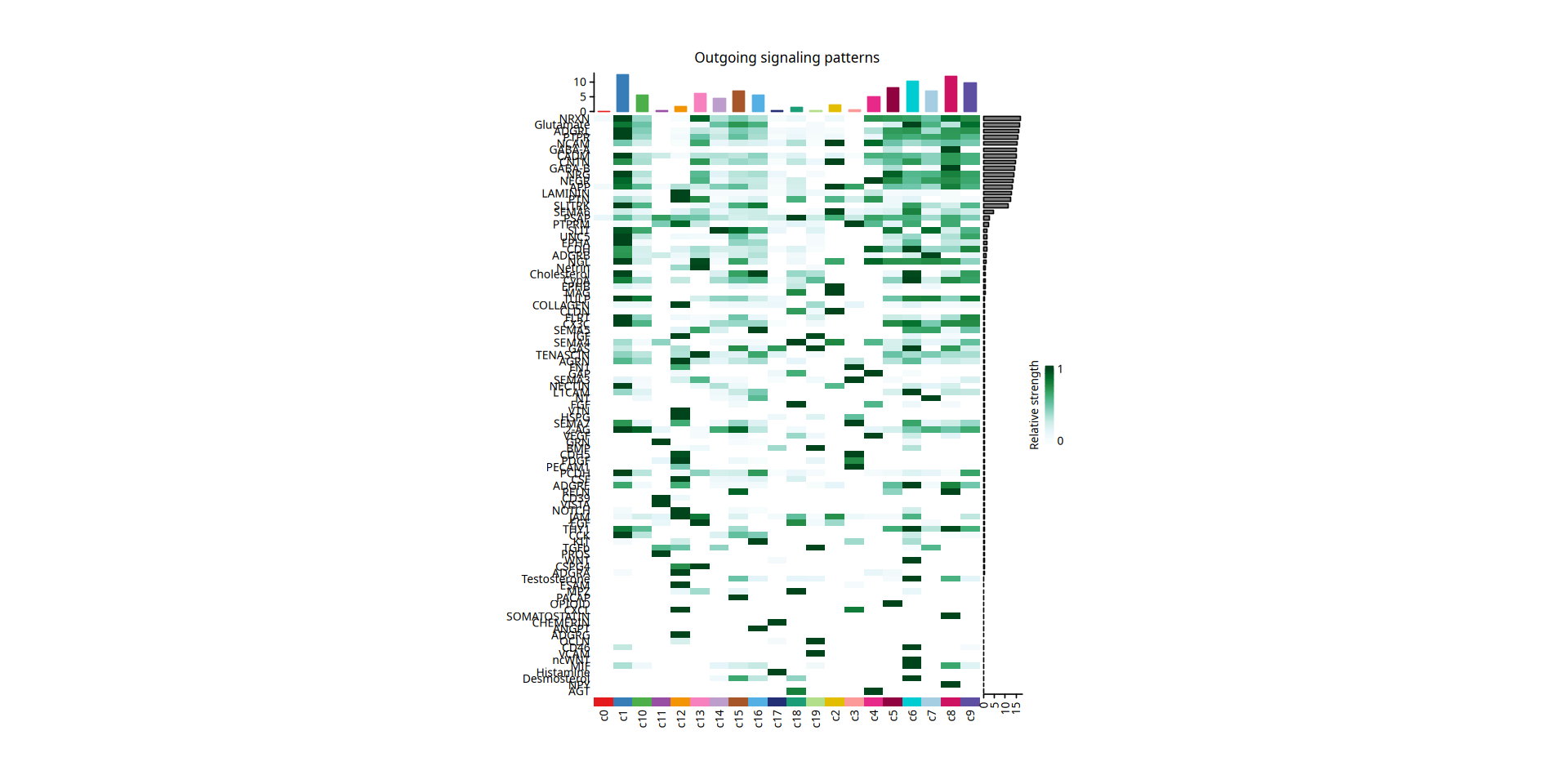
mat = signalingRole_heatmap_data_process(cellchat,pattern = "incoming")
mat.ori <- mat
mat <- sweep(mat, 1L, apply(mat, 1, max), '/', check.margin = FALSE)
mat[mat == 0] <- NA

if(min(mat,na.rm = TRUE)==max(mat,na.rm=TRUE)){
    mat[is.na(mat)] = 0
}
ht2 = netAnalysis_signalingRole_heatmap(mat=mat,mat.ori=mat.ori, legend.name = "Incoming", width = 10, height = 15)

print(ht2)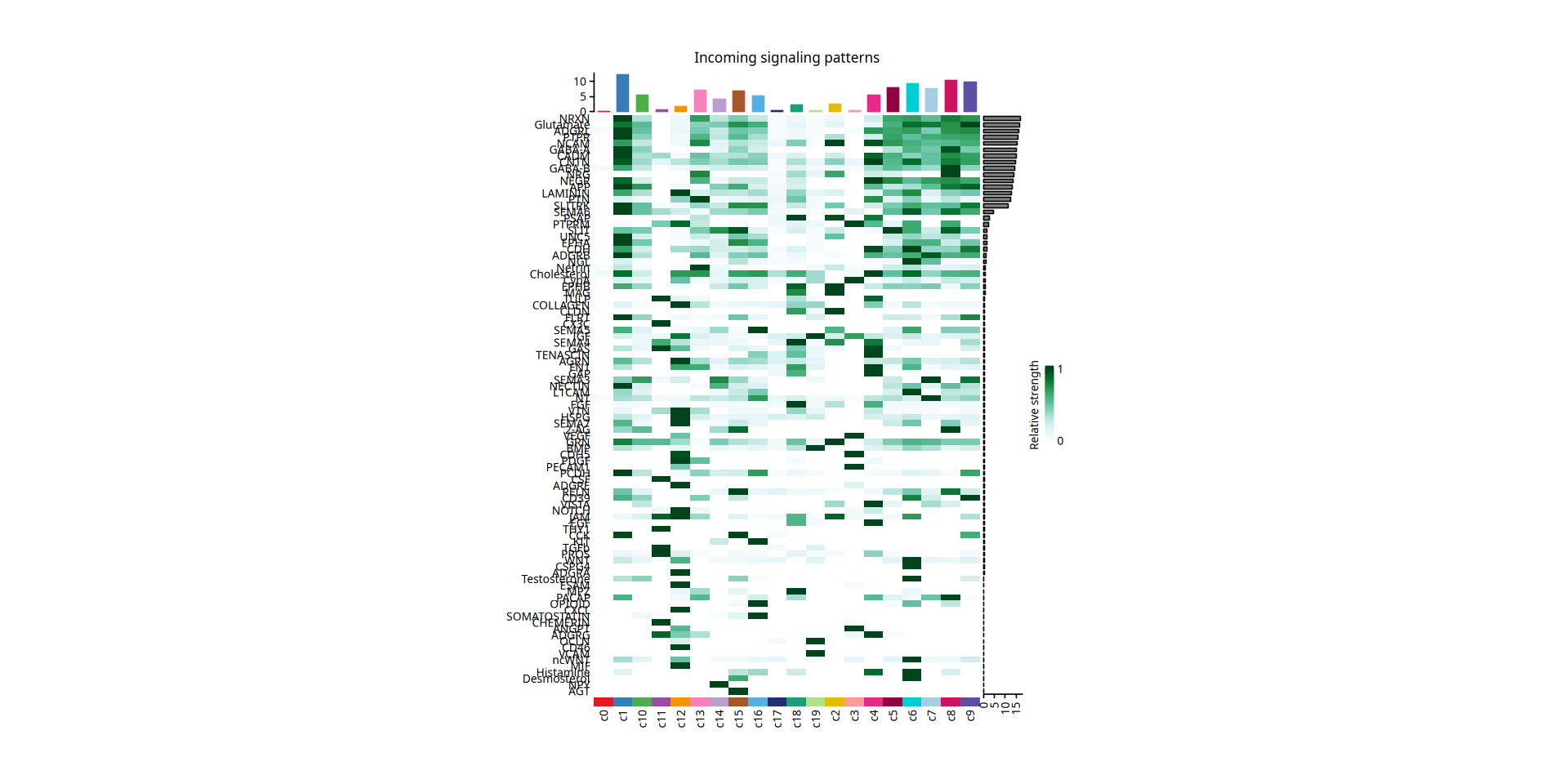
4.7 信号通路功能相似性聚类
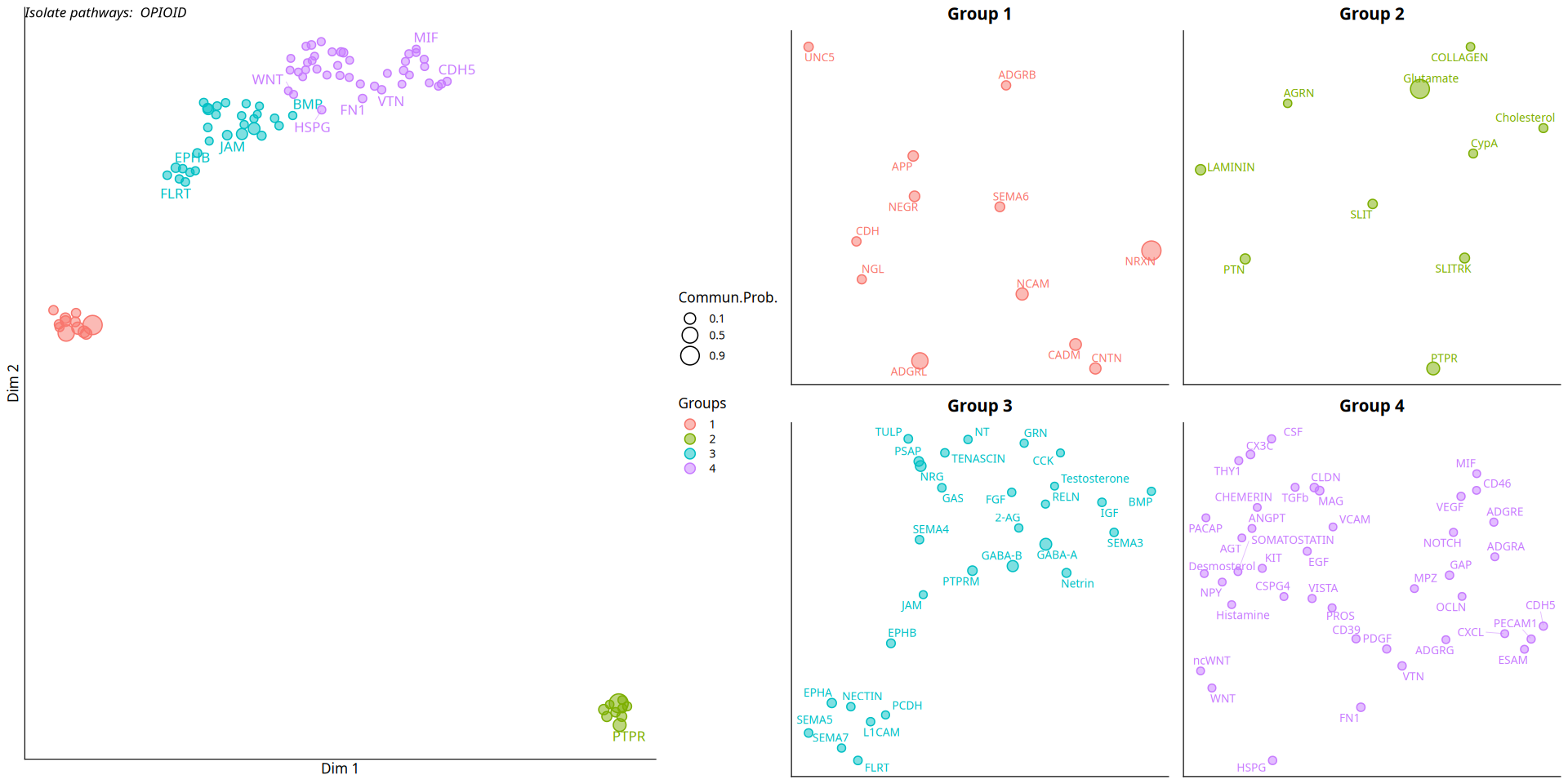
本部分旨在通过比较各个信号通路的通讯网络结构,来探索它们在功能上的相似性。CellChat 算法会基于通路的通讯概率矩阵构建共享最近邻(SNN)图,并进行降维聚类分析。
通过这种聚类,我们可以将那些在不同细胞群之间传递模式高度相似的信号通路归为一类(例如,某些通路可能共同介导了特定免疫细胞与肿瘤细胞间的通讯)。下图的二维散点展示了根据功能相似性对所有显著信号通路进行分类和降维的结果。
图注说明:信号通路功能相似性聚类的二维降维图。
- 点:图中的每一个点表示一个特定的信号通路。
- 形状/颜色:点的不同颜色或形状代表不同的聚类簇或组别,属于同一簇的通路被认为具有相似的通讯功能。
- 空间距离:点与点之间的距离反映了它们在通讯网络中的功能相似性。距离越近,表示这两个信号通路在细胞通讯网络中发挥的功能或模式越相似。
ll = list()
cellchat = computeNetSimilarity(cellchat, type = "functional")
cellchat = netEmbedding(cellchat, type = "functional", umap.method = 'uwot')
cellchat = netClustering(cellchat, type = "functional", do.parallel=FALSE)

ll[[1]] = netVisual_embedding(cellchat, type = "functional", label.size = 3.5)

ll[[2]] = netVisual_embeddingZoomIn(cellchat, type = "functional", nCol = 2)

options(repr.plot.height=8, repr.plot.width=16)
plot_grid(plotlist = ll, ncol = 2)Classification learning of the signaling networks for a single dataset
saveRDS(cellchat,"cellchat.rds")
write.table(df.netp,"cellchat_netp_lr.xls",quote=F,sep='\t',row.names=F)
write.table(df.net,"cellchat_net_lr.xls",quote=F,sep='\t',row.names=F)