Single-Cell Spatial Transcriptomics: Cell Communication Analysis (based on CellPhoneDB)
1. Module Introduction
This module is based on the CellPhoneDB algorithm and is used for cell communication network inference in single-cell spatial transcriptomics data.
CellPhoneDB maintains a comprehensive and high-quality public database of ligands, receptors, and their interactions. Its main feature is that it fully considers the multi-subunit structure of receptors and ligands, enabling accurate representation of heteromeric complexes. By analyzing the expression levels of specific ligands and receptors across different cell populations in the dataset, this module achieves the following core analytical objectives:
- Systematic Cell Interaction Network Construction: Comprehensively evaluates interactions between all potential cell type pairs, revealing the complex communication network topology within the cellular microenvironment.
- Specific Communication Pattern Mining: Identifies significantly active and highly cell-type-specific ligand-receptor interaction pairs based on statistical tests or differentially expressed gene analysis.
💡 Note
The input for this pipeline is Seurat-processed normalized expression data and metadata. After the analysis, the system will output detailed interaction score and P-value tables, and generate visualizations including interaction networks, intensity heatmaps, and dot plots.
2. Input File Preparation
This module requires the following input files:
1) metadata file contains two columns:
- barcode_sample: This column contains spatial barcode information for each cell.
- cell_type: This column contains cell type label assignments.
2) counts file is the normalized expression matrix.
3) Differentially expressed genes file has two columns containing upregulated or specific genes for cell types. The first column is the cluster name (must match the cell_type column in the metadata file); the second column is the upregulated gene.
4) Microenvironments file contains the cell types present in the microenvironment. CellPhoneDB only calculates interactions between cell types belonging to this microenvironment.
5) Active transcription factors file contains transcription factors for given cell types (optional). If provided, the first column is the cluster name; the second column is the TF.
How to export required CellPhoneDB files from a Seurat object:
If you already have a Seurat object (.rds) that has undergone preliminary analysis such as dimensionality reduction and clustering, along with corresponding Metadata, you can run the following R code snippet. This code will automatically extract the expression matrix, cell metadata, and microenvironment grouping information, and generate standard input file formats required by CellPhoneDB (such as counts, meta, microenvs, etc.), which will be uniformly stored in the cpdb_prepare_file directory.
# Load R packages
library(Seurat)
library(dplyr)
library(tibble)
library(readr)
library(Matrix)
library(stringr)


rds_path  = "./25020230_nao_CS_banksy.rds"
meta_path = "./meta_banksy.tsv"
col_sam = "Sample"
sample_name = "25020230_nao_CS_expression"
col_celltype = "RNA_snn_res.0.2"
col_env = "clust_M1_lam0.8_k50_res0.4"


dir.create('cpdb_prepare_file')

obj = readRDS(rds_path)
celltype = read.delim(meta_path,sep="\t")
sample_name = str_split(sample_name,",")[[1]]

obj@meta.data = celltype
if(colnames(obj@meta.data)[1] == "barcode"){
    obj@meta.data = column_to_rownames(obj@meta.data,"barcode")
} else if(colnames(obj@meta.data)[1] == "barcodes") {
    obj@meta.data = column_to_rownames(obj@meta.data,"barcodes")
}

obj@meta.data$barcode = rownames(obj@meta.data)

for(i in 1:length(sample_name)){
    dir.create(paste0(sample_name[i],'_filtered_feature_bc_matrix'))

    obj1 = obj
    obj1 = subset(obj1,cells = obj1@meta.data[obj1@meta.data[[col_sam]] %in% sample_name[i],]$barcode)

    metadata = obj1@meta.data[,c('barcode',col_celltype)]


    write.table(metadata,paste0("cpdb_prepare_file/meta_file_",sample_name[i],".txt"),sep = "\t",row.names = F,col.names = T,quote = F)

    # Region/Microenvironment file generation processing
    micro = as.data.frame(table(obj1@meta.data[[col_celltype]],obj1@meta.data[[col_env]]))
    micro = micro[micro$Freq != 0,]
    micro_name = c('cell_type', 'microenvironment')
    colnames(micro)[1:2] = micro_name
    micro = select(micro,all_of(micro_name))


    add_name2 = c('niche_')

    micro$microenvironment = paste0(add_name2,micro$microenvironment)
    write.table(micro,paste0("cpdb_prepare_file/microenvs_file_",sample_name[i],".txt"),sep="\t",col.names=T,row.names=F,quote=F)

    # Identify cell type differentially expressed genes
    Idents(obj1) = obj1@meta.data[col_celltype]
    DEGs = FindAllMarkers(obj1, test.use = 'LR', verbose = T, only.pos = T, random.seed = 1, logfc.threshold = 0.2, min.pct = 0.1, return.thresh = 0.05)
    DEGs_name = c('P.Value','logFC','pct1','pct2','adj.P.Val','cell_type','gene')

    colnames(DEGs) = DEGs_name
    DEGs_name_order = c('cell_type','gene','logFC','P.Value','adj.P.Val')

    DEGs = DEGs[,DEGs_name_order]

    write.table(DEGs,paste0("cpdb_prepare_file/degs_file_",sample_name[i],".txt"),sep="\t",col.names=T,row.names=F,quote=F)

    # Expression matrix
    counts = as.data.frame(GetAssayData(obj1,slot="data"))

    colnames(counts) = colnames(obj1)
    rownames(counts) = rownames(obj1)
    counts = rownames_to_column(counts,var = "Gene")
    write.table(counts,paste0("cpdb_prepare_file/counts_file_",sample_name[i],".txt"),sep="\t",col.names=T,row.names=F,quote=F)


    # Export matrix files
    writeMM(GetAssayData(obj1,slot="counts"), file = paste0(sample_name[i],'_filtered_feature_bc_matrix/matrix.mtx'))

    Gene = data.frame(GeneID = rownames(obj1), Gene = rownames(obj1))
    write.table(Gene,paste0(sample_name[i],'_filtered_feature_bc_matrix/genes.tsv'), row.names = F, col.names = F, sep = '\t', quote = F)

    barcode = data.frame(Barcode = colnames(obj1))
    write.table(barcode,paste0(sample_name[i],'_filtered_feature_bc_matrix/barcodes.tsv'), row.names = F, col.names = F, sep = '\t', quote = F)
}
3. Data Loading and Preprocessing
import numpy as np
import pandas as pd
import scanpy as sc
import anndata
import os
import sys
from scipy import sparse
import logging
import warnings
import matplotlib.pyplot as plt
from ktplotspy.utils.settings import DEFAULT_V5_COL_START, DEFAULT_COL_START, DEFAULT_CLASS_COL, DEFAULT_CPDB_SEP
from itertools import product
from matplotlib.colors import ListedColormap
from typing import Optional, Union, Dict, List
from PIL import Image
from scipy.stats import zscore
import math
import anndata as ad
import ktplotspy as kpy# --- Input parameter configuration ---
## species: Species selection, either "human" or "mouse"
species="mouse"
## active_tf_path: Optional. Defaults to None; if a cell type transcription factor file is provided, fill in the file path
active_tf_path=None
## method: Two analysis methods of CellPhoneDB. Can be 'statistical_analysis' or 'degs_analysis'
method="degs_analysis"
## col_celltype: The column name representing the cell type in Metadata
col_celltype="RNA_snn_res.0.2"
## sample_name: The name of the sample to be analyzed, multiple samples are separated by commas
sample_name="25020230_nao_CS_expression"sample_name = sample_name.strip().split(",")# Load the ligand-receptor database required for analysis
if species == "human":
cpdb_file_path = "/PROJ2/FLOAT/jinwen/apps/cellphonedb-data-5.0.0/cellphonedb.zip"
elif species == "mouse":
cpdb_file_path = "/PROJ2/FLOAT/jinwen/apps/cellphonedb-data-5.0.0/mouse/cellphonedb.zip"3.1 Run CellPhoneDB Analysis
This step will call the core CellPhoneDB algorithm to calculate the cell communication network. Depending on whether differentially expressed genes are used, the analysis is divided into two different methods (selected by setting the method parameter):
Statistical Inference Analysis (
statistical_analysis):- Applicable Scenarios: General exploration of cell communication networks.
- Principle Analysis: This method performs statistical inference based on empirical shuffling. It randomly permutes the cluster labels of all cells to construct a null distribution of average ligand and receptor expression levels, thereby evaluating the specificity and significance (P-value) of the observed ligand-receptor interactions between cell types.
Differentially Expressed Genes Cell Communication Analysis (
degs_analysis):- Applicable Scenarios: Retrieving interactions specific to (or highly associated with) a particular cell type.
- Principle Analysis: This method is an alternative to statistical inference. It requires the user to additionally provide a Differentially Expressed Genes (DEGs) file indicating which genes are relevant to specific cell types (e.g., cell-type specific marker genes). Under this method, the algorithm will prioritize these ligand-receptor pairs with cell-type specific expression, thus uncovering communication patterns unique to that cell type.
Core Output Files Description (cpdb_result directory):
relevant_interactions.txt/pvalues.txt: Core result files. Record the information of ligand-receptor interaction pairs and their interaction significance between cell types (1 for significant, 0 for non-significant; or provide P-values directly).means.txt: Contains the average expression levels of all receptors and ligands across all cell types.significant_means.txt: Retains only the average expression levels of statistically significant ligand-receptor pairs.interaction_scores.txt: Records the ligand-receptor interaction scores (ifscore_interactions = Trueis enabled).
from cellphonedb.src.core.methods import cpdb_degs_analysis_method
from cellphonedb.src.core.methods import cpdb_statistical_analysis_method

if method == "degs_analysis":
    results = {}
    for i in sample_name:

        cpdb_results = cpdb_degs_analysis_method.call(
            cpdb_file_path = cpdb_file_path,                            # mandatory: CellphoneDB database zip file.
            meta_file_path = f"./cpdb_prepare_file/meta_file_{i}.txt",                            # mandatory: tsv file defining barcodes to cell label.
            counts_file_path = f"./cpdb_prepare_file/counts_file_{i}.txt",                        # mandatory: normalized count matrix - a path to the counts file, or an in-memory AnnData object
            degs_file_path = f"./cpdb_prepare_file/degs_file_{i}.txt",                            # mandatory: tsv file with DEG to account.
            counts_data = 'hgnc_symbol',                                # defines the gene annotation in counts matrix.
            microenvs_file_path = f"./cpdb_prepare_file/microenvs_file_{i}.txt",                  # optional (default: None): defines cells per microenvironment.
            active_tfs_file_path = active_tf_path,                      # optional: defines cell types and their active TFs.
            score_interactions = True,                                  # optional: whether to score interactions or not.
            threshold = 0.1,                                            # defines the min % of cells expressing a gene for this to be employed in the analysis.
            result_precision = 3,                                       # Sets the rounding for the mean values in significan_means.
            separator = '|',                                            # Sets the string to employ to separate cells in the results dataframes "cellA|CellB".
            debug = False,                                              # Saves all intermediate tables emplyed during the analysis in pkl format.
            output_path = "./cpdb_result/",                                     # Path to save results
            output_suffix = None,                                       # Replaces the timestamp in the output files by a user defined string in the  (default: None)
            threads = 16
            )
        results[i] = cpdb_results
elif method == "statistical_analysis":
    results = {}
    for i in sample_name:
        cpdb_results = cpdb_statistical_analysis_method.call(
            cpdb_file_path = cpdb_file_path,                 # mandatory: CellphoneDB database zip file.
            meta_file_path = f"./cpdb_prepare_file/meta_file_{i}.txt",                 # mandatory: tsv file defining barcodes to cell label.
            counts_file_path = f"./cpdb_prepare_file/counts_file_{i}.txt",             # mandatory: normalized count matrix - a path to the counts file, or an in-memory AnnData object
            counts_data = 'hgnc_symbol',                     # defines the gene annotation in counts matrix.
            active_tfs_file_path = active_tf_path,           # optional: defines cell types and their active TFs.
            microenvs_file_path = f"./cpdb_prepare_file/microenvs_file_{i}.txt",         # optional (default: None): defines cells per microenvironment.
            score_interactions = True,                       # optional: whether to score interactions or not.
            iterations = 1000,                               # denotes the number of shufflings performed in the analysis.
            threshold = 0.1,                                 # defines the min % of cells expressing a gene for this to be employed in the analysis.
            threads = 16,                                     # number of threads to use in the analysis.
            debug_seed = 42,                                 # debug randome seed. To disable >=0.
            result_precision = 3,                            # Sets the rounding for the mean values in significan_means.
            pvalue = 0.05,                                   # P-value threshold to employ for significance.
            subsampling = False,                             # To enable subsampling the data (geometri sketching).
            subsampling_log = False,                         # (mandatory) enable subsampling log1p for non log-transformed data inputs.
            subsampling_num_pc = 100,                        # Number of componets to subsample via geometric skectching (dafault: 100).
            subsampling_num_cells = 1000,                    # Number of cells to subsample (integer) (default: 1/3 of the dataset).
            separator = '|',                                 # Sets the string to employ to separate cells in the results dataframes "cellA|CellB".
            debug = False,                                   # Saves all intermediate tables employed during the analysis in pkl format.
            output_path = "./cpdb_result/",                  # Path to save results.
            output_suffix = None                             # Replaces the timestamp in the output files by a user defined string in the  (default: None).
            )
results[i] = cpdb_resultsReading user files...n WARNING: DEGs expects 2 columns and got 5. Dropping extra columns.
The following user files were loaded successfully:
../cpdb_prepare_file/counts_file_25020230_nao_CS_expression.txt
../cpdb_prepare_file/meta_file_25020230_nao_CS_expression.txt
../cpdb_prepare_file/microenvs_file_25020230_nao_CS_expression.txt
../cpdb_prepare_file/degs_file_25020230_nao_CS_expression.txt
[ ][CORE][03/06/26-23:08:12][INFO] Running Real Analysis
[ ][CORE][03/06/26-23:08:12][INFO] Limiting cluster combinations using microenvironments
[ ][CORE][03/06/26-23:08:12][INFO] Running DEGs-based Analysis
[ ][CORE][03/06/26-23:08:13][INFO] Building results
[ ][CORE][03/06/26-23:08:13][INFO] Scoring interactions: Filtering genes per cell type..n
100%|██████████| 20/20 [00:00<00:00, 27.70it/s]
[ ][CORE][03/06/26-23:08:14][INFO] Scoring interactions: Calculating mean expression of each gene per group/cell type..n
00%|██████████| 20/20 [00:00<00:00, 172.81it/s]
[ ][CORE][03/06/26-23:08:14][INFO] Scoring interactions: Calculating scores for all interactions and cell types..n
00%|██████████| 80/80 [00:11<00:00, 6.96it/s]
Saved deconvoluted to ../cpdb_result/degs_analysis_deconvoluted_06_03_2026_230829.txt
Saved deconvoluted_percents to ../cpdb_result/degs_analysis_deconvoluted_percents_06_03_2026_230829.txt
Saved means to ../cpdb_result/degs_analysis_means_06_03_2026_230829.txt
Saved relevant_interactions to ../cpdb_result/degs_analysis_relevant_interactions_06_03_2026_230829.txt
Saved significant_means to ../cpdb_result/degs_analysis_significant_means_06_03_2026_230829.txt
Saved interaction_scores to ../cpdb_result/degs_analysis_interaction_scores_06_03_2026_230829.txt
4. Cell Communication Calculation Results
4.1 Average Values of Significant Ligand-Receptor Pair Interactions
This section aims to extract and summarize interaction information for all ligand-receptor (L-R) pairs deemed significant. By parsing the statistical or differential analysis results obtained in the previous steps, we integrate two core components of data:
- Interaction Relevance: Marks whether the ligand-receptor interaction between specific cell type pairs has statistical significance.
- Average Expression (Mean): The average expression levels of receptors and ligands in their corresponding cell subpopulations.
Ultimately, we generate a standardized long-format data table (e.g., relevant_interactions_plot_*.txt), which not only contains information on ligand-receptor pairs and the interacting cell types, but also applies Z-score normalization (Mean_scaled) to the average expression values, providing direct input data support for subsequently plotting high-quality dot plots or network graphs.
if method == "degs_analysis":
    for i in sample_name:
        # -- Get annotation columns and interactions
        annotation = list(results[i]['relevant_interactions'].columns[:11])
        interaction = list(results[i]['relevant_interactions'].columns[11:])


        # -- Convert relevant_interactions file from wide to long
        relevant_interactions_long = pd.melt(results[i]['relevant_interactions'],
                                             id_vars = annotation,
                                             var_name = 'Interacting_cell',
                                             value_vars = interaction,
                                             value_name = 'Relevance')

        relevant_interactions_long[['Cell_a', 'Cell_b']] = relevant_interactions_long['Interacting_cell'] \
            .str.split('|', expand = True) \
            .rename(columns={0 : 'Cell_a', 1: 'Cell_b'})

        means_long = pd.melt(results[i]['means'],
                             id_vars = annotation,
                             var_name = 'Interacting_cell',
                             value_vars = interaction,
                             value_name = 'Mean')

        id_cp_dict = relevant_interactions_long.groupby('id_cp_interaction')['Relevance'] \
            .sum() \
            .to_dict()

        # -- Add new column to indicante the recurrence of an interaction
        relevant_interactions_long['Recurrence'] = relevant_interactions_long['id_cp_interaction'] \
            .map(id_cp_dict)

        # -- Sort according to the recurrence
        relevant_interactions_long = relevant_interactions_long.sort_values(['Recurrence'],
                                                                        ascending = True)

        relevant_interactions_long.head(3)
        relevant_interactions_plot = relevant_interactions_long.copy()
        # -- Add mean value of the interacting partners
        relevant_interactions_plot = relevant_interactions_plot.merge(means_long[['id_cp_interaction', 'Interacting_cell', 'Mean']],
                                                                      on = ['id_cp_interaction', 'Interacting_cell'],
                                                                      how = 'inner')
        relevant_interactions_plot['Mean_scaled'] = relevant_interactions_plot.groupby('id_cp_interaction', group_keys = False)['Mean'].transform(lambda x : zscore(x, ddof = 1))
        relevant_interactions_plot = relevant_interactions_plot.sort_values('Interacting_cell')
        relevant_interactions_plot.to_csv(f"./cpdb_result/relevant_interactions_plot_{i}.txt",sep="\t",index=False)
elif method == "statistical_analysis":
    for i in sample_name:
        # -- Get annotation columns and interactions
        results[i]['pvalues'].iloc[:, 11:] = (results[i]['pvalues'].iloc[:, 11:] < 0.05).astype(int)
        annotation = list(results[i]['pvalues'].columns[:11])
        interaction = list(results[i]['pvalues'].columns[11:])


        # -- Convert relevant_interactions file from wide to long
        relevant_interactions_long = pd.melt(results[i]['pvalues'],
                                             id_vars = annotation,
                                             var_name = 'Interacting_cell',
                                             value_vars = interaction,
                                             value_name = 'Relevance')

        relevant_interactions_long[['Cell_a', 'Cell_b']] = relevant_interactions_long['Interacting_cell'] \
            .str.split('|', expand = True) \
            .rename(columns={0 : 'Cell_a', 1: 'Cell_b'})

        means_long = pd.melt(results[i]['means'],
                             id_vars = annotation,
                             var_name = 'Interacting_cell',
                             value_vars = interaction,
                             value_name = 'Mean')

        id_cp_dict = relevant_interactions_long.groupby('id_cp_interaction')['Relevance'] \
            .sum() \
            .to_dict()

        # -- Add new column to indicante the recurrence of an interaction
        relevant_interactions_long['Recurrence'] = relevant_interactions_long['id_cp_interaction'] \
            .map(id_cp_dict)

        # -- Sort according to the recurrence
        relevant_interactions_long = relevant_interactions_long.sort_values(['Recurrence'],
                                                                        ascending = True)

        relevant_interactions_long.head(3)
        relevant_interactions_plot = relevant_interactions_long.copy()
        # -- Add mean value of the interacting partners
        relevant_interactions_plot = relevant_interactions_plot.merge(means_long[['id_cp_interaction', 'Interacting_cell', 'Mean']],
                                                                      on = ['id_cp_interaction', 'Interacting_cell'],
                                                                      how = 'inner')
        relevant_interactions_plot['Mean_scaled'] = relevant_interactions_plot.groupby('id_cp_interaction', group_keys = False)['Mean'].transform(lambda x : zscore(x, ddof = 1))
        relevant_interactions_plot = relevant_interactions_plot.sort_values('Interacting_cell')
        relevant_interactions_plot.to_csv(f"./cpdb_result/relevant_interactions_plot_{i}.txt",sep="\t",index=False)
Calculate the total number of significant interactions between cell types:
To evaluate communication activity between cell populations from a macroscopic perspective, the following code summarizes the detailed interaction results generated in the previous step. It iterates over all possible cell type pairs (e.g., Cell_A and Cell_B) and counts the total number of ligand-receptor interaction pairs deemed statistically significant between them.
The final summary statistics table generated (count.final_*.txt) contains the signal sender (SOURCE), signal receiver (TARGET), and the number of significant interactions (COUNT), providing foundational data for the subsequent plotting of cell communication network graphs.
for i in sample_name:

    cell_types=None
    default_sep = DEFAULT_CPDB_SEP

    if method == "degs_analysis":
        #all_intr = cpdb_results['relevant_interactions'].copy()
        all_intr = results[i]['relevant_interactions'].copy()
    elif method == "statistical_analysis":
        #all_intr = cpdb_results['pvalues'].copy()
        all_intr = results[i]['pvalues'].copy()

    intr_pairs = all_intr.interacting_pair
    col_start = (
        DEFAULT_V5_COL_START if all_intr.columns[DEFAULT_CLASS_COL] == "classification" else DEFAULT_COL_START
    )  # in v5, there are 12 columns before the values
    all_int = all_intr.iloc[:, col_start : all_intr.shape[1]].T
    all_int.columns = intr_pairs
    if cell_types is None:
        cell_types = sorted(list(set([y for z in [x.split(default_sep) for x in all_intr.columns[col_start:]] for y in z])))
    cell_types_comb = ["|".join(list(x)) for x in list(product(cell_types, cell_types))]
    cell_types_keep = [ct for ct in all_int.index if ct in cell_types_comb]
    empty_celltypes = list(set(cell_types_comb) ^ set(cell_types_keep))
    all_int = all_int.loc[cell_types_keep]
    if len(empty_celltypes) > 0:
        tmp_ = np.zeros((len(empty_celltypes), all_int.shape[1]))
        if method == "statistical_analysis":
            tmp_ += 1
        tmp_ = pd.DataFrame(tmp_, index=empty_celltypes, columns=all_int.columns)
        all_int = pd.concat([all_int, tmp_], axis=0)
    all_count = all_int.melt(ignore_index=False).reset_index()
    if method == "degs_analysis":
        all_count["significant"] = all_count.value == 1
    elif method == "statistical_analysis":
        all_count["significant"] = all_count.value < 0.05
    count1x = all_count[["index", "significant"]].groupby("index").agg({"significant": "sum"})
    tmp = pd.DataFrame([x.split("|") for x in count1x.index])
    count_final = pd.concat([tmp, count1x.reset_index(drop=True)], axis=1)
    count_final.columns = ["SOURCE", "TARGET", "COUNT"]
    count_final.to_csv(f"./cpdb_result/count.final_{i}.txt",sep="\t",index=False)
4.2 Number of Cell-Cell Interactions
This section aims to display communication strength between cell populations at a macroscopic network level. By counting the number of all significant interacting ligand-receptor pairs (L-R pairs count) present between each pair of cell subpopulations, we construct and plot the global cell communication network graph.
This analysis will generate two forms of network graphs:
- Comprehensive Network Graph: Centrally displays interactions of all cell populations in a single graph, intuitively presenting communication hubs and the full network topology within the entire tissue microenvironment.
- Split Network Graph: Splits and displays each cell type separately as a signal sender, facilitating focused study on the outward communication signal characteristics of specific cell types.
Generate Cell Communication Network Graphs (based on R):
To obtain higher quality and more aesthetically pleasing network visualizations, this pipeline will call plotting functions (like netVisual_circle) from the R package CellChat to draw interaction network graphs based on the statistical results generated in the previous step (count.final_*.txt) and save them as image files.
library(CellChat)
library(tidyr)
library(argparse)
options(warn =  -1)

samples = "25020230_nao_CS_expression"
mynet = read.delim(paste0("./cpdb_result/count.final_",samples,".txt"))

count_inter <- mynet
count_inter$COUNT <- count_inter$COUNT/100
count_inter<-spread(count_inter, TARGET, COUNT)
rownames(count_inter) <- count_inter$SOURCE
count_inter <- count_inter[, -1]
count_inter <- as.matrix(count_inter)
png(paste0("./cpdb_result/netVisual_circle_",samples,".png"), width = 1000, height = 500, bg = "white",res = 100)
par(mfrow = c(1,1), xpd=TRUE)
p=netVisual_circle(count_inter,weight.scale = T,title.name = "Number of interactions")
dev.off()


n=nrow(count_inter)
x = floor(sqrt(n))
y = ceiling(n / x)
png(paste0("./cpdb_result/netVisual_circle_split_count_",samples,".png"), width = 1000, height = 500, bg = "white",res = 100)
options(repr.plot.height=4*4, repr.plot.width=24)
par(mfrow = c(x,y), xpd=TRUE,mar=c(1,3,1,1))
for (i in 1:nrow(count_inter)) {
  mat2 <- matrix(0, nrow = nrow(count_inter), ncol = ncol(count_inter), dimnames = dimnames(count_inter))
  mat2[i, ] <- count_inter[i, ]
  netVisual_circle(mat2,
                   weight.scale = T,
                   edge.weight.max = max(count_inter),
                   title.name = rownames(count_inter)[i],
                   arrow.size=0.2)
}
dev.off()
Figure Legend: The figure below shows the cell communication network graph between different cell groups (Overall).
- Nodes (Solid Circles): Solid circles of different colors represent different cell subpopulations. The size of the circle is proportional to the number of cells contained in that cell group.
- Lines (Edges): Represent the presence of significant ligand-receptor interactions (L-R pairs) between two cell groups. The color of the edge matches the color of the signal sender (Sender) cell group.
- Interpretation: The thickness of the edge is proportional to the number of significant ligand-receptor pairs. Thicker lines indicate more frequent communication and stronger interactions between cells.
for i in sample_name:
    display(Image.open(f"./cpdb_result/netVisual_circle_{i}.png"))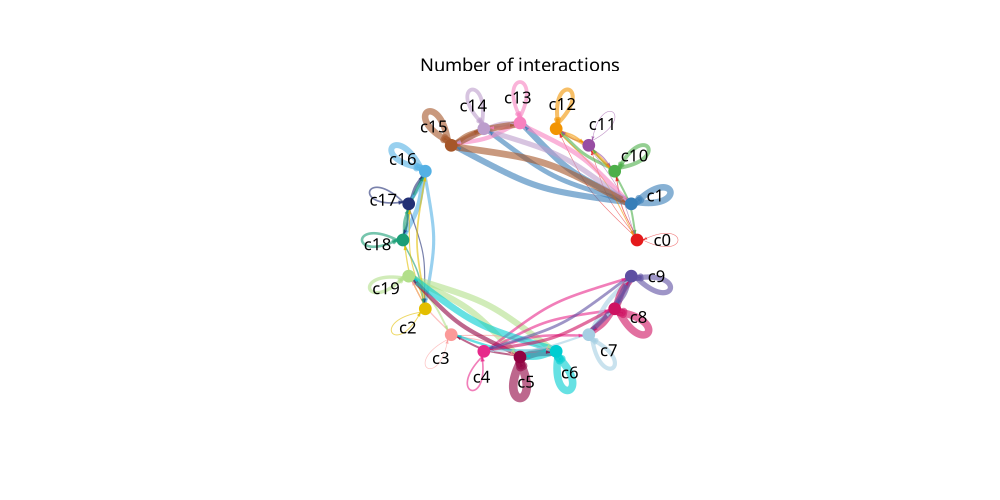
Figure Legend: The figure below shows independent cell communication network graphs for each cell group as a signal sender (Split).
- Nodes (Solid Circles): Solid circles of different colors represent different cell subpopulations. The size of the circle is proportional to the number of cells contained in that cell group.
- Lines (Edges): Communication signals sent by a specific cell group as a signal sender to other cell groups. The color of the edge matches the signal sender.
- Interpretation: Used to individually view interactions between a certain cell type and all other cell types. Thicker lines represent a greater number of interacting ligand-receptor pairs between that specific sender and receiver.
for i in sample_name:
    display(Image.open(f"./cpdb_result/netVisual_circle_split_count_{i}.png"))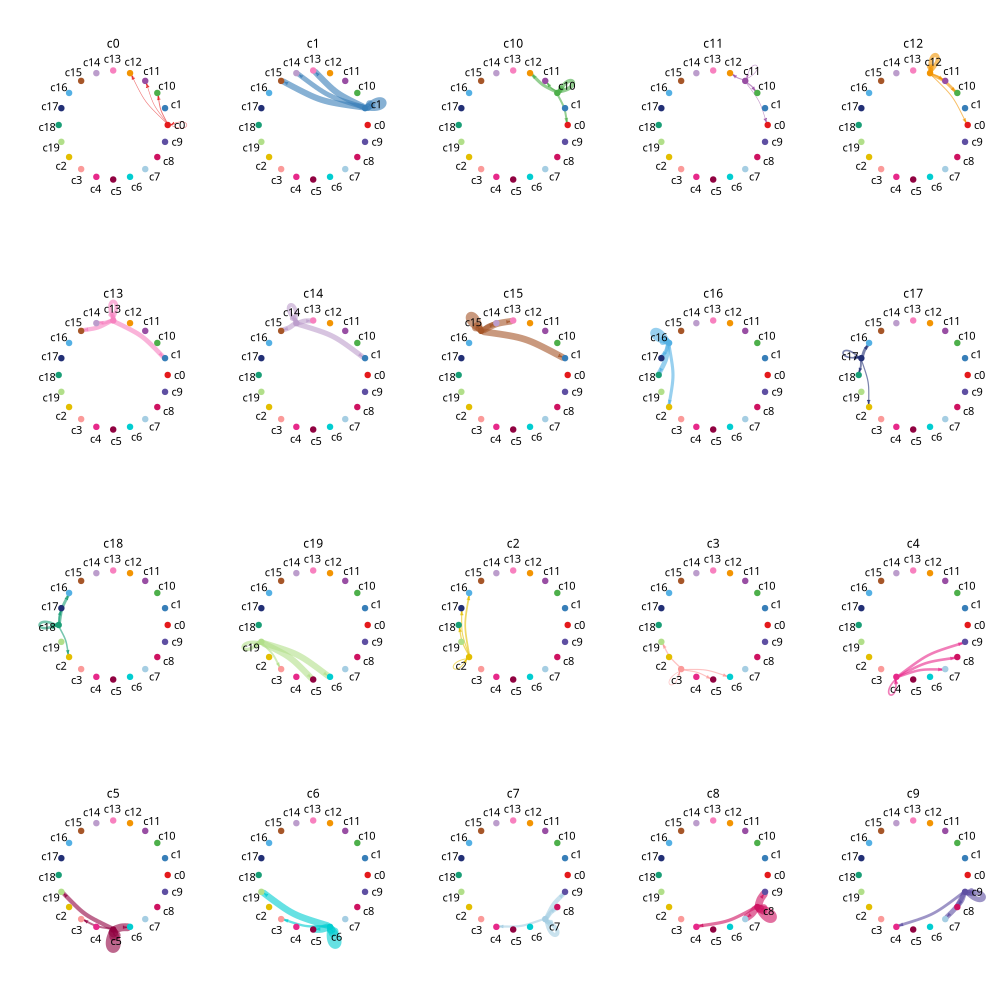
4.3 Cell Communication Dot Plot
This plot intuitively and precisely shows which specific ligand-receptor pairs are functioning between various cell type pairs.
Because the complete interaction network can be massive, we automatically filter out the most relevant (e.g., Top 25%) ligand-receptor pairs for display when plotting, to ensure the clarity and readability of the image.
Figure Legend: The figure below shows the cell type communication interaction dot plot (Dotplot).
- Horizontal Axis (Interacting_cell): Represents the interacting cell type combinations (e.g., Cell_A|Cell_B).
- Vertical Axis (interacting_pair): Represents specific ligand-receptor pairs (Ligand-Receptor pairs).
- Color (Relevance): Indicates whether the ligand-receptor pair interaction between these two cell types is significant. 1 (usually colored) represents significant interaction, 0 (usually gray) represents non-significant interaction.
- Dot Size (Mean_scaled): Represents the normalized value (Z-score) of the average expression levels of the receptor and ligand in the corresponding cell types.
- Interpretation: Larger, colored dots indicate higher expression levels of the ligand-receptor pair between the two cell types and more significant interactions.
import seaborn as sns
if method == "degs_analysis" or method == "statistical_analysis":
    for i in sample_name:
        relevant_interactions_plot = pd.read_csv(f"./cpdb_result/relevant_interactions_plot_{i}.txt",sep="\t")
        relevant_interactions_plot = relevant_interactions_plot[relevant_interactions_plot["interacting_pair"].isin(list(set(relevant_interactions_plot["interacting_pair"].tolist()))[1:math.ceil(len(list(set(relevant_interactions_plot["interacting_pair"].tolist())))/40)])]
        g = sns.relplot(
            data = relevant_interactions_plot,
            x = "Interacting_cell",
            y = "interacting_pair",
            hue = "Relevance",
            size = "Mean_scaled",
            palette = "vlag",
            hue_norm=(-1, 1),
            height = 20,
            aspect = 5,
            sizes = (0, 1000)
        )
        g.set_xticklabels(rotation=90, fontsize=50)      # x轴刻度字体大小
        g.set_yticklabels(fontsize=50)
        g.set_axis_labels("Interacting_cell", "interacting_pair", fontsize=60)
        sns.move_legend(g, "center right", bbox_to_anchor=(1.05, 0.5))   # 数值可调
        if g.legend:
            g.legend.get_title().set_fontsize(55)   # 直接修改标题字体大小
            for text in g.legend.get_texts():
                text.set_fontsize(45)
        plt.tight_layout()
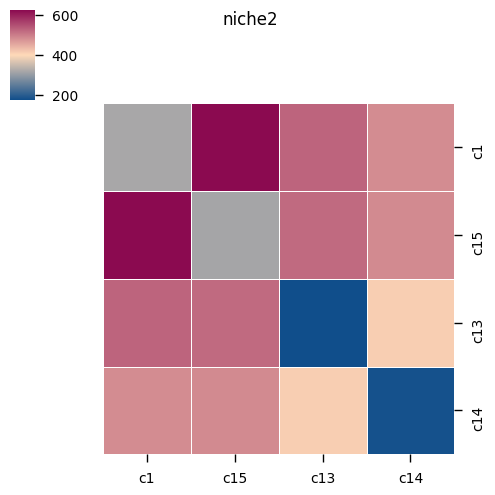
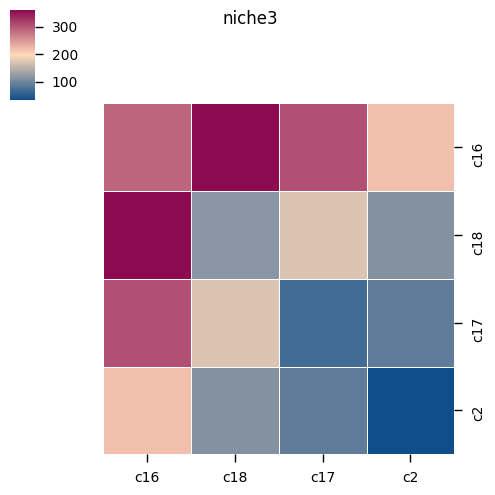
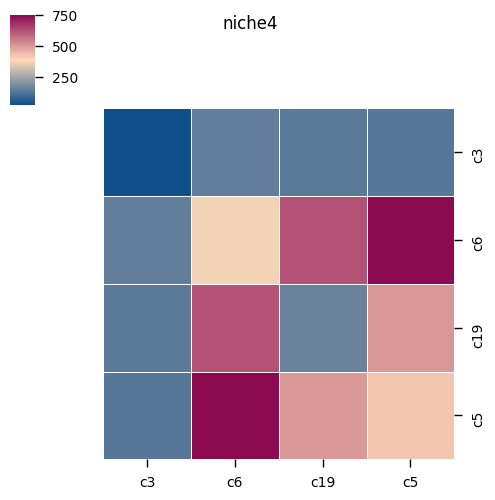
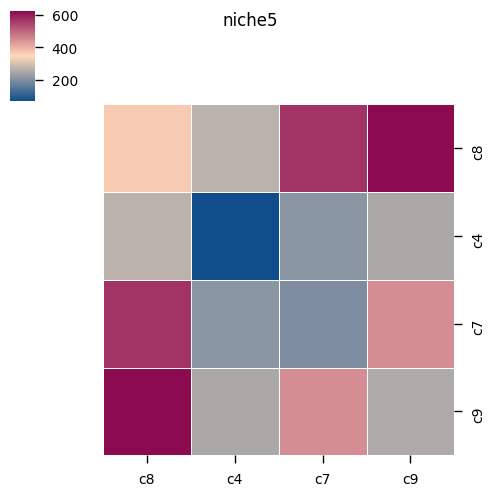
4.4 Cell Communication Heatmap
We counted and summarized the total number of significant interactions present between each pair of cell types. This helps us quickly identify the core cell populations with the most active communication within the tissue, as well as which target cells they tend to communicate with.
%matplotlib inline
for i in sample_name:
    if method == "degs_analysis":
        kpy.plot_cpdb_heatmap(pvals = results[i]['relevant_interactions'],
                              degs_analysis=True,
                              figsize=(5, 5),
                              title="Sum of significant interactions")

    elif method == "statistical_analysis":
        kpy.plot_cpdb_heatmap(pvals = results[i]['pvalues'],
                          degs_analysis = False,
                          figsize = (5, 5),
                          title = "Sum of significant interactions")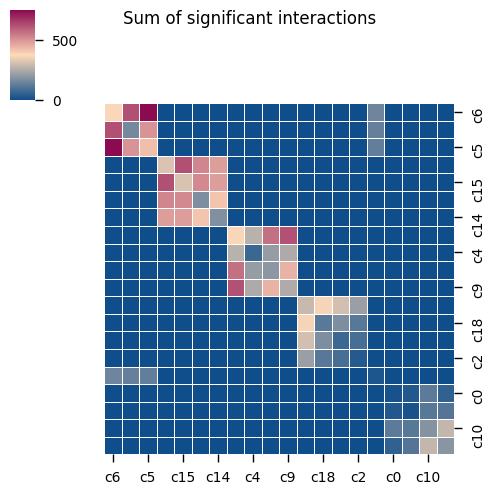
Figure Legend: The figure below shows the cell communication interaction count heatmap (Heatmap).
- Rows and Columns: Represent the signal-sending and signal-receiving cell types, respectively.
- Color: Represents the total number of significantly interacting ligand-receptor pairs between two cell types.
- Interpretation: Darker/brighter colors (depending on the color bar) indicate more active overall communication interactions between the two cell groups.
for j in sample_name:
    microenv = pd.read_csv(f"./cpdb_prepare_file/microenvs_file_{j}.txt",sep = '\t')
    microenv['cell_type'] = microenv['cell_type'].astype(str)
    microenv_dic = microenv.groupby('microenvironment')['cell_type'].apply(lambda x : list(x.value_counts().index))
    if method == "degs_analysis":
        for i in microenv_dic.index:
            kpy.plot_cpdb_heatmap(pvals = results[j]['relevant_interactions'],
                                  degs_analysis=True,
                                  cell_types=microenv_dic[i],
                                  title=i,
                                  figsize=(5, 5))

    elif method == "statistical_analysis":
        for i in microenv_dic.index:
            kpy.plot_cpdb_heatmap(pvals = results[j]['pvalues'],
                                  degs_analysis=False,
                                  cell_types=microenv_dic[i],
                                  title=i,
                                  figsize=(5, 5))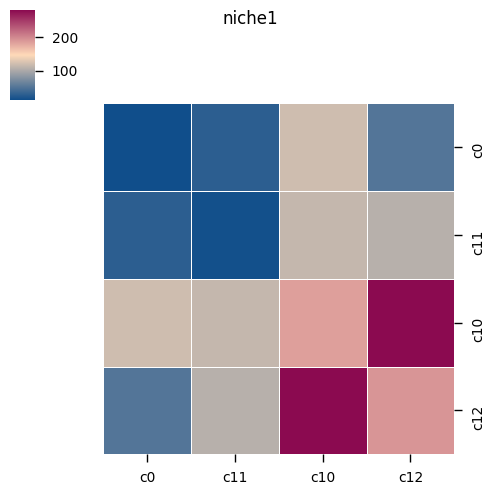
4.5 Cell Type Pathway Interaction Dot Plot
After clarifying the global communication hotspots, this section further provides advanced visualization functions targeting specific objectives.
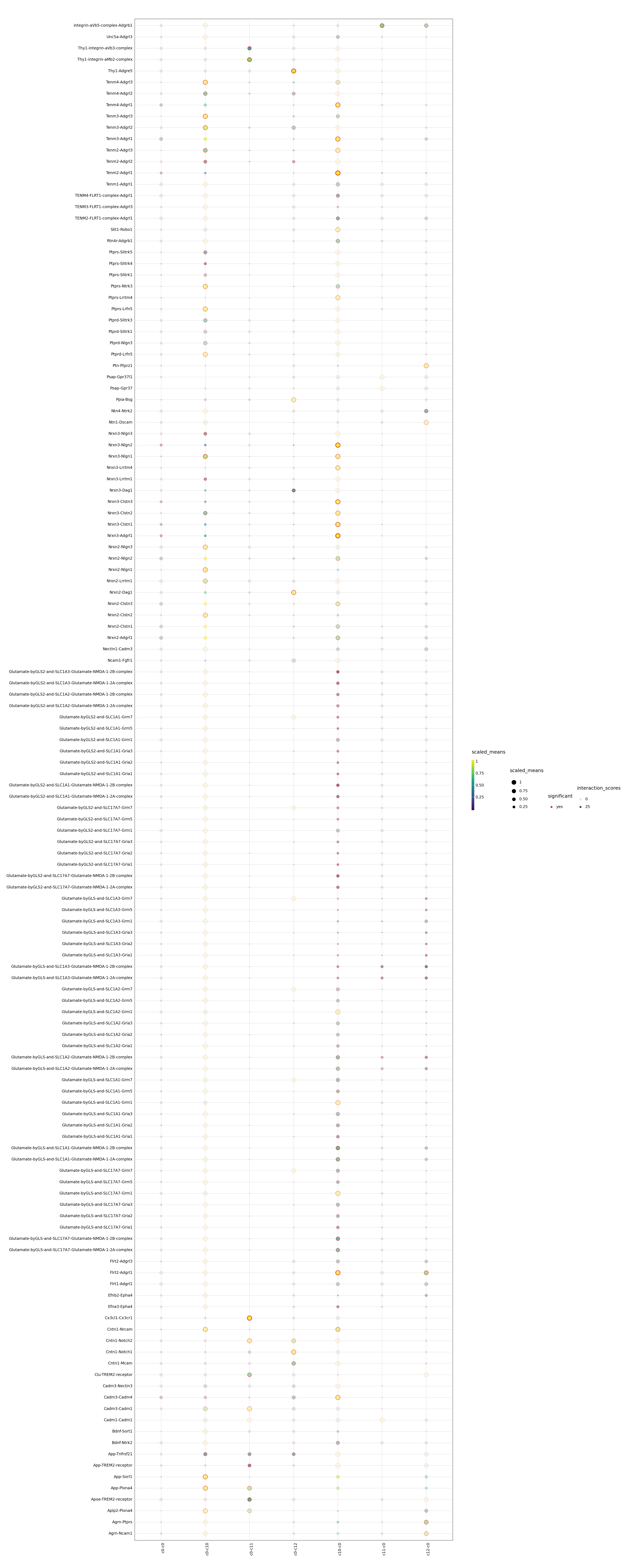
You can specify cell types of interest (such as cell_type1 and cell_type2) or specific biological pathways/gene sets to filter out target information from the complex and massive communication network and plot an exclusive dot plot. This is very helpful for deeply studying specific interaction mechanisms between two particular cell types.
Figure Legend: The figure below shows the specific cell type or pathway interaction dot plot.
- Horizontal Axis: Represents the interacting cell type combinations.
- Vertical Axis: Represents specific pathways or selected ligand-receptor pairs.
- Color (Relevance): Indicates whether the ligand-receptor pair interaction is significant (1: significant; 0: non-significant).
- Dot Size (scaled_means): Represents the normalized value of the average expression levels of the receptor and ligand in the corresponding cell types.
- Interpretation: Used to focus on viewing detailed communication situations of specific pathways or ligand-receptor pairs of interest between different cell groups. Larger dots with significant color represent stronger interactions.
for i in sample_name:
    adata = sc.read_10x_mtx("./filtered_feature_bc_matrix/")
    meta = pd.read_csv(f"./cpdb_prepare_file/meta_file_{i}.txt",sep = "\t")
    meta.index = meta["barcode"]
    adata.obs = adata.obs.join(meta)
    adata.obs[col_celltype] = adata.obs[col_celltype].astype('string')
    if method == "degs_analysis":
        p=kpy.plot_cpdb(
            adata = adata,
            cell_type1 = "c0",
            cell_type2 = "c0|c1",
            means = results[i]['means'],
            pvals = results[i]['relevant_interactions'],
            celltype_key = col_celltype,
            genes = None,
            figsize = (20,50),
            #title = "Interactions between PV and trophoblast ",
            max_size = 5,
            highlight_size = 0.75,
            degs_analysis = True,
            standard_scale = True,
            interaction_scores = results[i]['interaction_scores'],
            scale_alpha_by_interaction_scores=True,
        )
        print(p)
        #fig = p.draw()
        #plt.close(fig)

    elif method == "statistical_analysis":
        p=kpy.plot_cpdb(
            adata = adata,
            cell_type1 = "0",
            cell_type2 = "1|2|3",
            means = results[i]['means'],
            pvals = results[i]['pvalues'],
            celltype_key = col_celltype,
            genes = None,
            figsize = (20, 10),
            #title = "Interactions between\nPV and trophoblast",
            max_size = 3,
            highlight_size = 0.75,
            degs_analysis = False,
            standard_scale = True,
            interaction_scores = results[i]['interaction_scores'],
            scale_alpha_by_interaction_scores = True
        )
        print(p)
        #fig = p.draw()
        #plt.close(fig)