单细胞空间转录组: 细胞通讯分析(基于 CellPhoneDB)
1. 模块简介
本模块基于 CellPhoneDB 算法,用于对单细胞空间转录组数据进行细胞通讯网络推断。
CellPhoneDB 维护了一个全面且高质量的配体、受体及其相互作用的公共数据库,其最大特色是充分考虑了受体和配体的多亚基结构,能够精确地表示异聚体复合物。本模块通过分析数据集中特定配体和受体在不同细胞群体中的表达水平,实现以下核心分析目标:
- 系统性细胞互作网络构建:全面评估所有潜在细胞类型对之间的相互作用,揭示细胞微环境中复杂的通讯网络拓扑结构。
- 特异性通讯模式挖掘:基于统计检验或差异基因分析,鉴定出显著活跃且具有高度细胞类型特异性的配体-受体交互对。
💡 Note
本流程的输入为 Seurat 处理后的标准化表达数据及元数据。分析完成后,系统将输出详细的互作打分与 P 值表格,并生成互作网络、强度热图及气泡图的可视化结果。
2. 输入文件准备
本模块需要提供以下输入文件:
1) metadata 文件包含两列:
- barcode_sample: 该列包含每个细胞的空间 barcode 信息
- cell_type: 该列包含细胞类型标签分配
2) counts 文件为标准化后的表达矩阵。
3) Differentially expressed genes 文件有两列,包含细胞类型上调或者特异性的基因。第一列是 cluster 的名字(要与上述 metadata 文件的 cell_type 列匹配);第二列是上调基因。
4) Microenvironments 文件包含微环境中包含的细胞类型,CellPhoneDB 仅计算属于该微环境中的细胞类型之间的相互作用。
5) Active transcription factors 文件包含给定细胞类型的转录因子(非必需文件),若提供,第一列是 cluster 的名字;第二列是 TF。
如何从 Seurat 对象导出 CellPhoneDB 所需文件:
如果您已有经过降维聚类等初步分析的 Seurat 对象(.rds)以及相应的 Metadata,可以运行以下 R 代码片段。该代码将自动提取表达矩阵、细胞元数据及微环境分组等信息,并生成符合 CellPhoneDB 要求的标准输入文件格式(如 counts、meta、microenvs 等),统一存放在 cpdb_prepare_file 目录中。
# 加载 R 包
library(Seurat)
library(dplyr)
library(tibble)
library(readr)
library(Matrix)
library(stringr)


rds_path  = "./25020230_nao_CS_banksy.rds"
meta_path = "./meta_banksy.tsv"
col_sam = "Sample"
sample_name = "25020230_nao_CS_expression"
col_celltype = "RNA_snn_res.0.2"
col_env = "clust_M1_lam0.8_k50_res0.4"


dir.create('cpdb_prepare_file')

obj = readRDS(rds_path)
celltype = read.delim(meta_path,sep="\t")
sample_name = str_split(sample_name,",")[[1]]

obj@meta.data = celltype
if(colnames(obj@meta.data)[1] == "barcode"){
    obj@meta.data = column_to_rownames(obj@meta.data,"barcode")
} else if(colnames(obj@meta.data)[1] == "barcodes") {
    obj@meta.data = column_to_rownames(obj@meta.data,"barcodes")
}

obj@meta.data$barcode = rownames(obj@meta.data)

for(i in 1:length(sample_name)){
    dir.create(paste0(sample_name[i],'_filtered_feature_bc_matrix'))

    obj1 = obj
    obj1 = subset(obj1,cells = obj1@meta.data[obj1@meta.data[[col_sam]] %in% sample_name[i],]$barcode)

    metadata = obj1@meta.data[,c('barcode',col_celltype)]


    write.table(metadata,paste0("cpdb_prepare_file/meta_file_",sample_name[i],".txt"),sep = "\t",row.names = F,col.names = T,quote = F)

    # 区域/微环境文件生成处理
    micro = as.data.frame(table(obj1@meta.data[[col_celltype]],obj1@meta.data[[col_env]]))
    micro = micro[micro$Freq != 0,]
    micro_name = c('cell_type', 'microenvironment')
    colnames(micro)[1:2] = micro_name
    micro = select(micro,all_of(micro_name))


    add_name2 = c('niche_')

    micro$microenvironment = paste0(add_name2,micro$microenvironment)
    write.table(micro,paste0("cpdb_prepare_file/microenvs_file_",sample_name[i],".txt"),sep="\t",col.names=T,row.names=F,quote=F)

    # 识别细胞类型差异基因
    Idents(obj1) = obj1@meta.data[col_celltype]
    DEGs = FindAllMarkers(obj1, test.use = 'LR', verbose = T, only.pos = T, random.seed = 1, logfc.threshold = 0.2, min.pct = 0.1, return.thresh = 0.05)
    DEGs_name = c('P.Value','logFC','pct1','pct2','adj.P.Val','cell_type','gene')

    colnames(DEGs) = DEGs_name
    DEGs_name_order = c('cell_type','gene','logFC','P.Value','adj.P.Val')

    DEGs = DEGs[,DEGs_name_order]

    write.table(DEGs,paste0("cpdb_prepare_file/degs_file_",sample_name[i],".txt"),sep="\t",col.names=T,row.names=F,quote=F)

    # 表达矩阵
    counts = as.data.frame(GetAssayData(obj1,slot="data"))

    colnames(counts) = colnames(obj1)
    rownames(counts) = rownames(obj1)
    counts = rownames_to_column(counts,var = "Gene")
    write.table(counts,paste0("cpdb_prepare_file/counts_file_",sample_name[i],".txt"),sep="\t",col.names=T,row.names=F,quote=F)


    # 导出矩阵文件
    writeMM(GetAssayData(obj1,slot="counts"), file = 'filtered_feature_bc_matrix/matrix.mtx')

    Gene = data.frame(GeneID = rownames(obj1), Gene = rownames(obj1))
    write.table(Gene,'filtered_feature_bc_matrix/genes.tsv', row.names = F, col.names = F, sep = '\t', quote = F)

    barcode = data.frame(Barcode = colnames(obj1))
    write.table(barcode,'filtered_feature_bc_matrix/barcodes.tsv', row.names = F, col.names = F, sep = '\t', quote = F)
}
3. 数据加载与预处理
import numpy as np
import pandas as pd
import scanpy as sc
import anndata
import os
import sys
from scipy import sparse
import logging
import warnings
import matplotlib.pyplot as plt
from ktplotspy.utils.settings import DEFAULT_V5_COL_START, DEFAULT_COL_START, DEFAULT_CLASS_COL, DEFAULT_CPDB_SEP
from itertools import product
from matplotlib.colors import ListedColormap
from typing import Optional, Union, Dict, List
from PIL import Image
from scipy.stats import zscore
import math
import anndata as ad
import ktplotspy as kpy# --- 输入参数配置 ---
## species:物种选择,可选"human"或者"mouse"
species="mouse"
## active_tf_path:可选填。默认不填为None;若提供细胞类型的转录因子文件,则填写文件路径
active_tf_path=None
## method:CellPhoneDB的两种分析方法。可填'statistical_analysis','degs_analysis'其中之一
method="degs_analysis"
## col_celltype:Metadata 中代表细胞类型的列名
col_celltype="RNA_snn_res.0.2"
## sample_name:需要分析的样本名称,多个样本用逗号分隔
sample_name="25020230_nao_CS_expression"sample_name = sample_name.strip().split(",")# 加载分析所需的配受体库
if species == "human":
cpdb_file_path = "/PROJ2/FLOAT/jinwen/apps/cellphonedb-data-5.0.0/cellphonedb.zip"
elif species == "mouse":
cpdb_file_path = "/PROJ2/FLOAT/jinwen/apps/cellphonedb-data-5.0.0/mouse/cellphonedb.zip"3.1 运行 CellPhoneDB 分析
本步骤将调用 CellPhoneDB 核心算法计算细胞间的通讯网络。根据是否利用差异表达基因,我们将分析分为两种不同的方法(通过设置 method 参数进行选择):
统计推断分析 (
statistical_analysis):- 适用场景:常规的细胞通讯网络探索。
- 原理解析:该方法执行基于经验洗牌的统计推断。它通过对所有细胞的簇(Cluster)标签进行随机置换,构建出平均配体和受体表达量的零分布(Null Distribution),从而评估实际观察到的受配体在各细胞类型之间互作的特异性和显著性(P-value)。
差异基因细胞通讯分析 (
degs_analysis):- 适用场景:需要检索特定细胞类型所特有的(或高度相关的)相互作用。
- 原理解析:该方法是统计推断方法的替代方案。它要求用户额外提供一个差异表达基因(DEGs)文件,指示哪些基因对特定的细胞类型是相关的(例如,某细胞类型的特异性 Marker 基因)。在此方法下,算法将优先聚焦于这些具有细胞类型特异性表达的受配体对,从而挖掘出该细胞类型独有的通讯模式。
核心输出文件说明 (cpdb_result 目录):
relevant_interactions.txt/pvalues.txt:核心结果文件。记录了受配体互作对的信息以及它们在各细胞类型之间互作的显著性(1 为显著,0 为不显著;或直接给出 P 值)。means.txt:包含所有受体和配体在各个细胞类型中的平均表达量。significant_means.txt:仅保留了具有统计学显著性的受配体对的平均表达量。interaction_scores.txt:记录了受配体互作的分数(如果启用了score_interactions = True)。
from cellphonedb.src.core.methods import cpdb_degs_analysis_method
from cellphonedb.src.core.methods import cpdb_statistical_analysis_method

if method == "degs_analysis":
    results = {}
    for i in sample_name:

        cpdb_results = cpdb_degs_analysis_method.call(
            cpdb_file_path = cpdb_file_path,                            # mandatory: CellphoneDB database zip file.
            meta_file_path = f"./cpdb_prepare_file/meta_file_{i}.txt",                            # mandatory: tsv file defining barcodes to cell label.
            counts_file_path = f"./cpdb_prepare_file/counts_file_{i}.txt",                        # mandatory: normalized count matrix - a path to the counts file, or an in-memory AnnData object
            degs_file_path = f"./cpdb_prepare_file/degs_file_{i}.txt",                            # mandatory: tsv file with DEG to account.
            counts_data = 'hgnc_symbol',                                # defines the gene annotation in counts matrix.
            microenvs_file_path = f"./cpdb_prepare_file/microenvs_file_{i}.txt",                  # optional (default: None): defines cells per microenvironment.
            active_tfs_file_path = active_tf_path,                      # optional: defines cell types and their active TFs.
            score_interactions = True,                                  # optional: whether to score interactions or not.
            threshold = 0.1,                                            # defines the min % of cells expressing a gene for this to be employed in the analysis.
            result_precision = 3,                                       # Sets the rounding for the mean values in significan_means.
            separator = '|',                                            # Sets the string to employ to separate cells in the results dataframes "cellA|CellB".
            debug = False,                                              # Saves all intermediate tables emplyed during the analysis in pkl format.
            output_path = "./cpdb_result/",                                     # Path to save results
            output_suffix = None,                                       # Replaces the timestamp in the output files by a user defined string in the  (default: None)
            threads = 16
            )
        results[i] = cpdb_results
elif method == "statistical_analysis":
    results = {}
    for i in sample_name:
        cpdb_results = cpdb_statistical_analysis_method.call(
            cpdb_file_path = cpdb_file_path,                 # mandatory: CellphoneDB database zip file.
            meta_file_path = f"./cpdb_prepare_file/meta_file_{i}.txt",                 # mandatory: tsv file defining barcodes to cell label.
            counts_file_path = f"./cpdb_prepare_file/counts_file_{i}.txt",             # mandatory: normalized count matrix - a path to the counts file, or an in-memory AnnData object
            counts_data = 'hgnc_symbol',                     # defines the gene annotation in counts matrix.
            active_tfs_file_path = active_tf_path,           # optional: defines cell types and their active TFs.
            microenvs_file_path = f"./cpdb_prepare_file/microenvs_file_{i}.txt",         # optional (default: None): defines cells per microenvironment.
            score_interactions = True,                       # optional: whether to score interactions or not.
            iterations = 1000,                               # denotes the number of shufflings performed in the analysis.
            threshold = 0.1,                                 # defines the min % of cells expressing a gene for this to be employed in the analysis.
            threads = 16,                                     # number of threads to use in the analysis.
            debug_seed = 42,                                 # debug randome seed. To disable >=0.
            result_precision = 3,                            # Sets the rounding for the mean values in significan_means.
            pvalue = 0.05,                                   # P-value threshold to employ for significance.
            subsampling = False,                             # To enable subsampling the data (geometri sketching).
            subsampling_log = False,                         # (mandatory) enable subsampling log1p for non log-transformed data inputs.
            subsampling_num_pc = 100,                        # Number of componets to subsample via geometric skectching (dafault: 100).
            subsampling_num_cells = 1000,                    # Number of cells to subsample (integer) (default: 1/3 of the dataset).
            separator = '|',                                 # Sets the string to employ to separate cells in the results dataframes "cellA|CellB".
            debug = False,                                   # Saves all intermediate tables employed during the analysis in pkl format.
            output_path = "./cpdb_result/",                  # Path to save results.
            output_suffix = None                             # Replaces the timestamp in the output files by a user defined string in the  (default: None).
            )
results[i] = cpdb_resultsReading user files...n WARNING: DEGs expects 2 columns and got 5. Dropping extra columns.
The following user files were loaded successfully:
../cpdb_prepare_file/counts_file_25020230_nao_CS_expression.txt
../cpdb_prepare_file/meta_file_25020230_nao_CS_expression.txt
../cpdb_prepare_file/microenvs_file_25020230_nao_CS_expression.txt
../cpdb_prepare_file/degs_file_25020230_nao_CS_expression.txt
[ ][CORE][03/06/26-23:08:12][INFO] Running Real Analysis
[ ][CORE][03/06/26-23:08:12][INFO] Limiting cluster combinations using microenvironments
[ ][CORE][03/06/26-23:08:12][INFO] Running DEGs-based Analysis
[ ][CORE][03/06/26-23:08:13][INFO] Building results
[ ][CORE][03/06/26-23:08:13][INFO] Scoring interactions: Filtering genes per cell type..n
100%|██████████| 20/20 [00:00<00:00, 27.70it/s]
[ ][CORE][03/06/26-23:08:14][INFO] Scoring interactions: Calculating mean expression of each gene per group/cell type..n
00%|██████████| 20/20 [00:00<00:00, 172.81it/s]
[ ][CORE][03/06/26-23:08:14][INFO] Scoring interactions: Calculating scores for all interactions and cell types..n
00%|██████████| 80/80 [00:11<00:00, 6.96it/s]
Saved deconvoluted to ../cpdb_result/degs_analysis_deconvoluted_06_03_2026_230829.txt
Saved deconvoluted_percents to ../cpdb_result/degs_analysis_deconvoluted_percents_06_03_2026_230829.txt
Saved means to ../cpdb_result/degs_analysis_means_06_03_2026_230829.txt
Saved relevant_interactions to ../cpdb_result/degs_analysis_relevant_interactions_06_03_2026_230829.txt
Saved significant_means to ../cpdb_result/degs_analysis_significant_means_06_03_2026_230829.txt
Saved interaction_scores to ../cpdb_result/degs_analysis_interaction_scores_06_03_2026_230829.txt
4. 细胞通讯计算结果
4.1 显著配受体对相互作用的平均值
本部分旨在提取并汇总所有被判定为显著的配体-受体 (L-R) 对的互作信息。通过解析前序步骤中得到的统计或差异分析结果,我们会整合两部分核心数据:
- 互作显著性 (Relevance):标记特定细胞类型对之间的该受配体互作是否具有统计学意义上的显著性。
- 表达平均值 (Mean):受体和配体在其对应细胞亚群中的平均表达水平。
最终,我们会生成一张标准化的长格式数据表(如 relevant_interactions_plot_*.txt),其中不仅包含受配体对及发生互作的细胞类型信息,还对平均表达值进行了 Z-score 标准化 (Mean_scaled),为后续绘制高质量的气泡图或网络图提供直接的输入数据支持。
if method == "degs_analysis":
    for i in sample_name:
        # -- Get annotation columns and interactions
        annotation = list(results[i]['relevant_interactions'].columns[:11])
        interaction = list(results[i]['relevant_interactions'].columns[11:])


        # -- Convert relevant_interactions file from wide to long
        relevant_interactions_long = pd.melt(results[i]['relevant_interactions'],
                                             id_vars = annotation,
                                             var_name = 'Interacting_cell',
                                             value_vars = interaction,
                                             value_name = 'Relevance')

        relevant_interactions_long[['Cell_a', 'Cell_b']] = relevant_interactions_long['Interacting_cell'] \
            .str.split('|', expand = True) \
            .rename(columns={0 : 'Cell_a', 1: 'Cell_b'})

        means_long = pd.melt(results[i]['means'],
                             id_vars = annotation,
                             var_name = 'Interacting_cell',
                             value_vars = interaction,
                             value_name = 'Mean')

        id_cp_dict = relevant_interactions_long.groupby('id_cp_interaction')['Relevance'] \
            .sum() \
            .to_dict()

        # -- Add new column to indicante the recurrence of an interaction
        relevant_interactions_long['Recurrence'] = relevant_interactions_long['id_cp_interaction'] \
            .map(id_cp_dict)

        # -- Sort according to the recurrence
        relevant_interactions_long = relevant_interactions_long.sort_values(['Recurrence'],
                                                                        ascending = True)

        relevant_interactions_long.head(3)
        relevant_interactions_plot = relevant_interactions_long.copy()
        # -- Add mean value of the interacting partners
        relevant_interactions_plot = relevant_interactions_plot.merge(means_long[['id_cp_interaction', 'Interacting_cell', 'Mean']],
                                                                      on = ['id_cp_interaction', 'Interacting_cell'],
                                                                      how = 'inner')
        relevant_interactions_plot['Mean_scaled'] = relevant_interactions_plot.groupby('id_cp_interaction', group_keys = False)['Mean'].transform(lambda x : zscore(x, ddof = 1))
        relevant_interactions_plot = relevant_interactions_plot.sort_values('Interacting_cell')
        relevant_interactions_plot.to_csv(f"./cpdb_result/relevant_interactions_plot_{i}.txt",sep="\t",index=False)
elif method == "statistical_analysis":
    for i in sample_name:
        # -- Get annotation columns and interactions
        results[i]['pvalues'].iloc[:, 11:] = (results[i]['pvalues'].iloc[:, 11:] < 0.05).astype(int)
        annotation = list(results[i]['pvalues'].columns[:11])
        interaction = list(results[i]['pvalues'].columns[11:])


        # -- Convert relevant_interactions file from wide to long
        relevant_interactions_long = pd.melt(results[i]['pvalues'],
                                             id_vars = annotation,
                                             var_name = 'Interacting_cell',
                                             value_vars = interaction,
                                             value_name = 'Relevance')

        relevant_interactions_long[['Cell_a', 'Cell_b']] = relevant_interactions_long['Interacting_cell'] \
            .str.split('|', expand = True) \
            .rename(columns={0 : 'Cell_a', 1: 'Cell_b'})

        means_long = pd.melt(results[i]['means'],
                             id_vars = annotation,
                             var_name = 'Interacting_cell',
                             value_vars = interaction,
                             value_name = 'Mean')

        id_cp_dict = relevant_interactions_long.groupby('id_cp_interaction')['Relevance'] \
            .sum() \
            .to_dict()

        # -- Add new column to indicante the recurrence of an interaction
        relevant_interactions_long['Recurrence'] = relevant_interactions_long['id_cp_interaction'] \
            .map(id_cp_dict)

        # -- Sort according to the recurrence
        relevant_interactions_long = relevant_interactions_long.sort_values(['Recurrence'],
                                                                        ascending = True)

        relevant_interactions_long.head(3)
        relevant_interactions_plot = relevant_interactions_long.copy()
        # -- Add mean value of the interacting partners
        relevant_interactions_plot = relevant_interactions_plot.merge(means_long[['id_cp_interaction', 'Interacting_cell', 'Mean']],
                                                                      on = ['id_cp_interaction', 'Interacting_cell'],
                                                                      how = 'inner')
        relevant_interactions_plot['Mean_scaled'] = relevant_interactions_plot.groupby('id_cp_interaction', group_keys = False)['Mean'].transform(lambda x : zscore(x, ddof = 1))
        relevant_interactions_plot = relevant_interactions_plot.sort_values('Interacting_cell')
        relevant_interactions_plot.to_csv(f"./cpdb_result/relevant_interactions_plot_{i}.txt",sep="\t",index=False)
计算细胞类型间的显著互作总数:
为了从宏观上评估细胞群之间的通讯活跃度,以下代码将对前一步生成的详细互作结果进行汇总。它会遍历所有可能的细胞类型对(例如 Cell_A 与 Cell_B),并统计它们之间被判定为具有统计学显著性的配体-受体交互对的总数。
最终生成的汇总统计表(count.final_*.txt)包含了信号发送方(SOURCE)、信号接收方(TARGET)以及显著互作的数量(COUNT),这为后续绘制细胞通讯网络图提供了基础数据。
for i in sample_name:

    cell_types=None
    default_sep = DEFAULT_CPDB_SEP

    if method == "degs_analysis":
        #all_intr = cpdb_results['relevant_interactions'].copy()
        all_intr = results[i]['relevant_interactions'].copy()
    elif method == "statistical_analysis":
        #all_intr = cpdb_results['pvalues'].copy()
        all_intr = results[i]['pvalues'].copy()

    intr_pairs = all_intr.interacting_pair
    col_start = (
        DEFAULT_V5_COL_START if all_intr.columns[DEFAULT_CLASS_COL] == "classification" else DEFAULT_COL_START
    )  # in v5, there are 12 columns before the values
    all_int = all_intr.iloc[:, col_start : all_intr.shape[1]].T
    all_int.columns = intr_pairs
    if cell_types is None:
        cell_types = sorted(list(set([y for z in [x.split(default_sep) for x in all_intr.columns[col_start:]] for y in z])))
    cell_types_comb = ["|".join(list(x)) for x in list(product(cell_types, cell_types))]
    cell_types_keep = [ct for ct in all_int.index if ct in cell_types_comb]
    empty_celltypes = list(set(cell_types_comb) ^ set(cell_types_keep))
    all_int = all_int.loc[cell_types_keep]
    if len(empty_celltypes) > 0:
        tmp_ = np.zeros((len(empty_celltypes), all_int.shape[1]))
        if method == "statistical_analysis":
            tmp_ += 1
        tmp_ = pd.DataFrame(tmp_, index=empty_celltypes, columns=all_int.columns)
        all_int = pd.concat([all_int, tmp_], axis=0)
    all_count = all_int.melt(ignore_index=False).reset_index()
    if method == "degs_analysis":
        all_count["significant"] = all_count.value == 1
    elif method == "statistical_analysis":
        all_count["significant"] = all_count.value < 0.05
    count1x = all_count[["index", "significant"]].groupby("index").agg({"significant": "sum"})
    tmp = pd.DataFrame([x.split("|") for x in count1x.index])
    count_final = pd.concat([tmp, count1x.reset_index(drop=True)], axis=1)
    count_final.columns = ["SOURCE", "TARGET", "COUNT"]
    count_final.to_csv(f"./cpdb_result/count.final_{i}.txt",sep="\t",index=False)
4.2 细胞间互作数目
本部分旨在从宏观网络层面展示细胞群之间的通讯强度。通过统计每对细胞亚群之间存在的所有显著互作受配体对数量 (L-R pairs count),我们构建并绘制了全局的细胞通讯网络图。
该分析会生成两种形式的网络图:
- 综合网络图:将所有细胞群的互作集中展示在同一张图中,直观呈现整个组织微环境内的通讯枢纽与网络拓扑全貌。
- 拆分网络图:将每种细胞类型作为信号发送方单独拆分展示,便于聚焦研究特定细胞类型的向外通讯信号特征。
生成细胞通讯网络图(基于 R):
为了获得更高质量和更美观的网络可视化效果,本流程将调用 R 语言的 CellChat 包的绘图函数(如 netVisual_circle),基于上一步生成的统计结果 (count.final_*.txt),绘制互作网络图并保存为图像文件。
library(CellChat)
library(tidyr)
library(argparse)
options(warn =  -1)

samples = "25020230_nao_CS_expression"
mynet = read.delim(paste0("./cpdb_result/count.final_",samples,".txt"))

count_inter <- mynet
count_inter$COUNT <- count_inter$COUNT/100
count_inter<-spread(count_inter, TARGET, COUNT)
rownames(count_inter) <- count_inter$SOURCE
count_inter <- count_inter[, -1]
count_inter <- as.matrix(count_inter)
png(paste0("./cpdb_result/netVisual_circle_",samples,".png"), width = 1000, height = 500, bg = "white",res = 100)
par(mfrow = c(1,1), xpd=TRUE)
p=netVisual_circle(count_inter,weight.scale = T,title.name = "Number of interactions")
dev.off()


n=nrow(count_inter)
x = floor(sqrt(n))
y = ceiling(n / x)
png(paste0("./cpdb_result/netVisual_circle_split_count_",samples,".png"), width = 1000, height = 500, bg = "white",res = 100)
options(repr.plot.height=4*4, repr.plot.width=24)
par(mfrow = c(x,y), xpd=TRUE,mar=c(1,3,1,1))
for (i in 1:nrow(count_inter)) {
  mat2 <- matrix(0, nrow = nrow(count_inter), ncol = ncol(count_inter), dimnames = dimnames(count_inter))
  mat2[i, ] <- count_inter[i, ]
  netVisual_circle(mat2,
                   weight.scale = T,
                   edge.weight.max = max(count_inter),
                   title.name = rownames(count_inter)[i],
                   arrow.size=0.2)
}
dev.off()图注说明:下图展示不同细胞类群之间的细胞通讯网络图(整体)。
- 节点 (实心圆):不同颜色的实心圆表示不同的细胞亚群。圆的大小与该细胞群包含的细胞数量成正比。
- 连线 (边):表示两个细胞群之间存在显著的配受体相互作用 (L-R pairs)。边的颜色与信号发送者 (Sender) 细胞群的颜色保持一致。
- 判读:边的粗细与显著配受体对的数量成比例,连线越粗代表细胞间的通讯越频繁、互作越强烈。
for i in sample_name:
    display(Image.open(f"./cpdb_result/netVisual_circle_{i}.png"))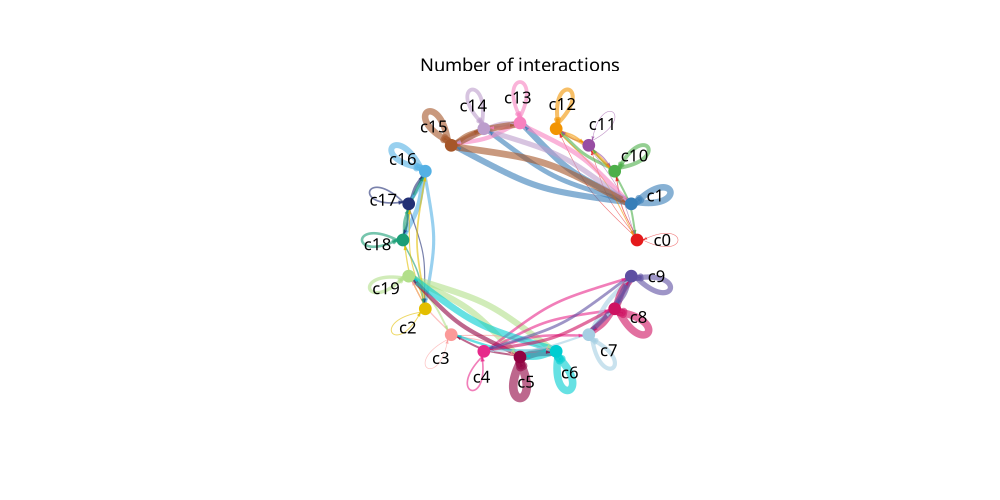
图注说明:下图展示各细胞类群作为信号发送者的独立细胞通讯网络图(拆分)。
- 节点 (实心圆):不同颜色的实心圆表示不同的细胞亚群。圆的大小与该细胞群包含的细胞数量成正比。
- 连线 (边):以特定细胞群作为信号发送者向其他细胞群发送的通讯信号。边的颜色与信号发送者保持一致。
- 判读:单独查看某一种细胞类型与其他所有细胞类型的互作情况。连线越粗代表该特定发送者与接收者之间的互作配受体数量越多。
for i in sample_name:
    display(Image.open(f"./cpdb_result/netVisual_circle_split_count_{i}.png"))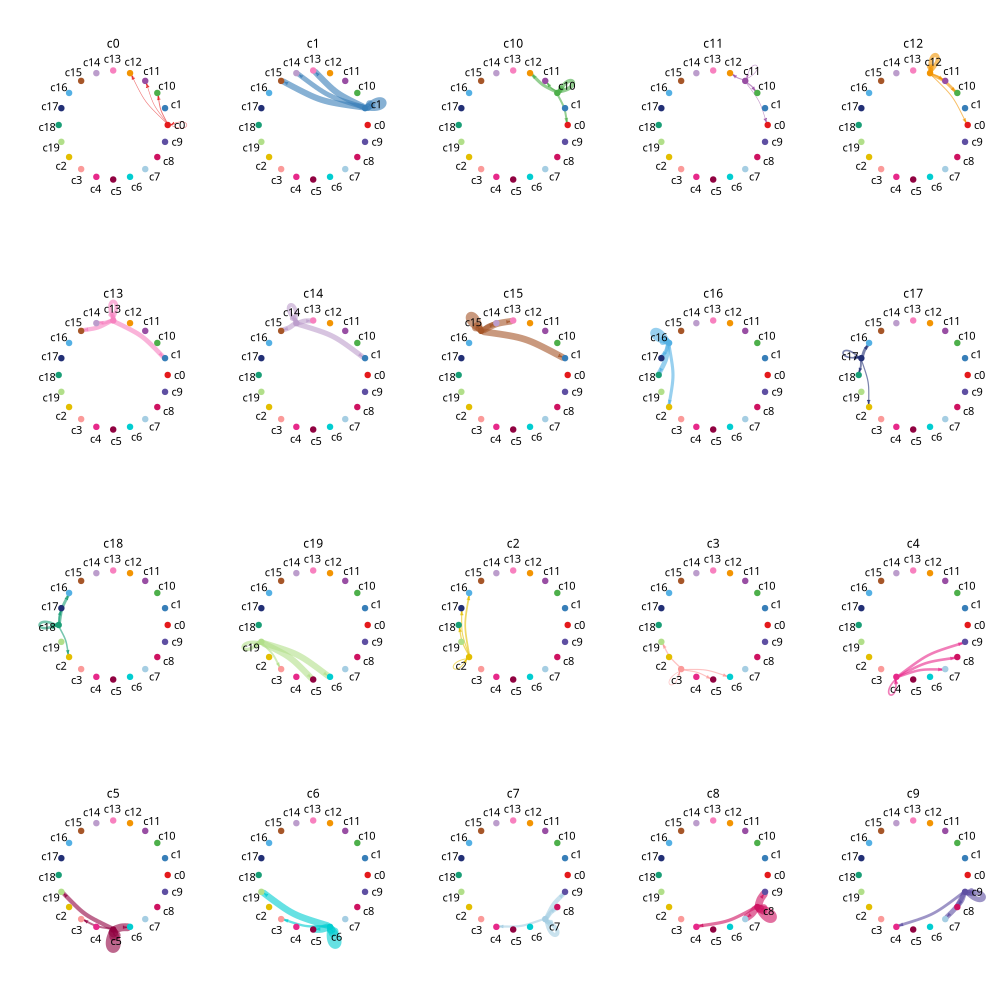
4.3 细胞通讯点图
该图能够直观、精细地展示在各种细胞类型对之间,具体是哪些配体-受体对在发挥作用。
由于完整的互作网络可能非常庞大,我们在绘图时会自动筛选出最相关(如 Top 25%)的受配体对进行展示,以确保图像的清晰度和可读性。
图注说明:下图展示细胞类型通讯互作点图(Dotplot)。
- 横轴 (Interacting_cell):代表发生互作的细胞类型组合(如 Cell_A|Cell_B)。
- 纵轴 (interacting_pair):代表具体的配体-受体对 (Ligand-Receptor pairs)。
- 颜色 (Relevance):表示这两个细胞类型之间的配受体对互作是否显著。1(通常为有色)代表互作显著,0(通常为灰色)代表互作不显著。
- 点的大小 (Mean_scaled):表示受体和配体在相应细胞类型中平均表达量的标准化值 (Z-score)。
- 判读:点越大且有颜色,说明该配受体对在这两类细胞间的表达水平越高且互作越显著。
import seaborn as sns
if method == "degs_analysis" or method == "statistical_analysis":
    for i in sample_name:
        relevant_interactions_plot = pd.read_csv(f"./cpdb_result/relevant_interactions_plot_{i}.txt",sep="\t")
        relevant_interactions_plot = relevant_interactions_plot[relevant_interactions_plot["interacting_pair"].isin(list(set(relevant_interactions_plot["interacting_pair"].tolist()))[1:math.ceil(len(list(set(relevant_interactions_plot["interacting_pair"].tolist())))/40)])]
        g = sns.relplot(
            data = relevant_interactions_plot,
            x = "Interacting_cell",
            y = "interacting_pair",
            hue = "Relevance",
            size = "Mean_scaled",
            palette = "vlag",
            hue_norm=(-1, 1),
            height = 20,
            aspect = 5,
            sizes = (0, 1000)
        )
        g.set_xticklabels(rotation=90, fontsize=50)      # x轴刻度字体大小
        g.set_yticklabels(fontsize=50)
        g.set_axis_labels("Interacting_cell", "interacting_pair", fontsize=60)
        sns.move_legend(g, "center right", bbox_to_anchor=(1.05, 0.5))   # 数值可调
        if g.legend:
            g.legend.get_title().set_fontsize(55)   # 直接修改标题字体大小
            for text in g.legend.get_texts():
                text.set_fontsize(45)
        plt.tight_layout()
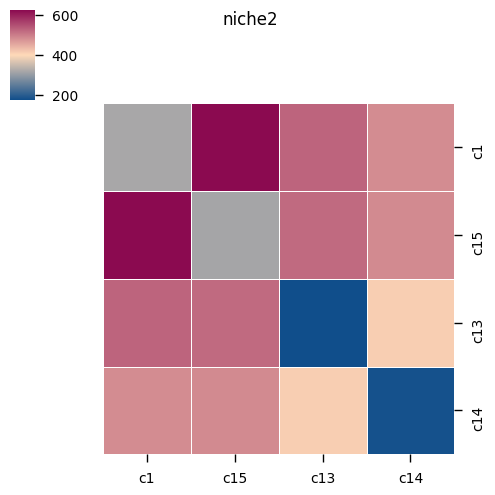
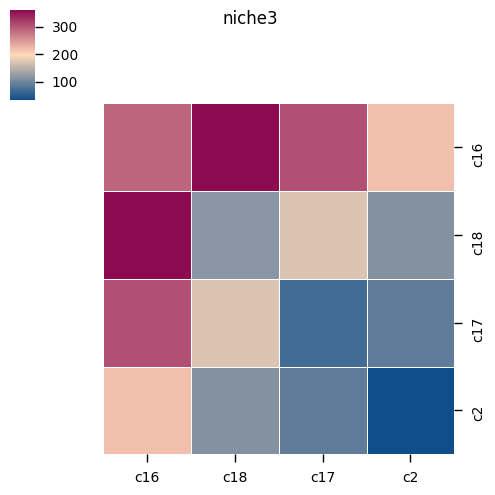
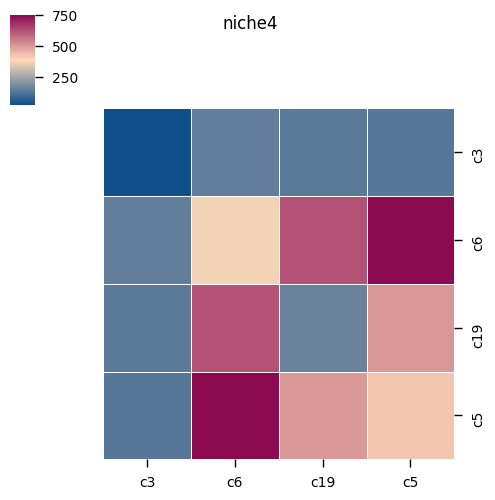
4.4 细胞通讯热图
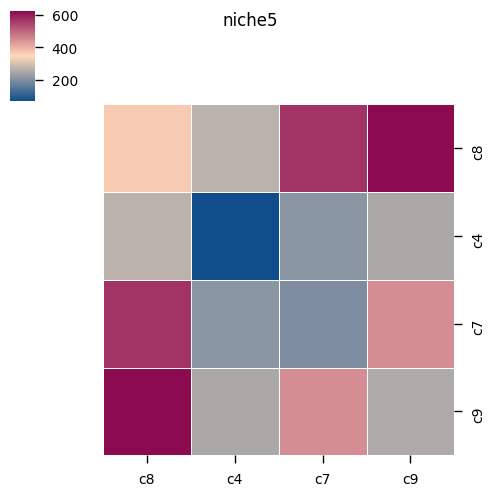
我们统计并汇总了每对细胞类型之间存在的所有显著互作的总数。这有助于我们快速识别出组织内通讯最活跃的核心细胞群,以及它们倾向于与哪些靶细胞进行交流。
%matplotlib inline
for i in sample_name:
    if method == "degs_analysis":
        kpy.plot_cpdb_heatmap(pvals = results[i]['relevant_interactions'],
                              degs_analysis=True,
                              figsize=(5, 5),
                              title="Sum of significant interactions")

    elif method == "statistical_analysis":
        kpy.plot_cpdb_heatmap(pvals = results[i]['pvalues'],
                          degs_analysis = False,
                          figsize = (5, 5),
                          title = "Sum of significant interactions")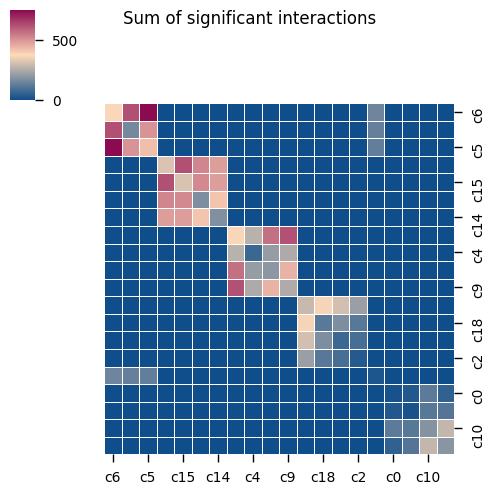
图注说明:下图展示细胞通讯互作数量热图(Heatmap)。
- 行与列:分别代表发送信号和接收信号的细胞类型。
- 颜色:代表两个细胞类型之间显著互作的配体-受体对总数。
- 判读:颜色越深/越亮(具体视色条而定),说明这两个细胞群之间的整体通讯交互越活跃。
for j in sample_name:
    microenv = pd.read_csv(f"./cpdb_prepare_file/microenvs_file_{j}.txt",sep = '\t')
    microenv['cell_type'] = microenv['cell_type'].astype(str)
    microenv_dic = microenv.groupby('microenvironment')['cell_type'].apply(lambda x : list(x.value_counts().index))
    if method == "degs_analysis":
        for i in microenv_dic.index:
            kpy.plot_cpdb_heatmap(pvals = results[j]['relevant_interactions'],
                                  degs_analysis=True,
                                  cell_types=microenv_dic[i],
                                  title=i,
                                  figsize=(5, 5))

    elif method == "statistical_analysis":
        for i in microenv_dic.index:
            kpy.plot_cpdb_heatmap(pvals = results[j]['pvalues'],
                                  degs_analysis=False,
                                  cell_types=microenv_dic[i],
                                  title=i,
                                  figsize=(5, 5))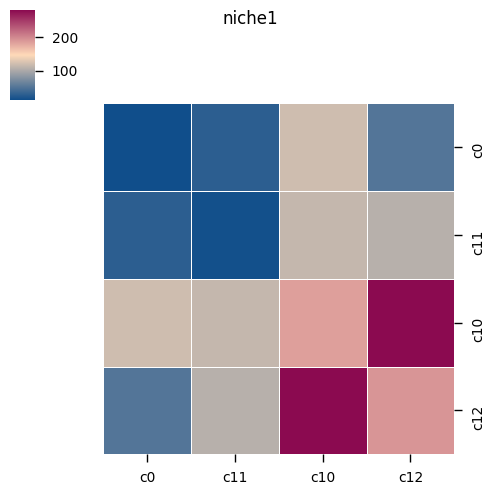
4.5 细胞类型通路互作点图
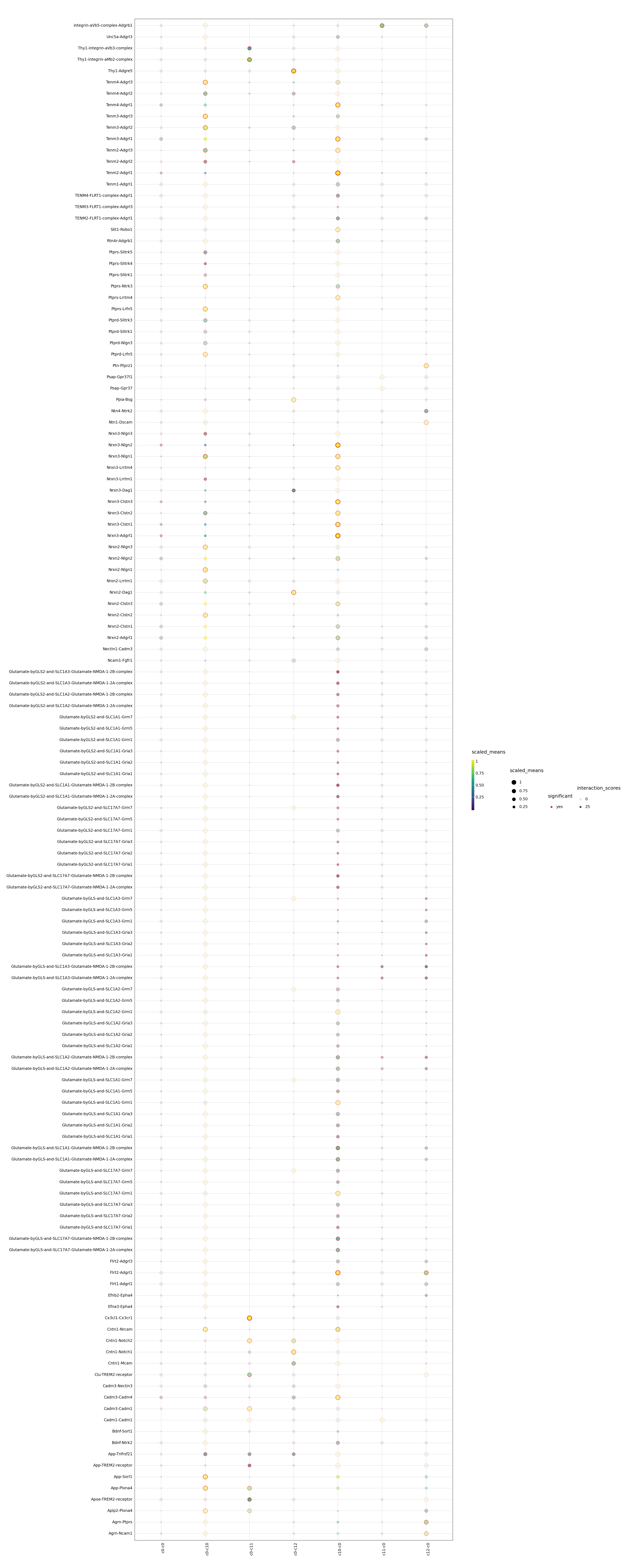
在明确了全局的通讯热点后,本部分进一步提供针对特定目标的高级可视化功能。
您可以指定感兴趣的特定细胞类型(如 cell_type1 和 cell_type2)或特定的生物学通路/基因集,从而在复杂庞大的通讯网络中过滤出目标信息,绘制出专属的点图。这对于深入研究某两类细胞间的特定相互作用机制非常有帮助。
图注说明:下图展示特定细胞类型或通路互作点图。
- 横轴:代表发生互作的细胞类型组合。
- 纵轴:代表特定通路或选定的受配体对。
- 颜色 (Relevance):表示配受体对互作是否显著(1:显著;0:不显著)。
- 点的大小 (scaled_means):表示受体和配体在相应细胞类型中平均表达量的标准化值。
- 判读:用于聚焦查看特定通路或感兴趣的受配体在不同细胞群间的详细通讯情况。点越大且具有显著颜色,代表互作越强。
for i in sample_name:
    adata = sc.read_10x_mtx("./filtered_feature_bc_matrix/")
    meta = pd.read_csv(f"./cpdb_prepare_file/meta_file_{i}.txt",sep = "\t")
    meta.index = meta["barcode"]
    adata.obs = adata.obs.join(meta)
    adata.obs[col_celltype] = adata.obs[col_celltype].astype('string')
    if method == "degs_analysis":
        p=kpy.plot_cpdb(
            adata = adata,
            cell_type1 = "c0",
            cell_type2 = "c0|c1",
            means = results[i]['means'],
            pvals = results[i]['relevant_interactions'],
            celltype_key = col_celltype,
            genes = None,
            figsize = (20,50),
            #title = "Interactions between PV and trophoblast ",
            max_size = 5,
            highlight_size = 0.75,
            degs_analysis = True,
            standard_scale = True,
            interaction_scores = results[i]['interaction_scores'],
            scale_alpha_by_interaction_scores=True,
        )
        print(p)
        #fig = p.draw()
        #plt.close(fig)

    elif method == "statistical_analysis":
        p=kpy.plot_cpdb(
            adata = adata,
            cell_type1 = "0",
            cell_type2 = "1|2|3",
            means = results[i]['means'],
            pvals = results[i]['pvalues'],
            celltype_key = col_celltype,
            genes = None,
            figsize = (20, 10),
            #title = "Interactions between\nPV and trophoblast",
            max_size = 3,
            highlight_size = 0.75,
            degs_analysis = False,
            standard_scale = True,
            interaction_scores = results[i]['interaction_scores'],
            scale_alpha_by_interaction_scores = True
        )
        print(p)
        #fig = p.draw()
        #plt.close(fig)