
Doublet.calculate Module Documentation
Module Overview
Doublet.calculate is a module for the identification and removal of doublets in single-cell data (scRNA-seq / scATAC-seq / FFPE / SeekSpace).
Background: What Is a Doublet
In droplet-based single-cell platforms (SeekOne), a single droplet occasionally encapsulates two or more cells during cell capture. These cells share the same barcode and are sequenced as if they were "one cell", producing a mixed transcriptome. Doublets lead to:
- Abnormally high UMI / gene counts for that barcode;
- Interference with clustering and cell-type identification;
- Contamination of downstream differential analysis, cell–cell communication, trajectory inference, and other conclusions.
Module Purpose
For every barcode in every sample, determine whether it is a Doublet or a Singlet, and output:
- The classification label / score for each barcode;
- A doublet / singlet statistics table;
- Visualization: a UMAP plot marking the doublets;
- A cleaned Seurat object with Doublets filtered out, retaining only Singlets;
- An HTML report.
Two algorithms are supported, which can be run individually or together (controlled by the type parameter):
| type | Algorithm | Implementation Language |
|---|---|---|
DoubletFinder | Artificial doublet simulation + clustering-neighborhood kNN | R (DoubletFinder package) |
Scrublet | Artificial doublet simulation + PCA-neighborhood scoring | Python (scrublet package) |
both | Run both, each producing its own results | R + Python |
Analysis Principles
Both algorithms share the same core idea: simulate a batch of artificial doublets from the real data, and use them to judge which real cells look more like doublets.
DoubletFinder
- First perform routine dimensionality reduction and clustering on the cells, grouping cells with similar expression together.
- Within this clustering structure, artificially "merge two cells into one" to create a batch of simulated doublets.
- Using the simulated doublets as a reference, judge via nearest-neighbor analysis whether each real cell "looks more like a doublet or a singlet".
- Apply corrections in combination with cell type to avoid misclassifying cells of the same type as doublets.
Characteristics: Results fit the data's own clustering structure well, but it is slower and more memory-intensive.
Scrublet
- Without relying on clustering, directly add the expression of two randomly chosen cells in the raw expression matrix to create a batch of simulated doublets.
- Reduce the dimensions of real and simulated doublets together, and count "how many simulated doublets" surround each real cell.
- This proportion is the "doublet score": the higher the score, the more likely the cell is a doublet. A threshold is then automatically determined to classify cells into doublets / singlets.
Characteristics: Fast and memory-efficient, but more sensitive to data quality (especially FFPE paraffin samples and decontaminated data), and the automatic threshold sometimes fails.
Differences Between the Two
| DoubletFinder | Scrublet | |
|---|---|---|
| Where simulated doublets are created | Within clustering / dimensionality-reduction results | Randomly merged in the raw expression matrix |
| How classification is done | Nearest-neighbor relationship to simulated doublets | Doublet score |
| Speed / memory | Slower / larger | Faster / smaller |
Cloud Platform Parameter Description
Parameter Overview
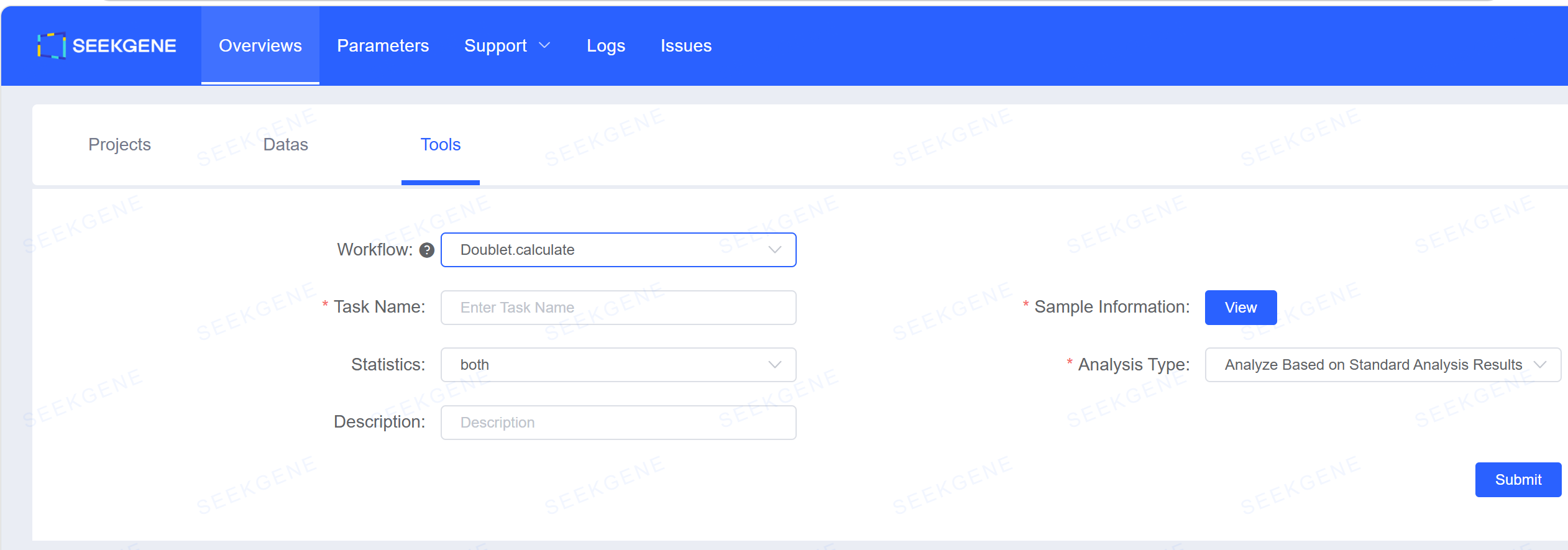

| Option | Required | Meaning |
|---|---|---|
| Analysis workflow | Required | Doublet.calculate |
| Task name | Required | Task ID; must not duplicate historical tasks |
| Sample information | Required | Sample name; the remaining information (analysis batch number, data type, file path) is filled automatically; a single sample may correspond to multiple analysis batches, so verify carefully. |
| Statistical method | Required | Default both (DoubletFinder + Scrublet run simultaneously) |
| Analysis type | Required | Default Analyze based on standard analysis results; optionally Analyze based on historical SoupX results or Analyze based on uploaded data results |
| Description | Optional | Task content description |
WARNING
Data scope note: This module supports transcriptome data only. For data such as SeekARC and SeekSpace, only the transcriptome portion is analyzed for doublets (the ATAC portion of SeekARC is retained with the result object but does not participate in doublet identification); for 5' + VDJ libraries, only the 5' transcriptome library analysis is supported — TCR/BCR data cannot be analyzed.
How to Use the Results
- Check whether the doublet ratio is reasonable: Look at the
percent.Doubletcolumn inmerged_DoubletFinder_table.txtormerged_Scrublet_table.txt. In normal data, the doublet rate rises with cell count; samples with thousands to over ten thousand cells are typically around 2% ~ 6%. If many samples show 0% or abnormally high values, further verification is needed. - Check whether the doublet calls are trustworthy: Look at each sample's
{sample}DoubletFinder.png/{sample}Scrublet.png(the marked positions of doublets on the UMAP) andDoubletFinder_result.txt/Scrublet_result.txt(the classification label and score of each barcode), and confirm that the doublet distribution is reasonable with no large-scale misclassification. - Use the filtered RDS directly for downstream analysis: After the analysis is complete, the doublet-filtered data is automatically added to "Cloud Platform — Resource Overview — My Data", where you can check the cell count and confirm that the number of cells retained after filtering for each sample is reasonable, with no abnormal sharp drop. After verifying the results, you can directly create a workflow and select the corresponding data for analysis.
Usage Notes
- Algorithm selection: The default
bothprovides two sets of results and two sets of cleaned data from DoubletFinder and Scrublet simultaneously; if you only need one of them, select it individually in "Statistical method" to save roughly half the time and memory. - Input data source: Three analysis entry points are supported (based on standard analysis results / based on historical SoupX results / based on uploaded data results). When submitting, confirm that the selected sample matches the corresponding analysis batch.
- Notes for FFPE / decontaminated data: On such data, Scrublet's automatic detection sometimes fails (some samples may be judged to have 0 doublets). It is recommended to prefer DoubletFinder's results and manually verify in combination with the visualization plots.